
R-Shell — Lightweight SSH Client for macOS, Windows & Linux


A modern SSH/SFTP/FTP/RDP/VNC client built with Rust and Tauri 2. ~98% less memory than Java-based alternatives (~34 MB vs ~1.7 GB). Installer under 10 MB.
Low memory · Native speed · Multi-protocol · Remote desktop · Split terminals · SFTP file manager · GPU monitoring · Log viewer · Directory sync
Features · Install · Screenshots · Development · Contributing
📸 Screenshots
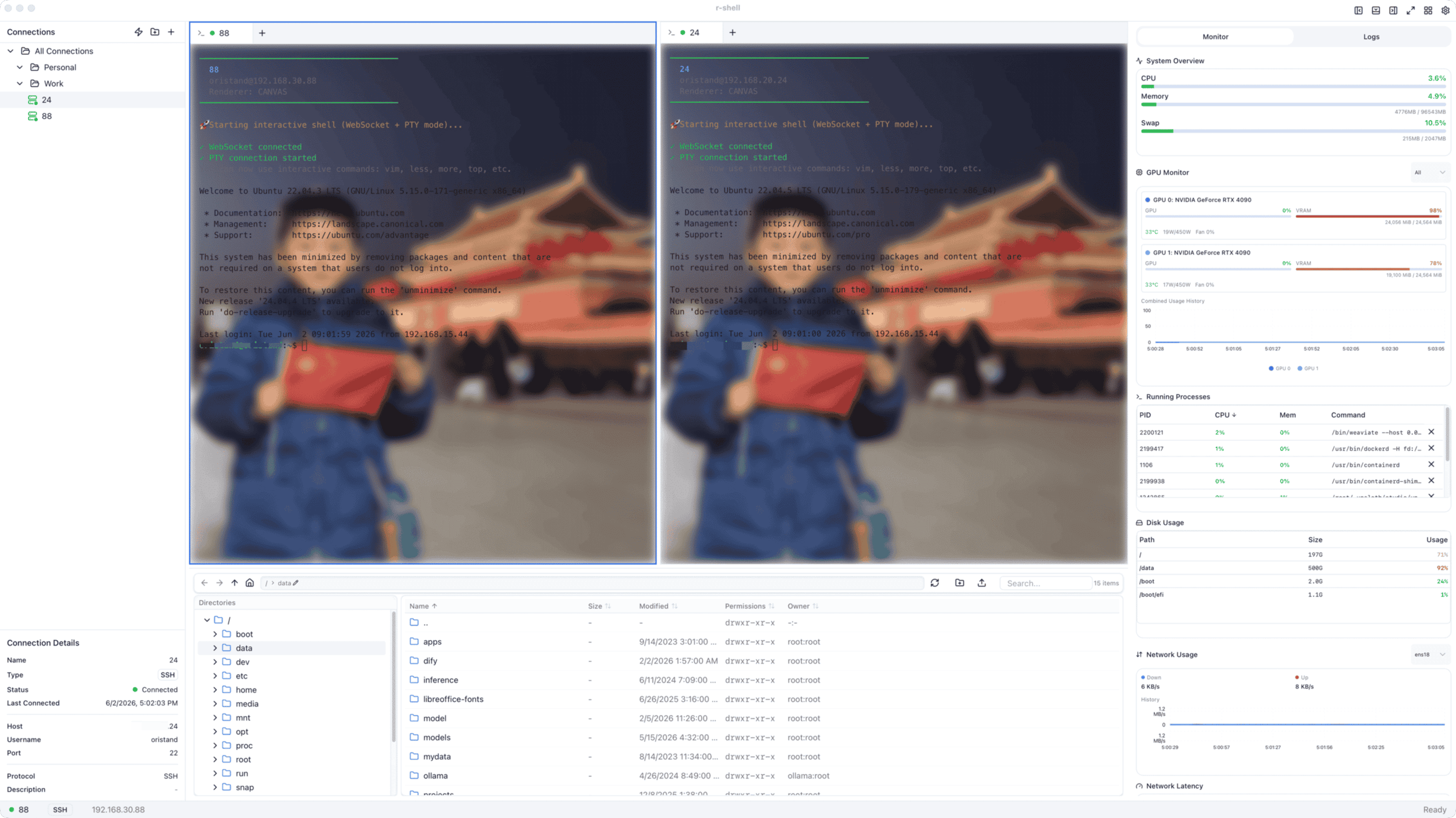
R-Shell — split terminals, file manager, and system monitor in a single window
🚀 Why R-Shell?
Most SSH clients (FinalShell, MobaXterm, Xshell) run on Java or Electron — burning memory even at idle. R-Shell uses Rust + Tauri 2 for native performance at a fraction of the cost.
Memory Comparison
Measured on macOS (Apple Silicon, 16 GB RAM) using footprint:
| App | Technology | Memory | Relative |
|---|---|---|---|
| R-Shell | Rust + Tauri 2 | ~34 MB | 1× |
| FinalShell | Java | ~1.7 GB | ~50× |
Installer Size
| Platform | R-Shell | FinalShell | Savings |
|---|---|---|---|
| Windows | 3.99 MB | 64 MB | 16× smaller |
| macOS | 8.13 MB | 102 MB | 12× smaller |
No bundled JVM or Chromium — Tauri uses the OS native webview.
🎯 About
R-Shell combines an interactive terminal, dual-panel file manager, remote desktop viewer (RDP/VNC), real-time system/GPU monitoring, and log viewing in a single VS Code-like workspace. Built with Rust for native performance and minimal resource usage.
- Native Performance — Tauri 2 + Rust backend, not Electron or Java
- AI-Generated Frontend — UI generated from Figma designs
- AI-Assisted Development — Entire codebase built with GitHub Copilot
- Cross-Platform — macOS, Windows, and Linux
✨ Features
🔌 Multi-Protocol Connections
| Protocol | Authentication | Description |
|---|---|---|
| SSH | Password, Public Key | Full interactive PTY terminal |
| SFTP | Password, Public Key | Standalone file transfer sessions |
| FTP | Password, Anonymous | Plain FTP file transfers |
| FTPS | Password, Anonymous | FTP over TLS |
| RDP | Password | Remote Desktop Protocol |
| VNC | Password | Virtual Network Computing |
- Connection Manager — Tree-view sidebar with folders, favorites, tags, and drag-and-drop
- Connection Profiles — Save, import/export (JSON), duplicate, and edit connections
- Session Restore — Automatically reconnects your workspace on launch
- Quick Connect — Toolbar dropdown with recent connections
- Auto Reconnect — Exponential backoff reconnection (up to 5 attempts)
💻 Interactive PTY Terminal
- Full terminal emulation — xterm.js v5 with support for vim, htop, top, less, and all interactive programs
- WebSocket streaming — Low-latency bidirectional I/O with flow control
- WebGL renderer — Hardware-accelerated rendering with automatic canvas fallback
- Terminal search — Regex and case-sensitive search with F3 navigation
- Context menu — Copy, paste, select all, clear, save to file, reconnect
- IME / CJK input — Full support for Chinese, Japanese, Korean input methods
🪟 Split Panes & Tab Groups
- Split in 4 directions — Up, Down, Left, Right
- Recursive grid layout — Unlimited nested splits with resizable panels
- Tab management — Add, close, duplicate, reorder (drag-and-drop), move between groups
- Drop zone overlay — Drag tabs onto 5 drop zones (up/down/left/right/center)
- Keyboard shortcuts —
Ctrl+\split,Ctrl+1-9focus group,Ctrl+Tabcycle tabs
📁 Dual-Panel File Manager (FileZilla-style)
- Local + Remote panels — Side-by-side browsing with upload/download buttons
- Multi-protocol — Works over SSH, SFTP, FTP, and FTPS
- File operations — Create, rename, delete, copy files and directories
- Breadcrumb navigation — Editable address bar with click-to-navigate
- Sort & filter — By name, size, date, permissions, owner (ascending/descending)
- Multi-select — Select multiple files for batch operations
- Transfer queue — Queued transfers with progress, speed, ETA, cancel, and retry
- Recursive directory transfer — Upload/download entire directory trees
🔄 Directory Synchronization
- 4-step sync wizard — Configure → Compare → Review → Sync
- Sync directions — Local-to-Remote or Remote-to-Local
- Comparison criteria — Size, modified time, or both
- Diff preview — Per-item checkboxes with upload/download/delete/skip actions
- Exclude patterns — Skip
.git,node_modules,.DS_Store, etc.
📊 System Monitoring
- CPU — Real-time usage with color-coded thresholds
- Memory & Swap — Total, used, free with percentage bars
- Disk — Per-mount filesystem usage with progress bars
- Uptime & Load Average — At a glance
- Process Manager — List processes sorted by CPU/MEM, kill with confirmation
- Real-time charts — CPU history and memory area charts (Recharts)
🎮 GPU Monitoring
- NVIDIA (nvidia-smi) — Utilization, memory, temperature, power, fan speed, encoder/decoder
- AMD — GPU stats support
- Multi-GPU — GPU selector with individual or "all" view
- History charts — Utilization, memory, temperature over time
- Temperature thresholds — Green < 60°C, yellow < 75°C, orange < 85°C, red ≥ 85°C
🌐 Network Monitoring
- Bandwidth — Per-interface rx/tx bytes per second
- Latency — Real-time network latency measurements
- Active connections — Protocol, local/remote address, state, PID
- Usage charts — Download/upload history
📋 Log Monitoring
- Multi-source — Log files, journalctl services, Docker containers, custom paths
- Auto-discovery — Finds available log sources on the remote host
- Level filtering — ERROR, WARN, INFO, DEBUG, TRACE filter chips
- Regex search — With match highlighting
- Live tail — Configurable refresh interval (1s – 30s)
- Rich formatting — Line numbers, timestamps, and level badges parsed from common log formats
- Download — Save log content locally
🎨 Appearance & Customization
- 10 terminal color themes — VS Code Dark, Monokai, Solarized Dark/Light, Dracula, One Dark, Nord, Gruvbox Dark, Tokyo Night, Matrix
- Dark / Light / Auto — Application theme follows system preference
- 7 font families — Menlo, JetBrains Mono, Fira Code, Source Code Pro, Consolas, Monaco, Courier New
- Configurable — Font size, line height, letter spacing, cursor style (block/underline/bar), scrollback (1K–100K lines)
- Background images — Custom image with opacity, blur, and position controls
- Terminal transparency — Configurable opacity
⌨️ Keyboard Shortcuts
| Shortcut | Action |
|---|---|
Ctrl+B |
Toggle Connection Manager |
Ctrl+J |
Toggle File Browser |
Ctrl+M |
Toggle Monitor Panel |
Ctrl+Z |
Toggle Zen Mode |
Ctrl+\ |
Split terminal right |
Ctrl+Shift+\ |
Split terminal down |
Ctrl+1 – Ctrl+9 |
Focus terminal group |
Ctrl+Shift+W |
Close active tab |
Ctrl+Tab |
Next tab |
Cmd/Ctrl+V |
Paste into terminal |
Cmd/Ctrl+F |
Search in terminal |
F3 / Shift+F3 |
Find next / previous |
Layout shortcuts are ignored while the terminal input is focused, so terminal-native bindings (e.g. tmux
Ctrl+B) still reach the shell.
🔧 Additional Features
- VS Code-like layout — Resizable left/right sidebars + bottom panel with 5 layout presets (Default, Minimal, Focus, Full Stack, Zen)
- Remote Desktop — Built-in RDP and VNC viewer with clipboard sync and dynamic resizing
- Auto-update — Check for updates with download progress and install-and-relaunch
- Menu bar — File, Edit, Tools, Connection menus with full keyboard shortcuts
- Status bar — Active connection name, protocol badge, connection status indicator
🛠 Tech Stack
Backend
- Tauri 2 — Native desktop framework using the OS webview (no bundled Chromium)
- Rust — Zero-cost abstractions, no GC, no JVM — ~34 MB vs ~1.7 GB
- russh / russh-sftp — Pure Rust SSH & SFTP implementation
- suppaftp — FTP/FTPS client
- tokio — Async runtime with minimal overhead
- tokio-tungstenite — WebSocket server for PTY streaming
- sysinfo — System stats collection
Frontend
- React 19 + TypeScript — Type-safe modern React
- Tailwind CSS — Utility-first styling
- Radix UI / shadcn/ui — 48+ accessible component primitives
- xterm.js v5 — Terminal emulation with WebGL, search, web-links, fit, and overlay addons
- Recharts — Data visualization for monitoring
- React Hook Form — Form handling
- Lucide Icons — Icon set
📦 Installation
🍺 Homebrew (macOS — Recommended)
brew tap GOODBOY008/tap
brew install --cask r-shell
Update:
brew upgrade --cask r-shell
📥 Download Releases
Download from the Releases page:
| Platform | File |
|---|---|
| macOS (Apple Silicon) | r-shell_x.x.x_aarch64.dmg |
| macOS (Intel) | r-shell_x.x.x_x64.dmg |
| Windows | r-shell_x.x.x_x64-setup.exe |
| Linux | r-shell_x.x.x_amd64.AppImage / .deb |
🚀 Development
Prerequisites
- Node.js ≥ 18
- pnpm
- Rust & Cargo
Quick Start
git clone https://github.com/GOODBOY008/r-shell.git
cd r-shell
pnpm install

# Web only
pnpm dev

# Desktop with Tauri
pnpm tauri dev
Build for Production
pnpm build && pnpm tauri build
Testing
pnpm test          # Frontend (Vitest)
cd src-tauri && cargo test  # Rust
pnpm test:e2e      # E2E
Version Bumping
pnpm run version:patch   # 2.2.0 → 2.2.1
pnpm run version:minor   # 2.2.0 → 2.3.0
pnpm run version:major   # 2.2.0 → 3.0.0
📁 Project Structure
r-shell/
├── src/
│   ├── components/           # React components
│   │   ├── ui/               # 48+ shadcn/ui primitives
│   │   ├── terminal/         # Split panes, tab groups, grid renderer
│   │   ├── pty-terminal.tsx   # PTY terminal (WebSocket + xterm.js)
│   │   ├── connection-*.tsx   # Connection dialog, manager, tabs
│   │   ├── file-*.tsx         # File browser, panels
│   │   ├── sftp-panel.tsx     # Dual-panel SFTP manager
│   │   ├── sync-dialog.tsx    # Directory synchronization
│   │   ├── transfer-*.tsx     # Transfer queue & controls
│   │   ├── system-monitor.tsx # CPU/MEM/Disk/GPU monitor
│   │   ├── network-monitor.tsx # Network stats
│   │   ├── log-monitor.tsx    # Multi-source log viewer
│   │   └── settings-modal.tsx # 6-tab settings
│   ├── lib/                   # State management & utilities
│   └── styles/                # Global CSS
├── src-tauri/                 # Tauri / Rust backend
│   └── src/
│       ├── ssh/               # SSH/SFTP implementation
│       ├── ftp_client.rs      # FTP/FTPS client
│       ├── commands.rs        # 54 Tauri commands
│       ├── websocket_server.rs # PTY WebSocket streaming
│       └── connection_manager.rs # Thread-safe session lifecycle
└── scripts/                   # Version bump and build scripts
🤝 Contributing
We welcome contributions! This project is an experiment in AI-assisted development.
Quick Links:
How to Contribute
- Fork the repo
- Create a feature branch (
git checkout -b feature/amazing-feature) - Commit (
git commit -m 'feat: add amazing feature') - Push (
git push origin feature/amazing-feature) - Open a Pull Request
Areas We Need Help
- 🐛 Bug fixes and issue reports
- 📝 Documentation improvements
- ✨ Feature enhancements
- 🧪 Test coverage
- 🌐 Internationalization (i18n)
- 🎨 UI/UX improvements
📄 License
MIT — see LICENSE.
🌟 Star History
💬 Community
🙏 Acknowledgments
- shadcn/ui — UI components
- Figma Make — Design generation
- Lucide — Icons
- GitHub Copilot — AI pair programming
Made with ❤️ and 🤖 AI
If you like this project, please give it a ⭐!