

Rails Start!
"Rails Start" is a starter kit for Ruby on Rails applications, designed to help developers quickly set up a new project with essential features and best practices.
This project is a perfect choice for:
- Enterprises looking to standardize their Rails application setup.
- Freelancers and agencies to kickstart client projects.
- Online education platforms to start teaching Ruby on Rails.
- Individual developers who want a solid foundation for their Rails applications.
Requirements
DockerandDocker Composeinstalled on your machine.gitinstalled (usually comes pre-installed on MacOS and Linux).makeutility installed (usually comes pre-installed on MacOS and Linux).WSL2(For Windows users) with a Linux distribution (like Ubuntu) is recommended.
How to Use
🪟 Windows Requirements (Click to expand)
Prerequisites for Windows Users
Before proceeding, Windows users need to set up WSL2:
-
Install WSL2 and Ubuntu (if not installed yet):
Open
cmdorPowerShelland run:wsl --install wsl --set-default-version 2 wsl --install -d Ubuntu -
Install make utility:
Run
WSLand installmake:wsl sudo apt-get install -y make -
Continue with the installation steps below inside your WSL2 Ubuntu terminal.
Installation Steps
-
Clone the repository:
git clone https://github.com/the-teacher/rails-start.git -
Navigate to the project directory:
cd rails-start -
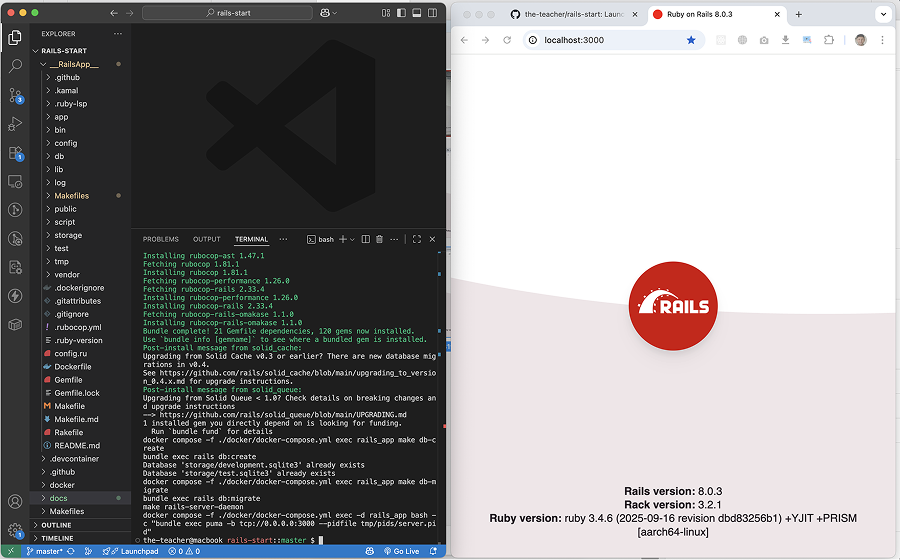
Start the application:
make rails-start
That's it! Very simple!
Now visit: http://localhost:3000 in your browser.
The Idea
DockerandDocker Composefor easy environment setup.Makefilesto simplify commands and automate tasks.DevContainerto make development environment consistent and easy to work with.make rails-startthe only command you need to start your project.
Docker Images
Docker Hub
- Base: Initial Software | Base.Dockerfile
- Main: Ruby + NodeJS + Rails | Main.Dockerfile
- Media: Media Processing Tools | Media.Dockerfile
Github Container Registry
- Base: Initial Software | Base.Dockerfile
- Main: Ruby + NodeJS + Rails | Main.Dockerfile
- Media: Media Processing Tools | Media.Dockerfile