

🎮 RAWG.IO
A production-ready iOS application showcasing modern Swift development practices





Features • Screenshots • Architecture • Tech Stack • CI/CD • Testing • Getting Started
📱 Features
- Browse Games — Explore the extensive RAWG.io database with infinite scrolling
- Search — Real-time search with debouncing and caching
- Game Details — Rich game information with screenshots and descriptions
- Favorites — Persist favorite games locally with SwiftData
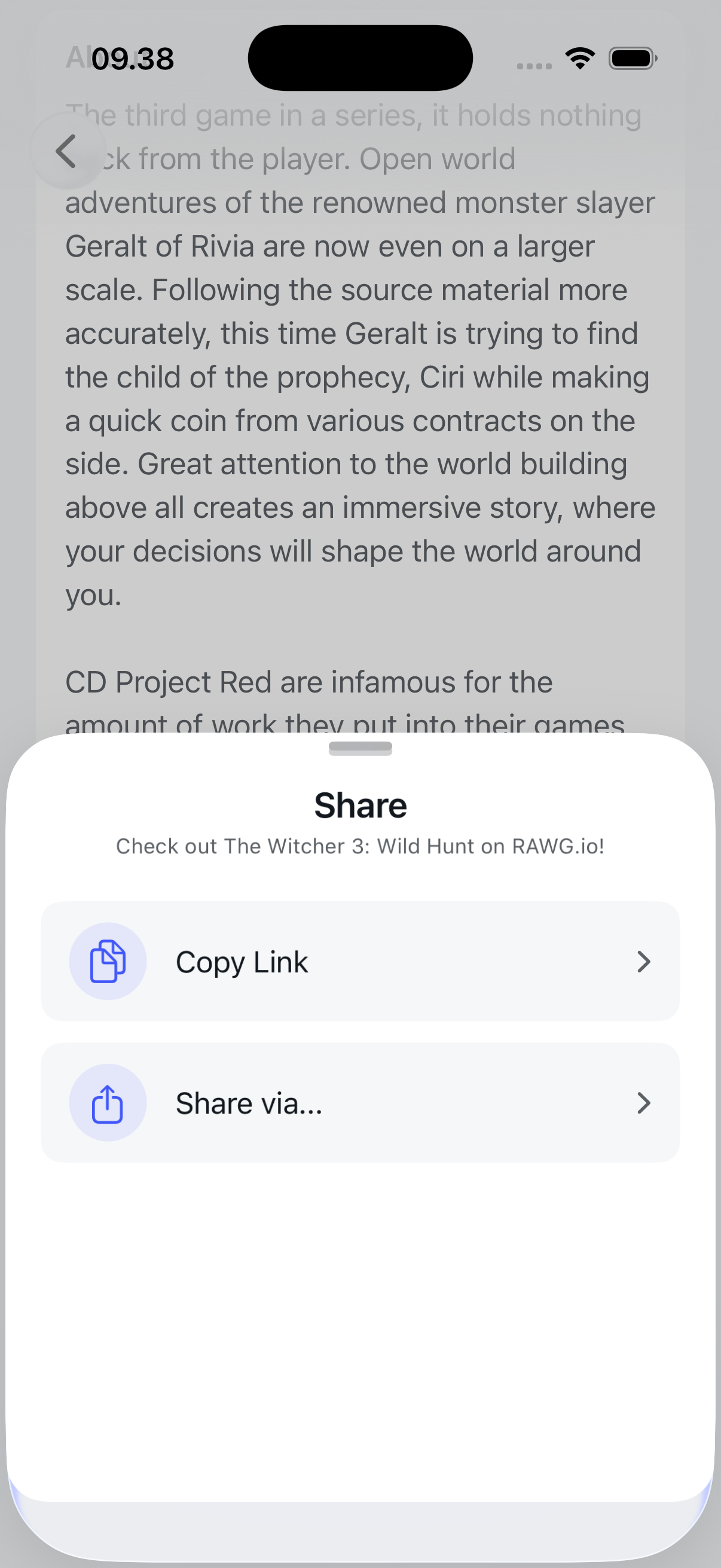
- Share — Share games via custom bottom sheet
🎬 Screenshots & Demos
App Showcase
| Games List | Game Details | Search |
|---|---|---|
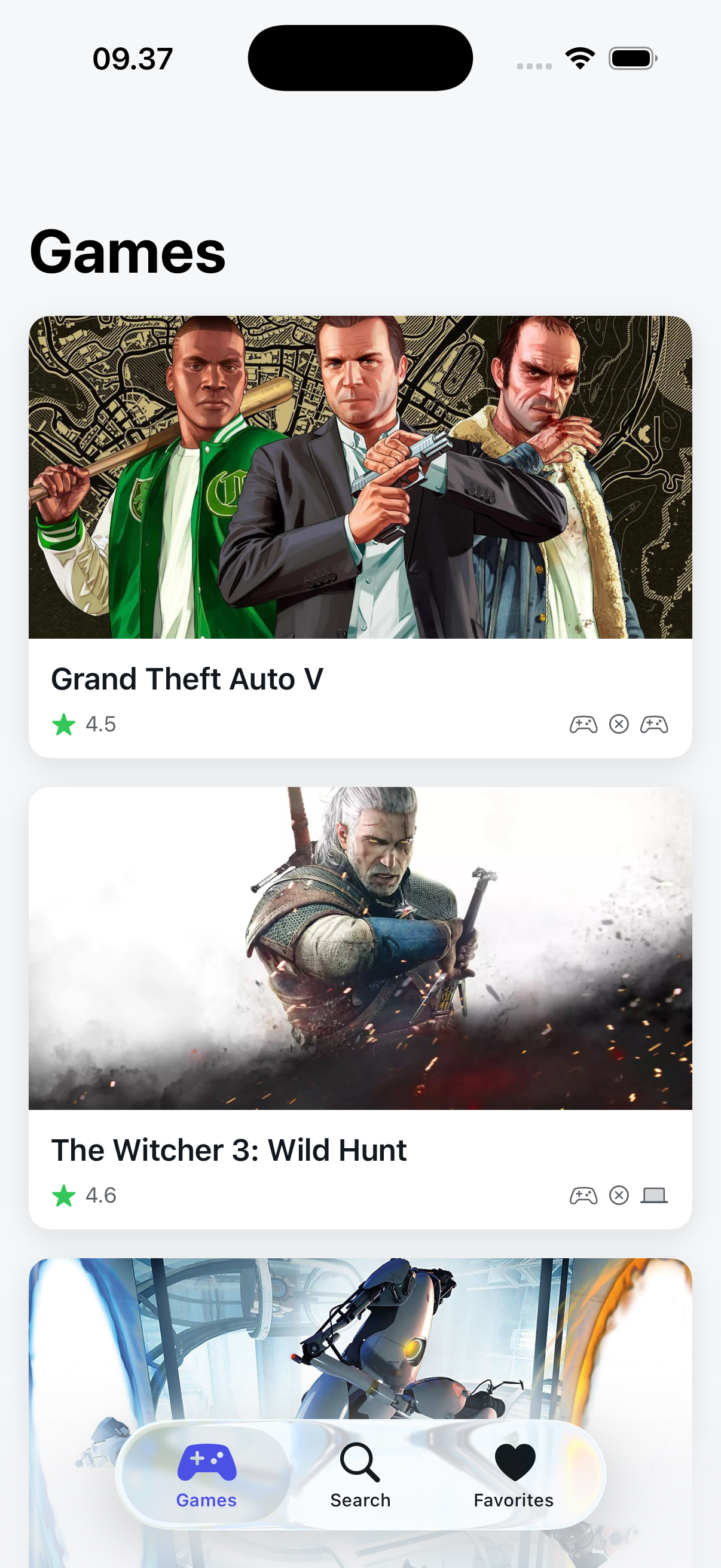 |
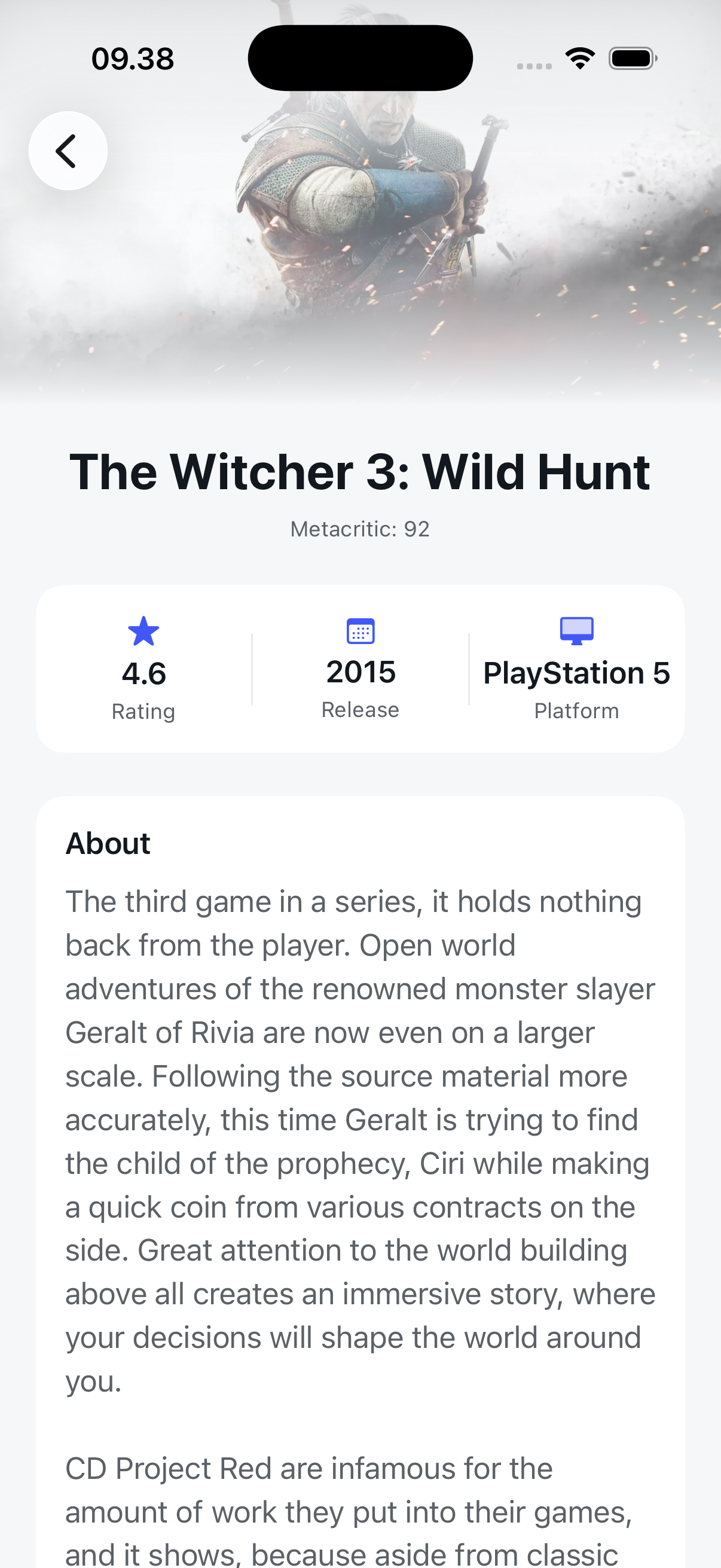 |
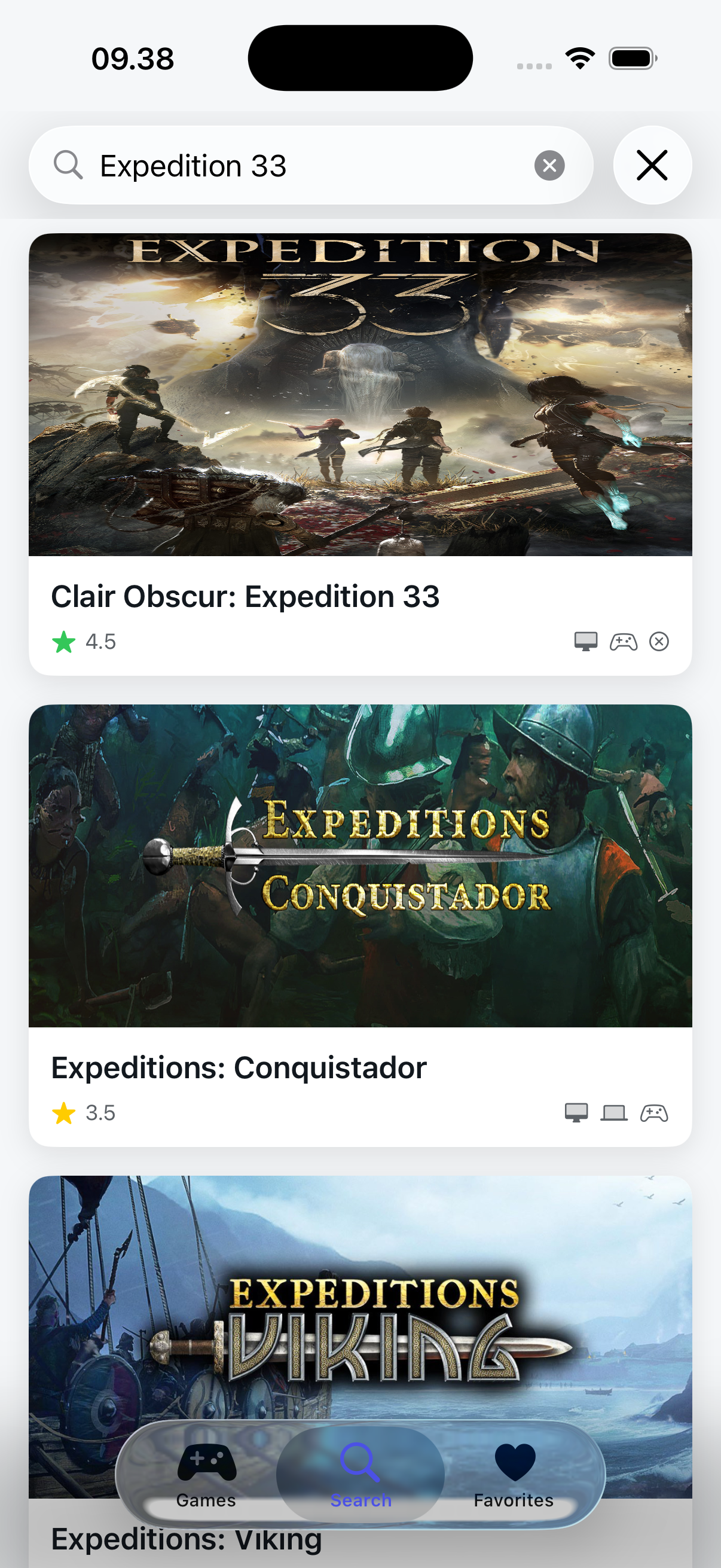 |
Favorites & Share
| Favorites | Share Sheet |
|---|---|
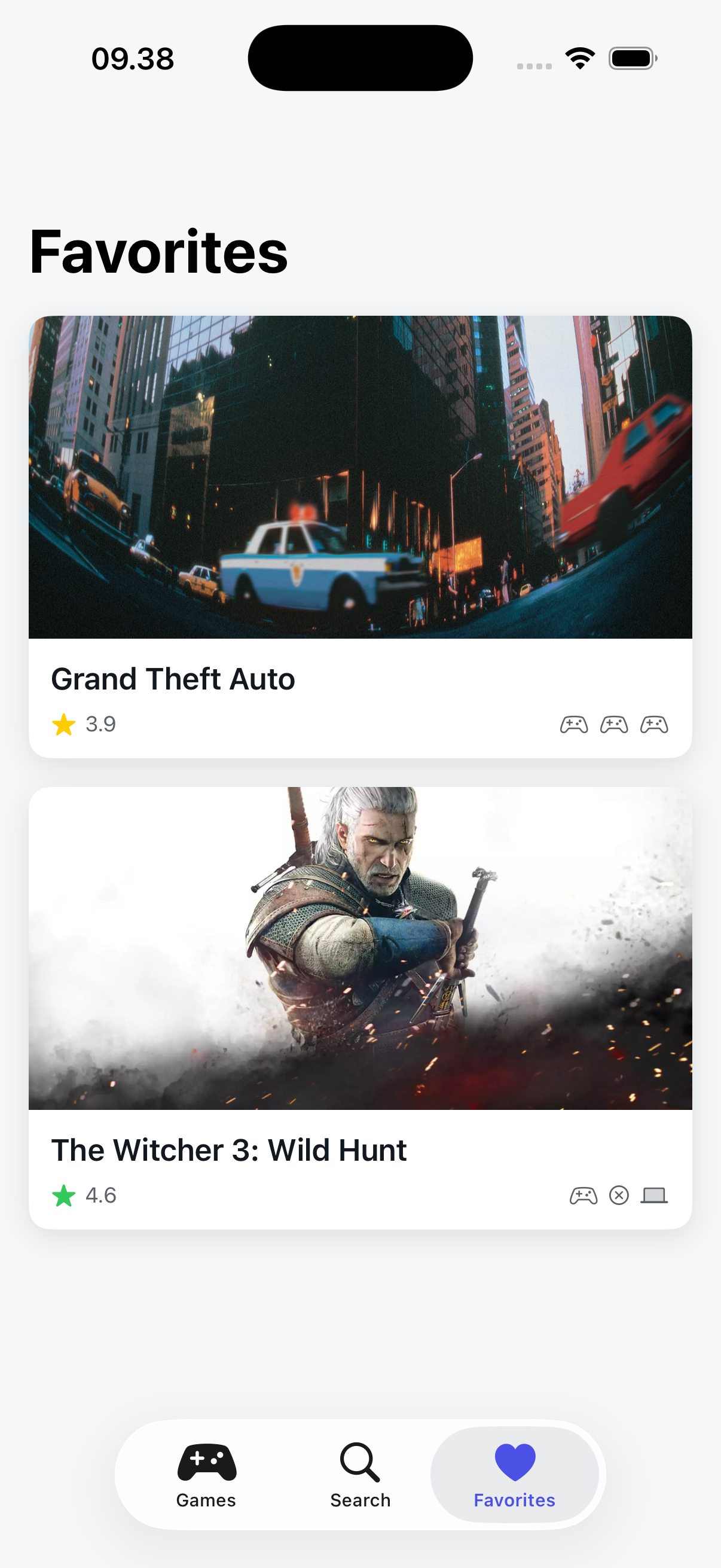 |
 |
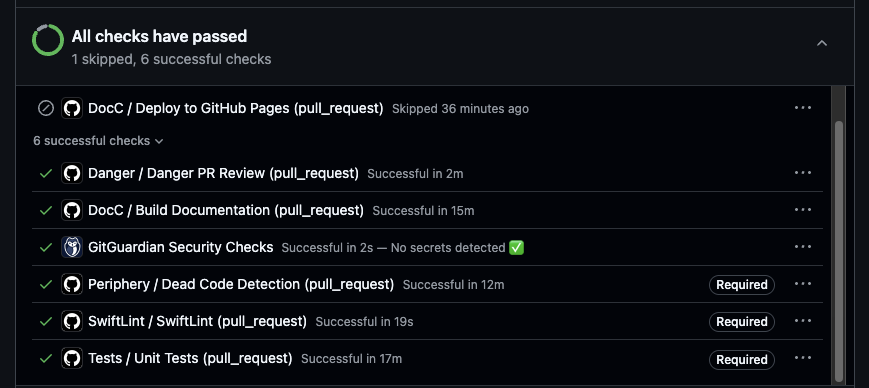
CI/CD Pipeline (All Green ✅)
Placeholder - Add a GIF or screenshot showing your GitHub Actions with all checks passing.
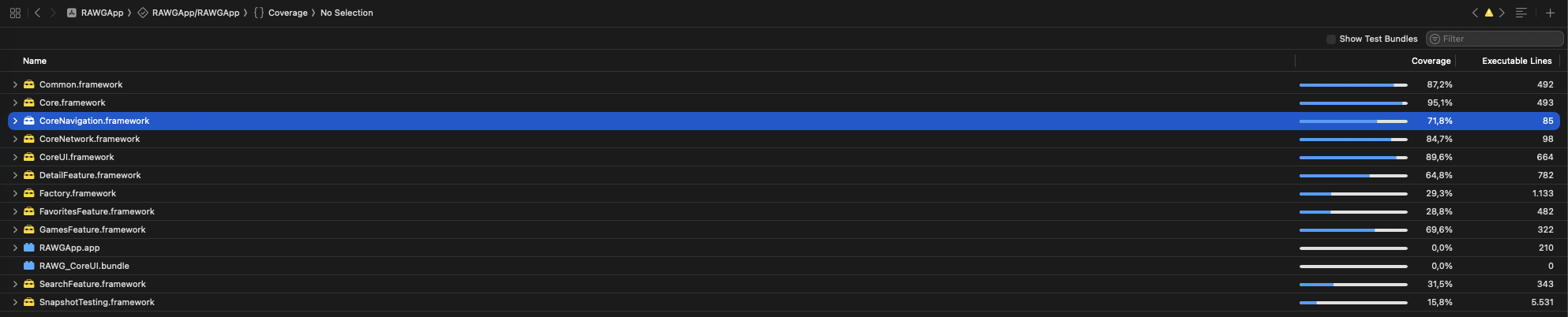
Test Coverage Report
🏛️ Architecture
This project implements Clean Architecture with strict module encapsulation, ensuring separation of concerns and testability at every layer.
Module Dependency Graph
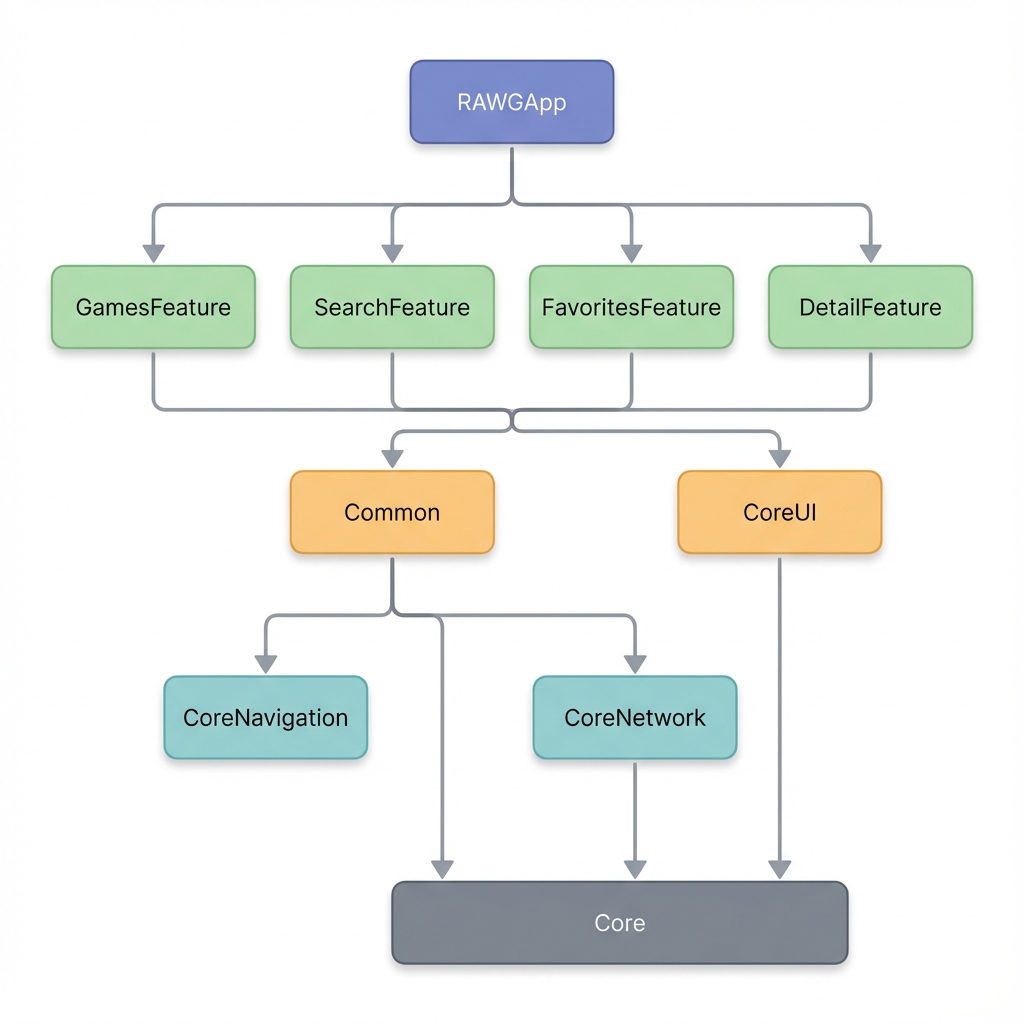
Layers: App → Feature Modules → Shared (Common, CoreUI) → Core (Core, CoreNavigation, CoreNetwork)
Clean Architecture Layers
Each Feature Module follows Clean Architecture with clear layer separation:
Modules/GamesFeature/
├── Sources/
│   ├── DI/                  # Dependency Injection (Factory)
│   ├── Data/                # Repositories, Data Sources
│   ├── Domain/              # UseCases, Entities
│   ├── Navigation/          # Navigator (Public API)
│   └── Presentation/        # Views, ViewModels
└── Tests/                   # Unit & Snapshot Tests
| Layer | Responsibility | Example |
|---|---|---|
| Presentation | UI components, ViewModels | GamesListView, GamesViewModel |
| Domain | Business logic, UseCases | GetGamesUseCase, SearchGamesUseCase |
| Data | Data access, Repository impl | GamesRepository, DefaultFavoritesService |
| Navigation | Public API - Only exposed interface | GamesNavigator |
| DI | Dependency registration | GamesFeatureAssembly |
Module Encapsulation
Following strict encapsulation principles, each feature module exposes only its Navigator as the public interface:
// ✅ Public - The only entry point to the module
public final class GamesNavigator {
    public func makeGamesListView() -> some View
    public func getGameDetailUseCase() -> GetGameDetailUseCaseProtocol
}

// ❌ Internal - Not accessible outside the module
internal final class GamesViewModel: ObservableObject { }
internal struct GamesListView: View { }
internal final class GetGamesUseCase { }
🛠️ Tech Stack
Core Modules
| Module | Purpose | Key Components |
|---|---|---|
| Core | Foundation utilities | Logger, ImageCache, SwiftData, Extensions |
| CoreNavigation | Type-safe navigation | NavigationRouter, RouteProtocol, SheetProtocol |
| CoreNetwork | Networking layer | APIClient (Actor-based), APIRequest, APIError |
| CoreUI | Reusable UI components | Theme, Design System, Custom Views |
| Common | Shared business logic | Entities, Repositories, Protocols |
Key Technologies
| Category | Technology |
|---|---|
| UI Framework | SwiftUI |
| Concurrency | Swift Concurrency (async/await, Actors) |
| Persistence | SwiftData |
| Dependency Injection | Factory |
| Image Caching | Custom Actor-based cache (Memory + Disk) |
| Navigation | Custom type-safe router with sheet support |
| Project Management | Tuist |
| Testing | XCTest, SnapshotTesting |
🎯 Design Principles
SOLID Principles
| Principle | Implementation |
|---|---|
| Single Responsibility | Each class has one reason to change (e.g., APIClient only handles network requests) |
| Open/Closed | Protocols enable extension without modification (e.g., APIRequest, RouteProtocol) |
| Liskov Substitution | Protocol conformances are substitutable (e.g., URLSessionProtocol for testing) |
| Interface Segregation | Small, focused protocols (e.g., AddFavoriteUseCaseProtocol vs monolithic service) |
| Dependency Inversion | High-level modules depend on abstractions, not concretions (UseCase protocols) |
Clean Code Practices
- Dependency Injection — All dependencies injected via Factory
- Protocol-Oriented Design — Abstractions over implementations
- Actor Isolation — Thread-safe concurrency with Swift Actors
- Immutability — Prefer
letovervar, value types over reference types - Single Source of Truth — ViewModels own UI state
⚡ Automation & CI/CD
This project implements a comprehensive 5-workflow CI/CD pipeline using GitHub Actions, ensuring code quality, test coverage, and automated documentation deployment.
Pipeline Overview
| Workflow | Trigger | Purpose | Status |
|---|---|---|---|
| Tests | Push/PR to main |
Unit tests, Snapshot tests, Code coverage |  |
| SwiftLint | Push/PR (.swift files) |
Enforces 60+ lint rules |  |
| Danger | Pull Requests | Automated PR review & feedback |  |
| Periphery | Push/PR (.swift files) |
Dead code detection |  |
| DocC | Push to main |
Documentation generation & deployment |  |
1️⃣ Tests Workflow
File:
.github/workflows/tests.yml
Runs comprehensive unit and snapshot tests on every push and pull request to main.
Trigger:
- Push to
mainbranch - Pull requests targeting
main
Key Features:
- 🧪 Unit Tests — Validates ViewModels, UseCases, Repositories
- 📸 Snapshot Tests — Visual regression testing for SwiftUI views
- 📊 Code Coverage — Generates coverage reports via
xcresult - 🔄 Concurrency Control — Cancels in-progress runs on new commits
- 📦 Artifact Upload — Stores test results for 14 days
Pipeline Steps:
1. Checkout code
2. Setup Xcode 16.1
3. Prepare iOS Simulator
4. Install Tuist via Mise
5. Fetch dependencies (tuist install)
6. Generate project (tuist generate)
7. Run tests with code coverage
8. Upload test results & coverage
9. Cleanup simulator
2️⃣ SwiftLint Workflow
File:
.github/workflows/swiftlint.yml
Enforces Swift code style consistency across the entire codebase.
Trigger:
- Push/PR to
mainwith changes to*.swiftor.swiftlint.yml
Key Features:
- ✅ 60+ Lint Rules — Comprehensive code style enforcement
- 📝 GitHub Actions Logging — Inline annotations on violations
- ⚡ Fast Execution — Only runs when Swift files change
Custom Rules Enforced:
# No print statements in production code
no_print_statement:
  regex: "\\bprint\\s*\\("
  message: "Use Logger instead of print()"

# No DispatchQueue usage
no_direct_dispatch:
  regex: "DispatchQueue\\.(main|global)"
  message: "Use async/await instead of DispatchQueue"
Rule Categories:
| Category | Examples |
|---|---|
| Code Safety | force_unwrapping, implicitly_unwrapped_optional, fatal_error_message |
| Code Style | closure_spacing, operator_usage_whitespace, modifier_order |
| Performance | first_where, last_where, contains_over_filter_count |
| Complexity | cyclomatic_complexity (max 15), function_body_length (max 100) |
3️⃣ Danger Workflow
File:
.github/workflows/danger.yml
Config:danger/Dangerfile.swift
Provides intelligent, automated PR review with actionable feedback.
Trigger:
- Pull requests (opened, synchronized, reopened, edited)
Key Features:
- 📏 PR Size Checks — Warns for large PRs (>500 lines, >20 files)
- 🧪 Test Coverage Enforcement — Ensures tests accompany source changes
- 📝 PR Template Validation — Verifies description and type selection
- 🔗 Issue Linking — Suggests linking related issues
- ⚠️ Critical File Alerts — Warns on
Project.swift,Tuist.swiftchanges - 📦 Module Structure Checks — Monitors Clean Architecture compliance
- 🔍 SwiftLint Integration — Inline lint comments on changed lines
PR Validation Rules:
// Configuration
enum Config {
    static let maxPRLines = 500        // Max lines changed
    static let maxFilesChanged = 20    // Max files modified
    static let requiredReviewers = 1   // Minimum reviewers
}

// PR Size Warning
if totalChanges > Config.maxPRLines {
    warn("⚠️ Consider breaking into smaller PRs")
}

// Test Coverage Check
if !changedSourceFiles.isEmpty && changedTestFiles.isEmpty {
    warn("🧪 Source files modified but no tests added")
}

// New File Test Requirement
for sourceFile in createdFiles where isSourceFile(sourceFile) {
    if !hasCorrespondingTest {
        warn("📁 New file doesn't have a corresponding test file")
    }
}
4️⃣ Periphery Workflow
File:
.github/workflows/periphery.yml
Detects unused code (dead code) to maintain a clean codebase.
Trigger:
- Push/PR to
mainwith changes to*.swift,.periphery.yml, orProject.swift - Manual trigger via
workflow_dispatch
Key Features:
- 🔍 Dead Code Detection — Finds unused classes, functions, properties
- 🎯 Multi-Target Scanning — Analyzes all feature modules
- 📊 GitHub Actions Reporter — Inline annotations for unused code
- ⚡ Skip Build Mode — Uses pre-built index for faster execution
- 🔒 Retains Public APIs — Ignores intentionally exposed interfaces
Scanned Targets:
--targets RAWGApp \
--targets Core \
--targets CoreUI \
--targets CoreNetwork \
--targets GamesFeature \
--targets SearchFeature \
--targets FavoritesFeature
Configuration Flags:
| Flag | Purpose |
|---|---|
--retain-public |
Keep public APIs even if unused internally |
--retain-objc-accessible |
Keep @objc exposed code |
--relative-results |
Show relative file paths |
--format github-actions |
Output inline PR annotations |
5️⃣ DocC Workflow
File:
.github/workflows/docc.yml
Generates and deploys Swift documentation to GitHub Pages.
Trigger:
- Push to
mainwith changes to*.swift,*.md, or*.docc/** - Pull requests (build only, no deploy)
- Manual trigger via
workflow_dispatch
Key Features:
- 📚 Multi-Module Documentation — Generates docs for all modules
- 🌐 GitHub Pages Deployment — Automatic hosting at project URL
- 🎨 Styled Index Page — Custom dark-mode landing page
- 🔄 Incremental Builds — Only rebuilds on documentation changes
Documented Modules:
SCHEMES=("RAWGApp" "Core" "CoreNavigation" "CoreNetwork" "CoreUI" "Common")
Pipeline Steps:
1. Checkout code
2. Setup Xcode 16.2
3. Install iOS Simulator
4. Generate project with Tuist
5. Build project for documentation symbols
6. Generate DocC archives for each module
7. Transform archives for static hosting
8. Create styled index page
9. Deploy to GitHub Pages (main branch only)
Live Documentation: 📖 View Documentation
CI/CD Best Practices
This pipeline implements several best practices:
| Practice | Implementation |
|---|---|
| Concurrency Control | Cancels in-progress runs on new commits |
| Caching | SPM package cache for faster builds |
| Conditional Triggers | Path-based filtering (only run when relevant files change) |
| Artifact Retention | Test results stored for 14 days |
| Parallel Execution | Independent workflows run concurrently |
| Fail-Fast | Early failure detection with clear feedback |
🧪 Testing Strategy
Test-Driven Development (TDD)
All features are developed following the Red-Green-Refactor cycle:
1. 🔴 Write failing test
2. 🟢 Write minimal code to pass
3. 🔵 Refactor while tests stay green
Test Types
| Type | Framework | Coverage |
|---|---|---|
| Unit Tests | XCTest | ViewModels, UseCases, Repositories |
| Snapshot Tests | swift-snapshot-testing | SwiftUI Views |
| Integration Tests | XCTest | API Client, SwiftData |
Snapshot Testing
func test_gameDetailView_displaysGameInfo() {
    // Arrange
    let viewModel = GameDetailViewModel(
        gameId: 123,
        gameName: "The Witcher 3: Wild Hunt",
        rating: 4.5,
        isPreview: true
    )
    let view = GameDetailView(viewModel: viewModel)
        .frame(width: 390, height: 844)

    // Assert
    assertSnapshot(of: view, as: .image)
}
Test Helpers
// Memory Leak Detection
func makeSUT() -> (sut: ViewModel, spy: RepositorySpy) {
    let spy = RepositorySpy()
    let sut = ViewModel(repository: spy)
    trackForMemoryLeaks(sut)
    return (sut, spy)
}
🚀 Getting Started
Prerequisites
- Xcode 16.0+
- iOS 17.0+
- Mise (for Tuist installation)
Installation
# 1. Clone the repository
git clone https://github.com/finnchristoffer/RAWG.IO.git
cd RAWG.IO

# 2. Install Tuist via Mise
mise install

# 3. Fetch dependencies
tuist install

# 4. Generate Xcode project
tuist generate

# 5. Open workspace
open RAWG.xcworkspace
API Key Setup
- Get your free API key from RAWG.io
- Add to your environment or configuration:
// In your local configuration
let apiKey = "YOUR_API_KEY"
📚 Documentation
Documentation is automatically generated and deployed via DocC:
Generate Locally
# Build documentation
xcodebuild docbuild \
  -workspace RAWG.xcworkspace \
  -scheme Core \
  -destination 'platform=iOS Simulator,name=iPhone 16'
📁 Project Structure
RAWG.IO/
├── 📱 RAWGApp/                    # Main app target
│   ├── Sources/
│   │   ├── RootView.swift
│   │   └── RAWGApp.swift
│   └── Resources/
│
├── 📦 Modules/
│   ├── Core/                      # Foundation utilities
│   ├── CoreNavigation/            # Type-safe navigation
│   ├── CoreNetwork/               # Networking layer
│   ├── CoreUI/                    # Design system
│   ├── Common/                    # Shared business logic
│   ├── GamesFeature/              # Games list feature
│   ├── SearchFeature/             # Search feature
│   ├── FavoritesFeature/          # Favorites feature
│   └── DetailFeature/             # Game detail feature
│
├── ⚙️ Configuration/
│   ├── Project.swift              # Tuist project definition
│   ├── Tuist.swift                # Tuist configuration
│   ├── .swiftlint.yml             # SwiftLint rules
│   └── .periphery.yml             # Periphery configuration
│
├── 🤖 .github/workflows/
│   ├── tests.yml                  # Unit & Snapshot tests
│   ├── swiftlint.yml              # Code style checks
│   ├── danger.yml                 # PR automation
│   ├── periphery.yml              # Dead code detection
│   └── docc.yml                   # Documentation
│
└── 🛡️ danger/
    └── Dangerfile.swift           # PR review rules
🗺️ Roadmap
🎯 Priority (Next Update)
| # | Feature | Description | Status |
|---|---|---|---|
| 1 | UI Renewal | Redesign with modern animations, polished transitions, and improved visual hierarchy | 🔜 Planned |
| 2 | 80% Test Coverage | Increase unit test coverage across all modules to ensure reliability | 🔜 Planned |
| 3 | Custom DI Framework | Replace Factory with custom dependency injection implementation | 🔜 Planned |
✨ Future Enhancements
| Feature | Description |
|---|---|
| Offline Mode | Cache games data for browsing without internet connection |
| Theme System | Dark/Light theme with system-aware automatic switching |
| Localization | Multi-language support (EN, ID, etc.) |
| iOS Widgets | Home screen widgets showing favorite games |
| Deep Links | Share direct links to specific game details |
| Performance Monitoring | Crash reporting & analytics integration |
| Accessibility | VoiceOver support, Dynamic Type, contrast improvements |
| Enhanced Loading | Skeleton loading states, improved pull-to-refresh |
💡 Have a suggestion? Feel free to open an issue!
🤝 Contributing
Contributions are welcome! Please follow these guidelines:
- Fork the repository
- Create a feature branch (
git checkout -b feature/amazing-feature) - Write tests first (TDD approach)
- Ensure all CI checks pass
- Submit a Pull Request
PR Checklist
- Tests added/updated
- Documentation updated
- SwiftLint passes
- Snapshot tests updated (if UI changes)
- PR description follows template
📄 License
This project is licensed under the MIT License - see the LICENSE file for details.
Built with ❤️ using Swift, SwiftUI, and Clean Architecture
