
record and replay Radio Frequency (RF) remote signal
Record any replay any RF signal. (optional) Integrate with Home Assistant. Trigger replay with Alexa or Google Home.
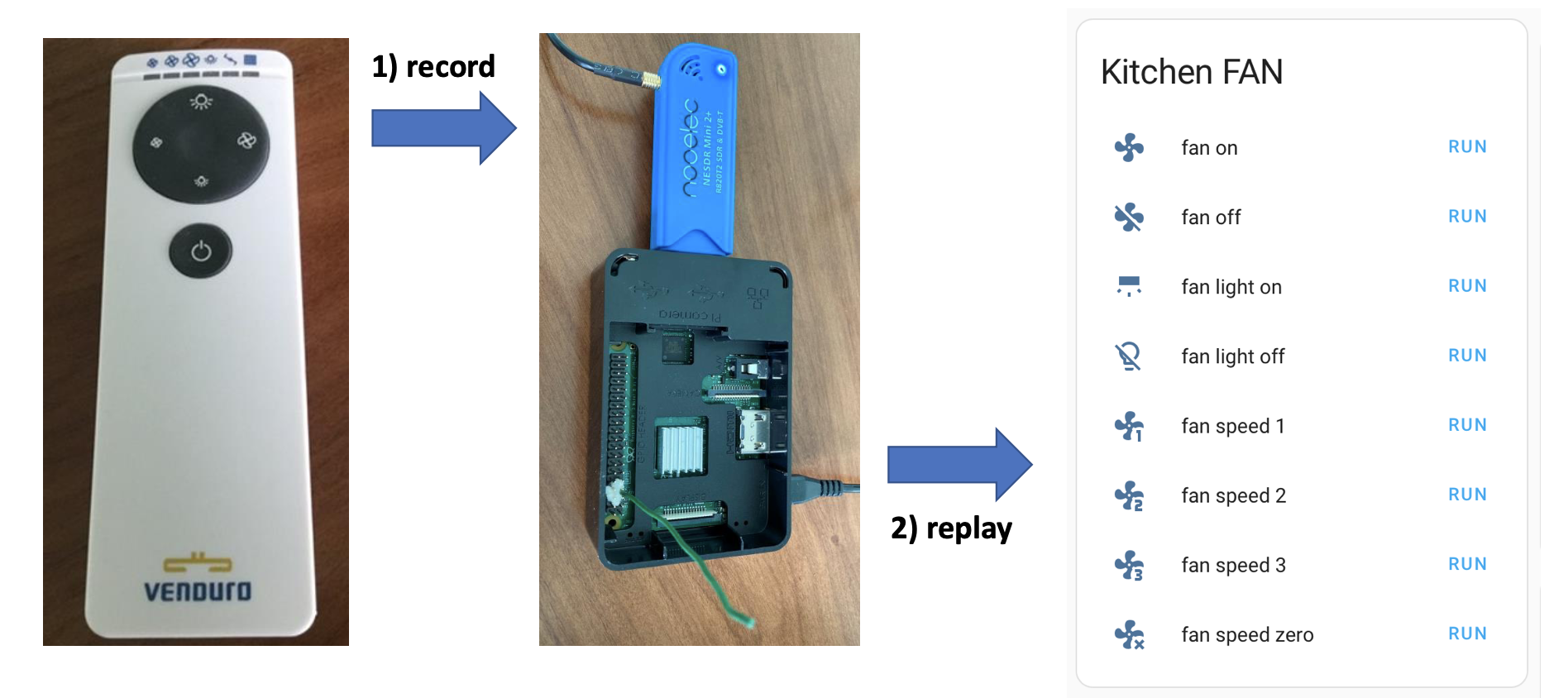 Common use cases: airconditioners, remote power plugs, fans, shades and kitchen hoods. This won't work with rolling codes often used for more secure communication to open doors for example.
required hardware
- Raspberry Pi (check https://github.com/F5OEO/rpitx#hardware for supported versions)
- radio receiver USB dongle (RTL-SDR with RTL2832U chipset)
record and replay RF signal
on your Pi
- Install Raspberry Pi OS.
- Install https://github.com/F5OEO/rpitx
- Connect the RTL-SDR dongle to your Pi.
- Record remote signal.
To find the frequency, your can install SDR software. If the remote has an FCC id, you can look that up here. Common frequencies are: 433.92, 868.3, 315, 288, 300, 303, 306, 310, 318, 330, 390, 403.55 and 418 MHz.
cd rpitx
# this records on 868.00 MHz frequency and writes it to a fan-on-button.iq file
rtl_sdr -s 250000 -g 35 -f 868.0000e6 fan-on-button.iq
above can also be done through the rtlmenu.sh GUI
- CTRL + C to stop recording.
You can remove the RTL-SDR dongle when you're done recoding. It's not required for sending.
- Add electrical wire to GPIO pin#7 (4th pin down, left row) - see picture.
- Replay recording.
sudo ./rpitx/sendiq -s 250000 -f 868.0000e6 -t u8 -i ./rpitx/fan-on-button.iq
integrate with Home Assistant
If you don't have HA, start here.
add Entity in Home Assistant
I used command_line with notify or switch. Switch requires a loop to turn the state back off. Notify doesn't need this because it's stateless ( it has no on or off state ). Executing notify can be combersome because you need to provide a message which we don't need. Creating a notify script with an empty message resolves this.
First I used
switch. But its turn-off loop gave strange errors in my logs. I'm usingnotifynow instead. I prefered to use a Button Entity. But none of the current Home Assistant Button types seem to supportcommand_line. Do you see a better solution? Great! Let me know by creating an issue.
command_line Notify
Create a command line Notify for everyone recording you want to replay.
# configuration.yaml
command_line:
  - notify:
      name: fan_on
      command: 'ssh -i /config/id_rsa -o StrictHostKeyChecking=no -q pi@<YOUR.PI.IP.ADDRESS> sudo ./rpitx/sendiq -s 250000 -f 868.0000e6 -t u8 -i ./rpitx/fan-all-on.iq | wc -l > /config/command.log'
Then create a script in the GUI - see here.
Or use the code below.
# because Notify, by itself, isn't a callable object, create a script for it
script:
  fan_on:
    sequence:
      - action: notify.fan_on
        metadata: {}
        data:
          message: " "
    alias: fan_on
    description: ""
command_line Switch
or Create a command line Switch for everyone recording you want to replay.
# configuration.yaml
command_line:
  - switch:
      name: fan_on
      unique_id: fan_on
# ssh is only required if HA and rpitx run on different machines
      command_on: "ssh -i /config/id_rsa -o StrictHostKeyChecking=no -q pi@<YOUR.PI.IP.ADDRESS> sudo ./rpitx/sendiq -s 250000 -f 868.0000e6 -t u8 -i ./rpitx/fan-all-on.iq"
      command_off: off
# HA doesn't get feedback if the device is on or off.  This returns the switch always back to the off-state.
      command_state: off
expose switch to 'emulated hue' component
This will allow Alexa to see the switch as a Philips Hue light.
# configuration.yaml
emulated_hue:
  listen_port: 80
  expose_by_default: false
  entities:
    switch.fan_on:
      name: "fan on"
      hidden: false
Alexa gets confused if you create multiple devices with simular names.
To work around this, create Alexa Routines with a unique trigger sentences and avoid the words 'on' or 'off'.
I used start- and stop cooking - see example.
create automation that exposes switch as a webhook
This will allow you to remotely trigger the switch via an HTTP POST request.
Can be used with Google Home for example.
# configuration.yaml
automation:
  - alias: webhook_fan_on
    trigger:
    - platform: webhook
      webhook_id: <PICK-A-RANDOM-WEBHOOK-ID>
      allowed_methods:
        - POST
        - PUT
      local_only: false
    condition: []
    action:
    - data: {}
      entity_id: switch.fan_on
      service: switch.turn_on
    mode: single
Test the webhook
curl -X POST https://<YOUR-HA>.duckdns.org/api/webhook/<YOUR-WEBHOOK-ID>
create certificate on HA
Only required if HA and rpitx run on different machines.
The certificate allows to remote execute ssh commands on another machine without a password prompt.
create certificate
ssh-keygen -t rsa -b 4096
send certificate to your pi (command still run on HA)
ssh-copy-id pi@<YOUR.PI.IP.ADDRESS>
Initially, HA gave errors when running the remote ssh commands. I can't remember the exact fix. It was either the HA user context not having access to the key files or the file and folder permissions for the certificate keys were not set correctly. I think below two things fixed it. Let me know if this works for you.
on HA copy the id_rsa to the HA /config folder
on your Pi
chmod 700 ~/.ssh/
chmod 600 ~/.ssh/*
create webhooks without HA
If you don't have HA, you can try creating webhooks with https://github.com/ncarlier/webhookd.
Protecting this setup is beyond the scope of this repository. It's not a question if you get hacked, but when.
credits
All rights of the original authors reserved.