
record-with-ffmpeg
Record your desktop audio, microphone and video in linux from terminal.
Features
- fully command line tool
- Different options for recording
- Internal/monitor audio only
- Microphone only
- Both internal audio and microphone
- Video only (without audio)
- Video with internal audio
- Video with microphone
- Video with both internal audio and microphone
Dependencies
- pipewire-pulse or pulseaudio (any one)
- ffmpeg
Installation
1. Get the installation script in your system.
git clone https://github.com/whoisYoges/record-with-ffmpeg
cd record-with-ffmpeg/
2. Make necessary changes in record-with-ffmpeg
Changes need to be made in following variable fields.
- videodir (location to save the recorded videos)
- audiodir (location to save the recorded audio)
- recordingresolution (resolution of your monitor or specific area of monitor you want to record)
- outputresolution (output video resolution (recommended <= recordingresolution))
- fps (required video output fps)
- cfr (Constant Rate factor (know more about crf))
Get following audio input sources using pactl list sources command under Name section in terminal.
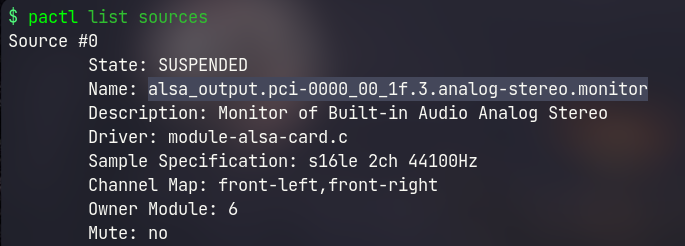
- monitoraudioinput (internal/system/monitor audio)
- microphoneaudioinput (external/microphone audio)
Also check audiochannel and audiofrequency value using pactl list sources command under Sample Specification section
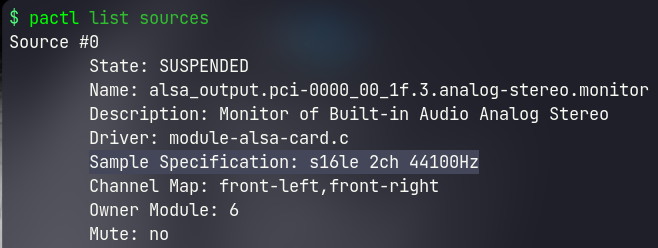
for eg: if output has:: Sample Specification: s16le 2ch 44100Hz
then audiochannel is 2 (i.e, audio channel) and audiofrequency is 44100 (i.e, audio rate/frequency)
- monitoraudiochannel (number of audio channel of builtin/monitor audio source)
- microphoneaudiochannel (number of audio channel of microphone)
- monitoraudiofrequency (audio frequency of builtin/monitor)
- microphoneaudiofrequency (audio frequency of microphone)
- outputaudiofrequency (output audio frequency (recommended: smaller among audio inputs))
3. Place it in the path.
chmod +x record-with-ffmpeg
sudo mv record-with-ffmpeg /usr/local/bin/
cd ../
rm -r record-with-ffmpeg
Uninstallation
sudo rm /usr/local/bin/record-with-ffmpeg