
RecyclerCalendarAndroid

A DIY calendar generator library for android written in Kotlin.
Step 1. Add the JitPack repository to your build file Add it in your root build.gradle at the end of repositories:
allprojects {
  repositories {
    ...
    maven {
      url 'https://jitpack.io'
    }
  }
}
Step 2. Add the dependency
dependencies {
 implementation 'com.github.tejpratap46:RecyclerCalendarAndroid:LATEST_RELEASE_TAG'
}
Try It

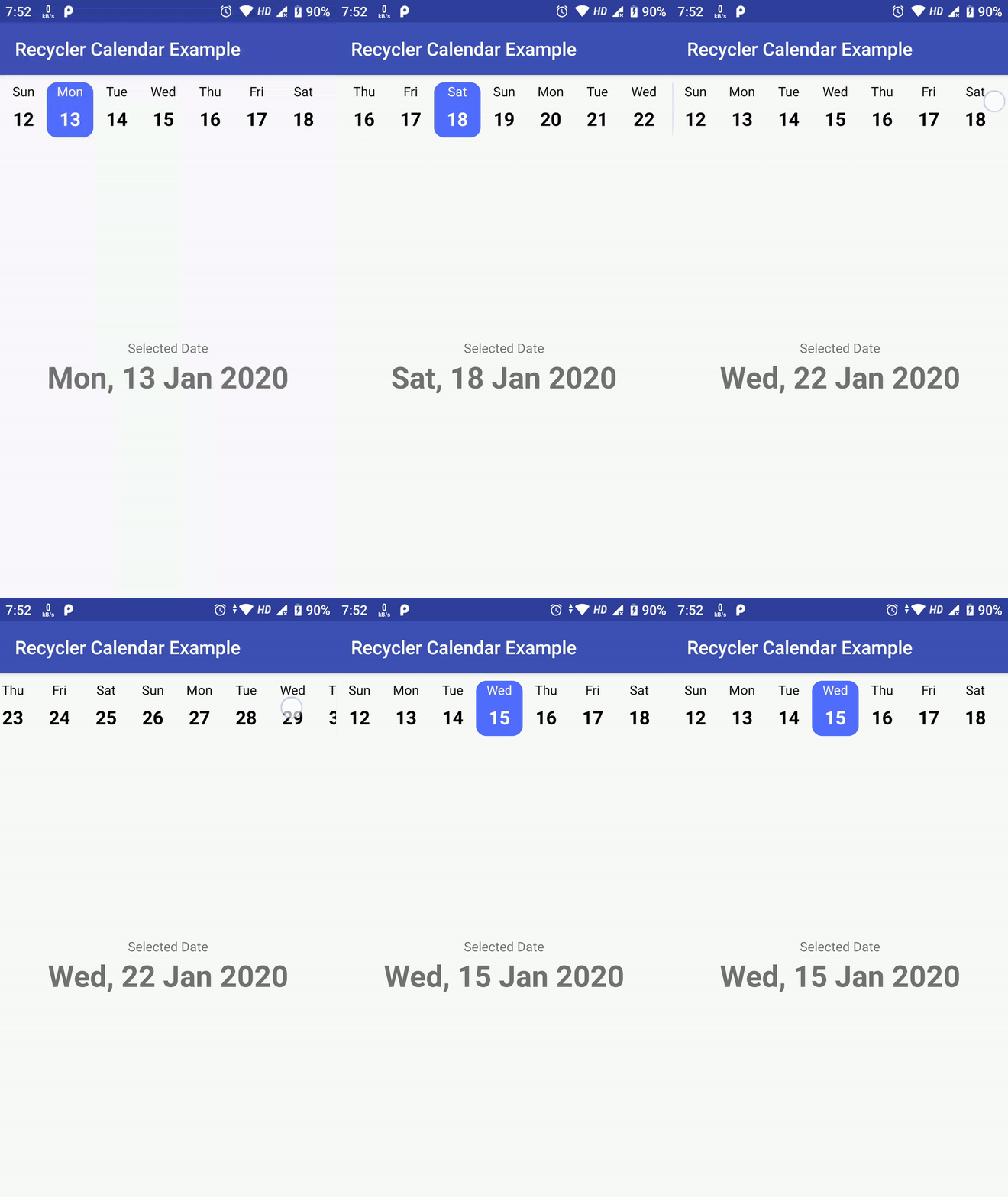
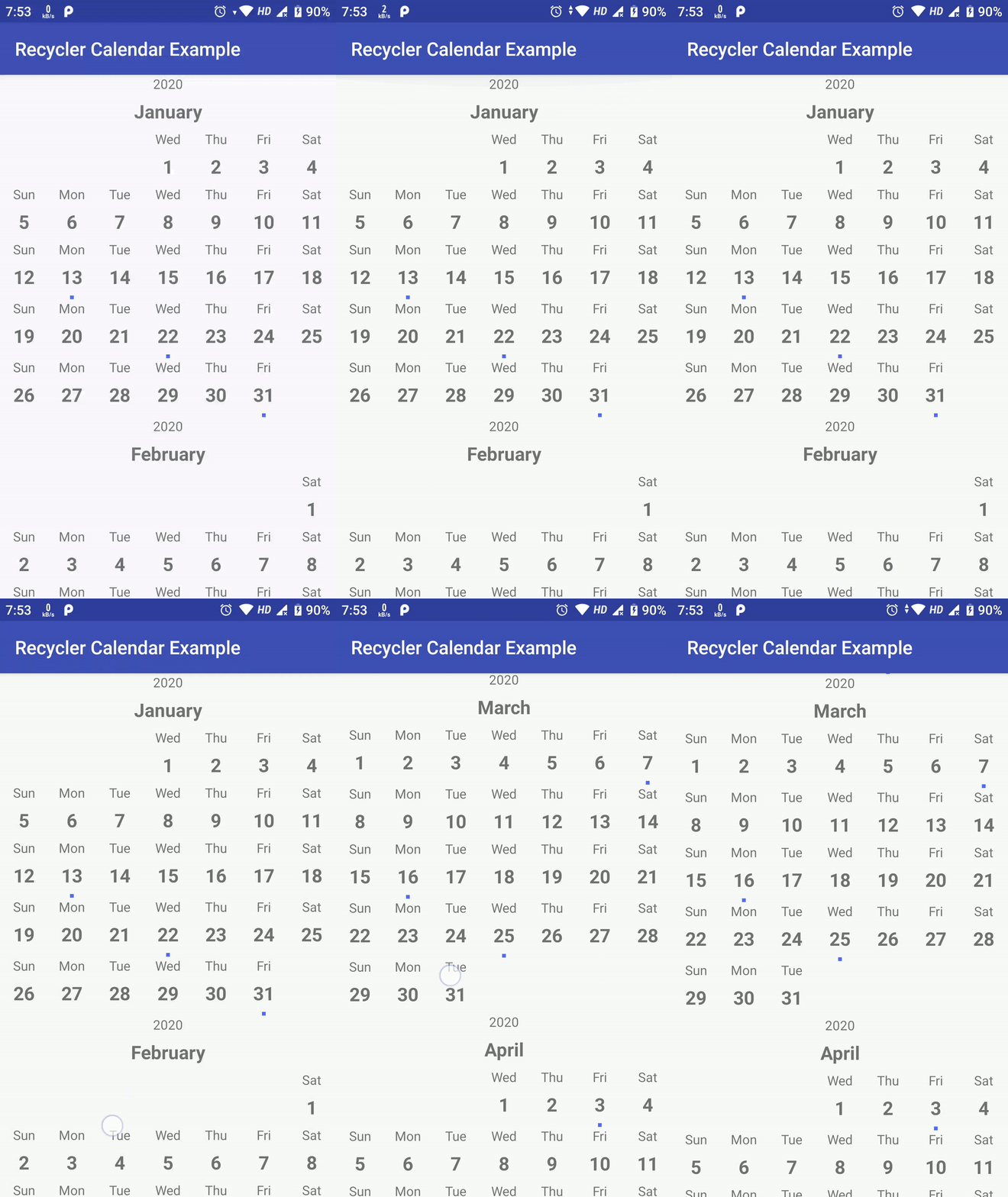
Here are sample calenders you can create with this library :
| Week Calendar | Month With Events | Month With Swipe Pages |
|---|---|---|
| Code At: horizontal | Code At: vertical | Code At: viewpager |
 |
 |
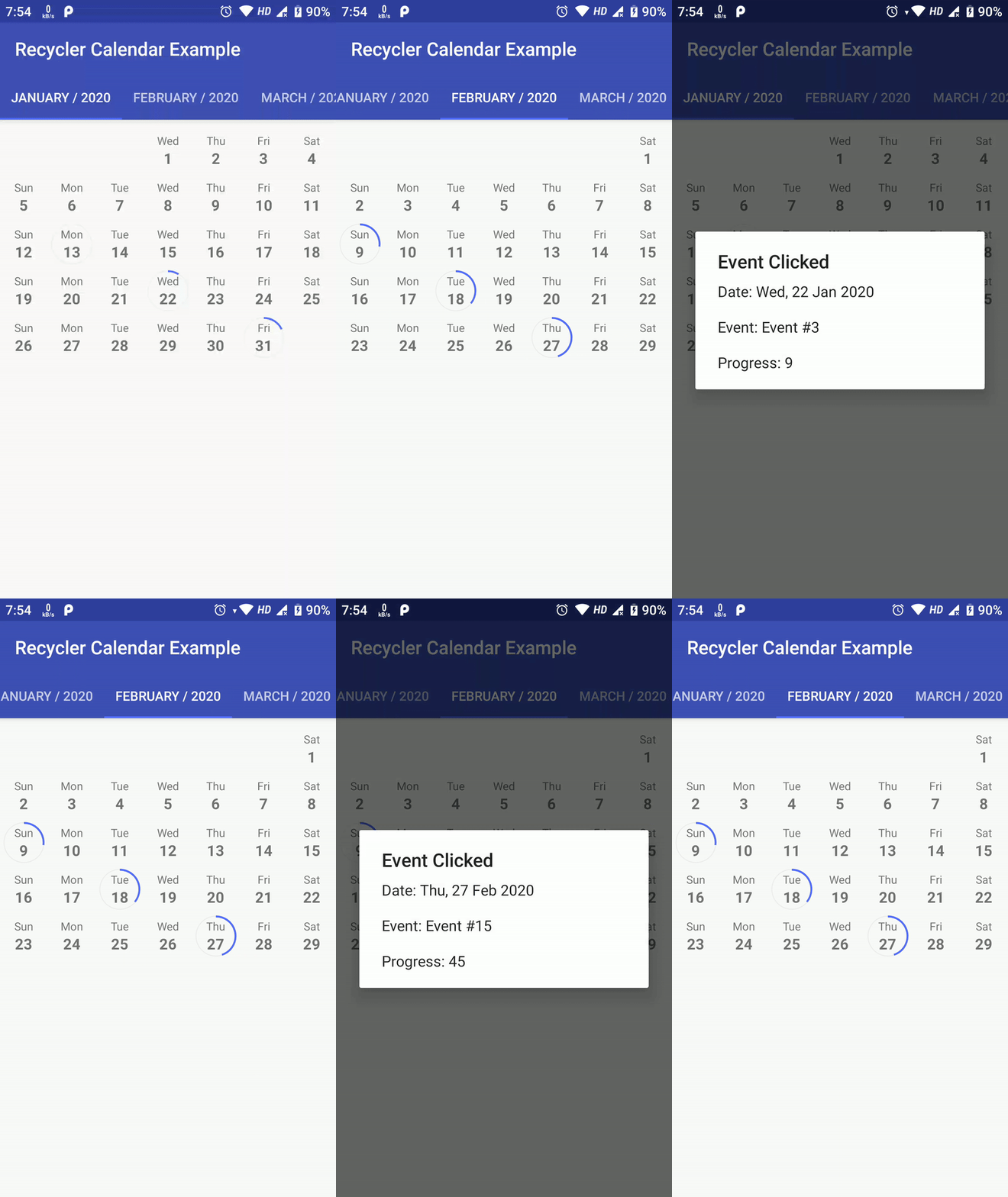 |
Above sample are not the limit of this library, possiblities are endless as you can create custom view for each date as well as add custom Business Login on top of it.
Here is how you can create your own Calendar using RecyclerCalendarAndroid.
Create a RecyclerView Adapter which extends RecyclerCalendarBaseAdapter
- Implement following methods:
override fun onCreateViewHolder(parent: ViewGroup, viewType: Int): RecyclerView.ViewHolder {
    val view: View = LayoutInflater.from(parent.context).inflate(R.layout.item_calendar_horizontal, parent, false)
    return MonthCalendarViewHolder(view)
}
- Create
ViewHolderClass for youViewwhich extendsRecyclerView.ViewHolder:
class MonthCalendarViewHolder(itemView: View) : RecyclerView.ViewHolder(itemView) {
    val textViewDay: TextView = itemView.findViewById(R.id.textCalenderItemVerticalDay)
    val textViewDate: TextView = itemView.findViewById(R.id.textCalenderItemVerticalDate)
    val viewEvent: View = itemView.findViewById(R.id.viewCalenderItemVerticalEvent)
}
- Now just implament
onBindViewHolder
override fun onBindViewHolder(
        holder: RecyclerView.ViewHolder,
        position: Int,
        calendarItem: RecyclerCalenderViewItem
	) {
    val monthViewHolder: MonthCalendarViewHolder = holder as MonthCalendarViewHolder
	// first reset view of current item as it will be reused for different dates and header.
	{
	    // Reset all you view here...
		monthViewHolder.itemView.visibility = View.VISIBLE
		monthViewHolder.itemView.setOnClickListener(null)
	}

	// Calendar item as 3 parts
	// 1. Header -> Where you put month name, year etc.
	// 2. Empty Space -> This is empty space to fill days before first day of month start, hide every view of ViewHolder Here
	// 3. Date -> This is a date, customise your date with event, tecket information, Available slot OR just selection etc here
	if (calendarItem.isHeader) {
	    val selectedCalendar = Calendar.getInstance(Locale.getDefault())
		selectedCalendar.time = calendarItem.date

		val month: String = CalendarUtils.getMonth(selectedCalendar.get(Calendar.MONTH)) ?: ""
		val year = selectedCalendar[Calendar.YEAR].toLong()

		monthViewHolder.textViewDay.text = year.toString()
		monthViewHolder.textViewDate.text = month
	} else if (calendarItem.isEmpty) {
		monthViewHolder.itemView.visibility = View.GONE
		monthViewHolder.textViewDay.text = ""
		monthViewHolder.textViewDate.text = ""
	} else {
	    val calendarDate = Calendar.getInstance(Locale.getDefault())
	    calendarDate.time = calendarItem.date

		val day: String = CalendarUtils.getDay(calendarDate.get(Calendar.DAY_OF_WEEK)) ?: ""

		monthViewHolder.textViewDay.text = day

		val dateInt: Int =
        (CalendarUtils.dateStringFromFormat(calendarDate.time, CalendarUtils.DB_DATE_FORMAT)
            ?: "0").toInt()

		if (eventMap.contains(dateInt)) {
			// As an example, here im checking if this date has any event passed from constructor
	        monthViewHolder.viewEvent.visibility = View.VISIBLE
	        // Set background color from event information
			monthViewHolder.viewEvent.setBackgroundColor(eventMap.get(dateInt)!!.color)
	    }

		// Set Date to textView
	    monthViewHolder.textViewDate.text = CalendarUtils.dateStringFromFormat(calendarDate.time, CalendarUtils.DISPLAY_DATE_FORMAT) ?: ""

		// Here as an example, im sending Tap data to listener
	    monthViewHolder.itemView.setOnClickListener {
			dateSelectListener.onDateSelected(calendarItem.date, eventMap[dateInt])
	    }
	}
}
above code is direct example from VerticalRecyclerCalendarAdapter
For People who want to just use simple date picker/selection calendar, i have created SimpleRecyclerCalendarView
To use SimpleRecyclerCalendarView, just include following in your .xml
<com.tejpratapsingh.recyclercalendar.views.SimpleRecyclerCalendarView
  android:id="@+id/calendarRecyclerView"
  android:layout_width="match_parent"
  android:layout_height="match_parent" />
And in Your Activity, include following
val calenderView: SimpleRecyclerCalendarView = findViewById(R.id.calendarRecyclerView)

val date = Date()
date.time = System.currentTimeMillis()

// Start From Date
val startCal = Calendar.getInstance()

// End Date
val endCal = Calendar.getInstance()
endCal.time = date
endCal.add(Calendar.MONTH, 3)

val configuration: SimpleRecyclerCalendarConfiguration =
    SimpleRecyclerCalendarConfiguration(
        calenderViewType = RecyclerCalendarConfiguration.CalenderViewType.VERTICAL, // calendarViewType could be VERTICAL OR HORIZONTAL
        calendarLocale = Locale.getDefault(),
        includeMonthHeader = true,
        selectionMode = SimpleRecyclerCalendarConfiguration.SelectionModeNone() // selectionMode could be one of [SelectionModeNone, SelectionModeSingle, SelectionModeMultiple, SelectionModeRange]
    )
configuration.weekStartOffset = RecyclerCalendarConfiguration.START_DAY_OF_WEEK.MONDAY


calenderView!!.initialise(
    startDate,
    endDate,
    configuration,
    object : SimpleRecyclerCalendarAdapter.OnDateSelected {
        override fun onDateSelected(date: Date) {
            Toast.makeText(
                calenderView!!.context,
                "Date Selected: ${CalendarUtils.getGmt(date)}",
                Toast.LENGTH_LONG
            ).show()
        }
    })
To know More about SimpleRecyclerCalendarView visit SimpleRecyclerCalendarActivity
For People who want to just use infinite date picker/selection calendar, i have created InfiniteRecyclerCalendarView
To use InfiniteRecyclerCalendarView, just include following in your .xml
<com.tejpratapsingh.recyclercalendar.views.InfiniteRecyclerCalendarView
  android:id="@+id/calendarRecyclerView"
  android:layout_width="match_parent"
  android:layout_height="match_parent" />
And in Your Activity, include following
val calenderView: InfiniteRecyclerCalendarView = findViewById(R.id.calendarRecyclerView)

val date = Date()
date.time = System.currentTimeMillis()

// Start From Date
val startCal = Calendar.getInstance()

// End Date
val endCal = Calendar.getInstance()
endCal.time = date
endCal.add(Calendar.MONTH, 3)

val configuration: InfiniteRecyclerCalendarConfiguration =
    InfiniteRecyclerCalendarConfiguration(
        calenderViewType = RecyclerCalendarConfiguration.CalenderViewType.VERTICAL, // calendarViewType could be VERTICAL OR HORIZONTAL
        calendarLocale = Locale.getDefault(),
        includeMonthHeader = true,
        selectionMode = InfiniteRecyclerCalendarConfiguration.SelectionModeNone() // selectionMode could be one of [SelectionModeNone, SelectionModeSingle, SelectionModeMultiple, SelectionModeRange]
    )
configuration.weekStartOffset = RecyclerCalendarConfiguration.START_DAY_OF_WEEK.MONDAY

calenderView!!.initialise(
    configuration,
    object : InfiniteRecyclerCalenderAdapter.OnDateSelected {
        override fun onDateSelected(date: Date) {
            Toast.makeText(
                calenderView!!.context,
                "Date Selected: ${CalendarUtils.getGmt(date)}",
                Toast.LENGTH_LONG
            ).show()
        }
    })
To know More about InfiniteRecyclerCalendarActivity visit InfiniteRecyclerCalendarActivity
Donate
