





📡 P3X Redis UI: A highly functional and convenient database GUI that fits in your pocket, accessible on both responsive web and desktop applications v2026.4.3005
🌌 Bugs are evident™ - MATRIX️
🚧 This project is under active development!
📢 We welcome your feedback and contributions.
NodeJS LTS is supported
🛠️ Built on NodeJs version
v24.16.0
📝 Description
p3x-redis-ui is a versatile Redis GUI that works as a web-based server application or a standalone desktop app. It excels at managing JSON data through an integrated CodeMirror editor with GitHub dark/light themes, supports uploading and downloading binary data, and handles SSH, cluster, and sentinel configurations.
📊 Comparing tools? See COMPARISON.md for an honest breakdown vs. redis-commander, RedisInsight, and AnotherRedisDesktopManager — feature matrix, performance at 1M keys, and when to pick each.
Minimum Node.js Version
v22.0.0
30-Second Docker Quick Start
mkdir -p ./p3x-redis-ui-settings
docker run -d \
  --name p3x-redis-ui \
  -p 7843:7843 \
  -v $PWD/p3x-redis-ui-settings:/settings \
  patrikx3/p3x-redis-ui
Open: http://localhost:7843
Kubernetes / Docker: Always use the
latesttag (patrikx3/p3x-redis-ui:latest) withimagePullPolicy: Always. Version-specific tags are available butlatestis the recommended and supported tag.
Supported Languages
Switch language in Settings — 54 languages covering 88+ countries:
Arabic (ar), Azerbaijani (az), Belarusian (be), Bengali (bn), Bosnian (bs), Bulgarian (bg), Chinese (zn), Chinese - Hong Kong (zh-HK), Chinese - Taiwan (zh-TW), Croatian (hr), Czech (cs), Danish (da), Dutch (nl), English (en), Estonian (et), Filipino (fil), Finnish (fi), French (fr), Georgian (ka), German (de), Greek (el), Hebrew (he), Hungarian (hu), Armenian (hy), Indonesian (id), Italian (it), Japanese (ja), Kazakh (kk), Khmer (km), Korean (ko), Kyrgyz (ky), Lithuanian (lt), Macedonian (mk), Malay (ms), Nepali (ne), Norwegian (no), Polish (pl), Portuguese (pt-PT), Portuguese - Brazil (pt-BR), Romanian (ro), Russian (ru), Serbian (sr), Sinhala (si), Slovak (sk), Slovenian (sl), Spanish (es), Swahili (sw), Swedish (sv), Tajik (tg), Tamil (ta), Thai (th), Turkish (tr), Ukrainian (uk), Vietnamese (vi)
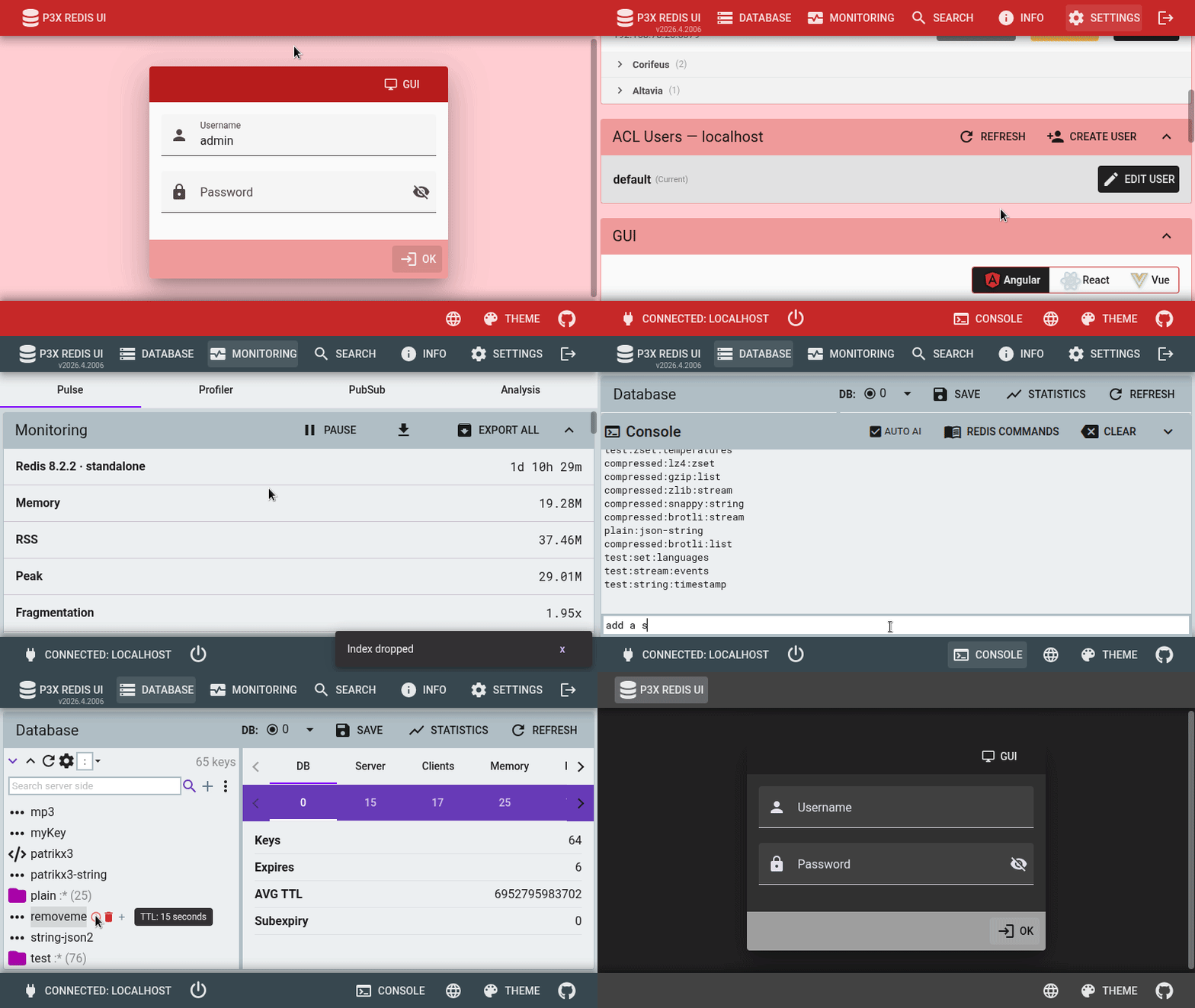
Screenshots
Demo
Live Demo
Try the latest version at p3x.redis.patrikx3.com.
- Daily data reset: the Redis database restores certain datasets every morning (CET)
- Brief downtime: occasional ~1 second interruptions may occur due to automatic updates from Git changes
- Version differences: the live instance may differ from the GitHub or NPM release; updates are typically published monthly
Features
See Features — Triple GUI (Angular + React + Vue), AI-powered queries, real-time monitoring (Pulse / Profiler / PubSub / Analysis), RediSearch, RedisTimeSeries, ReJSON, RedisBloom, VectorSet, Array (Redis 8.8), Redis 8.x, ACL, and more.
AI Configuration
See AI Configuration — works out of the box; covers GUI/CLI config, readonly mode, and the Groq API key.
Important Notice
Do not manually create the configuration JSON file with a text editor. Use the GUI to generate it instead — the resulting file can then be deployed to systems like Kubernetes.
Optional HTTP Basic Authentication
See HTTP Basic Auth — config, env vars, CLI flags.
Installation
Releases / Downloads
https://github.com/patrikx3/redis-ui/releases
CLI (Node.js / NPM)
Start the server via Node.js/NPM and access it in a browser.
npm install -g p3x-redis-ui
p3xrs
Open: http://localhost:7843
CLI Options
Usage: p3xrs [options]

Options:
  -V, --version                           output the version number
  -c, --config [config]                   Set the p3xr.json p3x-redis-ui-server configuration, see more help in p3x-redis-ui-server
  -r, --readonly-connections              Set the connections to be readonly, no adding, saving or delete a connection
  -n, --connections-file-name [filename]  Set the connections file name, overrides default .p3xrs-conns.json
  --http-auth-enable                      Enable HTTP Basic auth
  --http-auth-disable                     Disable HTTP Basic auth
  --http-auth-username [username]         HTTP Basic auth username
  --http-auth-password [password]         HTTP Basic auth plain password
  --http-auth-password-hash [hash]        HTTP Basic auth bcrypt password hash
  --http-auth-password-hash-file [file]   Read HTTP Basic auth bcrypt password hash from file
  --groq-api-key [key]                    Groq API key for AI-powered Redis query translation (get a free key at console.groq.com)
  --groq-api-key-readonly                 Prevent users from changing the Groq API key via the UI
  -h, --help                              display help for command
Docker
https://hub.docker.com/r/patrikx3/p3x-redis-ui
Compose
https://github.com/patrikx3/redis-ui/blob/master/docker-compose.yml
wget https://raw.githubusercontent.com/patrikx3/redis-ui/master/docker-compose.yml
# Adjust the settings folder path in docker-compose.yml as needed.
docker-compose up
Standalone
mkdir -p ./p3x-redis-ui-settings
docker run -v $PWD/p3x-redis-ui-settings:/settings -h docker-p3x-redis-ui -p 7843:7843 -t -i patrikx3/p3x-redis-ui
The GUI will be at http://localhost:7843
Health Check
The Docker image includes a built-in HEALTHCHECK that polls /health every 30 seconds. Container orchestrators (Docker Compose, Swarm, etc.) will automatically mark the container as unhealthy if the server stops responding.
Graceful Shutdown
The server handles SIGTERM and SIGINT signals gracefully — it closes Socket.IO connections, disconnects all Redis clients, and shuts down the HTTP server before exiting.
Kubernetes
Raw Manifests
https://github.com/patrikx3/redis-ui/blob/master/k8s/manifests
kubectl apply -f namespace.yaml
# Edit redis host and password in configmap.yaml first
kubectl apply -f configmap.yaml
kubectl apply -f deployment.yaml
kubectl apply -f service.yaml
kubectl apply -f ingress.yaml
The manifests and Helm chart include liveness and readiness probes — both use GET /health to verify the server is responding.
Helm Chart
https://github.com/patrikx3/redis-ui/blob/master/k8s/chart
helm template -f values.yaml release --namespace namespace . > generated.yaml
kubectl apply -f generated.yaml
Desktop Applications
Stuck on the loading screen? Reinstall the app (Snap / Flatpak / deb / rpm / AppImage / dmg / msi). A cached or partial install from a previous auto-update is the usual cause; reinstall clears it and the GUI loads on next launch.
macOS
Supports both Intel and Apple Silicon builds. If you download the zip for the arm64 version, remove the quarantine attribute:
sudo xattr -rd com.apple.quarantine P3X-Redis-UI.app
Snap
Available for x64 and arm64 architectures.
sudo snap install p3x-redis-ui

Flatpak
Download from the releases page and install:
wget https://github.com/patrikx3/redis-ui/releases/download/v${VERSION}/P3X-Redis-UI-${VERSION}-x86_64.flatpak
flatpak install ./P3X-Redis-UI-${VERSION}-x86_64.flatpak
flatpak run com.patrikx3.redis_ui
The application menu is automatically integrated.
AppImage, deb, rpm
These packages support automatic updates.
After downloading the AppImage, make it executable:
mkdir -p $HOME/opt
mv ~/Downloads/p3x-redis-ui-a.b.c-x86_64.AppImage $HOME/opt/
chmod +x $HOME/opt/p3x-redis-ui-a.b.c-x86_64.AppImage
$HOME/opt/p3x-redis-ui-a.b.c-x86_64.AppImage &
ElectronJs
The app is listed on ElectronJs Apps — search for P3X.
Architecture
See Architecture — Socket.IO + Express + ioredis, three frontends (Angular / React / Vue), related repositories.
Adoption Notes
redis-commander has more Docker pulls due to its longer history and presence in tutorials/CI pipelines. p3x-redis-ui adoption continues to grow steadily.
Detailed analysis and action plan
Change Log
Contributors
Links
P3X Redis UI playground Corifeus P3X Redis UI AlternativeTo NPM Snap Store GitHub Pages Web development Webfejlesztés
🌐 Meet Assistant SaaS — meeting.corifeus.com
Don't want to install anything? Try the hosted version at meeting.corifeus.com — full meeting workflow built for European businesses, no setup, no API key, no command line.
What the hosted version offers:
- 21-language live translation during the meeting
- AI summaries, action items, decisions, attendees, key quotes auto-generated after every meeting
- Custom vocabulary — your client / company / industry terms corrected automatically (Pro+ tier)
- Searchable meeting library — find any decision or promise across all your past meetings
- Shareable read-only links — send a clean meeting summary to a client or teammate, no signup needed on their end
- One-click email summary after each meeting
- Premium engine on every plan — no downgraded model, ever
- EU billing — Stripe Tax + VAT-compliant + EUR-priced (Solo €19.99 / Pro €39.99 / Business €99.99 per month, no lock-in)
- GDPR-compliant by default — browser-language auto-detection, no tracking cookies, your meetings stored encrypted
Try the live demo (1 minute free, no signup) or browse the public sample meeting at meeting.corifeus.com/sample.
Corifeus Network
AI-powered network & email toolkit — free, no signup.
Web · network.corifeus.com MCP · npm i -g p3x-network-mcp
- AI Network Assistant — ask in plain language, get a full domain health report
- Network Audit — DNS, SSL, security headers, DNSBL, BGP, IPv6, geolocation in one call
- Diagnostics — DNS lookup & global propagation, WHOIS, reverse DNS, HTTP check, my-IP
- Mail Tester — live SPF/DKIM/DMARC + spam score + AI fix suggestions, results emailed (localized)
- Monitoring — TCP / HTTP / Ping with alerts and public status pages
- MCP server — 17 tools exposed to Claude Code, Codex, Cursor, any MCP client
- Install —
claude mcp add p3x-network -- npx p3x-network-mcp - Try — "audit example.com", "why do my emails land in spam? test [email protected]"
- Source — patrikx3/network · patrikx3/network-mcp
- Contact — patrikx3.com · donate
❤️ Support Our Open-Source Project
If you appreciate our work, consider ⭐ starring this repository or 💰 making a donation to support server maintenance and ongoing development. Your support means the world to us—thank you!
🌍 About My Domains
All my domains, including patrikx3.com, corifeus.eu, and corifeus.com, are developed in my spare time. While you may encounter minor errors, the sites are generally stable and fully functional.
📈 Versioning Policy
Version Structure: We follow a Major.Minor.Patch versioning scheme:
- Major: 📅 Corresponds to the current year.
- Minor: 🌓 Set as 4 for releases from January to June, and 10 for July to December.
- Patch: 🔧 Incremental, updated with each build.
🚨 Important Changes: Any breaking changes are prominently noted in the readme to keep you informed.
P3X-REDIS-UI Build v2026.4.3005
