
Retrace
Turn failed Python tests and CI runs into replayable debug sessions.
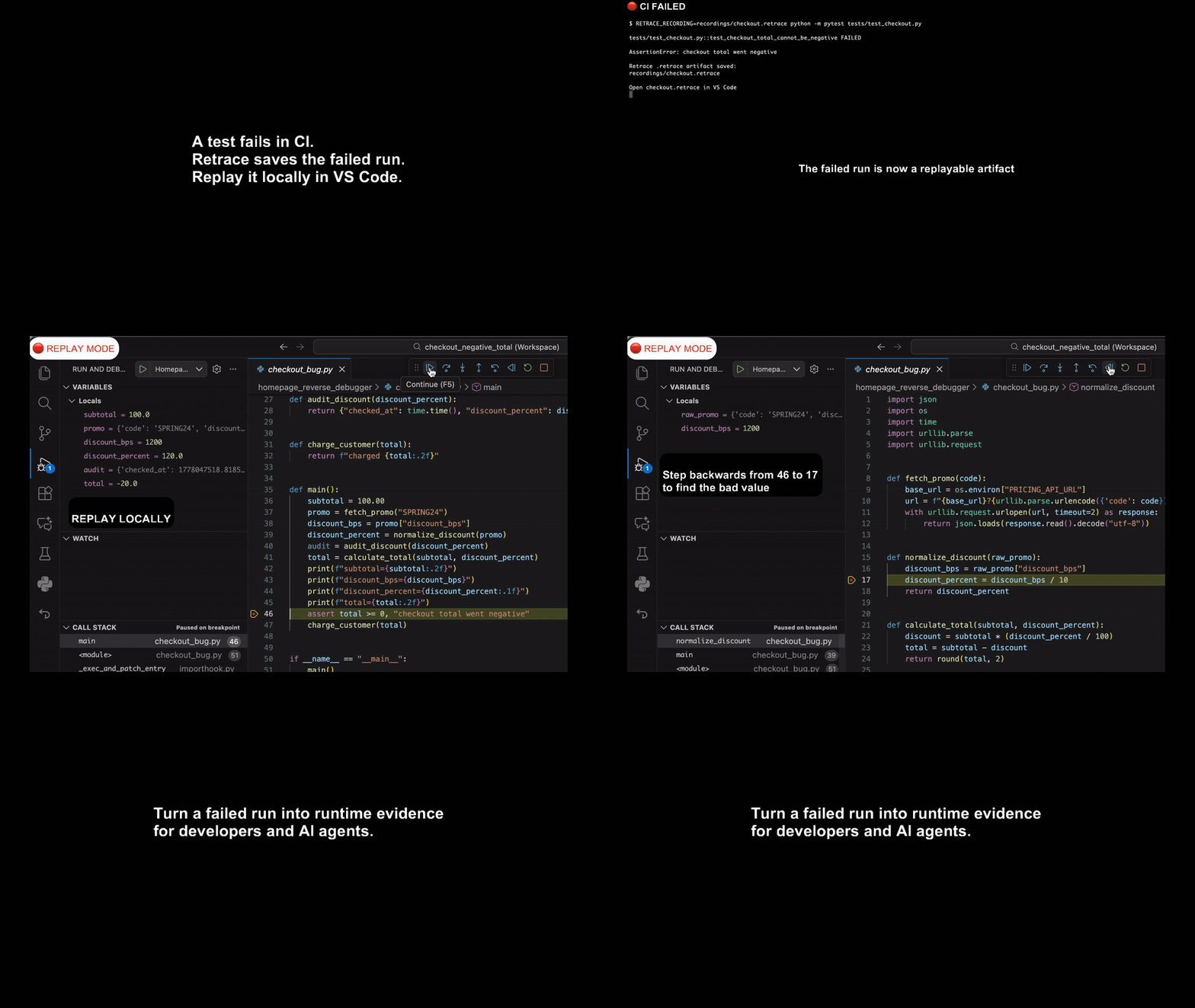
Retrace records a Python execution as a .retrace artifact. When pytest or CI fails, open the artifact locally in VS Code, replay the same failed run, and step backwards from the failure to inspect the runtime state that caused it.
The same recording model works for Python apps and production crashes. Start with tests today; move to production when the trust is there.
Start here: Replay a failed pytest run with the full quickstart.
Why Retrace
Most failed test and CI artifacts are logs, tracebacks, screenshots, or partial traces. They show symptoms. They do not preserve the execution.
Retrace preserves the failed run itself.
| Today | With Retrace |
|---|---|
| CI artifacts are logs and tracebacks | CI artifact is replayable |
| AI agents infer from partial context | AI agents get runtime evidence |
| Stack trace shows where it crashed | Replay shows what happened before |
| Logs show what you predicted would matter | Retrace preserves the failed execution |
The failed execution becomes something you can inspect, replay, and share.
Quick Start: Replay a Failed pytest Run
Install Retrace in your virtual environment:
python -m pip install retracesoftware pytest
Run pytest through Retrace's explicit runner:
PYTEST_DISABLE_PLUGIN_AUTOLOAD=1 python -m retracesoftware --recording recordings/pytest.retrace -- -m pytest tests -q --tb=short
If pytest fails, Retrace leaves behind a .retrace artifact for that exact failed run.
This is the recommended preview command for pytest. It keeps pytest plugin loading explicit so the first-run demo stays focused, repeatable, and easy to inspect.
Open the same project in VS Code:
code .
Then:
- Install the
Retrace Debug Extensionfrom the Marketplace. - Open the Retrace sidebar.
- Choose
Open Recording.... - Select
recordings/pytest.retrace. - Open the failing test or the code under test.
- Set a breakpoint near the failing assertion or exception.
- Start replay from the Retrace view.
You can now debug the failed execution locally, inspect runtime state, and step backwards from the failure without re-running the test.
CI Artifacts
Retrace works with ordinary CI artifact upload.
For example, in GitHub Actions:
- name: Run pytest with Retrace
  run: |
    mkdir -p recordings
    set +e
    PYTEST_DISABLE_PLUGIN_AUTOLOAD=1 \
      python -m retracesoftware --recording recordings/pytest.retrace -- -m pytest tests -q --tb=short
    PYTEST_STATUS=$?
    exit "$PYTEST_STATUS"

- name: Upload Retrace recording
  if: failure()
  uses: actions/upload-artifact@v4
  with:
    name: retrace-failed-run
    path: recordings/pytest.retrace
A failed CI run becomes a replayable artifact. Download it, open it locally in VS Code, and debug the same execution that failed in CI.
No hosted trace service or GitHub App is required.
A 30-Second Example
A test fails:
PYTEST_DISABLE_PLUGIN_AUTOLOAD=1 python -m retracesoftware --recording recordings/failure.retrace -- -m pytest tests/test_checkout.py -q --tb=short
Instead of rerunning and guessing, open recordings/failure.retrace in VS Code. Replay the exact failed execution, inspect locals and call stack, and step backwards from the failing assertion to the state that caused it.
The recording is the failed run. No reproduction steps, no retry loop, no guessing from logs.
How It Works
-
Run
Run pytest, CI, or your Python app with Retrace enabled.
-
Record
Retrace records the execution into a
.retraceartifact. -
Replay
Open the artifact locally in VS Code and debug the same execution.
-
Step backwards
Move backwards from the failure and inspect the runtime state that caused it.
Under the hood, Retrace records the boundary between your Python code and the nondeterministic outside world: network responses, filesystem state, clocks, randomness, subprocess behavior, thread scheduling, API calls, database calls, and other external effects.
During replay, your Python code runs for real, but those recorded boundary calls return their captured values instead of touching the live world. That makes replay deterministic and lets the debugger move through the original execution.
Built For Humans And AI Agents
Retrace gives a developer, debugger, or AI coding agent the runtime ground truth of a failed execution, not just source code, logs, and a stack trace.
That matters because AI agents often infer what happened from partial context. A .retrace artifact gives them runtime evidence from the actual failed run.
CLI access and AI-agent workflows are arriving alongside the VS Code path.
Full Quickstart
The full quickstart includes a small failing pytest demo, a replay bundle helper, terminal replay, and VS Code replay debugging.
Clone the repo and enter the quickstart directory:
git clone https://github.com/retracesoftware/retracesoftware.git
cd retracesoftware/quickstart
Create and activate a virtual environment:
python3.12 -m venv .venv
source .venv/bin/activate
Install Retrace and the demo dependencies:
python -m pip install --upgrade pip
python -m pip install retracesoftware
python -m pip install -r requirements.txt
Record the pytest demo:
PYTEST_DISABLE_PLUGIN_AUTOLOAD=1 python -m retracesoftware --recording recordings/pytest.retrace -- -m pytest pytest_demo -q --tb=short
Open the project in VS Code:
code .
In VS Code:
- Install the
Retrace Debug Extensionfrom the Marketplace. - Open the Retrace sidebar.
- Choose
Open Recording.... - Select
recordings/pytest.retrace. - Open
pytest_demo/checkout.py. - Set a breakpoint inside
build_receipt. - Start replay from the Retrace view.
The replay should stop at your breakpoint inside the recorded execution. You can inspect variables, continue, step forward, and step backward without running pytest live again.
For the full walkthrough, see quickstart/README.md.
Production Is The Destination
The .retrace artifact from a failed test uses the same architecture as a production crash replay.
Start with tests today. Run the same tool against production when the trust is there.
Retrace records the boundary between your Python code and the outside world — databases, APIs, files, time, randomness, and other nondeterministic calls — then replays those results locally.
Recording overhead is designed to be low enough for production processes to stay recorded.
What Retrace Is Not
Retrace is not a logging library. You do not decide in advance which variables, branches, or errors might matter.
Retrace is not a metrics or tracing dashboard. It does not sample requests or aggregate performance data across your application.
Retrace is not rr for Python. It does not record an entire machine process at the syscall level. Instead, it records the boundary between your Python code and the outside world, then replays those interactions so the original execution can be debugged deterministically.
Requirements
- CPython 3.11 or 3.12
- macOS or Linux, 64-bit
pip- VS Code for the current replay/debugging workflow
Supported PyPI wheels include Retrace's replay binary, so normal pip install retracesoftware users do not need Go installed. Go is only required when building Retrace from source or on unsupported platforms where pip has to build from source.
Recording Python Commands
Install the package:
python -m pip install retracesoftware
Enable the auto-recording hook in the active virtual environment:
python -m retracesoftware install
That installs a .pth file into the environment. Fresh Python processes in that environment import Retrace at startup, but they only record when you set a Retrace environment variable.
Record an ordinary Python file:
RETRACE_RECORDING=recordings/run.retrace python my_script.py
Record a pytest run:
PYTEST_DISABLE_PLUGIN_AUTOLOAD=1 python -m retracesoftware --recording recordings/tests.retrace -- -m pytest tests/ -q --tb=short
Record a module-based CLI:
RETRACE_RECORDING=recordings/cli.retrace python -m your_package.cli --input examples/input.json
Record a one-off command:
RETRACE_RECORDING=recordings/debug.retrace python -c "import random; print(random.random())"
Retrace creates the parent directory if needed and writes an executable .retrace file. The recording stores the command, working directory, environment, Python version, Retrace checksums, and recorded boundary calls.
You can also record without the .pth hook:
python -m retracesoftware --recording recordings/run.retrace -- my_script.py
For more examples, see docs/getting-started/recording-python-commands.md.
Replay And Debug In VS Code
Open the same folder that contains your source and .retrace file:
code .
Then open the recording from the Retrace sidebar or right-click the .retrace file and choose Open as Retrace Recording.
The extension reads the replay binary path embedded in the .retrace shebang, indexes the recorded process tree, and launches replay debugging through the Go replay tool.
Set breakpoints in the recorded Python code and start replay. The debugger runs the recorded execution, not a live process.
See docs/getting-started/vscode-extension.md.
Terminal Replay
Extract the recording:
./recordings/run.retrace --extract
That creates:
recordings/run.d/index.json
recordings/run.d/<PID>.bin
Find the root process:
ROOT_PID=$(python -m retracesoftware --recording recordings/run.retrace --list_pids | head -1)
Replay it:
./recordings/run.d/${ROOT_PID}.bin
Other Editors And CLI
Retrace speaks the Debug Adapter Protocol, so any DAP-compatible debugger should be able to drive a Retrace replay session.
VS Code is the first supported editor. PyCharm, Zed, and other DAP clients are on the path.
A standalone CLI workflow is also coming, so you will not need an editor at all to drive a replay. Watch the Discussions for updates.
Documentation
- Documentation index
- Getting started
- Installation
- Quickstart
- Recording Python commands
- VS Code extension
- Reference
- CLI reference
- Environment variables
- Recording files
- Compatibility
- Troubleshooting
- Internals
- Architecture
Development From Source
Install from this checkout:
python -m pip install --upgrade pip wheel
python -m pip install "meson>=1.3" "meson-python>=0.18.0" "setuptools_scm>=8.0.4" ninja
python -m pip install --no-build-isolation -e .
The package includes Python code, native extensions built by Meson, module interception config, and the Go replay tooling used for extraction, terminal replay, and VS Code replay/debugging.
Supported wheels include the replay binary. Source/development installs build the replay binary locally, so Go 1.25 or newer must be available on PATH.
On macOS with Homebrew:
brew install go
On Linux, install Go 1.25 or newer from your distro packages or from go.dev/dl.
Run Python tests:
python -m pytest tests/ -v --tb=short
Run Go tests:
cd go
go test ./...
Repository Layout
quickstart/first-run demo and public quickstart flowsrc/retracesoftware/__main__.pyCLI record/replay entrypointsrc/retracesoftware/autoenable.py.pthstartup hook implementationsrc/retracesoftware/tape.pyrecording file setup, checksums, and tape I/Osrc/retracesoftware/install/runtime patching and import hookssrc/retracesoftware/proxy/record/replay boundary semanticssrc/retracesoftware/modules/stdlib and third-party interception configsrc/retracesoftware/stream/andcpp/stream/trace serializationsrc/retracesoftware/dap/Python debugger protocol piecesgo/replay extraction, indexing, and debug adapter toolingvscode/VS Code extensiontests/anddockertests/unit, replay, and scenario testsdocs/user and maintainer documentation
License
Apache-2.0