
 Rockpile
A pixel-art companion living in your MacBook's notch — visualizing AI agent activity in real time





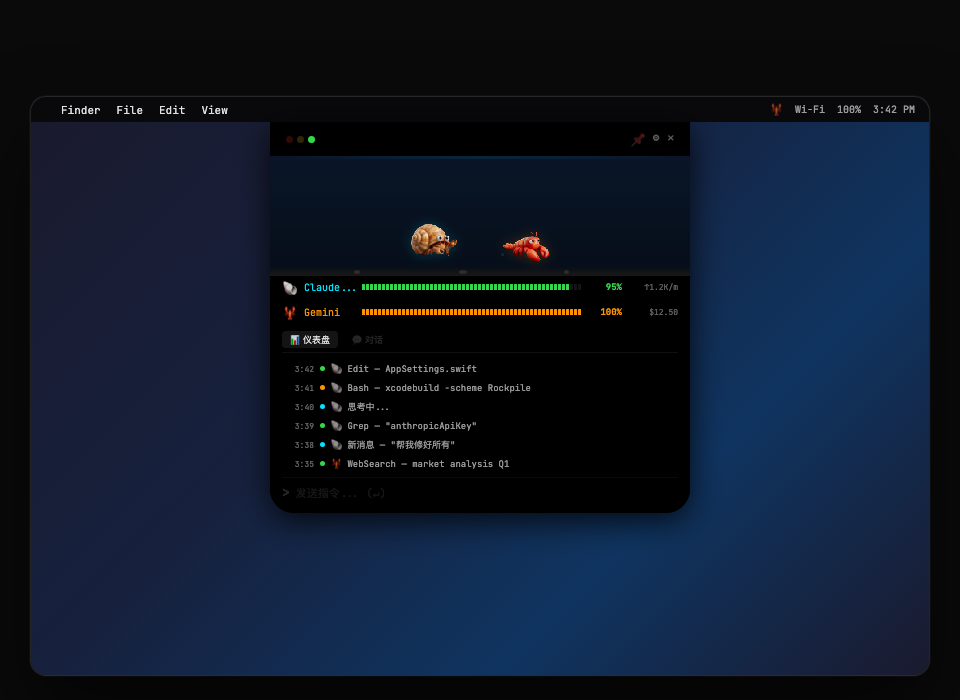
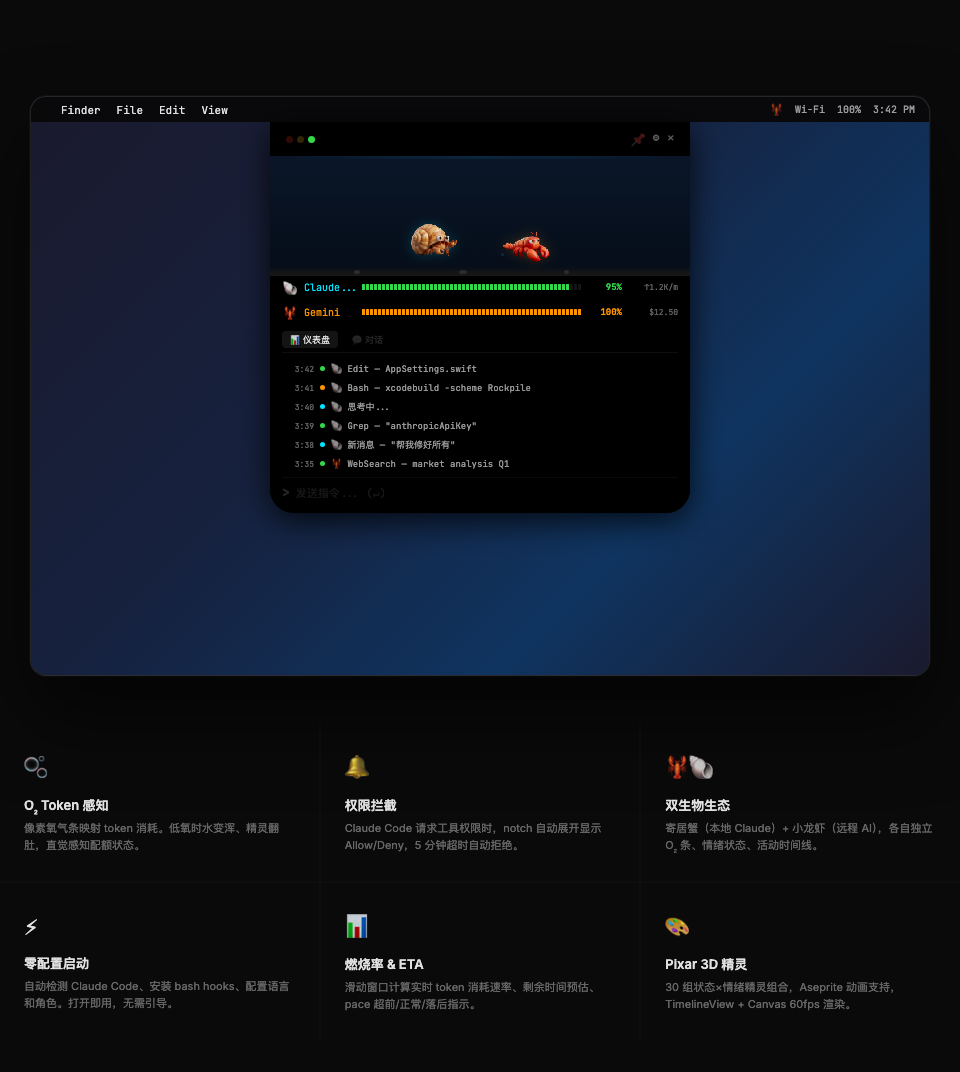
What is Rockpile?
Rockpile is a pixel-art crawfish companion that lives in your MacBook's Notch area. It connects to your AI Agent (Claude Code, etc.) via Socket, mapping the agent's thinking, coding, waiting, and error states into real-time sprite animations, emotions, and underwater environment changes.
- 🧠 Agent thinking — the crawfish ponders deeply
- 🔨 Calling tools — the crawfish works busily
- ⏳ Waiting for input — the crawfish looks around
- 💀 Tokens depleted — water turns murky, crawfish belly-up...
A shrimp in the notch.
Features
🎮 Dual Creature System
Two pixel creatures share the same tank, each tracking a different AI data source:
| Creature | Role | Data Source |
|---|---|---|
| 🦀 Hermit Crab | Local AI | Unix Socket / local files |
| 🦞 Crawfish | Remote AI | TCP / Gateway WebSocket |
🌊 Immersive Underwater Scene
- Pixel-art seabed — sand, swaying seaweed, rising bubbles, light rays
- O₂-linked — the more tokens consumed, the murkier the water and fewer bubbles
- Interaction particles — the two creatures meet and play during idle time, with stars and splashes
📊 O₂ Tank (Token Usage Meter)
A Street Fighter-style pixel health bar that intuitively maps token consumption:
| O₂ % | Color | Water Effect |
|---|---|---|
| 100–60% | 🟢 Green | Clear water, normal bubbles |
| 60–30% | 🟡 Yellow | Darker water, fewer bubbles |
| 30–10% | 🔴 Red blink | Murky water, dim light |
| 0% | 💀 K.O. | Belly-up |
Two modes supported:
- Claude Quota — reads
stats-cache.json, tracks daily subscription quota - Pay-as-you-go — supports Anthropic / xAI / OpenAI API real usage queries
🔌 Three Operating Modes
Mode A: Local         Mode B: Remote Dual-Mac      Mode C: Server
┌──────────┐     ┌──────────┐  ┌──────────┐    ┌──────────┐
│ Agent    │     │ Agent    │  │ Rockpile │    │ Agent    │
│ Rockpile │     │ Rockpile │  │ 🦞 Notch │    │ Rockpile │
│ 🦞 Notch │     │ (no UI)  │  │ (monitor)│    │ (no UI)  │
└──────────┘     └────┬─────┘  └────┬─────┘    └──────────┘
  Unix Socket         TCP:18790     │              Gateway
                      ────────────▶ │              WebSocket
| Mode | Metaphor | Use Case |
|---|---|---|
| Local | Farm shrimp 🏠 | Agent and App on the same Mac |
| Monitor | Fish tank 🐟 | MacBook displays remote Mac Mini's agent status |
| Server | Wild shrimp 🌊 | Mac Mini runs Agent, sends events to monitor |
🎭 7 States × 4 Emotions
| State | Trigger | Emotion Variants |
|---|---|---|
| 💤 Idle | Agent finished task | 😐 😊 😢 😠 |
| 🧠 Thinking | LLM reasoning | 😐 😊 |
| 🔨 Working | Tool calls / code gen | 😐 😊 😢 |
| ⏳ Waiting | Awaiting user input | 😐 😢 |
| ❌ Error | Tool call failed | 😐 😢 |
| 🌀 Compacting | Context compression | 😐 😊 |
| 😴 Sleeping | 5 min inactivity | 😐 😊 |
Emotions are analyzed in real time by Claude Haiku from user message sentiment, with natural 60-second decay.
🤝 Interaction System
| Action | Effect |
|---|---|
| Click | Context-aware reaction (jump + text) |
| Double-click | Heart particles |
| Long press | Info card |
| Right-click | Feed (+O₂) |
The two creatures automatically interact during idle time — bump, chase circles, claw fist-bump, side-by-side sway.
📡 Gateway Bidirectional Communication
- WebSocket connection to remote Agent (
ws://<host>:18789) - Real-time remote sessions, token details, health status
- Reverse commands — send messages to remote Agent directly from the Notch
- Auto-reconnect (exponential backoff 1s → 30s)
- Token authentication (HMAC-SHA256)
🐾 Session Footprints
Sessions are automatically saved after completion, displaying:
- Timestamps (smart format: today
14:32/ yesterdayYesterday 14:32/3/8 14:32) - Token consumption (
1.2K/2.1M) - Tool call summary (
bash·edit·grep +2) - Expandable token breakdown (input / output / cache read / cache write)
🌏 Three Languages
- 🇨🇳 Chinese
- 🇺🇸 English
- 🇯🇵 Japanese
📈 Project Statistics
| Metric | Value |
|---|---|
| Language | Swift 6.0 (100%) |
| Source Files | 63 Swift files |
| Lines of Code | ~12,600+ |
| Sprite Assets | 34 sets (41 images) |
| Modules | Core (6) · Models (9) · Services (19) · Views (22) · Window (5) |
| i18n | 🇨🇳 Chinese · 🇺🇸 English · 🇯🇵 Japanese |
| Min Deployment | macOS 15.0 Sequoia |
Requirements
| Item | Requirement |
|---|---|
| OS | macOS 15.0 (Sequoia) or later |
| Hardware | MacBook with Notch (2021+) |
| Xcode | 16.0+ (for building from source) |
| XcodeGen | brew install xcodegen |
Installation
Option 1: DMG Installer (Recommended)
Download the latest .dmg from Releases and drag to Applications.
Signed + Apple notarized. Double-click to open, no security workaround needed.
Option 2: Build from Source
# Clone the project
git clone https://github.com/ar-gen-tin/rockpile.git
cd rockpile

# Install build tools
brew install xcodegen

# Generate Xcode project & build
xcodegen generate
xcodebuild -project Rockpile.xcodeproj \
  -scheme Rockpile \
  -configuration Release \
  build

# Or open in Xcode directly
open Rockpile.xcodeproj   # Cmd+R to run
Option 3: Signed Release Build
# Build + sign + DMG
bash build-release.sh

# Build + sign + DMG + Apple notarization
bash build-release.sh notarize
Output at dist/Rockpile-v{version}.dmg.
Quick Start
1. First Launch
Open Rockpile — the setup wizard appears automatically:
- Choose language — Chinese / English / Japanese
- Choose mode — Local / Monitor / Server
- Configure O₂ — AI provider, tank capacity, Admin Key (optional)
- Install plugin — Auto-generates Hook plugin to
~/.rockpile/plugins/rockpile/
2. Daily Use
- The crawfish appears beside the Notch — reflecting Agent status in real time
- Hover / click the Notch — expand panel for activity log, O₂ usage, session footprints
- Menu bar icon — quick access to status, pairing code, settings
3. Remote Pairing (Dual-Mac Mode)
MacBook (Monitor)                     Mac Mini (Server)
1. Choose "Monitor" mode              1. Choose "Server" mode
2. Screen shows pairing code: 1HG-E15W  →  2. Enter pairing code
3. 🦞 Starts responding to remote events    3. Plugin auto-installed, restart Agent
Pairing code = Base-36 encoded IP address (e.g. 192.168.1.100 → 1HG-E15W)
Architecture
Claude Code Plugin (JS)
    ↓ Unix Socket / TCP:18790
SocketServer (BSD Socket, DispatchSource)
    ↓ HookEvent JSON
StateMachine (@MainActor, @Observable)
    ↓ State routing
SessionStore → SessionData[] → ClawState / EmotionState / TokenTracker
    ↓ SwiftUI reactive
NotchContentView → PondView (underwater) + ExpandedPanelView (info panel)

Gateway WebSocket (ws://<host>:18789)
    ↓ Bidirectional
GatewayClient → GatewayDashboard (health/status/sessions)
    ↓ Reverse commands
CommandSender → chat.send → Remote Agent
Tech Stack
| Item | Technology |
|---|---|
| Language | Swift 6.0 (strict concurrency) |
| UI | SwiftUI + AppKit |
| State | @Observable + @MainActor |
| Networking | BSD Socket + URLSession WebSocket |
| Animation | TimelineView + Canvas (no Timer leaks) |
| Persistence | UserDefaults + Keychain + atomic file writes |
| Build | XcodeGen + xcodebuild |
| Signing | Developer ID + Hardened Runtime + Notarization |
Project Structure
Rockpile/
├── Core/             # Settings, localization, design system, launch
├── Models/           # State enums, emotions, session data, token tracking
├── Services/         # Socket server, Gateway, emotion analysis, plugin mgmt
├── Views/            # Underwater scene, sprite animation, panels, onboarding
├── Window/           # Notch window, shape, hit testing
├── Assets.xcassets/  # 38 sprite sets (7 states × 2-3 emotions × 2 creatures)
├── AppDelegate.swift # Lifecycle & mode routing
└── RockpileApp.swift # @main entry
Communication Protocols
| Protocol | Port / Path | Purpose |
|---|---|---|
| Unix Socket | /tmp/rockpile.sock |
Local mode event transport |
| TCP | 18790 |
Remote mode event transport |
| HTTP | 18790 /health |
Health check |
| WebSocket | ws://:18789 |
Gateway bidirectional comm |
Roadmap
- v0.1 — Foundation: 3 modes, 7 states, O₂ system, setup wizard
- v1.0 — Rebrand ClawEMO → Rockpile
- v1.1 — Session history (footprints), version update flow
- v1.2 — Footprint system, atomic write persistence
- v1.3 — Gateway WebSocket, reverse commands, remote activity tracking
- v2.0 — Dual creature system, Token API monitoring, trilingual i18n
- v2.5 — Drag-to-feed, kill switch, progression system
- v3.0 — LAN tank visiting, team leaderboard, shared aquarium
Full roadmap at ROADMAP.md.
Documentation
| Doc | Description |
|---|---|
| INSTALL.md | Installation guide (detailed steps for all 3 modes) |
| DEVLOG.md | Development log (architecture, version history, tech details) |
| ROADMAP.md | Product roadmap |
Build & Release
# Development build
xcodegen generate && xcodebuild -project Rockpile.xcodeproj -scheme Rockpile

# Sign + DMG
bash build-release.sh

# Sign + DMG + Apple notarization
bash build-release.sh notarize

# Deploy to local + Mac Mini
bash deploy-to-mini.sh build
Acknowledgments
- Pixel crawfish sprites generated by AI and hand-tuned
- Inspired by Notchi, Star Office UI, and other great macOS Notch companion projects
- Built with XcodeGen for project configuration
- Packaged with create-dmg
License
MIT License — free to use, modify, and distribute.
Sprite art assets are for this project only and are not covered by the MIT License.
🦞 A shrimp in the notch.
Download · Install Guide · Dev Log · Roadmap