

S4
S4 is 100% compatible AWS S3 storage, accessed through Tor and distributed using IPFS.
Tor acts as a DNS and hides the physical location of the S4 server. IPFS acts as a CDN and will make your data permanently accessible and is impossible to take offline once it has been published. A sidecar docker container is provided to seamlessly proxy requests from your existing S3 code over Tor to S4.
Create S4 server
You can set-up your own local S4 server with just 4 commands.
$ git clone [email protected]:anthonybudd/S4.git && cd S4/

$ cp .env.example .env

$ docker run -it --rm -v $(pwd)/data/tor:/web anthonybudd/s4-tor-proxy generate ^s4

$ docker-compose up
Node.js AWS-SDK Example
Once you have created your local S4 server, you can test it using the included example. This demo shows the current Node.js AWS-SDK working with the sidecar docker container to proxy the AWS S3 requests over Tor back to your local S4 server.
$ cd example/

$ nano .env

$ docker-compose up -d

$ docker exec -ti my-app node src/index.js
Architecture
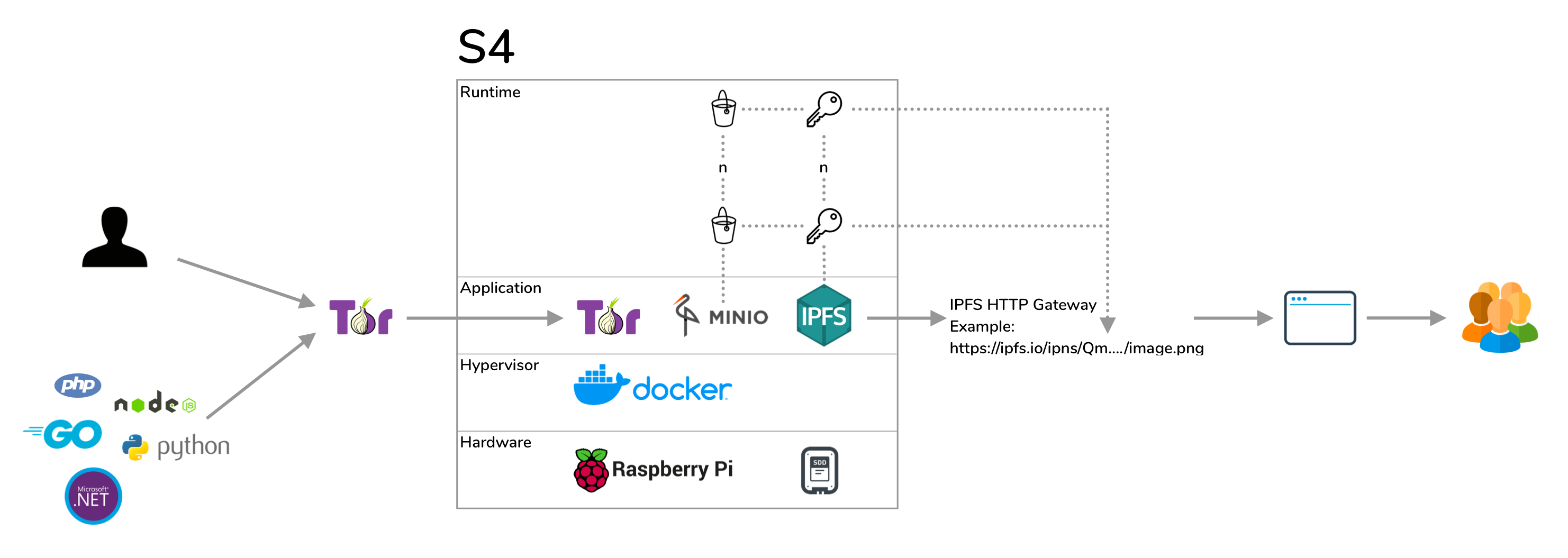
Tor does not just provide anonymity, Tor acts as a DNS. S4 uses Tor hidden services, data is uploaded into an S4 bucket over Tor. This also means you can create a free .onion domain name without needing any 3rd-parties. A sidecar container is provided to seamlessly proxy requests from your existing S3 code over Tor to S4.
IPFS acts as a CDN. Each S4 bucket is published to IPFS under a separate key allowing you to address your files using any existing IPFS HTTP gateway like this https://ipfs.io/ipns/[BUCKET-KEY]/image.jpg. This link will never change or go offline, the more people who request it, the faster the data will be returned to the user.
![https://ipfs.io/ipns/[BUCKET-KEY]/image.jpg](https://ipfs.io/ipns/QmTvcZ719MEiYjhn2RxwtiYGkJr6ea4xnSGqdxj5vRii8k/flag.jpg)
Build a Node
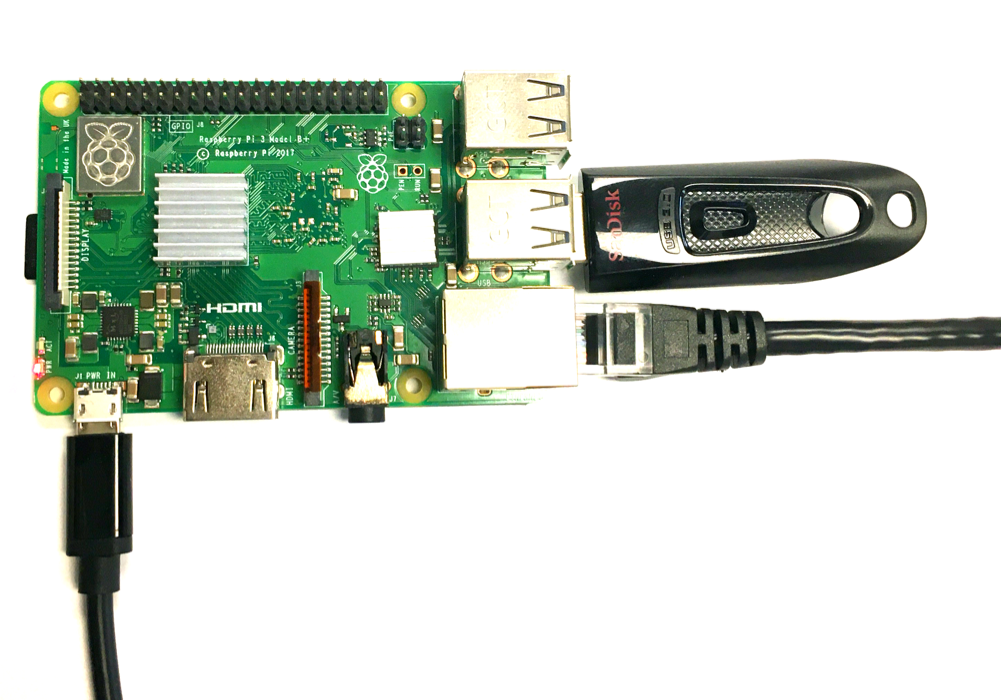
-
Install Ubuntu 20.04
-
$ git clone [email protected]:anthonybudd/S4.git -
$ cd S4 -
$ ./install -
$ sudo mount /dev/XXX /mnt/ssd -
$ sed -i "" "s#S4_ROOT=.*#S4_ROOT=/mnt/ssd#" .env -
$ sed -i "" "s#ACCESS_KEY=.*#ACCESS_KEY=$(openssl rand -hex 10)#" .env -
$ sed -i "" "s#SECRET_KEY=.*#SECRET_KEY=$(openssl rand -hex 20)#" .env -
$ sudo reboot -
$ docker run -it --rm -v /mnt/ssd/tor:/web anthonybudd/s4-tor-proxy:arm64v8 generate ^s4 -
$ docker-compose up