
🚀 N8N with Workers Template
Complete self-hosted n8n stack with Redis queue mode for scalable workflow automation
A production-ready template that combines n8n workflow automation, Redis queue processing, and PostgreSQL database to create a horizontally scalable automation platform. Perfect for teams running heavy workflows that need reliable background processing.




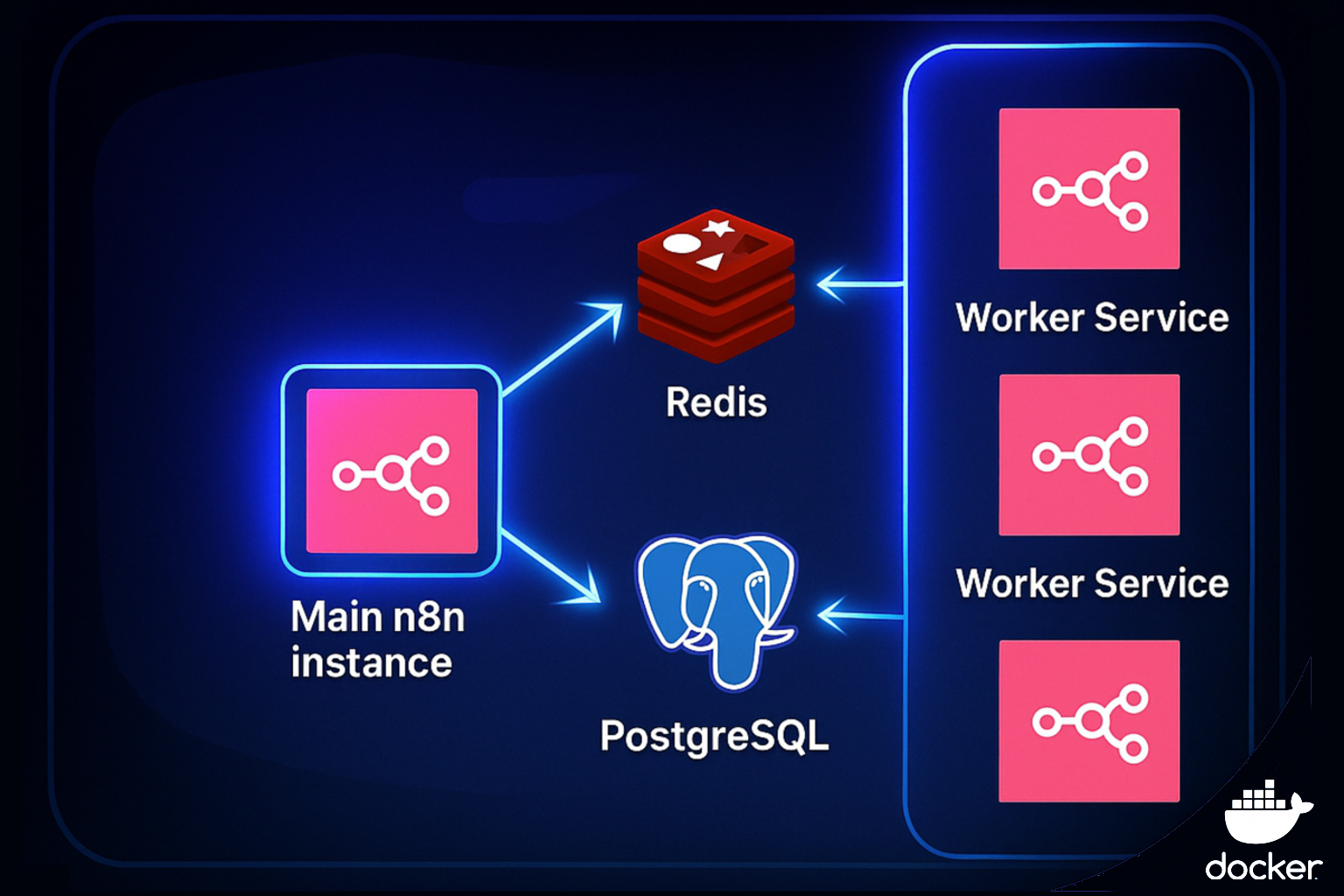
🔥 Why This Stack is Perfect for Heavy Automation
⚡ Scalable Architecture
- Main n8n Instance - Handles UI and API while staying responsive
- Worker Processes - Execute workflows in background, scale horizontally
- Redis Queue - Reliable job distribution and retry handling
- PostgreSQL Database - Enterprise-grade data persistence
🐳 One-Command Deployment
- Docker Compose - Complete stack launches with single command
- Auto-configuration - Database, queue, and workers pre-configured
- Production Ready - Health checks, persistence, and monitoring included
🚀 Quick Start
Deploy the Complete Stack
# Clone the repository
git clone https://github.com/brunosergi/self-hosted-n8n-template.git
cd self-hosted-n8n-template

# Configure environment
cp .env.example .env
# Edit .env with your settings (especially N8N_ENCRYPTION_KEY and POSTGRES_PASSWORD)

# Launch everything
docker compose up -d
Your Automation Platform is Ready!
- 🎛️ n8n Workflow Builder: http://localhost:5678
- 📊 Queue Monitoring: Redis CLI via
docker exec -it redis redis-cli
📋 What You Get
Core Infrastructure
- n8n Main Instance - Web UI, API, and workflow management
- n8n Worker Process - Background workflow execution from queue
- Redis Queue System - Job distribution and retry handling
- PostgreSQL Database - Workflow storage and execution history
Production Features
- Health Checks - All services monitored and auto-restart
- Data Persistence - Workflows and data survive container restarts
- Horizontal Scaling - Add more workers as your automation grows
- Queue Reliability - Failed jobs retry automatically
⚙️ Essential Configuration
Copy .env.example to .env and set these critical values:
# Security (REQUIRED)
N8N_ENCRYPTION_KEY=your-super-secret-encryption-key-here
POSTGRES_PASSWORD=your-super-secret-postgres-password

# Optional
N8N_PORT=5678
GENERIC_TIMEZONE=Europe/Berlin
🔧 Scaling Your Automation
Add More Workers
When workflows start queuing up, just add more workers to docker-compose.yml:
# Add to docker-compose.yml
n8n-worker-2:
  container_name: n8n-worker-2
  image: n8nio/n8n:latest
  user: "1000:1000"
  restart: unless-stopped
  command: worker
  environment:
    - GENERIC_TIMEZONE=${GENERIC_TIMEZONE:-Europe/Berlin}
    - N8N_ENCRYPTION_KEY=${N8N_ENCRYPTION_KEY}
    - N8N_ENFORCE_SETTINGS_FILE_PERMISSIONS=false
    - DB_TYPE=postgresdb
    - DB_POSTGRESDB_HOST=postgres
    - DB_POSTGRESDB_PORT=5432
    - DB_POSTGRESDB_USER=postgres
    - DB_POSTGRESDB_PASSWORD=${POSTGRES_PASSWORD}
    - DB_POSTGRESDB_DATABASE=postgres
    - DB_POSTGRESDB_SCHEMA=n8n_data
    - DATABASE_URL=postgresql://postgres:${POSTGRES_PASSWORD}@postgres:5432/postgres?schema=n8n_data
    - EXECUTIONS_MODE=queue
    - QUEUE_BULL_REDIS_HOST=redis
    - QUEUE_BULL_REDIS_PORT=6379
    - QUEUE_BULL_REDIS_DB=2
    - QUEUE_HEALTH_CHECK_ACTIVE=true
  volumes:
    - n8n-data:/home/node/.n8n
  networks: [app-network]
  depends_on:
    postgres: { condition: service_healthy }
    redis: { condition: service_healthy }
    n8n: { condition: service_healthy }

# For worker 3, 4, etc., just change the container_name
Then restart to apply changes:
docker compose up -d
All workers automatically pull jobs from the same Redis queue!
Monitor Your Queue
# Check queue status
docker exec -it redis redis-cli
> LLEN bull:queue:default

# View service health
docker compose ps
🏗️ How Queue Mode Works
- Main Instance - Receives triggers (webhooks, timers) and creates jobs
- Redis Queue - Stores pending workflow executions
- Workers - Pick up jobs and execute workflows independently
- Database - Stores results and maintains workflow state
This means your UI stays fast even when processing hundreds of workflows!
🐛 Quick Troubleshooting
Worker not processing jobs?
- Check logs:
docker logs n8n-worker - Verify encryption keys match between main and worker
Queue backing up?
- Add more worker instances
- Check for failed workflows blocking the queue
Need to backup data?
docker exec postgres pg_dump -U postgres postgres > backup.sql
🚀 Ready to scale your automation?
The complete n8n stack for serious workflow automation ⚡