
ShadCN Dashboard + Landing Page Template


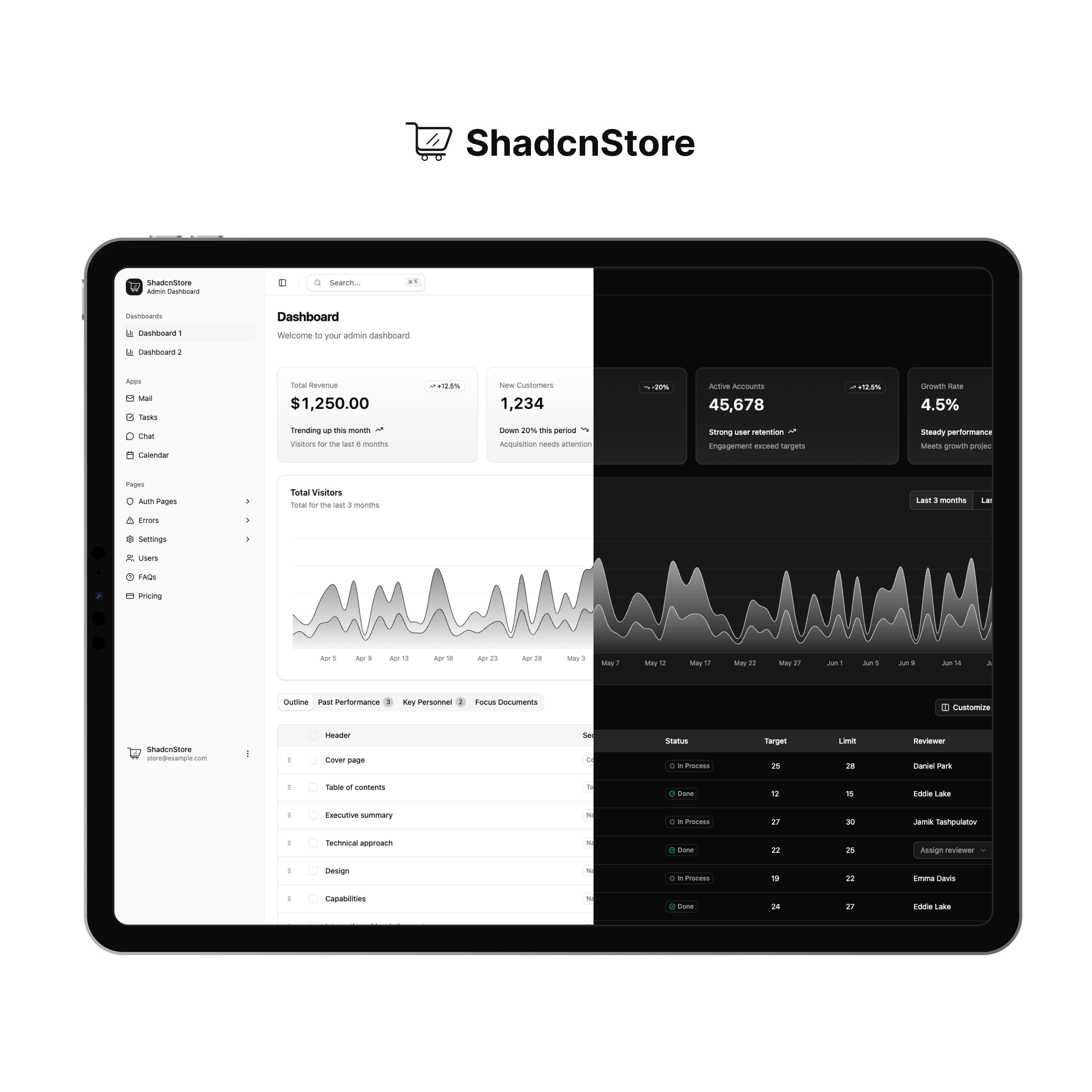
Introducing a sleek, modern, and open-source admin dashboard template built with the latest web technologies, including React + TypeScript + Vite and Next.js + TypeScript. Powered by shadcn/ui v3 and Tailwind CSS v4, this project offers a clean, responsive, and highly customizable UI. Developed and maintained by ShadcnStore, this free and open-source template is designed to accelerate your development process. Whether you're building an admin panel, SaaS dashboard, or launching an AI-driven product, this dashboard provides a beautiful, production-ready interface for your application — complete with a seamless dashboard and a fully-featured landing page to help you hit the ground running.
🚀 Free & Open Source by ShadcnStore - Your gateway to premium UI components and templates.
🌟 Live Demo
Experience the template in action:
- 🖥️ Dashboard Demo - Complete admin dashboard with apps
- 🌐 Landing Page Demo - Beautiful marketing landing page
Note: This template includes both a complete dashboard (with mail, tasks, chat, calendar apps) and a marketing landing page in both Vite and Next.js versions.
✨ What's Included
🎯 Two Complete Templates:
- 🖥️ Admin Dashboard - Modern, feature-rich dashboard with 30+ pages
- 🌐 Landing Page - Business-ready landing page template
⚡ Dual Framework Support:
- Vite - Lightning-fast development experience
- Next.js 15 - Production-ready with App Router
🎨 Live Theme Customization:
- tweakcn integration - Real-time theme editing
- Built-in customizer - Preview all possible combinations live
- Multiple layouts - Sidebar variants & collapsible options
🚀 Key Features
📊 Dashboard Features
- 2 Dashboard Variants - Overview & Analytics dashboards
- App Demos - Mail, Tasks, Chat, Calendar, Users applications
- 30+ Pages - Authentication, Settings, Errors, FAQ, Pricing
- Data Tables - Advanced tables with sorting, filtering, and pagination
- Charts & Analytics - Recharts integration with beautiful visualizations
🎨 Design & Theming
- Live Theme Customizer - Real-time color and layout switching
- tweakcn Integration - Professional theme management
- Multiple Layouts - Sidebar variants, collapsible navigation
- Responsive Design - Mobile-first approach with container queries
- Dark/Light Mode - Seamless theme switching
⚡ Developer Experience
- Modern Tech Stack - React 19, TypeScript, Tailwind CSS v4
- Cross-Platform - Works with both Vite and Next.js
- Type Safety - Full TypeScript support throughout
- Component Library - Latest shadcn/ui v3 with Radix UI
- Easy Customization - Well-structured, modular codebase
🏗️ Project Structure
📁 shadcn-dashboard/
├── 📁 vite-version/              # Vite + React version
│   ├── 📁 src/
│   │   ├── 📁 app/               # Demo pages & applications
│   │   │   ├── 📁 dashboard/     # Dashboard variants
│   │   │   ├── 📁 dashboard-2/   # Alternative dashboard layout
│   │   │   ├── 📁 landing/       # Landing page template
│   │   │   ├── 📁 auth/          # Authentication pages
│   │   │   ├── 📁 mail/          # Email application demo
│   │   │   ├── 📁 tasks/         # Task management demo
│   │   │   ├── 📁 chat/          # Chat application demo
│   │   │   ├── 📁 calendar/      # Calendar demo
│   │   │   ├── 📁 settings/      # User settings pages
│   │   │   ├── 📁 errors/        # Error pages (404, 500, etc.)
│   │   │   ├── 📁 users/         # User management pages
│   │   │   ├── 📁 faqs/          # FAQ pages
│   │   │   └── 📁 pricing/       # Pricing pages
│   │   ├── 📁 components/        # UI components
│   │   │   ├── 📁 ui/            # shadcn/ui v3 components
│   │   │   ├── 📁 layouts/       # Layout components
│   │   │   └── 📁 theme-customizer/ # Live theme editor
│   │   ├── 📁 hooks/             # Custom React hooks
│   │   ├── 📁 lib/               # Utilities & configurations
│   │   └── 📁 types/             # TypeScript type definitions
│   └── 📄 package.json           # Vite dependencies
│
├── 📁 nextjs-version/            # Next.js 15 version
│   ├── 📁 src/
│   │   ├── 📁 app/               # App Router with route groups
│   │   │   ├── 📁 (auth)/        # Authentication route group
│   │   │   │   ├── 📁 login/     # Login pages
│   │   │   │   ├── 📁 signup/    # Registration pages
│   │   │   │   ├── 📁 forgot-password/ # Password recovery
│   │   │   │   └── 📁 errors/    # Error pages (404, 500, etc.)
│   │   │   ├── 📁 (dashboard)/   # Dashboard route group
│   │   │   │   ├── 📁 dashboard/ # Main dashboard
│   │   │   │   ├── 📁 dashboard-2/ # Alternative dashboard
│   │   │   │   ├── 📁 mail/      # Email application
│   │   │   │   ├── 📁 tasks/     # Task management
│   │   │   │   ├── 📁 chat/      # Chat application
│   │   │   │   ├── 📁 calendar/  # Calendar demo
│   │   │   │   ├── 📁 settings/  # User settings
│   │   │   │   ├── 📁 users/     # User management
│   │   │   │   ├── 📁 faqs/      # FAQ pages
│   │   │   │   ├── 📁 pricing/   # Pricing pages
│   │   │   │   └── 📄 layout.tsx # Dashboard layout
│   │   │   ├── 📁 landing/       # Landing page template
│   │   │   ├── 📄 layout.tsx     # Root layout
│   │   │   ├── 📄 loading.tsx    # Global loading component
│   │   │   ├── 📄 not-found.tsx  # 404 page
│   │   │   └── 📄 page.tsx       # Homepage
│   │   ├── 📁 components/        # Same component structure as Vite
│   │   ├── 📁 hooks/             # Custom React hooks
│   │   ├── 📁 lib/               # Utilities & configurations
│   │   └── 📁 types/             # TypeScript type definitions
│   └── 📄 package.json           # Next.js dependencies
│
├── 📄 README.md                  # This file
└── 📄 LICENSE                    # MIT License
� Quick Start
Prerequisites
- Node.js 18+
- pnpm (recommended) or npm
1. Clone the Repository
git clone https://github.com/silicondeck/shadcn-dashboard-landing-template
cd shadcn-dashboard
2. Choose Your Framework
🔥 Vite Version (Recommended for Development)
cd vite-version
pnpm install
pnpm dev
Access at: http://localhost:5173
⚡ Next.js Version (Production-Ready)
cd nextjs-version
pnpm install
pnpm dev
Access at: http://localhost:3000
3. Start Building
- Dashboard: Navigate to /dashboard or /dashboard-2
- Landing Page: Visit /landing for the business template
- Theme Customizer: Use the built-in customizer to preview themes live
- Apps: Explore Mail, Tasks, Chat, Calendar, Users
- Authentication: Check out Signin, Signup, Forgot Password
- Settings: Visit Account, Appearance, Billing
🛠️ Development Commands
Vite Version
pnpm dev          # Start development server
pnpm build        # Build for production
pnpm preview      # Preview production build
pnpm lint         # Run ESLint
Next.js Version
pnpm dev          # Start development server
pnpm build        # Build for production
pnpm start        # Start production server
pnpm lint         # Run Next.js linter
🎨 Theme Customization
Live Theme Customizer
This template includes a powerful live theme customizer powered by tweakcn:
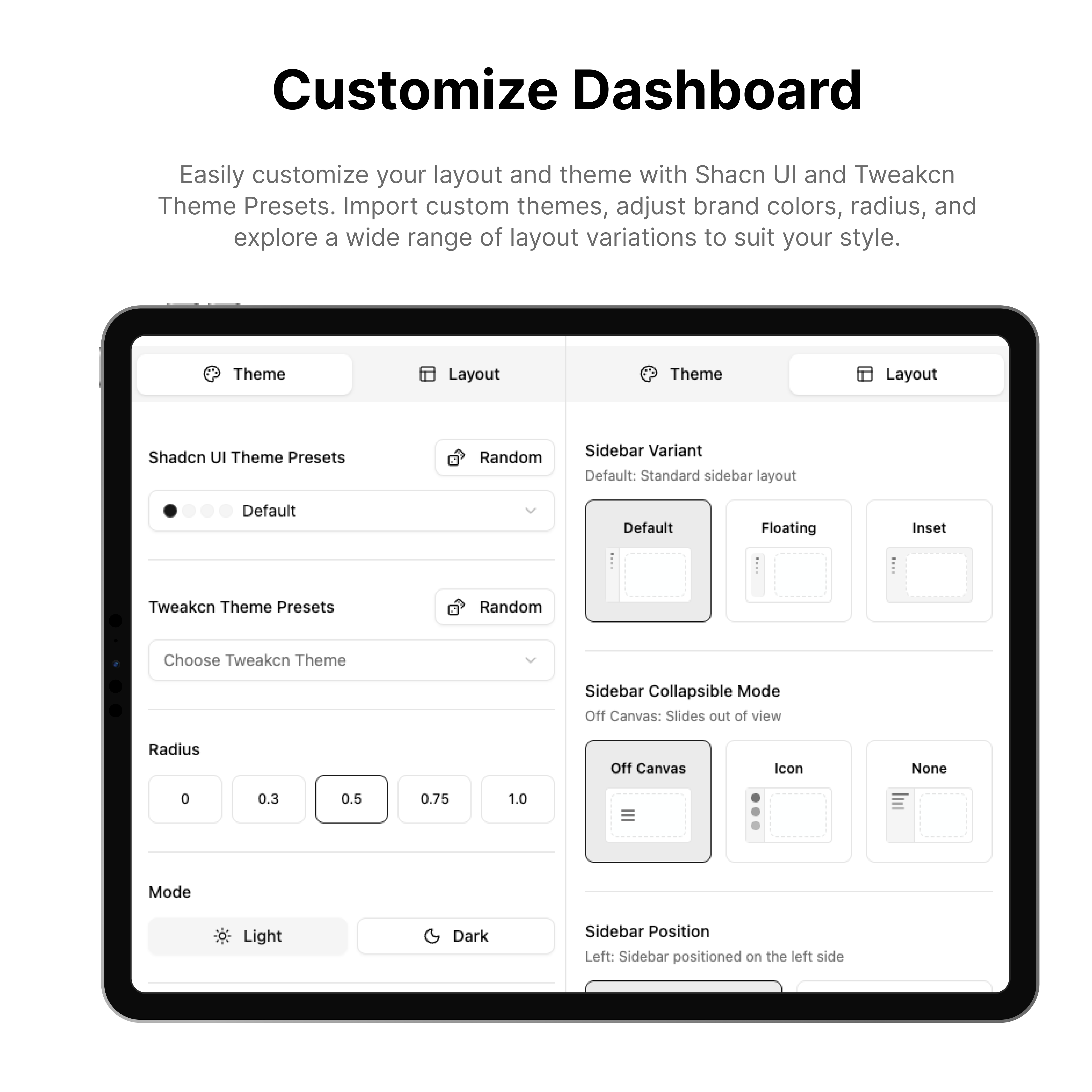
- Open the customizer - Click the theme customizer button
- Choose colors - Pick from preset themes or create custom palettes
- Layout options - Switch between sidebar variants and layouts
- Real-time preview - See changes instantly across all components
- Export themes - Save your custom themes for production use
Built-in Themes
- 🌊 Default - Clean blue theme
- 🌙 Dark - Professional dark theme
- 🌸 Rose - Warm pink accents
- 🌿 Green - Fresh green palette
- 🌅 Orange - Vibrant orange theme
- 🔴 Red - Bold red accents
- 💜 Violet - Modern purple theme
Custom Theme Creation
Adding Custom Themes to the Customizer
To add your own custom themes to the live customizer, create theme objects in your theme configuration:
// src/config/theme-data.ts (or similar file)
export const customTheme = {
  name: "Custom Brand",
  cssVars: {
    light: {
      primary: "210 100% 50%",
      "primary-foreground": "0 0% 98%",
      secondary: "210 100% 95%",
      "secondary-foreground": "210 100% 20%",
      accent: "210 100% 90%",
      "accent-foreground": "210 100% 15%",
      // Add more color variables as needed
    },
    dark: {
      primary: "210 100% 60%",
      "primary-foreground": "210 100% 15%",
      // Dark mode variants
    }
  }
}
Manual CSS Variable Customization
To directly modify theme colors, update your CSS variables in globals.css or index.css:
:root {
  --primary: oklch(0.5 0.2 240);
  --primary-foreground: oklch(0.98 0.02 240);
  --secondary: oklch(0.96 0.01 240);
  --secondary-foreground: oklch(0.2 0.02 240);
  /* Customize other variables */
}

.dark {
  --primary: oklch(0.7 0.2 240);
  --primary-foreground: oklch(0.15 0.02 240);
  /* Dark mode variants */
}
Removing the Theme Customizer
If you want to remove the theme customizer from your project:
Vite Version:
- Remove the theme customizer component:
src/components/theme-customizer.tsx - Remove the theme customizer button from your layout
- Remove theme-related imports from your main layout file
- Delete the
src/components/theme-customizer/folder if it exists
Next.js Version:
- Remove the theme customizer component:
src/components/theme-customizer.tsx - Remove the theme customizer button from
src/app/layout.tsx - Remove theme-related imports from your layout files
- Delete the
src/components/theme-customizer/folder if it exists
📖 Learn More: For comprehensive theming documentation, visit the official shadcn/ui theming guide which covers CSS variables, color formats, and advanced customization techniques.
📦 Tech Stack
Core Framework
- React 19 - Latest React with concurrent features
- TypeScript - Full type safety
- Vite - Ultra-fast development
- Next.js 15 - Production-ready with App Router
UI & Styling
- shadcn/ui v3 - Latest component library
- Radix UI - Accessible primitives
- Tailwind CSS v4 - Utility-first styling
- tweakcn - Advanced theme management
- Lucide React - Beautiful icons
State & Data
- Zustand - Lightweight state management
- React Hook Form - Forms with validation
- Zod - Schema validation
- TanStack Table - Advanced data tables
Development
- ESLint - Code linting
- Prettier - Code formatting
- TypeScript - Static type checking
📋 What's Included
🖥️ Dashboard Pages
- Dashboard - Overview with analytics cards and charts
- Dashboard v2 - Alternative dashboard with different metrics
📱 Application Demos
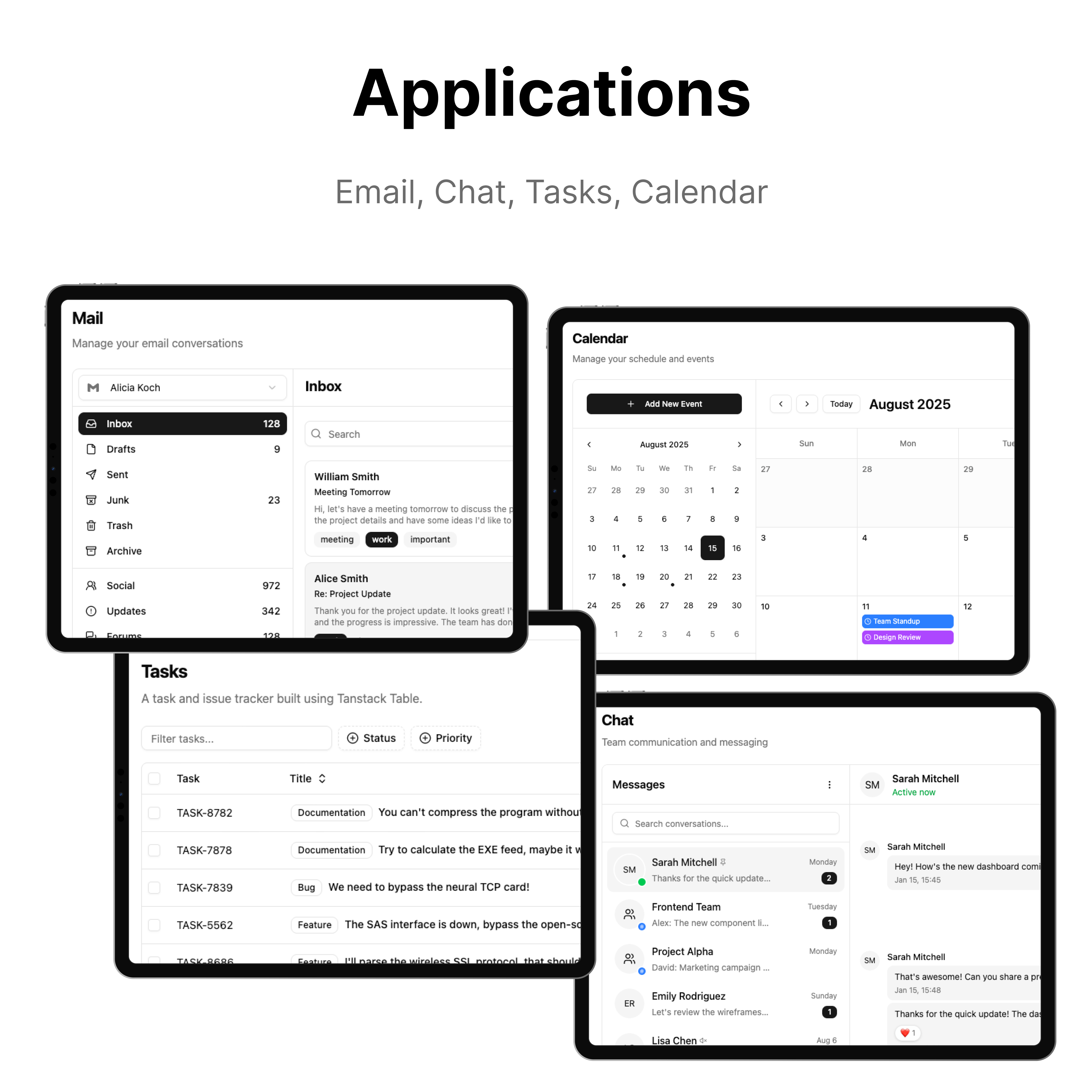
- 📧 Mail - Complete email interface (Inbox, Read, Compose)
- ✅ Tasks - Task management with drag & drop
- 💬 Chat - Real-time chat interface
- 📅 Calendar - Event scheduling and management
- 👥 Users - User management and profiles with advanced tables
🔐 Authentication
- Login - 3 login page variants with different layouts
- Sign Up - 3 registration page variants with different designs
- Forgot Password - 3 password recovery page variants
⚙️ Settings & Profile
- User Settings - Manage your personal information and preferences
- Account Settings - Profile management
- Plans & Billing - Subscription and payment pages
- Appearance - Theme and display preferences
- Notifications - Notification preferences
- Connections - Social media integrations
❌ Error Pages
- 404 - Page not found
- 401 - Unauthorized access
- 403 - Forbidden
- 500 - Internal server error
- Under Maintenance - Maintenance mode page
🌐 Landing Page Template
- Hero Section - Compelling headlines and CTAs
- About Section - Company/product introduction with interactive elements
- Features Section - Product/service highlights with icons
- Stats Section - Key metrics and achievements display
- Logo Carousel - Partner/client logos showcase
- Team Section - Team member profiles and information
- Testimonials Section - Customer reviews and social proof
- Blog Section - Latest blog posts and articles
- Pricing Section - Pricing tables and plans
- FAQ Section - Frequently asked questions with expandable answers
- Contact Section - Contact forms and information
- CTA Section - Call-to-action components
- Navigation & Footer - Complete navigation and footer components
- Theme Customizer - Live theme switching for landing page
📄 Additional Pages
- FAQ - Frequently asked questions
- Pricing - Detailed pricing pages
🌟 Why Choose This Template?
🆓 Completely Free & Open Source
- MIT Licensed - Use for personal and commercial projects
- No restrictions - Modify, distribute, and sell
- Community driven - Contributions welcome
🏢 Business Ready
- Production code - Clean, maintainable, and scalable
- Professional design - Modern UI that looks great
- Complete templates - Dashboard + Landing page included
🎨 Advanced Theming
- Live customization - See changes in real-time
- tweakcn integration - Professional theme management
- Multiple layouts - Sidebar variants and options
⚡ Developer Friendly
- Modern stack - Latest React, TypeScript, Tailwind CSS
- Great DX - Fast development with Vite
- Type safe - Full TypeScript coverage
- Well documented - Clear code and comments
🚀 Take It Further with ShadcnStore
This free template is just the beginning! ShadcnStore offers a complete ecosystem of free & premium UI components, dashboards and templates to accelerate your development:
🎁 Available Now
- Premium Blocks - 150+ production-ready UI blocks
- Application Blocks - Advanced dashboard components
- Marketing Blocks - Landing page sections
- E-commerce Blocks - Online store components
- Free Blocks - No-cost starter components
🔜 Coming Soon
- Premium Templates - Complete application templates
- Landing Page Collection - Business-ready landing pages
- Premium Dashboards - Advanced dashboard solutions
💡 Perfect For
- SaaS Applications - Complete dashboard solutions
- Marketing Sites - Beautiful landing pages
- E-commerce - Online store interfaces
- Internal Tools - Admin panels and dashboards
🎯 Explore ShadcnStore - Premium blocks, dashboards and templates for modern web applications.
🤝 Contributing
We welcome contributions! Here's how you can help:
Ways to Contribute
- 🐛 Report bugs - Found an issue? Let us know!
- 💡 Suggest features - Have ideas for improvements?
- 🔧 Submit PRs - Fix bugs or add new features
- 📖 Improve docs - Help make documentation better
- ⭐ Star the repo - Show your support!
Getting Started
- Fork the repository
- Create a feature branch:
git checkout -b my-feature - Make your changes and test thoroughly
- Commit:
git commit -m "Add new feature" - Push:
git push origin my-feature - Open a Pull Request
Code Style
- Use TypeScript for all new code
- Follow ESLint and Prettier configurations
- Add type definitions for props and data
- Write clear commit messages
- Test your changes in both Vite and Next.js versions
📄 License
This project is licensed under the MIT License - see the LICENSE file for details.
You are free to:
- ✅ Use commercially
- ✅ Modify and distribute
- ✅ Include in private projects
- ✅ Sell products built with this template
Attribution to ShadcnStore is appreciated but not required.
🙏 Credits & Acknowledgments
This template is built on the shoulders of amazing open-source projects:
- shadcn/ui - Beautiful and accessible components
- Radix UI - Low-level accessible primitives
- Tailwind CSS - Utility-first CSS framework
- Lucide Icons - Beautiful & consistent icons
- tweakcn - Advanced theme customization
- Recharts - Composable charting library
- TanStack Table - Powerful data tables
📞 Support & Community
Get Help
- 📖 Documentation - This README covers everything
- 🐛 Issues - Report bugs
- 💬 Discussions - Join conversations
Stay Connected
- 🌐 Website - ShadcnStore.com
- 🐦 Twitter - @shadcnstore
- 💬 Discord - Join our server
- 📧 Email - [email protected]
⭐ Star this repo if it helped you!

A free & open-source template by ShadcnStore - Premium UI components, dashboards and templates for modern web development.