
🛍️ Shofy - Modern eCommerce Platform
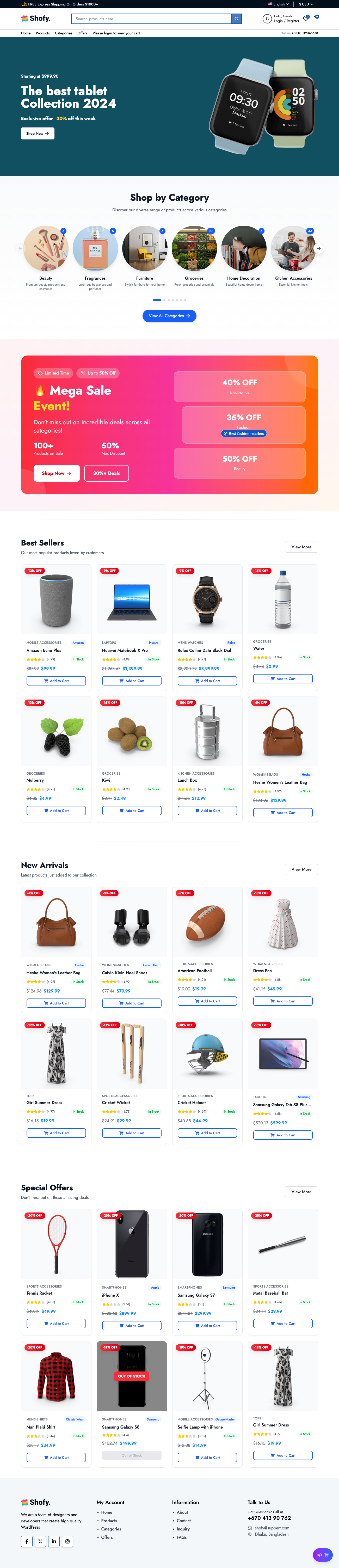
A modern, full-stack eCommerce application built with Next.js 15, TypeScript, Firebase, and NextAuth.js. Featuring a comprehensive admin dashboard, role-based authentication, and a responsive design.





🚀 Quick Start
🌟 View Youtube Video for setup
- Frontend: Youtube setup Link (if available)
Get your eCommerce store running in minutes:
# 1. Clone the repository
git clone https://github.com/noorjsdivs/shofy-commerce-app-yt.git
cd shofy-commerce-app-yt

# 2. Install dependencies
npm install

# 3. Set up environment variables (see setup guide below)
cp .env.example .env.local
# Fill in your credentials

# 4. Start development server
npm run dev

# 5. Open your browser
# Visit: http://localhost:3000
🌟 Live Demo
- Frontend: Live Demo Link (if available)
- Admin Dashboard: Available after completing setup (Premium Feature)
✨ Features
� eCommerce Core
- Product Catalog: Browse products with categories, search, and filtering
- Shopping Cart: Add/remove items, quantity management, persistent cart
- Checkout Process: Secure payment integration with Stripe
- Order Management: Track orders, order history, and status updates
- Wishlist/Favorites: Save products for later purchase
- User Profiles: Manage personal information, addresses, and preferences
🔐 Authentication & Authorization
- Multi-Provider Auth: Google, GitHub, and Email/Password via NextAuth.js
- Role-Based Access Control (RBAC):
- User: Standard shopping experience
- Admin: Full system access and management
- Accountant: Financial data access
- Delivery: Order fulfillment management
- Packer: Warehouse and packing operations
- Session Management: Secure session handling with automatic sync
- Profile Management: Edit profiles, upload avatars, change passwords
� Admin Dashboard
- Analytics & Insights: Revenue tracking, user analytics, sales charts
- User Management: View, edit, delete users with bulk operations
- Order Management: Process orders, update status, bulk operations
- Product Management: Add, edit, delete products and categories
- Role Assignment: Assign and manage user roles
- System Statistics: Real-time dashboard with key metrics
🎨 Design & UX
- Responsive Design: Mobile-first approach, works on all devices
- Modern UI: Clean, professional design with smooth animations
- Dark/Light Mode: Theme switching capabilities
- Multi-Currency: Support for different currencies with conversion
- Multi-Language: Internationalization ready
- Loading States: Skeleton loaders and smooth transitions
- Toast Notifications: Real-time feedback for user actions
🛠️ Technical Features
- Server-Side Rendering (SSR): Fast initial page loads
- Static Site Generation (SSG): Optimized performance for static content
- API Routes: RESTful API endpoints for all operations
- Database: Firebase Firestore for real-time data
- File Storage: Firebase Storage for images and files
- State Management: Redux Toolkit with persistence
- Form Handling: Advanced form validation and error handling
- SEO Optimized: Meta tags, sitemap generation, and structured data
- Performance: Code splitting, lazy loading, and optimization
📱 Pages & Routes
Public Pages
- Home: Featured products, categories, and promotional banners
- Products: Product listing with search, filters, and pagination
- Product Details: Detailed product view with images and specifications
- Categories: Browse products by category
- About: Company information and mission
- Contact: Contact form and company details
- FAQs: Frequently asked questions with search
- Inquiry: Customer inquiry form
User Pages
- Account Dashboard: Personal overview and quick actions
- Profile: Edit personal information and upload avatar
- Orders: Order history and tracking
- Order Details: Detailed order information
- Addresses: Manage shipping and billing addresses
- Settings: Account preferences and notifications
- Cart: Shopping cart management
- Checkout: Secure payment process
- Favorites: Saved products and wishlist
Admin Pages
- Admin Dashboard: System overview and analytics
- User Management: Comprehensive user administration
- Order Management: Order processing and fulfillment
- Analytics: Detailed business insights and reports
Role-Specific Dashboards
- Accountant Dashboard: Financial reports and revenue tracking
- Delivery Dashboard: Order delivery and logistics
- Packer Dashboard: Warehouse and packing operations
- User Dashboard: Standard user experience
🏗️ Tech Stack
Frontend
- Next.js 15.4.6 - React framework with App Router
- TypeScript - Type-safe development
- Tailwind CSS - Utility-first CSS framework
- Framer Motion - Smooth animations and transitions
- React Icons - Comprehensive icon library
- React Hot Toast - Beautiful notifications
Backend & Authentication
- NextAuth.js 5.0 - Complete authentication solution
- Firebase Firestore - NoSQL real-time database
- Firebase Storage - File and image storage
- Firebase Admin - Server-side operations
- bcryptjs - Password hashing
State Management
- Redux Toolkit - Predictable state management
- Redux Persist - State persistence across sessions
- React Redux - React bindings for Redux
Development & Build Tools
- ESLint - Code linting and quality
- TypeScript - Static type checking
- PostCSS - CSS processing
- Next Sitemap - Automatic sitemap generation
- Wrangler - Cloudflare deployment (optional)
📁 Project Structure
shofy-commerce-app-yt/
├── src/
│   ├── app/                           # Next.js 15 App Router
│   │   ├── (public)/                 # Public routes (no authentication required)
│   │   │   ├── about/                # About page
│   │   │   ├── contact/              # Contact page
│   │   │   ├── faqs/                 # FAQ page
│   │   │   └── inquiry/              # Customer inquiry
│   │   ├── (user)/                   # Protected user routes
│   │   │   ├── account/              # User account management
│   │   │   │   ├── admin/            # Admin dashboard (Premium)
│   │   │   │   ├── addresses/        # Address management
│   │   │   │   ├── notifications/    # User notifications
│   │   │   │   ├── orders/           # Order history
│   │   │   │   ├── payment/          # Payment methods
│   │   │   │   ├── profile/          # User profile
│   │   │   │   └── settings/         # Account settings
│   │   │   ├── cart/                 # Shopping cart
│   │   │   ├── categories/           # Product categories
│   │   │   ├── checkout/             # Checkout process
│   │   │   ├── favorite/             # Wishlist/Favorites
│   │   │   ├── offers/               # Special offers
│   │   │   └── products/             # Product pages
│   │   ├── api/                      # API routes
│   │   │   ├── admin/                # Admin API endpoints
│   │   │   └── auth/                 # Authentication API
│   │   ├── auth/                     # Authentication pages
│   │   ├── dashboard/                # Role-based dashboards
│   │   ├── delivery/                 # Public delivery info
│   │   ├── delivery-dashboard/       # Delivery staff dashboard
│   │   ├── packer-dashboard/         # Packer staff dashboard
│   │   ├── unauthorized/             # Unauthorized access page
│   │   ├── user-dashboard/           # User dashboard
│   │   ├── globals.css               # Global styles
│   │   └── layout.tsx                # Root layout
│   ├── components/                   # Reusable React components
│   │   ├── account/                  # Account-related components
│   │   ├── admin/                    # Admin dashboard components
│   │   ├── auth/                     # Authentication components
│   │   ├── cart/                     # Shopping cart components
│   │   ├── dashboard/                # Dashboard components
│   │   ├── header/                   # Header and navigation
│   │   ├── layout/                   # Layout components
│   │   ├── notifications/            # Notification components
│   │   ├── pages/                    # Page-specific components
│   │   ├── products/                 # Product-related components
│   │   ├── ui/                       # UI components (buttons, cards, etc.)
│   │   └── [Various Components]      # Core app components
│   ├── assets/                       # Static assets (images, fonts)
│   ├── contexts/                     # React Context providers
│   ├── hooks/                        # Custom React hooks
│   ├── lib/                          # Utility libraries
│   │   ├── auth/                     # Authentication utilities
│   │   ├── firebase/                 # Firebase configuration
│   │   └── rbac/                     # Role-based access control
│   ├── redux/                        # Redux state management
│   ├── types/                        # TypeScript type definitions
│   └── constants/                    # Application constants
├── public/                           # Static public assets
│   ├── thumbnail.png                 # Project preview image
│   ├── logo.png                      # App logo
│   ├── robots.txt                    # SEO robots file
│   └── [Other Assets]                # Images, icons, etc.
├── middleware.ts                     # Route protection middleware
├── auth.ts                          # NextAuth configuration
├── config.ts                        # App configuration
├── firebase.ts                      # Firebase client config
├── type.ts                          # Global type definitions
├── next.config.mjs                  # Next.js configuration
├── tailwind.config.ts               # Tailwind CSS config
├── tsconfig.json                    # TypeScript configuration
└── package.json                     # Dependencies and scripts
🚀 Complete Setup Guide
Prerequisites
Before you begin, make sure you have:
- Node.js 18+ and npm installed
- Git for cloning the repository
- A Firebase account (free tier available)
- A Google Cloud Console account (for OAuth)
- A GitHub account (for OAuth - optional)
Step-by-Step Installation
1. Clone the Repository
git clone https://github.com/noorjsdivs/shofy-commerce-app-yt.git
cd shofy-commerce-app-yt
2. Install Dependencies
npm install
3. Environment Setup
Create a .env.local file in the root directory:
touch .env.local
Add the following environment variables (see detailed setup below):
# NextAuth Configuration
NEXTAUTH_URL=http://localhost:3000
NEXTAUTH_SECRET=your-secret-key-here

# Google OAuth (Required)
AUTH_GOOGLE_ID=your-google-client-id
AUTH_GOOGLE_SECRET=your-google-client-secret

# GitHub OAuth (Optional)
AUTH_GITHUB_ID=your-github-client-id
AUTH_GITHUB_SECRET=your-github-client-secret

# Firebase Configuration
NEXT_PUBLIC_FIREBASE_API_KEY=your-api-key
NEXT_PUBLIC_FIREBASE_AUTH_DOMAIN=your-project.firebaseapp.com
NEXT_PUBLIC_FIREBASE_PROJECT_ID=your-project-id
NEXT_PUBLIC_FIREBASE_STORAGE_BUCKET=your-project.appspot.com
NEXT_PUBLIC_FIREBASE_MESSAGING_SENDER_ID=your-sender-id
NEXT_PUBLIC_FIREBASE_APP_ID=your-app-id

# Firebase Admin SDK
FIREBASE_PROJECT_ID=your-project-id
FIREBASE_PRIVATE_KEY="-----BEGIN PRIVATE KEY-----\nYour-Private-Key-Here\n-----END PRIVATE KEY-----\n"
FIREBASE_CLIENT_EMAIL=your-service-account@your-project.iam.gserviceaccount.com
4. Start Development Server
npm run dev
5. Open Your Browser
Navigate to http://localhost:3000
🔑 Environment Credentials Setup
🔥 Firebase Setup (Required)
Step 1: Create Firebase Project
- Go to Firebase Console
- Click "Create a project"
- Enter project name (e.g.,
shofy-ecommerce) - Enable Google Analytics (optional)
- Click "Create project"
Step 2: Get Client Configuration
- In Firebase Console, click ⚙️ Project Settings
- Scroll to "Your apps" section
- Click "Add app" → "Web" (</> icon)
- Register app with nickname (e.g.,
Shofy Web) - Copy the config values:
// Firebase Config Object
const firebaseConfig = {
  apiKey: "AIzaSyC...", // → NEXT_PUBLIC_FIREBASE_API_KEY
  authDomain: "project.firebaseapp.com", // → NEXT_PUBLIC_FIREBASE_AUTH_DOMAIN
  projectId: "your-project-id", // → NEXT_PUBLIC_FIREBASE_PROJECT_ID
  storageBucket: "project.appspot.com", // → NEXT_PUBLIC_FIREBASE_STORAGE_BUCKET
  messagingSenderId: "123456789", // → NEXT_PUBLIC_FIREBASE_MESSAGING_SENDER_ID
  appId: "1:123:web:abc123", // → NEXT_PUBLIC_FIREBASE_APP_ID
};
Step 3: Setup Firestore Database
- In Firebase Console, go to "Firestore Database"
- Click "Create database"
- Choose "Start in test mode" (for development)
- Select your preferred location
- Click "Enable"
Step 4: Setup Firebase Storage
- Go to "Storage" in Firebase Console
- Click "Get started"
- Choose "Start in test mode"
- Select the same location as Firestore
- Click "Done"
Step 5: Get Admin SDK Credentials
- Go to Project Settings → "Service accounts" tab
- Click "Generate new private key"
- Download the JSON file
- Extract these values for your
.env.local:project_id→FIREBASE_PROJECT_IDprivate_key→FIREBASE_PRIVATE_KEY(keep \n characters)client_email→FIREBASE_CLIENT_EMAIL
🔐 Google OAuth Setup (Required)
Step 1: Google Cloud Console
- Go to Google Cloud Console
- Create new project or select existing Firebase project
- Enable the project if prompted
Step 2: Configure OAuth Consent Screen
- Go to "APIs & Services" → "OAuth consent screen"
- Choose "External" → Click "Create"
- Fill in required fields:
- App name:
Shofy eCommerce - User support email: your email
- Developer contact: your email
- App name:
- Click "Save and Continue" through all steps
Step 3: Create OAuth Credentials
- Go to "APIs & Services" → "Credentials"
- Click "+ CREATE CREDENTIALS" → "OAuth 2.0 Client IDs"
- Application type: "Web application"
- Name:
Shofy Web Client - Add Authorized redirect URIs:
http://localhost:3000/api/auth/callback/google https://yourdomain.com/api/auth/callback/google - Click "Create"
- Copy the Client ID and Client Secret:
- Client ID →
AUTH_GOOGLE_ID - Client Secret →
AUTH_GOOGLE_SECRET
- Client ID →
🐙 GitHub OAuth Setup (Optional)
Step 1: Create GitHub OAuth App
- Go to GitHub Developer Settings
- Click "New OAuth App"
- Fill in the form:
- Application name:
Shofy eCommerce - Homepage URL:
http://localhost:3000 - Authorization callback URL:
http://localhost:3000/api/auth/callback/github
- Application name:
- Click "Register application"
Step 2: Get Credentials
- Copy Client ID →
AUTH_GITHUB_ID - Click "Generate a new client secret"
- Copy Client Secret →
AUTH_GITHUB_SECRET
🔒 NextAuth Secret Generation
Generate a secure secret for session encryption:
# Using Node.js
node -e "console.log(require('crypto').randomBytes(32).toString('base64'))"

# Or using OpenSSL
openssl rand -base64 32
Copy the generated string to NEXTAUTH_SECRET
✅ Verify Setup
After adding all environment variables:
-
Restart your development server:
npm run dev -
Test authentication:
- Visit
http://localhost:3000 - Click "Sign In"
- Try Google OAuth login
- Check if user data appears in Firebase Console
- Visit
📋 Available Scripts
# Development
npm run dev          # Start development server on http://localhost:3000
npm run build        # Build optimized production bundle
npm run start        # Start production server (after build)
npm run lint         # Run ESLint for code quality
npm run type-check   # Run TypeScript type checking

# Utilities
npm run postbuild    # Generate sitemap after build
npm run deploy:check # Run deployment checks
npm run deploy:cf    # Deploy to Cloudflare Pages (if configured)
Development Workflow
- Start Development:
npm run dev - Check Code Quality:
npm run lint - Type Safety:
npm run type-check - Build for Production:
npm run build - Test Production:
npm run start
� Admin Access Setup
Method 1: Email-Based Admin (Recommended)
Set admin email in your authentication logic:
- Register with your admin email
- Check
AccountLayout.tsx- admin access is granted to:[email protected]- Users with
role: "admin"
Method 2: Role-Based Admin
- Register a new account
- Go to Firebase Console → Firestore Database
- Find your user document in the
userscollection - Add a field:
role: "admin" - Save and refresh your application
Admin Features
- 🎯 Premium Feature: Full admin dashboard is available in the premium version
- 📊 Dashboard: Basic dashboard with upgrade prompt
- 🔗 Upgrade Link: Direct link to purchase premium features
- ⚙️ Settings: Standard account management
Admin URL: http://localhost:3000/account/admin
🌟 Key Features Highlights
Advanced Authentication
- Multiple OAuth providers
- Role-based dashboard routing
- Session synchronization
- Secure middleware protection
Comprehensive Admin Panel
- Real-time analytics
- Bulk operations for users and orders
- Advanced filtering and search
- Export capabilities
Enhanced UX
- Skeleton loading states
- Optimistic UI updates
- Real-time notifications
- Responsive design patterns
Performance Optimizations
- Image optimization with Next.js
- Code splitting and lazy loading
- Static generation where possible
- Efficient state management
🎨 Customization Guide
Branding & Styling
- Colors: Update
tailwind.config.tsfor brand colors - Logo: Replace files in
/public/and/src/assets/ - Fonts: Modify
/src/fonts/directory - Theme: Customize CSS variables in
globals.css
Content Customization
- Homepage: Edit components in
/src/components/pages/home/ - Navigation: Update
/src/components/header/ - Footer: Modify
/src/components/Footer.tsx - Static Pages: Edit files in
/src/app/(public)/
Feature Extensions
- Payment Integration: Add Stripe/PayPal in
/src/lib/ - Email Service: Integrate with SendGrid, Mailgun, etc.
- Analytics: Add Google Analytics, Mixpanel, etc.
- Search: Implement Algolia, Elasticsearch, etc.
API Customization
- Endpoints: Modify
/src/app/api/routes - Database: Extend Firestore collections
- Authentication: Add custom providers in
auth.ts - Middleware: Update
/middleware.tsfor custom logic
� Deployment
Vercel (Recommended)
-
Push to GitHub:
git add . git commit -m "Initial commit" git push origin main -
Deploy to Vercel:
- Go to Vercel Dashboard
- Click "New Project"
- Import your GitHub repository
- Add environment variables
- Deploy
-
Update Environment:
- Set
NEXTAUTH_URLto your Vercel domain - Update OAuth redirect URIs
- Set
Other Platforms
- Netlify: Connect GitHub and deploy
- Railway: One-click deployment
- Digital Ocean: App Platform
- AWS: Amplify Hosting
Environment Variables for Production
Remember to update these in production:
NEXTAUTH_URL=https://your-domain.com
# Update OAuth redirect URIs in Google/GitHub console
# Use production Firebase project
�📄 License
This project is licensed under the MIT License - see the LICENSE file for details.
📞 Support & Help
Getting Help
- 📖 Documentation: This README covers everything you need
- 🐛 Issues: Open a GitHub Issue
- 💬 Discussions: GitHub Discussions
- 📧 Email: [email protected]
Premium Support
- 🎯 Admin Dashboard: Buy Premium Version
- 🛠️ Custom Development: Available for hire
- 📚 Training: One-on-one setup assistance
- 🔧 Maintenance: Ongoing support packages
Community
- ⭐ Star this repo if you find it helpful
- 🍴 Fork & contribute improvements
- 📢 Share with other developers
🙏 Acknowledgments
- Next.js Team - Amazing React framework
- Firebase Team - Reliable backend services
- Tailwind CSS - Beautiful utility-first CSS
- NextAuth.js - Secure authentication
- Vercel - Seamless deployment platform
- Open Source Community - Inspiration and tools
🤝 Contributing
Contributions are welcome! Please feel free to submit a Pull Request.
- Fork the project
- Create your feature branch (
git checkout -b feature/AmazingFeature) - Commit your changes (
git commit -m 'Add some AmazingFeature') - Push to the branch (
git push origin feature/AmazingFeature) - Open a Pull Request
⭐ Star this repository if it helped you!
Built with ❤️ by Noor Mohammad for the developer community
🎨 Modern UI/UX
- Responsive Design (Mobile-first approach)
- Professional Animations with Framer Motion
- Loading Skeletons for better UX
- Toast Notifications for user feedback
- Dynamic Navigation with mobile optimization
- Professional Color Scheme with consistent branding
📱 Mobile Experience
- Mobile Navigation with hamburger menu
- Touch-Friendly interface
- Optimized Performance for mobile devices
- Progressive Web App ready
🚀 Getting Started
Prerequisites
- Node.js 18.0 or later
- npm or pnpm package manager
- Firebase Account (for database and authentication)
- Google Cloud Console account (for Google OAuth)
- GitHub account (for GitHub OAuth)
Installation
-
Clone the repository
git clone https://github.com/noorjsdivs/shofy-commerce-app.git cd shofy-commerce-app -
Install dependencies
npm install # or pnpm install -
Set up environment variables (see Environment Setup below)
-
Run the development server
npm run dev # or pnpm dev -
Open your browser Navigate to http://localhost:3000
🔧 Environment Setup
Create a .env file in the root directory and add the following variables:
# NextAuth Configuration
NEXTAUTH_URL=http://localhost:3000
NEXTAUTH_SECRET=your-secret-key-here

# Google OAuth Configuration
GOOGLE_CLIENT_ID=your-google-client-id
GOOGLE_CLIENT_SECRET=your-google-client-secret

# GitHub OAuth Configuration
GITHUB_ID=your-github-client-id
GITHUB_SECRET=your-github-client-secret

# Firebase Client Configuration
NEXT_PUBLIC_FIREBASE_API_KEY=your-firebase-api-key
NEXT_PUBLIC_FIREBASE_AUTH_DOMAIN=your-project.firebaseapp.com
NEXT_PUBLIC_FIREBASE_PROJECT_ID=your-firebase-project-id
NEXT_PUBLIC_FIREBASE_STORAGE_BUCKET=your-project.appspot.com
NEXT_PUBLIC_FIREBASE_MESSAGING_SENDER_ID=your-sender-id
NEXT_PUBLIC_FIREBASE_APP_ID=your-app-id

# Firebase Admin SDK (for server-side operations)
FIREBASE_PROJECT_ID=your-firebase-project-id
FIREBASE_PRIVATE_KEY="-----BEGIN PRIVATE KEY-----\nYOUR_PRIVATE_KEY_HERE\n-----END PRIVATE KEY-----\n"
FIREBASE_CLIENT_EMAIL=your-service-account@your-project.iam.gserviceaccount.com

# Stripe Configuration (Optional)
NEXT_PUBLIC_STRIPE_PUBLISHABLE_KEY=your-stripe-publishable-key
STRIPE_SECRET_KEY=your-stripe-secret-key
🔑 How to Obtain Environment Credentials
🔥 Firebase Setup
-
Create a Firebase Project
- Go to Firebase Console
- Click "Create a project"
- Enter project name (e.g., "shofy-ecommerce")
- Enable Google Analytics (optional)
-
Get Firebase Client Configuration
- In Firebase Console, click "Add app" → "Web"
- Register your app with a nickname
- Copy the configuration object values:
const firebaseConfig = {
  apiKey: "your-api-key", // → NEXT_PUBLIC_FIREBASE_API_KEY
  authDomain: "your-project.firebaseapp.com", // → NEXT_PUBLIC_FIREBASE_AUTH_DOMAIN
  projectId: "your-project-id", // → NEXT_PUBLIC_FIREBASE_PROJECT_ID
  storageBucket: "your-project.appspot.com", // → NEXT_PUBLIC_FIREBASE_STORAGE_BUCKET
  messagingSenderId: "123456789", // → NEXT_PUBLIC_FIREBASE_MESSAGING_SENDER_ID
  appId: "your-app-id", // → NEXT_PUBLIC_FIREBASE_APP_ID
};
-
Set up Firestore Database
- Go to "Firestore Database" in Firebase Console
- Click "Create database"
- Choose "Start in test mode" (for development)
- Select a location
-
Get Firebase Admin SDK
- Go to Project Settings → Service Accounts
- Click "Generate new private key"
- Download the JSON file
- Extract values:
project_id→FIREBASE_PROJECT_IDprivate_key→FIREBASE_PRIVATE_KEY(keep the newlines as \n)client_email→FIREBASE_CLIENT_EMAIL
🔐 Google OAuth Setup
-
Go to Google Cloud Console
- Visit Google Cloud Console
- Create a new project or select existing one
-
Enable Google+ API
- Go to "APIs & Services" → "Library"
- Search for "Google+ API" and enable it
-
Create OAuth 2.0 Credentials
- Go to "APIs & Services" → "Credentials"
- Click "Create Credentials" → "OAuth 2.0 Client IDs"
- Choose "Web application"
- Add authorized redirect URIs:
http://localhost:3000/api/auth/callback/google(development)https://yourdomain.com/api/auth/callback/google(production)
- Copy the Client ID and Client Secret
🐙 GitHub OAuth Setup
-
Go to GitHub Developer Settings
- Visit GitHub Developer Settings
- Click "New OAuth App"
-
Configure OAuth App
- Application name: Shofy E-Commerce
- Homepage URL:
http://localhost:3000(development) - Authorization callback URL:
http://localhost:3000/api/auth/callback/github - Click "Register application"
-
Get Credentials
- Copy the Client ID →
GITHUB_ID - Generate a new client secret →
GITHUB_SECRET
- Copy the Client ID →
🔒 NextAuth Secret
Generate a secure secret for NextAuth:
# Using openssl
openssl rand -base64 32

# Using Node.js
node -e "console.log(require('crypto').randomBytes(32).toString('base64'))"
Copy the generated string to NEXTAUTH_SECRET
💳 Stripe Setup (Optional)
-
Create Stripe Account
- Go to Stripe Dashboard
- Create an account or log in
-
Get API Keys
- Go to "Developers" → "API keys"
- Copy "Publishable key" →
NEXT_PUBLIC_STRIPE_PUBLISHABLE_KEY - Copy "Secret key" →
STRIPE_SECRET_KEY
📁 Project Structure
shofy-commerce-app/
├── src/
│   ├── app/                    # Next.js 13+ App Router
│   │   ├── auth/              # Authentication pages
│   │   │   ├── signin/        # Sign in page
│   │   │   └── register/      # Registration page
│   │   ├── api/               # API routes
│   │   │   └── auth/          # Authentication API
│   │   ├── cart/              # Shopping cart page
│   │   ├── offers/            # Special offers page
│   │   ├── products/          # Product pages
│   │   └── profile/           # User profile page
│   ├── components/            # Reusable components
│   │   ├── auth/              # Authentication components
│   │   ├── cart/              # Cart components
│   │   ├── header/            # Header components
│   │   ├── pages/             # Page-specific components
│   │   └── ui/                # UI components
│   ├── lib/                   # Utility libraries
│   │   ├── auth/              # Authentication configuration
│   │   └── firebase/          # Firebase configuration
│   ├── redux/                 # State management
│   ├── constants/             # Application constants
│   └── assets/                # Static assets
├── public/                    # Public assets
├── .env                       # Environment variables
└── package.json               # Dependencies and scripts
🛠️ Technologies Used
Frontend
- Next.js 15.4.6 - React framework with App Router
- TypeScript - Type-safe JavaScript
- Tailwind CSS - Utility-first CSS framework
- Framer Motion - Animation library
- React Icons - Icon library
- React Hot Toast - Toast notifications
Authentication
- NextAuth.js - Authentication framework
- Firebase Auth - Authentication provider
- bcryptjs - Password hashing
Database
- Firebase Firestore - NoSQL document database
- Firebase Storage - File storage
State Management
- Redux Toolkit - Predictable state container
- React Redux - React bindings for Redux
Development Tools
- ESLint - Code linting
- Prettier - Code formatting
- TypeScript - Static type checking
🎯 Key Features Explained
🔐 Authentication Flow
- Registration: Users create accounts with email/password or OAuth
- Verification: Email verification (optional)
- Login: Secure login with session management
- Protected Routes: Middleware protects authenticated pages
- User Profile: Complete profile management
🛒 Shopping Experience
- Product Browsing: Advanced filtering and sorting
- Search: Real-time product search
- Cart Management: Add/remove items with quantity control
- Wishlist: Save favorite products
- Checkout: Secure payment processing (Stripe integration)
📱 Responsive Design
- Mobile-First: Optimized for mobile devices
- Tablet Support: Proper layout for tablets
- Desktop: Full-featured desktop experience
- Cross-Browser: Compatible with all modern browsers
🚀 Deployment
Vercel Deployment (Recommended)
-
Push to GitHub
git add . git commit -m "Initial commit" git push origin main -
Deploy to Vercel
- Go to Vercel Dashboard
- Click "New Project"
- Import your GitHub repository
- Add environment variables
- Deploy
-
Update Environment Variables
- Update
NEXTAUTH_URLto your Vercel domain - Update OAuth redirect URIs to match your domain
- Update
Other Deployment Options
- Netlify
- Railway
- Digital Ocean
- AWS
🔧 Scripts
# Development
npm run dev          # Start development server
npm run build        # Build for production
npm run start        # Start production server
npm run lint         # Run ESLint
npm run type-check   # Run TypeScript check
🤝 Contributing
- Fork the repository
- Create a feature branch
git checkout -b feature/amazing-feature - Commit your changes
git commit -m "Add amazing feature" - Push to the branch
git push origin feature/amazing-feature - Open a Pull Request
📝 License
This project is licensed under the MIT License - see the LICENSE file for details.
🙏 Acknowledgments
- Next.js Team for the amazing framework
- Firebase Team for the backend services
- Tailwind CSS for the utility-first CSS framework
- DummyJSON for the product API
- React Community for the excellent ecosystem
📞 Support
If you have any questions or need help, please:
- Check the documentation above
- Open an issue on GitHub
- Join our Discord (coming soon)
- Contact the maintainer: [email protected]
🎉 Features Roadmap
- Email Verification
- Password Reset
- Admin Dashboard
- Order Management
- Inventory Management
- Product Reviews
- Advanced Analytics
- Multi-language Support
- Dark Mode
- PWA Features
Made with ❤️ by Noor Mohammad
⭐ Star this repository if you find it helpful!