
skill-check


skill-check validates agent skills with clear diagnostics, auto-fix support, quality scoring, and optional security scanning.
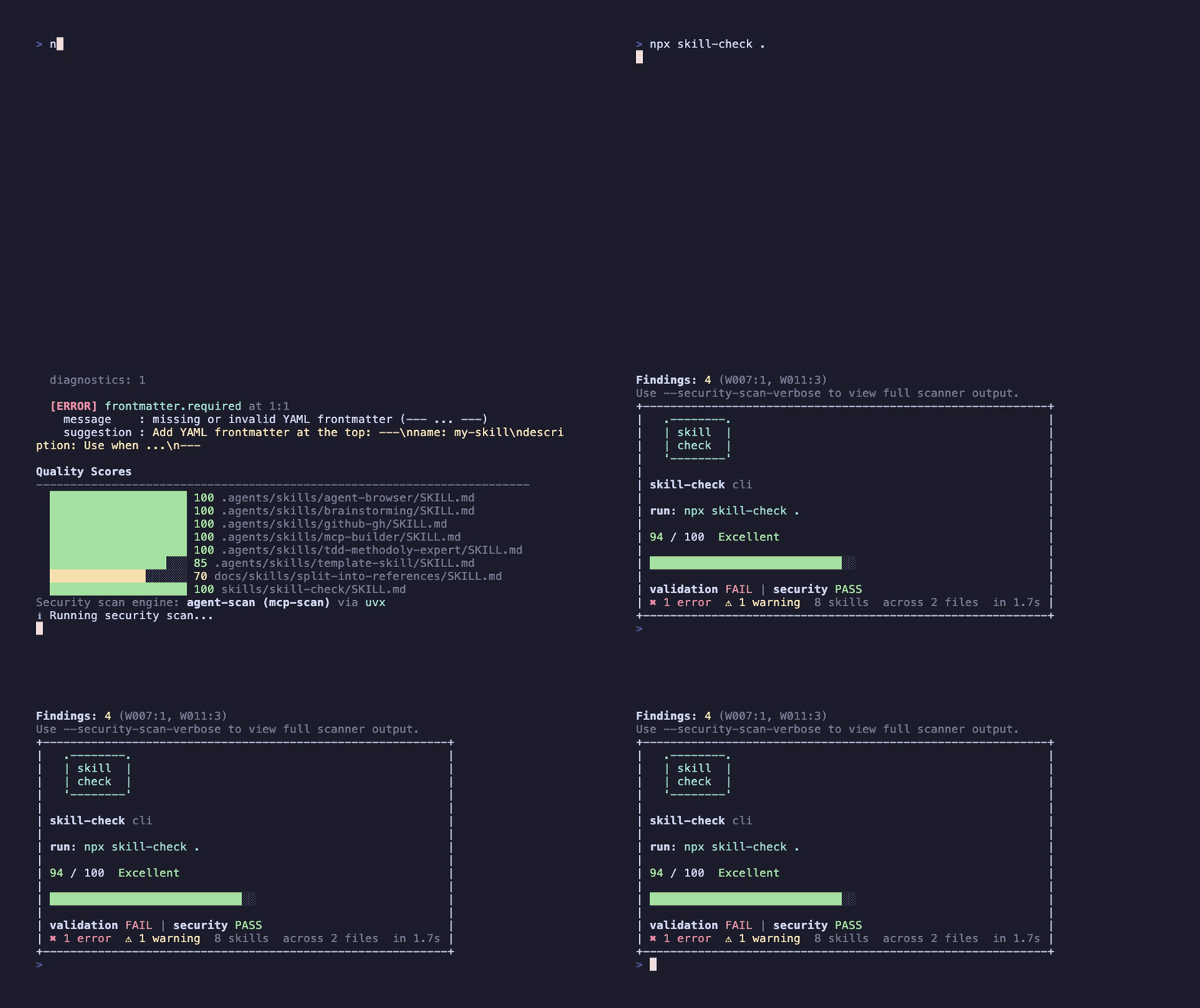
Quick Start
npx skill-check .
Features
- Validates
SKILL.mdstructure, frontmatter, description quality, body limits, and local references. - Scores skills from 0-100 so teams can track quality improvements over time.
- Supports deterministic
--fixfor safe formatting and metadata corrections. - Runs an integrated security scan (
agent-scan) in the same CLI pipeline. - Accepts local paths and GitHub URLs (
https://github.com/<owner>/<repo>). - Exports text, JSON, SARIF, HTML, and GitHub annotation formats.
Install Options
Global install via curl:
curl -fsSL https://raw.githubusercontent.com/thedaviddias/skill-check/main/scripts/install.sh | bash
Install via Homebrew:
brew tap thedaviddias/skill-check https://github.com/thedaviddias/skill-check
brew install skill-check
Commands
| Command | Description |
|---|---|
skill-check [path|github-url] |
Shorthand for skill-check check [path|github-url] |
skill-check check [path|github-url] |
Run validation (and optional security scan) |
skill-check split-body [path] |
Preview/apply section-based body split into references/*.md |
skill-check new <name> |
Scaffold a new skill directory with SKILL.md template |
skill-check watch [path] |
Watch local paths for changes and re-run validation on save |
skill-check diff <a> <b> |
Compare diagnostics between two skill directories |
skill-check report [path|github-url] |
Generate a markdown health report |
skill-check rules [id] |
List all rules, or show detail for a specific rule |
skill-check security-scan [path|github-url] |
Run security scan via agent-scan (mcp-scan) |
skill-check init |
Create skill-check.config.json template |
check options
| Flag | Description |
|---|---|
--fix |
Apply safe automatic fixes for supported findings |
--fix --interactive |
Prompt before applying each fix (TTY only) |
--baseline <path> |
Compare against a previous JSON run and show new/fixed counts |
--format <fmt> |
Output format (see below) |
--share |
Render a share card (text format only) |
--share-out <path> |
Save a share image file (default: ./skill-check-share.png) |
--no-open |
Skip auto-opening HTML reports |
--no-security-scan |
Skip the security scan |
--security-scan-verbose |
Show full raw agent-scan output (default is compact summary) |
--strict |
Treat warnings as errors |
--lenient |
Relax selected strict rules |
--fail-on-warning |
Exit non-zero when warnings exist |
Output Formats
| Format | Description |
|---|---|
text |
Colorized terminal output with ASCII tables, severity badges, and quality scores (default) |
json |
Machine-readable output including quality scores and optional baseline diff |
sarif |
SARIF format for security tooling and GitHub Code Scanning |
html |
Self-contained HTML report with scores, filtering, and dark mode |
github |
::error / ::warning annotations for GitHub Actions |
HTML reports are written to skill-check-report.html (or output.reportPath). In an interactive terminal the report opens in your browser automatically; use --no-open to skip.
View locally: npx skill-check . --format html or open the file directly: open skill-check-report.html (macOS).
The text formatter includes quality score bars per skill, colorized severity badges, and a share-friendly shield card with the exact runnable npx skill-check ... command (including GitHub URL targets when used).
An ASCII CLI banner is shown in interactive text mode; set SKILL_CHECK_NO_BANNER=1 to disable it.
Quality Scores
Every check run computes a quality score (0-100) per skill based on five weighted categories:
| Category | Weight | What it measures |
|---|---|---|
| Frontmatter | 30% | Required fields, naming, ordering |
| Description | 30% | Length, "Use when" phrasing |
| Body | 20% | Line/token limits |
| Links | 10% | Broken local and reference links |
| File | 10% | Trailing newlines, formatting |
Scores appear in text, html, and json output.
Duplicate Detection
When multiple skills share the same name or identical description, check emits duplicates.name / duplicates.description warnings so agents can reliably differentiate skills.
Baseline Comparison
Save a JSON run as a baseline and compare later:
npx skill-check check . --format json --no-security-scan > baseline.json
# ... make changes ...
npx skill-check check . --baseline baseline.json --no-security-scan
Output shows how many diagnostics are new, fixed, or unchanged.
Development Quick Start
pnpm install
pnpm run check
pnpm run report
Generate real CLI outputs from multi-skill fixtures:
pnpm run smoke:cli
Smoke output files are written to reports/smoke/.
Smoke includes a real security scan run by default.
Smoke also includes a real --fix run on a temp copy of the failing mixed fixture.
You can control smoke output colors with SMOKE_COLOR=always|auto|never.
You can set SMOKE_SECURITY_SCAN=0 to skip security smoke and SMOKE_SECURITY_SCAN_RUNNER=auto|local|uvx|pipx to choose the runner (default: pipx).
Use SMOKE_SECURITY_SCAN_SKILLS=/path/to/skills to override the skills path scanned in smoke mode.
Create config with guided setup:
npx skill-check init --interactive
Security Scan
skill-check can validate repos or direct skills directories:
npx skill-check /path/to/repo
npx skill-check check ~/.claude/skills
check runs the security scan by default.
If dependencies are missing, skill-check automatically installs scanner dependencies by default.
Use --no-installs to hard-block automatic installs.
By default, skill-check prints a compact security summary; use --security-scan-verbose for full scanner details.
Run security scan without UV by forcing pipx:
npx skill-check security-scan . --security-scan-runner pipx
Run validation + security scan in one pipeline step with explicit runner:
npx skill-check check . --security-scan-runner pipx
Skip security scan for local/offline linting:
npx skill-check check . --no-security-scan
Apply safe auto-fixes and then re-run validation:
npx skill-check check . --fix --no-security-scan
Interactively choose which fixes to apply:
npx skill-check check . --fix --interactive --no-security-scan
Scaffold a new skill:
npx skill-check new my-skill
Watch for changes during development:
npx skill-check watch . --no-security-scan
Compare two skill directories:
npx skill-check diff skills/ other-skills/
Use GitHub annotations in CI:
npx skill-check check . --format github --no-security-scan
Generate a screenshot-friendly share card:
npx skill-check https://github.com/thedaviddias/skill-check --share --no-security-scan
By default this also writes skill-check-share.png in your current directory.
Set a custom output path with --share-out path/to/card.png.
Hard-block dependency installs:
npx skill-check check . --no-installs
Remote GitHub URLs
skill-check supports scanning GitHub repos directly without a manual clone:
npx skill-check https://github.com/thedaviddias/skill-check --no-security-scan
npx skill-check https://github.com/thedaviddias/skill-check/tree/main/skills --no-security-scan
Remote URL scanning behavior:
- Creates an ephemeral shallow clone (
git clone --depth 1) in a temp directory. - Cleans up the checkout automatically after the command finishes.
- Shows remote preparation progress on stderr (spinner in TTY,
[remote]status lines in non-TTY/CI). - Keeps security scan enabled by default (same as local path behavior).
- Does not support
--fixfor URL targets (read-only workflow). watchanddiffare local-path only in this version.
Auto-fix Coverage
--fix currently handles deterministic formatting/metadata issues:
frontmatter.requiredfrontmatter.name_requiredfrontmatter.description_requiredfrontmatter.name_matches_directoryfrontmatter.name_slug_formatfrontmatter.field_orderdescription.use_when_phrasedescription.min_recommended_lengthfile.trailing_newline_single
Rules requiring human intent (content quality, max-length trimming, broken links, or oversized bodies) remain manual and are reported after fixes are applied.
Use --fix --interactive for per-diagnostic approval prompts (requires TTY).
Split Oversized Skill Bodies
When body.max_lines fails, use split-body to extract ## sections into references/*.md.
Preview first (no writes):
npx skill-check split-body <skill-dir-or-file>
Apply changes:
npx skill-check split-body <skill-dir-or-file> --write
Notes:
- Split is deterministic and section-based (
##headings). - If a long body has no
##headings, the command reports a blocked plan and explains what to add. split-bodyis local-path only (no GitHub URL mutation flow in v1).- After writing, run
npx skill-check check <skill-dir-or-file> --no-security-scan. - For editorial cleanup, use
docs/skills/split-into-references/SKILL.mdor the published copy.
GitHub Action
Use skill-check directly in workflows:
Marketplace status: not listed in GitHub Marketplace yet.
Supported usage today is direct repo tags (uses: thedaviddias/skill-check@v1 or @v1.x.y).
See docs/github-action-publishing.md for the publication playbook.
name: skill-check

on:
  pull_request:
  push:
    branches: [main]

jobs:
  validate:
    runs-on: ubuntu-latest
    steps:
      - uses: actions/checkout@v4
      - uses: thedaviddias/skill-check@v1
        with:
          path: .
Use --format github for inline annotations on PRs:
- run: npx skill-check check . --format github --no-security-scan
Enable security scan explicitly (default is disabled in the action):
name: skill-check-security

on:
  pull_request:

jobs:
  validate:
    runs-on: ubuntu-latest
    steps:
      - uses: actions/checkout@v4
      - uses: thedaviddias/skill-check@v1
        with:
          path: .
          security-scan: "true"
          security-scan-install-policy: allow
          security-scan-runner: pipx
Emit SARIF and upload to GitHub Code Scanning:
name: skill-check-sarif

on:
  pull_request:
  push:
    branches: [main]

permissions:
  contents: read
  security-events: write

jobs:
  validate:
    runs-on: ubuntu-latest
    steps:
      - uses: actions/checkout@v4
      - id: skillcheck
        uses: thedaviddias/skill-check@v1
        with:
          path: .
          format: sarif
          sarif-file: reports/skill-check.sarif.json
      - uses: github/codeql-action/upload-sarif@v3
        with:
          sarif_file: ${{ steps.skillcheck.outputs.sarif-file }}
The action outputs:
exit-code: CLI exit codesarif-file: absolute path to SARIF file whenformat=sarifcommand: full command used for execution
format=sarif cannot be combined with security-scan=true in the action because security scan output is not SARIF.
Action Release Checklist
- Ensure
maincontains the desiredaction.ymlandgithub-action/index.js. - Create and push an immutable version tag (example:
v1.2.0). - Move the major tag to the latest stable release (
v1->v1.2.0commit). - Verify a workflow using
uses: thedaviddias/skill-check@v1resolves the updated action.
Rules Reference
Run skill-check rules to see all built-in rules with severity and fixable status.
Run skill-check rules <id> for detail on a specific rule.
| Rule | Default | Fixable |
|---|---|---|
frontmatter.required |
error | yes |
frontmatter.name_required |
error | yes |
frontmatter.description_required |
error | yes |
frontmatter.name_matches_directory |
error | yes |
frontmatter.name_slug_format |
error | yes |
frontmatter.name_max_length |
error | no |
frontmatter.field_order |
error | yes |
frontmatter.unknown_fields |
warn | no |
frontmatter.compatibility_max_length |
warn | no |
frontmatter.metadata_string_values |
warn | no |
frontmatter.allowed_tools_format |
warn | no |
description.non_empty |
error | no |
description.max_length |
error | no |
description.use_when_phrase |
warn | yes |
description.min_recommended_length |
warn | yes |
body.max_lines |
error | no |
body.max_tokens |
warn | no |
file.trailing_newline_single |
warn | yes |
links.local_markdown_resolves |
warn | no |
links.references_resolve |
warn | no |
duplicates.name |
warn | no |
duplicates.description |
warn | no |
All rules emit actionable suggestion text to guide fixes.
Releasing
Releases are automated with semantic-release. Pushing to main (after CI passes) runs the release workflow: commits are analyzed for Conventional Commits (fix:, feat:, BREAKING CHANGE:), the version is bumped, CHANGELOG.md is updated, the package is published to npm, and a GitHub release is created.
- Commit messages are validated locally by commitlint (enforced by the
commit-msghook). Usefix:,feat:,docs:,chore:, etc. - npm auth: Use npm Trusted Publishing (OIDC) so you don’t need
NPM_TOKEN. On npmjs.com go to the skill-check package → Settings → Trusted publishing → add a GitHub Actions publisher with workflow filenamepublish.yml(exact name, including extension). Then the workflow can publish without any npm token. Alternatively, set theNPM_TOKENrepository secret for token-based publish.
To simulate a release locally (without publishing): pnpm run release:dry-run. It will fail verifyConditions without NPM_TOKEN and GITHUB_TOKEN; in CI both are set.
Docs
docs/quickstart.mddocs/github-action-publishing.mddocs/config.mddocs/rules.mddocs/plugins.mddocs/migration-from-agent-forge.md
Contributing
Contributions are welcome. Please read CONTRIBUTING.md before opening a pull request.
Contributors
Thanks goes to these people (emoji key):
 David Dias 💻 📖 🚧 |
This project follows the all-contributors specification.
License
MIT - see LICENSE.