
SkyChat
简体中文
English
模型简介
SkyChat是一款基于中文GPT-3 API研发的聊天机器人项目,它除了基本的聊天、对话、你问我答外,还能支持中英文互译、内容续写、对对联、写古诗、生成菜谱、第三人称转述、创建采访问题等多种功能。

更多细节可见奇点智源官网文档
下面是一些示例:
效果示例
体验、试用,请访问奇点智源API试用
聊天

问答

生成菜谱
输入:

输出:

对对联

——————————————————————————————
Demo使用教程:
模型服务以及Python环境搭建
Windows
- 下载Anaconda 勾选添加到环境变量选项
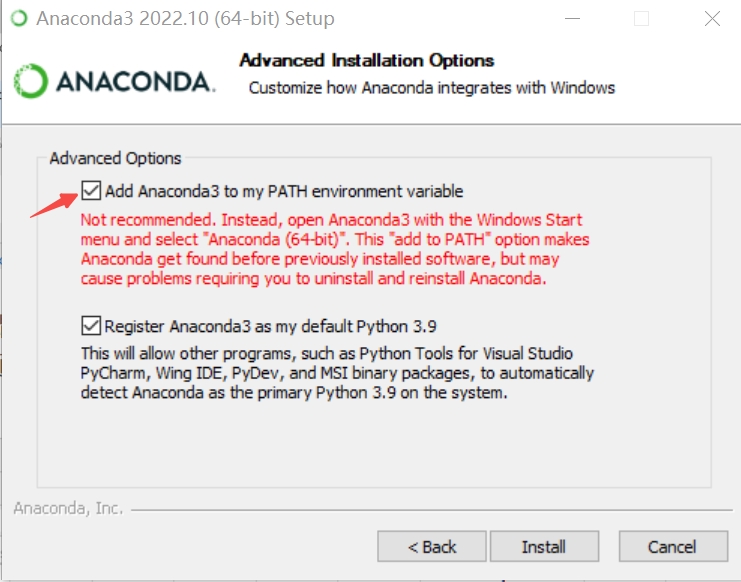
- 下载并解压semantic_score_clean和user_profile_clean服务、模型以及示例训练数据
- 打开Anaconda 输入
conda create -n semantic创建新环境
conda info --envs查看环境
activate semantic启动环境
cd C:\你的路径\semantic_score_clean\semantic_score_cleancd到解压好的semantic_score_clean文件夹
python -m pip uninstall numpy删掉初始自带的numpy
python -m pip install -r requirements.txt或者pip install -r requirements.txt安装所需依赖包
python semantic_score_api.py运行服务 - 下载对应系统的Cuda并安装
- 打开一个新的Anaconda界面 输入
conda create -n userprofile创建新环境
conda info --envs查看环境
activate userprofile启动环境
cd C:\你的路径\user_profile_clean\user_profile_cleancd 到解压好的user_profile_clean文件夹
python -m pip uninstall numpy删掉初始自带的numpy
python -m pip install -r requirements.txt或者pip install -r requirements.txt安装所需依赖包
python -m pip install torch==1.11.0+cu115 -f https://download.pytorch.org/whl/torch_stable.html下载cuda版torch
python server_v3.py运行服务
Unity版Demo
- Release中下载最新的包。
- 在openAPI网站 或demo中点击注册 注册并认证 获得 api-key 和 api-secret
- 点击设置 进入设置界面, 对应位置填入key和secret,以及双方姓名,完后点击保存并退出
- 确认semantic_score_clean和user_profile_clean服务以部署到本地,如果远程部署请在设置中替换对应请求URL
- 开聊
Python版Demo
- 在openAPI网站 或demo中点击注册 注册并认证 获得 api-key 和 api-secret
- 打开
\你的路径\OpenAPIDemo\PythonDemo\main.py在对应位置填入api-key 和 api-secret 并修改需要修改的参数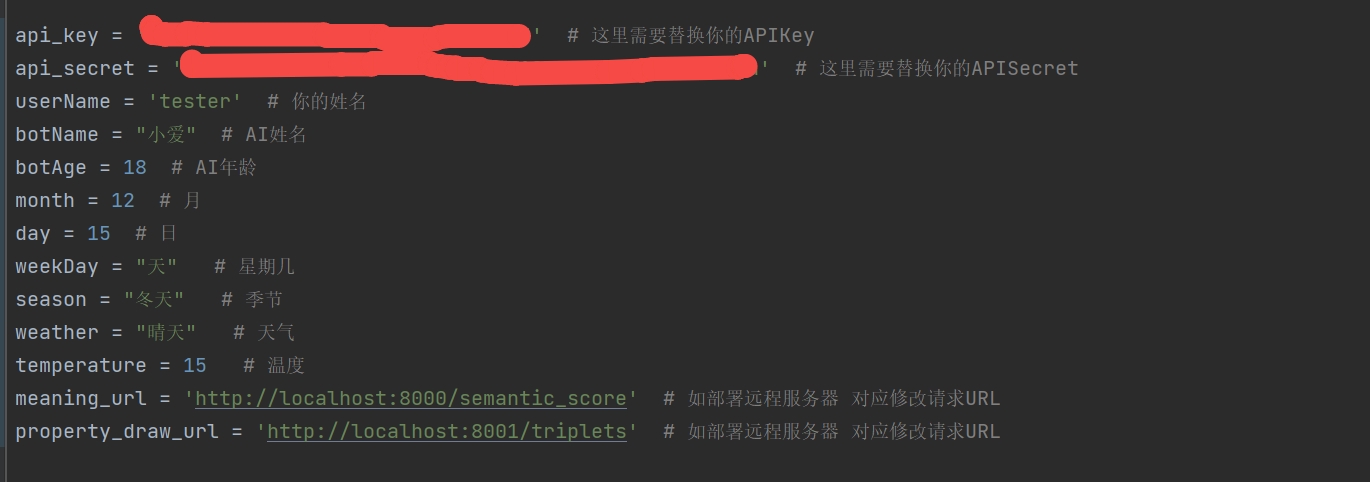
- 打开Anaconda 输入
conda create -n talk创建新环境
conda info --envs查看环境
activate talk启动环境
cd C:\你的路径\OpenAPIDemo\PythonDemo导航到代码所在的文件夹
python -m pip install requests下载依赖资源
python main.py开始聊天(需确认2个服务以开启)
*最低配置要求Nvidia Gfx 1060
加入开发者群
如果您有问题,不妨微信扫码加入开发者群——

感兴趣别忘了star一下~
