
[!TIP]
⬇️ Download Smart Clipboard v1.3.1
Free • No installer needed • Windows 10/11

Smart Clipboard ✨
A clipboard that remembers everything, peeks without leaving your app, and pastes smarter in seconds.
Never lose anything you copy. Stop re-copying the same things over and over.
👀 Clipboard Peek — instantly see what you copied without leaving your app
🕐 Time Machine — find anything by remembering when you copied it
✨ Smart Paste — instantly clean, fix, and format text before pasting
Private by default. Nothing leaves your device. Ever.



Full Walkthrough — Time Machine, Clipboard Peek & Split

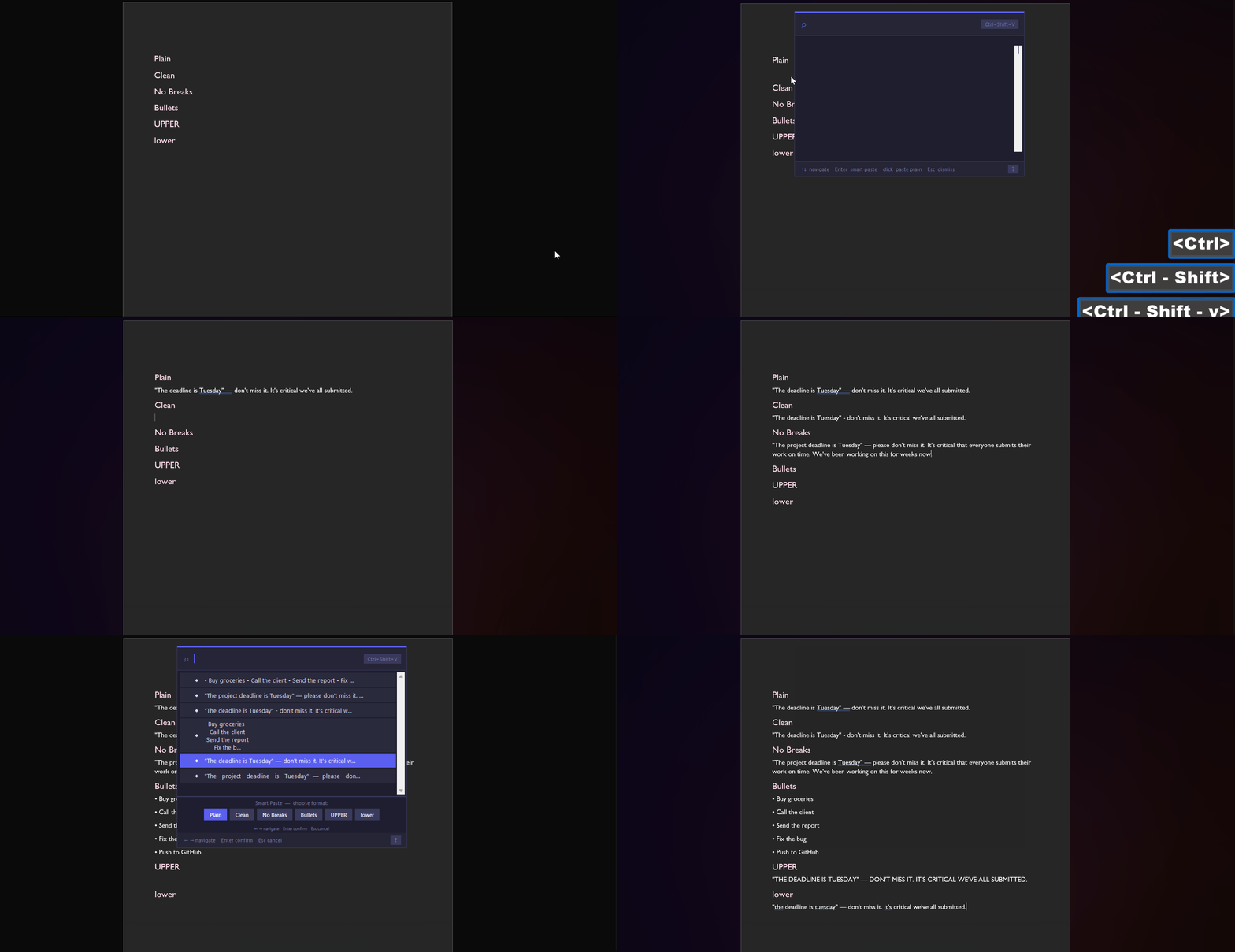
Smart Paste
What is Smart Clipboard?
Smart Clipboard is a free Windows clipboard manager that automatically saves everything you copy and lets you instantly find, preview, and paste it—without ever switching apps.
Built because most clipboard managers are either too complex, too ugly, or overpriced.
Why Smart Clipboard is different
👀 Clipboard Peek — hold Ctrl+Shift from anywhere and a floating overlay shows your clipboard without stealing focus. Keep typing while referencing what you copied.
🕐 Time Machine — your clips are grouped into work sessions automatically. Find that link you copied this morning without remembering the exact words.
✨ Smart Paste — paste messy text as clean formatting, bullet points, UPPERCASE or a single line. One keystroke, perfect output every time.
Works instantly. No setup. Install and go.
No other free clipboard manager does this. No accounts. No tracking. No cloud. Ever.
Features
Core
- 📋 Auto-capture — everything you copy is saved automatically
- 🔍 Instant search — find any clip in milliseconds
- 📌 Pin clips — keep important clips at the top forever
- 🏷️ Tags — colour-coded organisation for your clips
- 🖼️ Image support — screenshots and images saved with preview
- 🔎 Auto code detection — code clips are automatically detected and formatting is preserved
Power Features
- ⚡ Quick-paste launcher — press
Ctrl+Shift+Vanywhere for an instant floating search palette. No app switching needed. - ✨ Smart Paste — when pasting from the launcher, choose how to paste: Plain, Clean (fix quotes & spacing), No Breaks, Bullet List, UPPERCASE, or lowercase. One keystroke, perfect output.
- ⟨⟩ Templates — save clips with
{placeholders}that fill in on demand. Perfect for repetitive emails and messages. - 🔒 Private mode — clips stay in memory only, never written to disk. Clears automatically when you're done.
- ⊕ Merge clips — select multiple clips and merge them with a custom separator (newline, comma, space, or custom) into one paste.
- ⌨️ Double-tap Ctrl — open Smart Clipboard instantly from anywhere without memorising shortcuts.
- 🎨 Syntax highlighting — code clips display with colour highlighting in the preview panel.
- 🔍 Clipboard Peek — hold
Ctrl+Shiftfrom anywhere to instantly preview your clipboard without losing focus. Lock it to zoom into images, pan around screenshots and navigate clip history. No other free clipboard manager does this. - 🕐 Clipboard Time Machine — clips are automatically grouped into work sessions by time. Find anything by remembering what you were doing, not what you copied.
- ✂️ Clipboard Split — copy a comma-separated list and Smart Clipboard detects it automatically. Press
Xto split into separate clips, bullet list, numbered list or one line instantly. - 🎯 Hotkey Clips — assign any clip to
Ctrl+Shift+1throughCtrl+Shift+9for instant paste from anywhere.
Privacy & Safety
- 🛡️ Sensitive content filter — passwords, credit cards and SSNs are automatically detected and never saved
- 🚫 Excluded apps — configure apps like password managers to never be captured
- 📵 Zero telemetry — no internet connection, no tracking, no accounts ever
Installation
No installer needed — just download and run.
- Go to Releases
- Download
Smart Clipboard.exe - Place it anywhere on your PC
- Run it once and follow the 30-second onboarding
- Done — the app starts automatically with Windows from now on
Requirements
- Windows 10 or Windows 11
- No additional software needed
Keyboard Shortcuts
Main App
CLIPBOARD
| Shortcut | Action |
|---|---|
Ctrl + C |
Capture to clipboard |
Ctrl + Alt + C |
Capture & pin |
Ctrl + Shift + V |
Open quick-paste launcher |
Ctrl + Shift + E |
Toggle capture on / off |
Ctrl + Shift + X |
Toggle private mode |
Double Ctrl |
Open Smart Clipboard |
Ctrl + Shift + 1–9 |
Paste hotkey clip instantly |
Ctrl + Shift (hold) |
Peek at latest clip (click to lock) |
LIST
| Shortcut | Action |
|---|---|
C |
Copy selected |
P |
Pin / unpin |
T |
Tag selected |
M |
Mark / unmark template |
F |
Merge selected clips |
X |
Split clip into parts |
H |
Assign hotkey slot (Ctrl+Shift+1–9) |
S |
Focus search bar |
E |
Edit selected |
B |
Open Settings |
Del |
Delete selected |
↑ / ↓ |
Navigate |
Ctrl + ↑ / ↓ |
Extend / shrink multi-selection |
Enter |
Copy & close |
Escape |
Hide to tray |
Quick-Paste Launcher
| Shortcut | Action |
|---|---|
↑ / ↓ |
Navigate clips |
Enter |
Open Smart Paste bar |
← / → |
Navigate Smart Paste options |
Enter (in bar) |
Paste with selected format |
Esc (in bar) |
Close Smart Paste bar |
| Click | Paste plain instantly |
Esc |
Dismiss launcher |
#tag |
Filter clips by tag |
template hotkey |
Filter clips by property |
| any text | Fuzzy search clips |
Smart Paste Formats
| Format | What it does |
|---|---|
| Plain | Paste exactly as copied |
| Clean | Fix smart quotes, dashes, collapse spaces |
| No Breaks | Remove all line breaks into one line |
| Bullets | Convert each line into a bullet point |
| UPPER | Convert to UPPERCASE |
| lower | Convert to lowercase |
⟨⟩ Templates — Personalise anything in seconds
Most clipboard tools save fixed text. Smart Clipboard templates have {placeholders} that open a fill-in dialog the moment you paste — so every paste is personalised without retyping anything.
Hi {name},

Following up on our meeting on {date}.
Please find {document} attached.

Best regards,
Paul
Press copy on this clip → a dialog opens asking for name, date and document → fill them in → perfect personalised message copied instantly. No switching apps. No retyping. No mistakes.
Perfect for: Sales emails, Customer support replies, Developer boilerplate, Formal student emails, Any repetitive message you send daily.
To create a template: Select any clip → press M to mark it as a template → wrap any word in {curly braces} to make it a placeholder.
Privacy
Smart Clipboard is built with privacy as a core feature — not an afterthought.
| Feature | Detail |
|---|---|
| Storage | All data stored locally in data/clips.json |
| Network | Zero internet connection required or used |
| Telemetry | None — ever |
| Sensitive filter | Passwords and card numbers auto-blocked |
| Private mode | Clips never touch disk |
| Excluded apps | Configure any app to be ignored |
Settings
Open settings via the ⚙ gear icon in the toolbar (or press B):
- Main settings — max clips, auto-delete, excluded apps
- Advanced settings — startup, global shortcuts, Time Machine gap, export clips, sensitive content storage
- Personalize Shortcuts — enable or disable individual shortcuts independently
- Give Feedback — opens GitHub issues directly from the app
- Replay tutorial — re-run the onboarding at any time
FAQ
Will this slow down my PC? No. Smart Clipboard runs as a lightweight background process and uses minimal CPU and memory.
Is my clipboard data sent anywhere? Never. Everything is stored locally in a JSON file on your own computer.
Can I use this at work? Yes. Enable Private mode or turn off capture entirely when working with sensitive documents.
My antivirus flagged it — is it safe? Yes. PyInstaller executables are sometimes flagged by antivirus tools. You can verify Smart Clipboard is safe by reviewing the full source code in this repository.
How do I uninstall? Delete the exe and the folder. To remove from Windows startup, open Settings → disable auto-start, then delete the folder.
What is Smart Paste? Smart Paste is a feature in the quick-paste launcher that lets you transform text before pasting. Press Enter on any clip to open the Smart Paste bar, then choose your format with arrow keys.
What is Clipboard Peek? Hold Ctrl+Shift from anywhere to instantly preview your last copied item without losing focus on your current app. Click the overlay to lock it in place and navigate through clip history with the arrow buttons.
What is Clipboard Time Machine? Your clips are automatically grouped into work sessions based on time gaps. Instead of scrolling through a flat list, you can find clips by remembering what you were working on when you copied them.
What's New in v1.3.1
- Performance fix — launcher now uses virtual scrolling and stays smooth with 200+ clips
- Touchpad fix — two finger pinch-to-zoom no longer accidentally opens Smart Clipboard
- Bulk delete — deleting multiple clips at once now registers instantly
What's New in v1.3.0
- Smarter search — type "template", "hotkey", "pinned" or any tag name to instantly filter clips
- Image zoom in Peek — scroll to zoom, drag to pan inside locked Clipboard Peek overlay
- Source app detection — preview panel shows which app each clip was copied from
- Smart Paste auto-suggestion — automatically highlights the most relevant format based on clip content
- Advanced settings — cleaner settings panel with power user options tucked away
- Template shortcut — press Enter or C on a template clip to instantly open the fill dialog
- Sensitive content opt-in — advanced option to store sensitive content if needed
- Silent startup — app now starts completely invisibly with no flash on boot
- Bug fixes — launcher scrolling overhaul, search accuracy, app window staying hidden, private mode duplication, code detection false positives and much more
📖 Read More
Built With
- Python — core language
- Tkinter — UI framework
- pynput — global keyboard listener
- pystray — system tray icon
- Pillow — image support
- pywin32 — Windows API
- psutil — process detection
Running from Source
# Clone the repository
git clone https://github.com/ezeiq7/Smart-Clipboard.git

# Install dependencies
pip install -r requirements.txt

# Run the app
python main.py
Reporting Issues
Found a bug? Have a feature request?
Open an issue and describe what happened. Include your Windows version and what you were doing when the issue occurred.
License
Copyright © 2026 Smart Clipboard
Made with ☕ and way too many late nights
⭐ If Smart Clipboard saves you time, a star means a lot!