
SPEAR Next
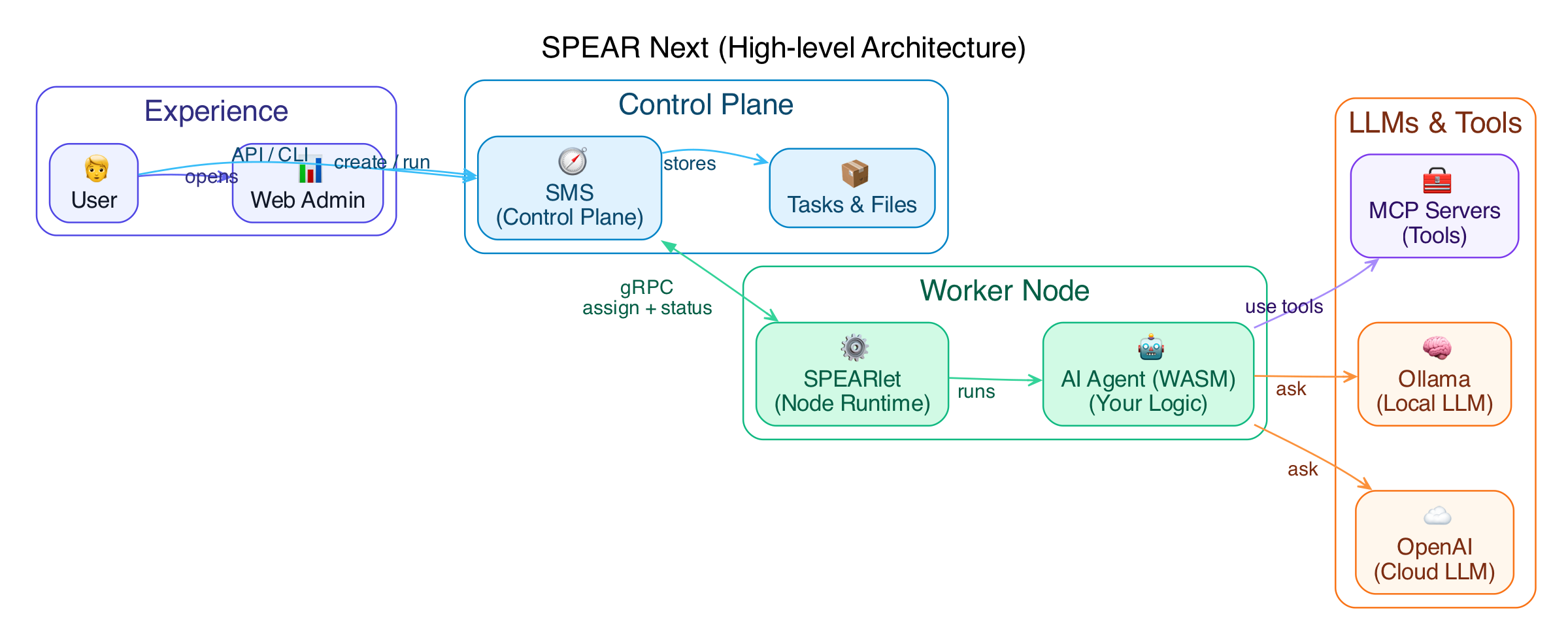
SPEAR Next is the Rust/async implementation of SPEAR’s core services:
- SMS: the metadata/control-plane server.
- SPEARlet: the node-side agent/runtime.
Chinese README: README.zh.md
Repository layout
src/apps/sms: SMS binary entrypointsrc/apps/spearlet: SPEARlet binary entrypointweb-admin/: Web Admin frontend sourceassets/admin/: built Web Admin static assets embedded/served by SMSsamples/wasm-c/: C-based WASM samples (WASI)docs/: design notes and usage guides
Architecture
Quick start
Prerequisites
- Rust toolchain (latest stable recommended)
- Docker (Docker Desktop on macOS/Windows, or Docker Engine on Linux)
- Docker Compose v2 (
docker compose)
This repo uses protoc-bin-vendored, so you typically don’t need to install protoc manually.
Run locally with Docker Compose (SMS + SPEARlet)
This is the recommended cross-platform local setup (no Kubernetes required). It runs:
- SMS (gRPC + HTTP gateway + optional Web Admin)
- SPEARlet (agent/runtime) connecting to SMS via the Compose network
Use the provided Compose file:
deploy/docker/compose.local.yaml
Start:
docker compose -f deploy/docker/compose.local.yaml up -d --build
Useful endpoints (default host ports):
- SMS health:
http://127.0.0.1:18080/health - SMS Swagger:
http://127.0.0.1:18080/swagger-ui/ - SPEAR Console (served by SMS):
http://127.0.0.1:18080/console - SMS Web Admin:
http://127.0.0.1:18082/ - SPEARlet health:
http://127.0.0.1:18081/health
Stop:
docker compose -f deploy/docker/compose.local.yaml down
Remove local data (volumes):
docker compose -f deploy/docker/compose.local.yaml down -v
Common build/network notes:
- If Docker Hub is not reachable, override base images via environment variables (example mirrors):
export NODE_IMAGE=docker.m.daocloud.io/library/node:20-bookworm-slim
export RUST_IMAGE=docker.m.daocloud.io/library/rust:1.91-bookworm
export DEBIAN_IMAGE=docker.m.daocloud.io/library/debian:trixie-slim
docker compose -f deploy/docker/compose.local.yaml up -d --build
- If you use Local AI Models (llama.cpp), SPEARlet needs
llama-server. The Compose file defaults to a build target that includes it. You can override:
SPEARLET_BUILD_TARGET=runtime_with_node_and_llama docker compose -f deploy/docker/compose.local.yaml up -d --build spearlet
Build
make build

# release
make build-release

# build with Rust features (e.g. sled / rocksdb)
make FEATURES=sled build

# enable local microphone capture implementation (optional)
make FEATURES=mic-device build

# macOS shortcut (equivalent to FEATURES+=mic-device)
make mac-build
Run SMS
./target/debug/sms

# enable Web Admin
./target/debug/sms --enable-web-admin --web-admin-addr 127.0.0.1:8081
Useful endpoints:
- HTTP gateway:
http://127.0.0.1:8080 - Swagger UI:
http://127.0.0.1:8080/swagger-ui/ - OpenAPI spec:
http://127.0.0.1:8080/api/openapi.json - gRPC:
127.0.0.1:50051 - Web Admin (when enabled):
http://127.0.0.1:8081/admin
Run SPEARlet
SPEARlet connects to SMS once you provide --sms-grpc-addr (then it auto-registers by default).
./target/debug/spearlet --sms-grpc-addr 127.0.0.1:50051
Configuration
Config file locations
- SMS:
~/.sms/config.toml(or--config <path>) - SPEARlet:
~/.spear/config.toml(or--config <path>)
Repo-shipped examples:
- SMS:
config/sms/config.toml - SPEARlet:
config/spearlet/config.toml
Priority
- CLI
--configfile - Home config (
~/.sms/config.tomlor~/.spear/config.toml) - Environment variables (
SMS_*,SPEARLET_*) - Built-in defaults
Secrets
Do not put secrets into config files. Use spearlet.llm.credentials[].api_key_env to reference environment variables and bind them from backends via credential_ref.
LLM backend notes:
[[spearlet.llm.backends]] hostingis required and must belocalorremote.credential_refis optional. If set, the referenced env var must exist (otherwise the backend is filtered). If not set, the backend is treated as “no-auth” (useful for self-hosted proxies).
Ollama discovery
SPEARlet can import models from a local Ollama on startup and materialize them as LLM backends.
- Docs:
docs/ollama-discovery-en.md
Routing and debugging
- Route by model: if some backends are configured with
model = "...", requests can be routed by setting onlymodel(no explicitbackendrequired). - Observe the selected backend:
cchat_recvJSON includes a top-level_spear.backend/_spear.model.- Router emits a
router selected backenddebug log after selection.
Web Admin
Web Admin provides Nodes/Tasks/Files/AI Models pages.
- AI Models provides an aggregated view across nodes, split into Local/Remote.
- Local AI Models supports creating/deleting model deployments on a node.
Local model provisioning (llamacpp):
modelis just a display key; actual download usesparams.model_urlwhen the model file is missing.- Supported params:
model_url: http/https URL to a.gguffile (large files are supported).download_timeout_s: total download budget in seconds (default: 3600).model_path: absolute path, or relative tospearlet.local_models_dir.skip_download=1: fail if the model file is missing (no download).
Docs:
docs/web-admin-overview-en.mddocs/web-admin-ui-guide-en.md
WASM samples
make samples
Artifacts are written to samples/build/ (C) and samples/build/js/ (WASM-JS, compat: samples/build/rust/).
Docs:
docs/samples-build-guide-en.md
Development
make help
make dev
make ci
UI tests (Playwright):
make test-ui
Documentation
docs/INDEX.md
License
Apache-2.0. See LICENSE.