spp





SPP is a simple and powerful proxy
Note: This tool is only to be used for study and research, do not use it for illegal purposes
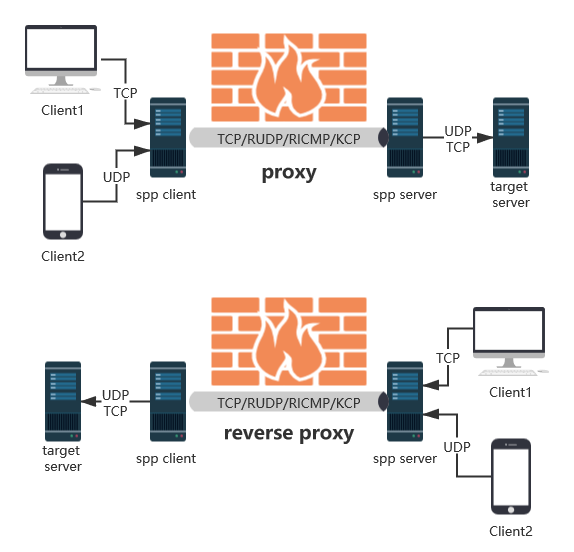
Features
- Supported protocols: TCP, UDP, RUDP (Reliable UDP), RICMP (Reliable ICMP), RHTTP (Reliable HTTP), KCP, Quic
- Supported types: forward proxy, reverse proxy, SOCKS5 forward proxy, SOCKS5 reverse proxy
- Protocols and types can be freely combined
- External proxy protocols and internal forwarding protocols can be freely combined
- Support Shadowsocks plug-in, spp-shadowsocks-plugin,spp-shadowsocks-plugin-android
Instructions
Server
- Start Server, assume that the server IP is www.server.com, listening port 8888
# ./spp -type server -proto tcp -listen :8888
- You can also listen simultaneously with other types of ports and protocols.
# ./spp -type server -proto tcp -listen :8888 -proto rudp -listen :9999 -proto ricmp -listen 0.0.0.0
- Can also use Docker
# docker run --name my-server -d --restart=always --network host esrrhs/spp ./spp -proto tcp -listen :8888
Client
- Start TCP forward proxy, map the 8080 port of www.server.com to the local 8080 so that access to local 8080 is equivalent to accessing www.server.com 8080
# ./spp -name "test" -type proxy_client -server www.server.com:8888 -fromaddr :8080 -toaddr :8080 -proxyproto tcp
- Start the TCP reverse proxy, map the local 8080 to the 8080 port of www.server.com, so that visiting www.server.com:8080 is equivalent to accessing the local 8080
# ./spp -name "test" -type reverse_proxy_client -server www.server.com:8888 -fromaddr :8080 -toaddr :8080 -proxyproto tcp
- Start TCP Forward SOCKS5 Proxy, open the SOCKS5 protocol on the local 8080 port, access the network through the Server
# ./spp -name "test" -type socks5_client -server www.server.com:8888 -fromaddr :8080 -proxyproto tcp
- Start TCP Reverse SOCKS5 Proxy, open the SOCKS5 protocol on www.server.com's 8080 port, access the network through the Client
# ./spp -name "test" -type reverse_socks5_client -server www.server.com:8888 -fromaddr :8080 -proxyproto tcp
- Other proxy protocols only need to modify the -proxyproto parameter of the client, for example
Proxy UDP
# ./spp -name "test" -type proxy_client -server www.server.com:8888 -fromaddr :8080 -toaddr :8080 -proxyproto udp

Proxy rudp
# ./spp -name "test" -type proxy_client -server www.server.com:8888 -fromaddr :8081 -toaddr :8081 -proxyproto rudp

Proxy ricmp
# ./spp -name "test" -type proxy_client -server www.server.com:8888 -fromaddr :8082 -toaddr :8082 -proxyproto ricmp

At the same time, the above three
# ./spp -name "test" -type proxy_client -server www.server.com:8888 -fromaddr :8080 -toaddr :8080 -proxyproto udp -fromaddr :8081 -toaddr :8081 -proxyproto rudp -fromaddr :8082 -toaddr :8082 -proxyproto ricmp
- Internal communication between Client and Server can also use other protocols; automatic conversion between external protocols and internal protocols is supported. E.g
Proxy TCP, internal RUDP protocol forwarding
# ./spp -name "test" -type proxy_client -server www.server.com:8888 -fromaddr :8080 -toaddr :8080 -proxyproto tcp -proto rudp

Proxy TCP, internal RICMP protocol forwarding
# ./spp -name "test" -type proxy_client -server www.server.com -fromaddr :8080 -toaddr :8080 -proxyproto tcp -proto ricmp

Agent UDP, internal TCP protocol forwarding
# ./spp -name "test" -type proxy_client -server www.server.com:8888 -fromaddr :8080 -toaddr :8080 -proxyproto udp -proto tcp

Agent UDP, internal KCP protocol forwarding
# ./spp -name "test" -type proxy_client -server www.server.com:8888 -fromaddr :8080 -toaddr :8080 -proxyproto udp -proto kcp

Proxy TCP, internal Quic protocol forwarding
# ./spp -name "test" -type proxy_client -server www.server.com:8888 -fromaddr :8080 -toaddr :8080 -proxyproto tcp -proto quic

Proxy TCP, internal RHTTP protocol forwarding
# ./spp -name "test" -type proxy_client -server www.server.com:8888 -fromaddr :8080 -toaddr :8080 -proxyproto tcp -proto rhttp
- Can also use Docker
# docker run --name my-client -d --restart=always --network host esrrhs/spp ./spp -name "test" -type proxy_client -server www.server.com:8888 -fromaddr :8080 -toaddr :8080 -proxyproto tcp
Performance Testing
- Using the IPERF script in the Benchmark/local_tcp directory, tested on a single machine (CPU-bound), the maximum bandwidth with TCP as the proxy protocol and various transit protocols is as follows:
| Agent | Speed | Speed (Ency) | Speed (Encryption Compression) |
|---|---|---|---|
| Direct connection | 3535 MBytes/sec | ||
| tcp forwarding | 663 MBytes/sec | 225 MBytes/sec | 23.4 MBytes/sec |
| rudp forwarding | 5.15 MBytes/sec | 5.81 MBytes/sec | 5.05 MBytes/sec |
| ricmp forwarding | 3.34 MBytes/sec | 3.25 MBytes/sec | 3.46 MBytes/sec |
| rhttp forwarding | 10.7 MBytes/sec | 10.8 MBytes/sec | 8.73 MBytes/sec |
| kcp forwarding | 18.2 MBytes/sec | 18.6 MBytes/sec | 14.7 MBytes/sec |
| quic forwarding | 35.5 MBytes/sec | 32.8 MBytes/sec | 15.1 MBytes/sec |
- Using the IPERF script in the Benchmark/remote_tcp directory, tested across multiple machines (server on Tencent Cloud, client local), the maximum bandwidth with TCP as the proxy protocol and various transit protocols is as follows:
| Agent | Speed | Speed (Ency) | Speed (Encryption Compression) |
|---|---|---|---|
| Direct connection | 2.74 MBytes/sec | ||
| tcp forwarding | 3.81 MBytes/sec | 3.90 MBytes/sec | 4.02 MBytes/sec |
| rudp forwarding | 3.33 MBytes/sec | 3.41 MBytes/sec | 3.58 MBytes/sec |
| ricmp forwarding | 3.21 MBytes/sec | 2.95 MBytes/sec | 3.17 MBytes/sec |
| rhttp forwarding | 3.48 MBytes/sec | 3.49 MBytes/sec | 3.39 MBytes/sec |
| kcp forwarding | 3.58 MBytes/sec | 3.58 MBytes/sec | 3.75 MBytes/sec |
| quic forwarding | 3.85 MBytes/sec | 3.83 MBytes/sec | 3.92 MBytes/sec |
- Note: The test data is Centos.ISO, which has been compressed, so the effect of compression forwarding is not obvious.
- If you want to directly test each protocol bandwidth of the network, use multi-protocol bandwidth test tools connperf
Thanks for free JetBrains Open Source license