
Sprint Ant Family
Sprint Ant Family consists of three open-source repositories designed for rapid web application development.
- Sprint Ant Backend: the Spring Boot Backend (this repository).
- Sprint Ant Frontend: the React Frontend based on Ant Design Pro, for quickly building an admin-panel web application, see Feature Highlights screenshot below.
- Sprint Ant Frontend API Core: if you are not using Ant Design Pro as your UI framework, then you can copy the 200 lines of core TypeScript code into your existing Frontend to integrate with the Spring Ant Backend API.
Feature Highlights
- Login with JWT tokens (default username:
adminoruser, password:ant.design) - Multi-language support
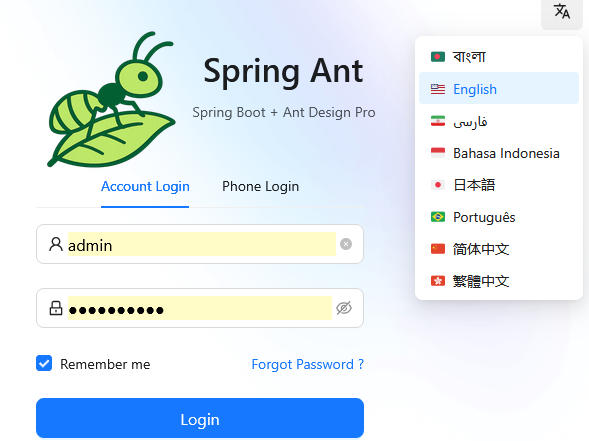
- Role-Based Access Control (RBAC)
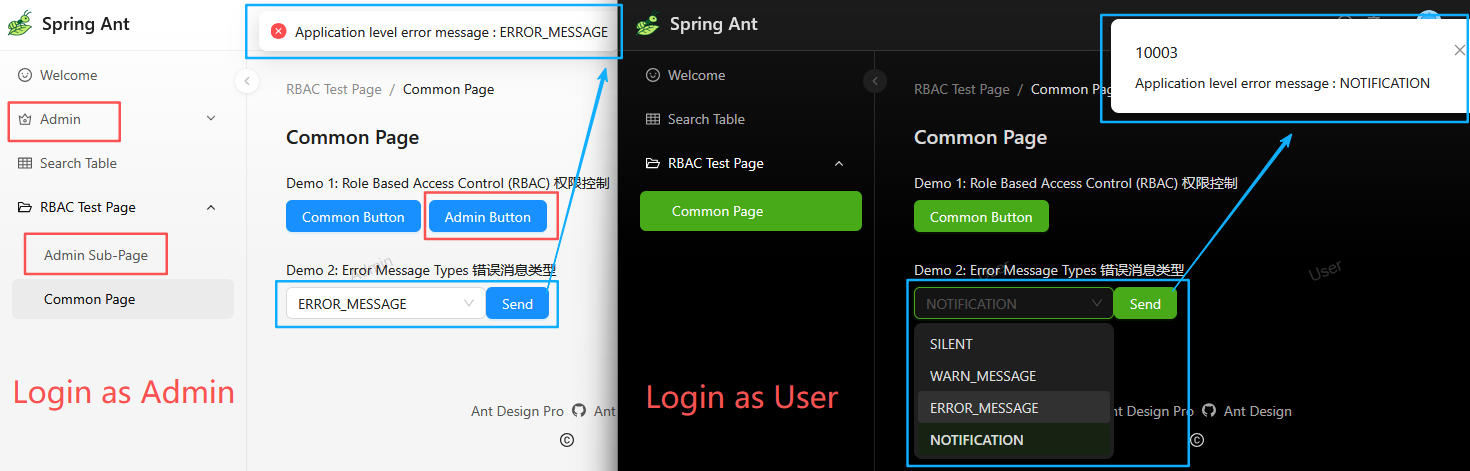
As shown in red below, the admin on the left has access to "admin page", "admin sub-page", and "admin button", while the regular user on the right does not. Backend is using Spring Security for RBAC. - Error Code and Display Type
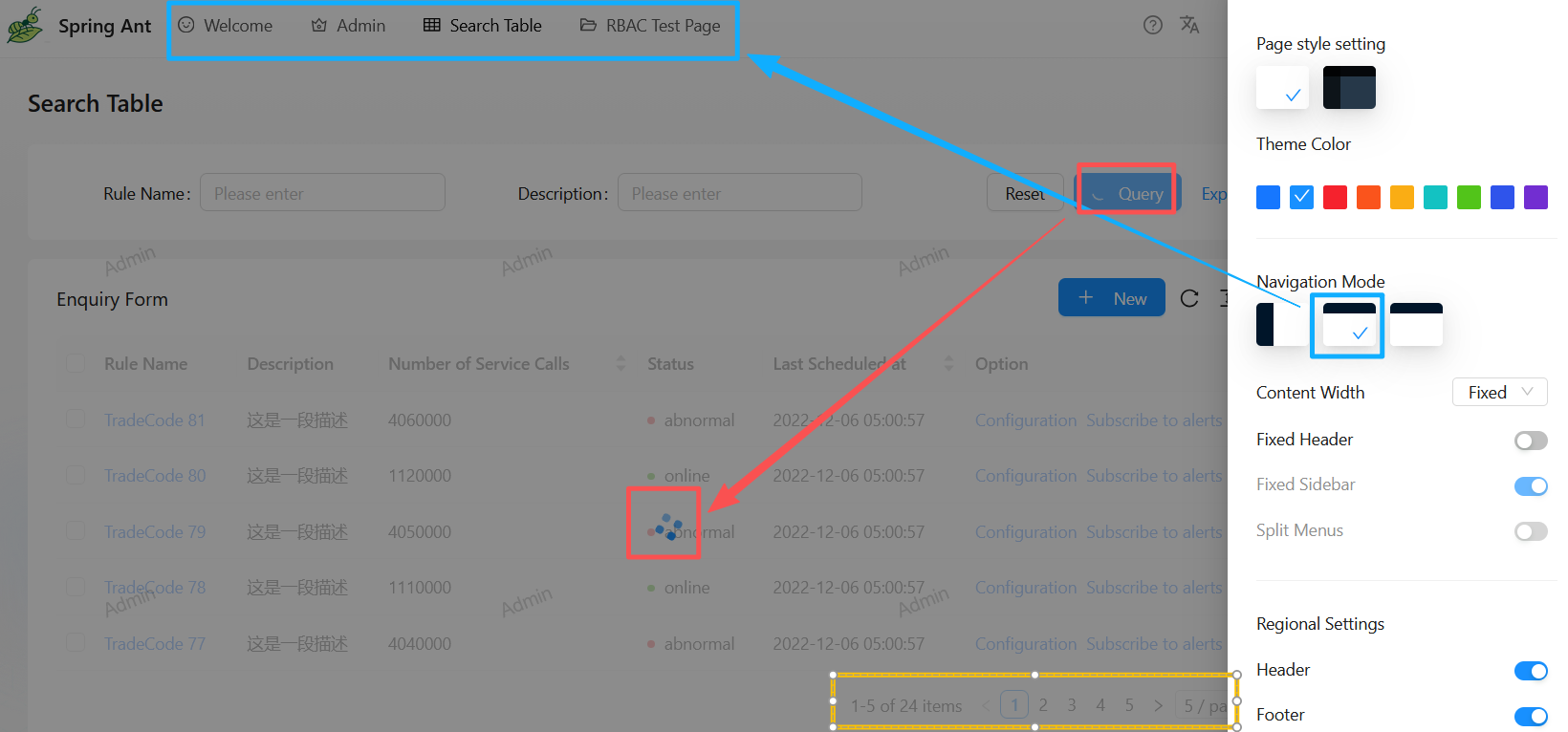
As shown in blue below, the backend can return differentError CodeandDisplay Typebased on business needs. Network and HTTP-level errors are also handled uniformly by Frontend. - Configurable Layout: Dark Mode, Theme Color, Navigation (side, top, mix), etc.
- Loading state management (
Loading SpinnerandLoading Overlayto prevent user interaction while requests are in progress). (red below) - Pagination (yellow below)
Sprint Ant Backend
A Java Spring Boot backend framework for rapid development, with core features such as JWT authentication, RBAC (Spring Security), Aspect (unified API format, logging, and error handling), pagination, and pipelined model code generation from PostgreSQL -> MyBatis Generator -> Swagger (SpringDoc).
Database Initialization
Build the project
- Gradle (to build a .jar file; you may change "/" to "\" to suit your OS)
./gradlew clean
./gradlew build -x test - Docker (to build docker image)
docker build -t spring_ant_backend:0.0.1 .
5 ways to run the project in the DEV Environment (application-dev.yml)
-
Run with IDEA Ultimate Edition (recommended for local development and debugging)
Edit Configuration -> Active profile:dev -
Run with IDEA Community Edition (recommended for local development and debugging)
Edit Configuration -> Environment variables:SPRING_PROFILES_ACTIVE=dev -
Run with Gradle
./gradlew bootRun -Dspring.profiles.active=dev -
Run "java spring_ant_backend-0.0.1-SNAPSHOT.jar" as a background process on Linux
nohup java -jar .\spring_ant_backend-0.0.1-SNAPSHOT.jar --spring.profiles.active=dev & -
Run with Docker (Recommended for Production)
docker run -d --add-host host.docker.internal:host-gateway -p 8080:8080 -e SPRING_PROFILES_ACTIVE=dev --name spring_ant_backend spring_ant_backend:0.0.1
OpenAPI (Swagger) URLs
The username and password are configured under swagger-auth in application-dev.yml.
- Web UI:
http://localhost:8080/api/swagger-ui/index.html - OpenAPI JSON configuration file:
http://localhost:8080/api/api-docs
Framework Design
Future Release Plan, Code Contribution, and Code Convention
Why we created this open-source project
This project is open-sourced by Nick, Jacob, and Ken from the Hong Kong Productivity Council (HKPC). The original idea came from finding that Ant Design Pro is a great React UI solution, but there is no ready-to-use backend framework for it. We hope that open-sourcing this project can be helpful for others. For example, Small and Medium Enterprises (SMEs) can use this project to quickly set up an admin-panel web application. Don't worry if you don't know Java and Spring Boot — you can just run it, and the detailed documentation and code comments will help you master it quickly.
Let us know if you find this project helpful in any way, and feel free to ask questions in the GitHub Discussions tab. Your support and feedback are valuable to us.