
supabase-grafana
Observability for your Supabase project, using Prometheus/Grafana, collecting ~200 metrics at a granularity of 1 minute:

For more information, see our documentation
⚠️ Note that this repository is an example and is not intended for production use. We strongly recommend that you setup metrics collection into your own observability stack, see the Metrics page in our documentation for guidance.
If you just need the dashboard to import into your own Grafana instance (self-hosted or in the Cloud), you can find the source here
Self-hosting
To run the collector locally using Docker Compose:
Create secrets
Create an .env file:
cp .env.example .env
Fill it out with your project details.
-
To monitor a single project, fill out your
project refandsecret key(orservice role keyfor legacy keys), which you can find here. -
Alternatively, to monitor multiple projects you'll need to create an access token here.
Run with Docker
After that, simply start docker compose and you will be able to access Grafana:
docker compose up
Access the dashboard
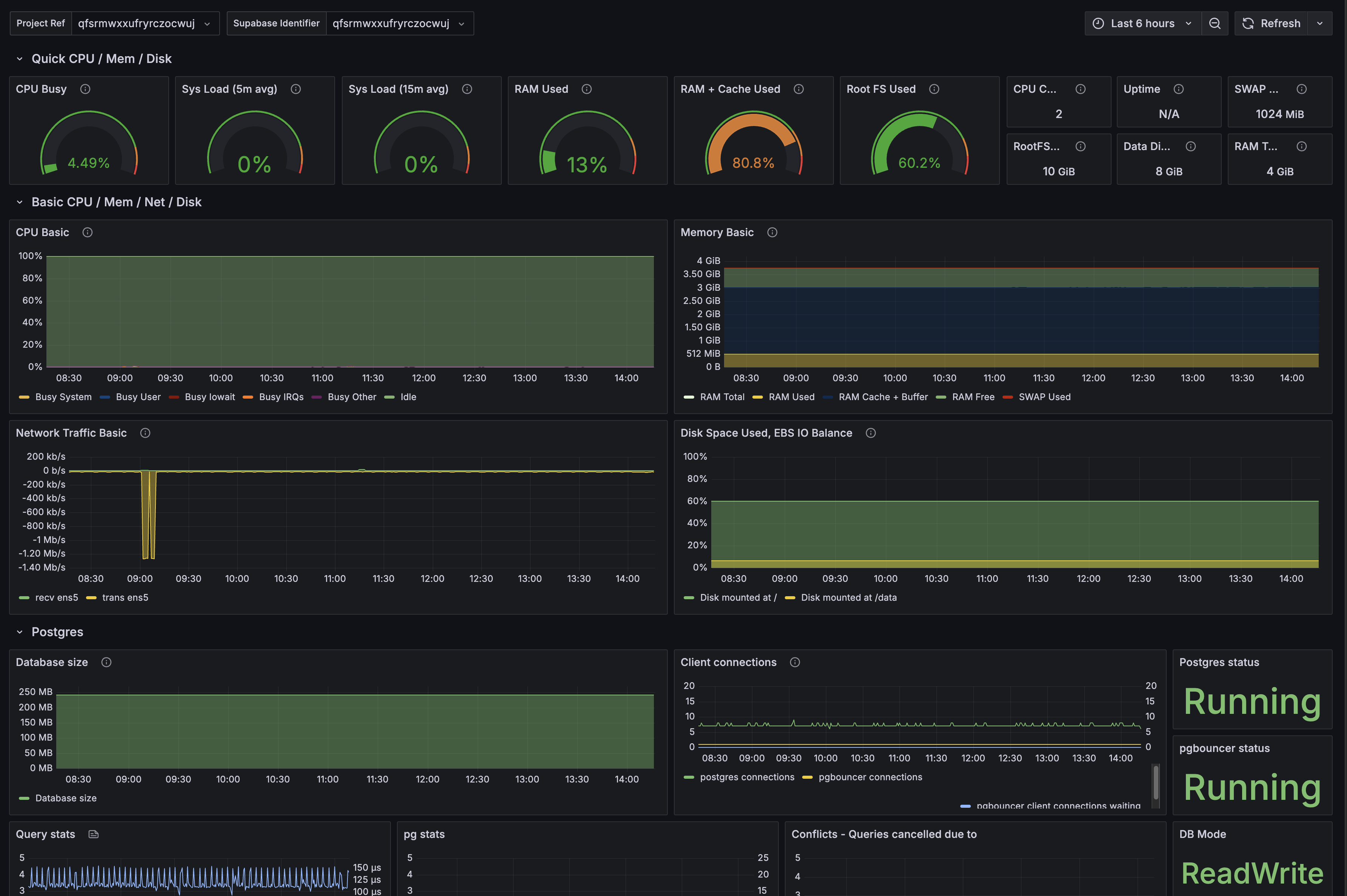
Visit localhost:8000 and login with the credentials:
- Username:
admin - Password: [the password in your
.envfile]
Deploying to the Cloud
Deploy this service to a server which is always running to continuously collect metrics for your Supabase project.
You will need:
- Prometheus (or compatible datasource)
- Grafana
Deploy Prometheus
A managed Prometheus instance can be deployed on Grafana Cloud or from Cloud Providers, like AWS or Digital Ocean.
Prometheus - Adding your Scrape Job
Configure your Prometheus instance with a scrape job that looks like this:
scrape_configs:
  - job_name: "<YOUR JOB NAME>"
    metrics_path: "/customer/v1/privileged/metrics"
    scheme: https
    basic_auth:
      username: "service_role"
      password: "SECRET API KEY OR SERVICE_KEY FOR LEGACY KEYS"
    static_configs:
      - targets: [
        "<YOUR SUPABASE PROJECT REF>.supabase.co:443"
          ]
        labels:
          group: "<YOUR LABEL CHOICE>"
Prometheus - Adding a Scrape Job for your Read Replica(s)
Scraping your Read Replica for metrics is done as a separate Scrape Job within your Prometheus config. Under the scrape_config section, add a new job that looks like the example below.
As an example, if the identifier for your read replica is foobarbaz-us-east-1-abcdef, you would insert the following snippet:
  - job_name: supabase-foobarbaz-us-east-1-abcdef
    scheme: https
    metrics_path: "/customer/v1/privileged/metrics"
    basic_auth:
      username: service_role
      password: __SECRET_API_KEY_OR_SERVICE_KEY_FOR_LEGACY_KEYS__
    static_configs:
      - targets: ["foobarbaz-us-east-1-abcdef.supabase.co"]
        labels:
          group: "<YOUR LABEL CHOICE>"
Deploy Grafana
A managed Grafana instance can be deployed on Grafana Cloud or from Cloud Providers, like AWS or Digital Ocean.
Grafana - Add your Prometheus Data Source
Once running, log into your Grafana instance and select Data Sources on the left menu. Click Add data source and add your Prometheus information:
- Prometheus Server URL
- Credentials (where relevant)
Test it, save it and remember the name of your data source.
Grafana - Add the Supabase Project Dashboard
Select Dashboards on the left menu, click New and then Import. Copy the file contents from this dashboard and paste it into the JSON field and click Load. Give the dashboard a name and select the Prometheus data source that you created previously. The dashboard will then load with the resource usage of your Supabase Project.

Integrations
There are unofficial, third-party integrations (not affiliated with Supabase available) that are listed below: