

From experiment to enterprise — faster
Unified platform for LLM deployment, training, tuning, evaluation
What is Surogate Studio?
Surogate Studio is an enterprise-grade LLMOps platform built to accelerate the development and deployment of generative AI applications.
It unifies deployment, fine-tuning, evaluation, safeguarding, and optimization into a single platform — streamlining the journey from experimentation to reliable large-scale production adoption.
Key Features
- KV-aware routing, GPU sharding, replicas, and disaggregated serving for production-grade performance.
- Git-like Data Hub for models & datasets.
- Multi-GPU; Multi-node (Ray-based).
- Import/Export from/to HuggingFace and ModelScope.
- Pretraining; full fine-tuning; LoRA / QLoRA.
- BF16, FP8, NVFP4, BnB; mixed-precision training.
- Experiment metrics with charts (Loss, Eval loss, Learning rate, Grad norm., Tokens per second).
- Logs and Test vLLM chat.
- Integration with Axolotl and SOTA Surogate training libraries.
- Benchmark with MMLU, ARC, GSM8k, TruthfulQA, HellaSwag, and more. Red-team for toxicity, bias, misinformation, PII, and harms.
- Custom benchmarks with judge and simulators.
- Workload deployment on local or remote Kubernetes clusters and on public clouds.
- Integrations with AWS, GCP, OCI and RunPod (Powered by SkyPilot).
- Optional air-gapped.
- Kubernetes-native scaling.
- Workload/container isolation.
- GPU & node monitoring.
- Start from templates or deploy custom apps via an intuitive UI. Includes Surogate Agent
- Deterministic configs + predefined recipes.
🎯 Demo
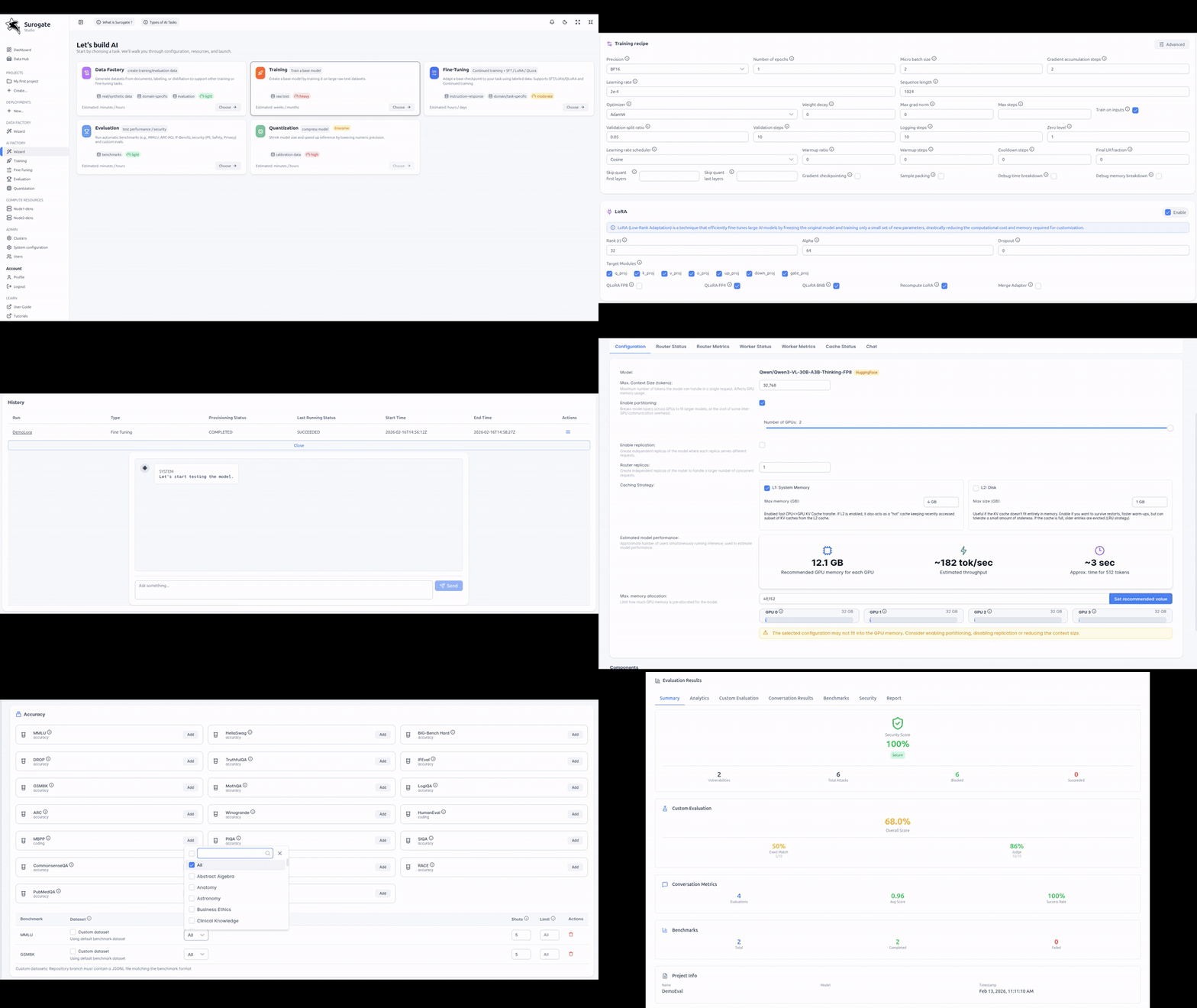
See Surogate Studio in action:
🌍 Live Demo: https://demo.surogate.ai
📘 Documentation: https://docs.surogate.ai
Explore:
- Serving and deployment workflows
- Fine-tuning pipelines
- Built-in evaluation benchmarks
- Safety / red-team evaluation dashboards
- Kubernetes & cloud workload orchestration
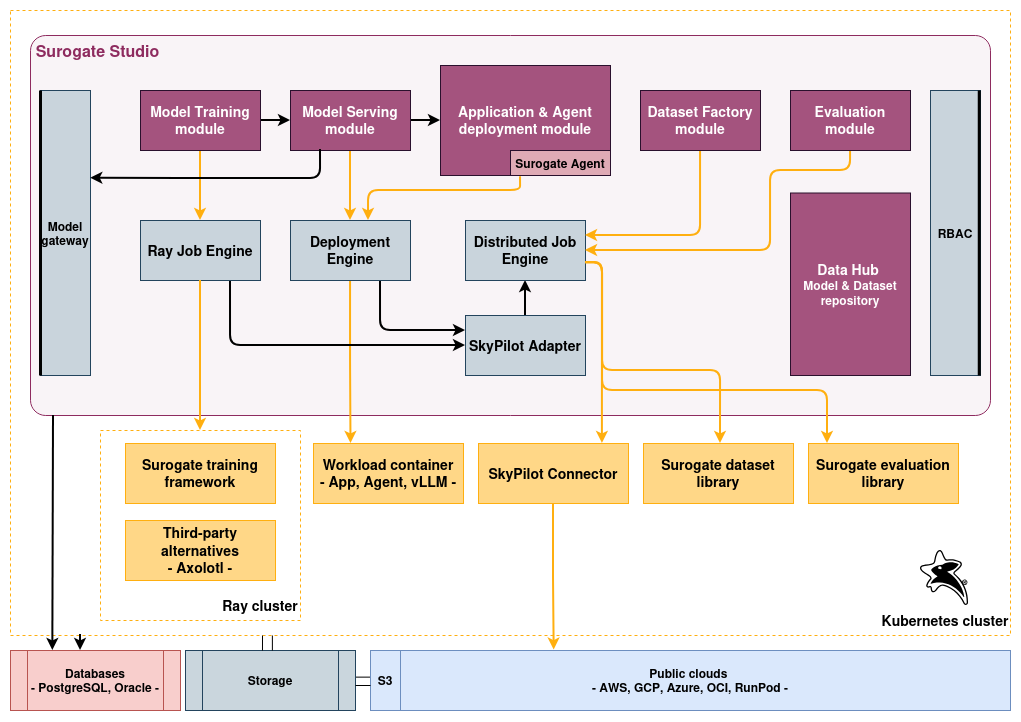
Detailed architecture and data flow
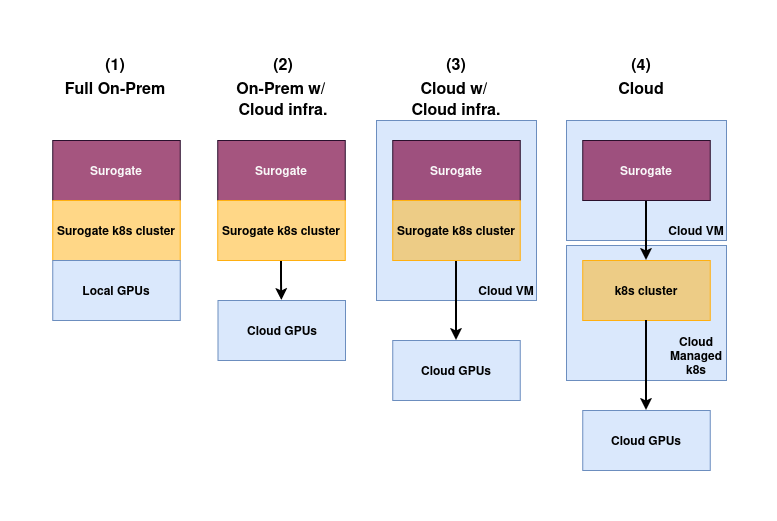
Deployment options
Quickstart
Run using Docker:
docker run -e SPRING_PROFILES_ACTIVE=appliance-prod -e APP_CLIENT_URL=http://localhost:8080 -p 8080:8080 ghcr.io/invergent-ai/studio:latest
Connect the studio to your Kubernetes cluster:
- Navigate to Admin section > Clusters and edit default cluster.
- Add the KubeConfig of your k8s cluster.
Deploy the studio on your Kubernetes cluster (Optional):
export KUBECONFIG=<kube config path>
cd <PROJECT_ROOT>/src/main/helm

kubectl create namespace surogate
helm install --namespace surogate surogate surogate
Install dependencies:
<PROJECT_ROOT>/install/install-deps.sh
Development
Before you can build this project, you must install and configure the following dependencies on your machine:
- Node.js: We use Node to run a development web server and build the project. Depending on your system, you can install Node either from source or as a pre-packaged bundle.
After installing Node, you should be able to run the following command to install development tools. You will only need to run this command when dependencies change in package.json.
npm install
We use npm scripts and Angular CLI with Webpack as our build system.
Run the following commands in two separate terminals to create a blissful development experience where your browser auto-refreshes when files change on your hard drive.
./mvnw
npm start
Building for production
Packaging as jar
To build the final jar and optimize the Surogate application for production, run:
./mvnw -Pprod clean package
To ensure everything worked, run:
java -jar target/*.jar
Others
CI/CD - Build and push docker image for production
For the first time login to dockerhub with your credentials:
docker login
then
npm run docker:push
Contributing
Contributions are welcome! Feel free to open an issue to report bugs or suggest improvements, and submit pull requests for fixes or new features.
When submitting a PR, please include:
- a clear description of the change
- steps to test/verify it locally
- relevant screenshots (UI changes) or API examples (backend changes)
Please make sure the project builds successfully and all tests pass before submitting.
License
Apache 2.0 — see LICENSE.