
tablecn
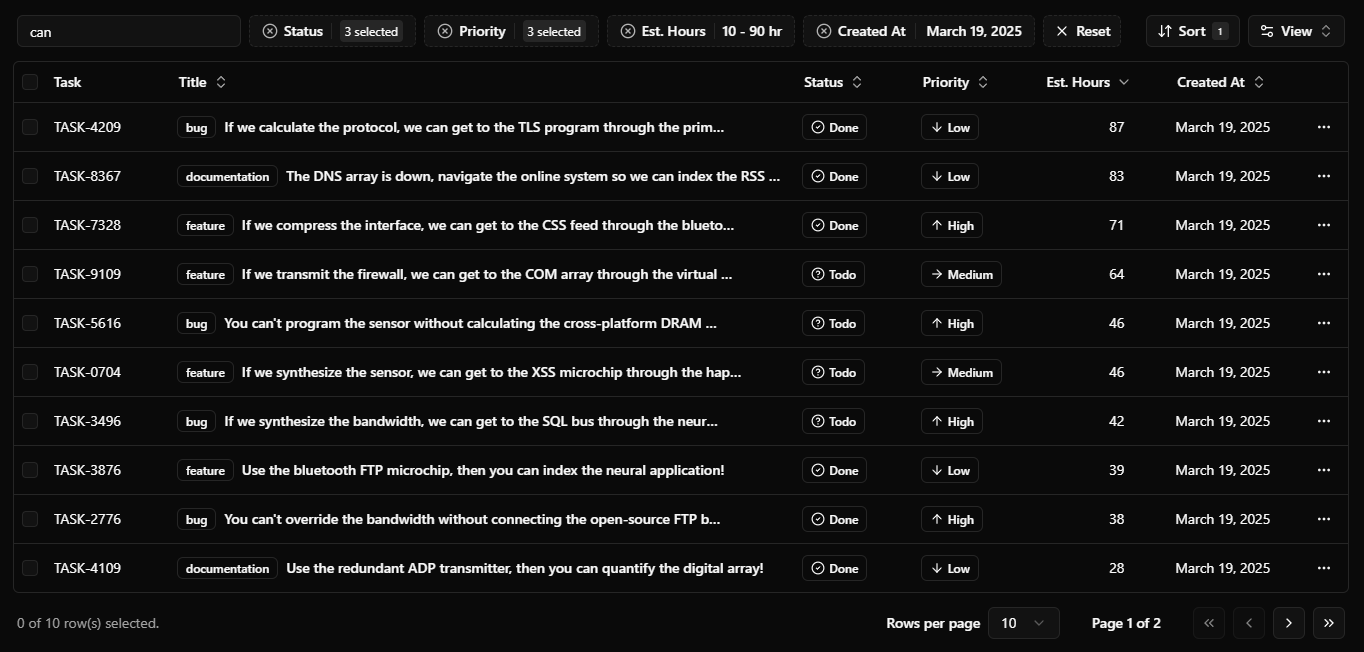
This is a shadcn table component with server-side sorting, filtering, and pagination. It is bootstrapped with create-t3-app.

Documentation
See the documentation to get started.
Tech Stack
- Framework: Next.js
- Styling: Tailwind CSS
- UI Components: shadcn/ui
- Table package: TanStack/react-table
- Database: PlanetScale
- ORM: Drizzle ORM
- Validation: Zod
Features
- Server-side pagination, sorting, and filtering
- Customizable columns
- Auto generated filters from column definitions
- Dynamic
Data-Table-Toolbarwith search, filters, and actions -
Notion/Airtablelike advanced filtering -
Linearlike filter menu for command palette filtering - Action bar on row selection
Running Locally
Quick Setup (with docker)
-
Clone the repository
git clone https://github.com/sadmann7/tablecn cd tablecn -
Copy the environment variables
cp .env.example .env -
Run the setup
pnpm ollieThis will install dependencies, start the Docker PostgreSQL instance, set up the database schema, and seed it with sample data.
Manual Setup
-
Clone the repository
git clone https://github.com/sadmann7/tablecn cd tablecn -
Install dependencies
pnpm install -
Set up environment variables
cp .env.example .envUpdate the
.envfile with your database credentials. -
Choose your database approach:
Option A: Use Docker PostgreSQL
# Start PostgreSQL container
pnpm db:start

# Set up database schema and seed data
pnpm db:setup

# Start development server
pnpm dev
Option B: Use existing PostgreSQL database
# Update .env with your database URL
# Then set up database schema and seed data
pnpm db:setup

# Start development server
pnpm dev
How do I deploy this?
Follow the deployment guides for Vercel, Netlify and Docker for more information.
Credits
- shadcn/ui - For the initial implementation of the data table.