
tfautomv


Generate moved blocks and state move commands automatically for Terraform and OpenTofu.
[!NOTE] Status: stable. Used in production. Maintenance is mostly dependency updates: no new features are planned, but bug reports are welcome. Still v0.x because some internals may change in major ways before 1.0.
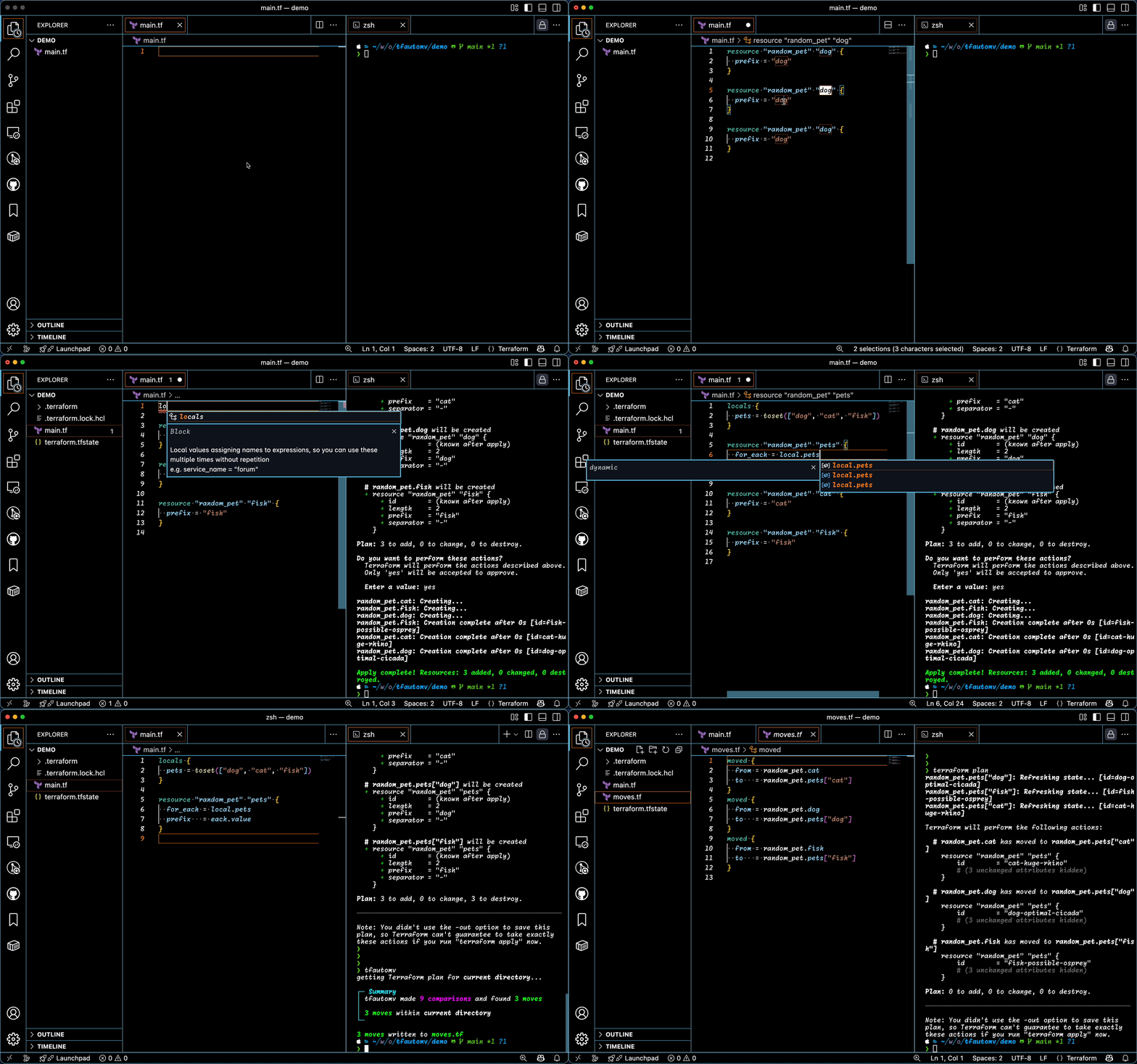
When you rename or move a resource in your Terraform code, Terraform loses track of the resource's state. The next plan shows the original resource being destroyed and a "new" one created in its place. tfautomv inspects the plan, detects these create/delete pairs, and writes moved blocks (or terraform state mv commands) so Terraform updates state in place without touching infrastructure.
For example, after renaming aws_instance.web to aws_instance.web_server:
resource "aws_instance" "web_server" {
  ami           = "ami-12345"
  instance_type = "t2.micro"
}
Running tfautomv produces a moves.tf file:
moved {
  from = aws_instance.web
  to   = aws_instance.web_server
}
The next terraform plan shows no changes.
Installation
Homebrew
On MacOS or Linux:
brew install busser/tap/tfautomv
Shell script
On MacOS or Linux:
curl -sSfL https://raw.githubusercontent.com/busser/tfautomv/main/install.sh | sh
Other methods
Yay (Arch Linux), asdf, manual download, from source
Yay (Arch Linux):
yay tfautomv-bin
asdf version manager:
asdf plugin add tfautomv https://github.com/busser/asdf-tfautomv.git
Manual download: grab a binary from the Releases page and put it in a directory on your PATH.
From source (requires Go 1.18+):
git clone https://github.com/busser/tfautomv
cd tfautomv
make build
Then move bin/tfautomv to a directory on your PATH.
Contributions to support other installation methods, including Windows for the shell script, are welcome.
Usage
Run tfautomv in any directory where you would run terraform plan:
tfautomv
This runs terraform init, terraform refresh, and terraform plan, then writes moved blocks to a moves.tf file. You can also target a specific working directory:
tfautomv ./production
Output formats
By default, tfautomv writes moved blocks. Force moved blocks only with --output=blocks:
tfautomv --output=blocks
Force terraform state mv commands with --output=commands. The commands are printed to stdout, so you can review them, save them to a file, or pipe to a shell:
tfautomv --output=commands              # print to stdout
tfautomv --output=commands > moves.sh   # save to a file
tfautomv --output=commands | sh         # run immediately
-o is shorthand for --output.
Moving resources across directories
If you have multiple Terraform modules in different directories, pass them all to tfautomv:
tfautomv ./production/main ./production/backup -o commands
This runs terraform init, refresh, and plan in each directory, then writes terraform state mv commands to standard output. The commands move resources within and across directories as needed.
Terraform does not natively support moving resources across directories. To work around this, the generated commands pull copies of each directory's state, perform the moves locally, and push the new state back. You can pass as many directories as you want.
This requires the commands output format. Terraform's moved block syntax does not support cross-directory moves.
Skipping init and refresh
tfautomv runs init and refresh by default. To skip them and iterate faster:
tfautomv --skip-init --skip-refresh
# or, equivalently:
tfautomv -sS
Best practices
tfautomv is for pure refactoring: restructuring code without changing infrastructure. Mixing refactoring with configuration changes (renaming a resource AND modifying its tags in the same step, for example) leads to bad matches or surprise infrastructure changes.
Recommended workflow:
- Make structural changes only (rename, move between modules, switch to
for_each). - Run
tfautomvand apply the resulting moves. Plan should show no infrastructure changes. - In a separate change, modify resource attributes as needed.
Debugging unmatched resources
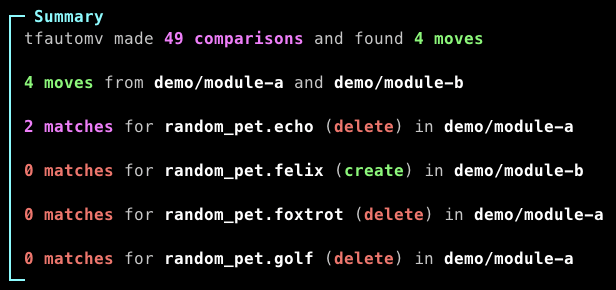
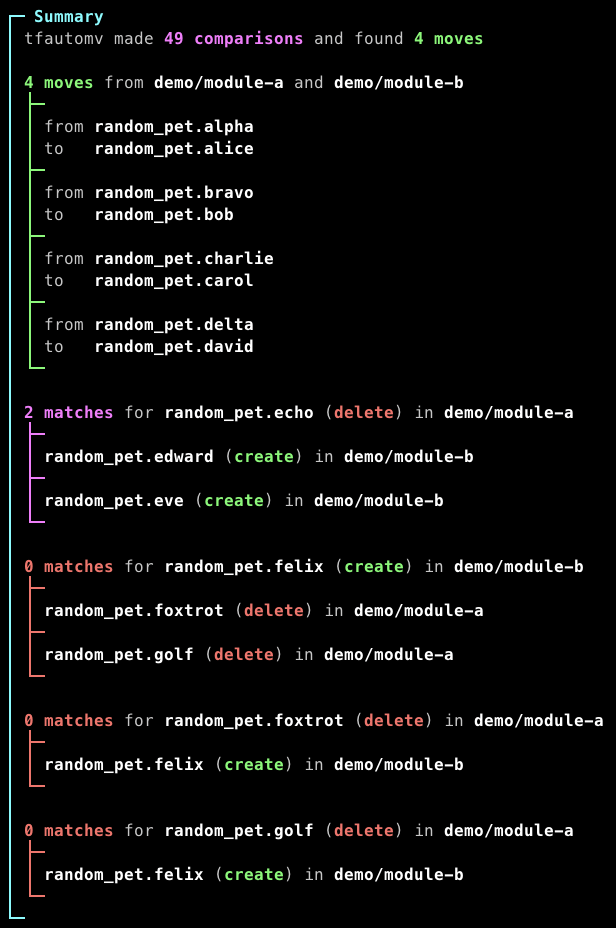
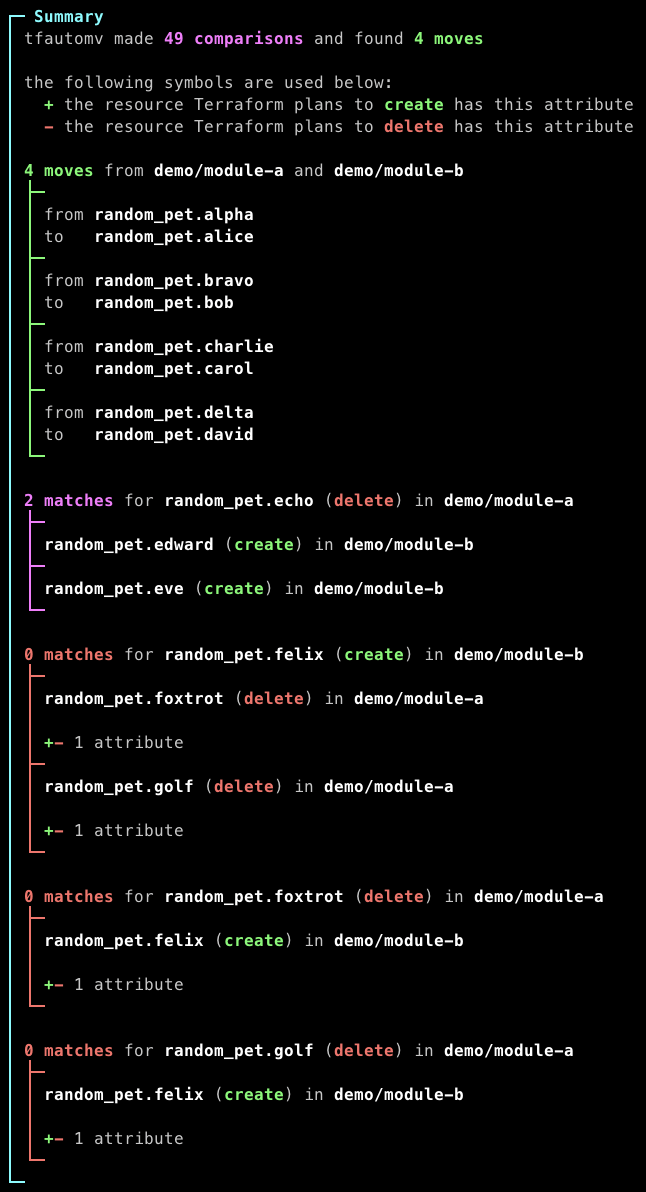
If a resource you expected to be matched is not, increase verbosity with -v (up to -vvv) to see why:
tfautomv -vvv
| level 0 (default) | level 1 (-v) |
level 2 (-vv) |
level 3 (-vvv) |
|---|---|---|---|
 |
 |
 |
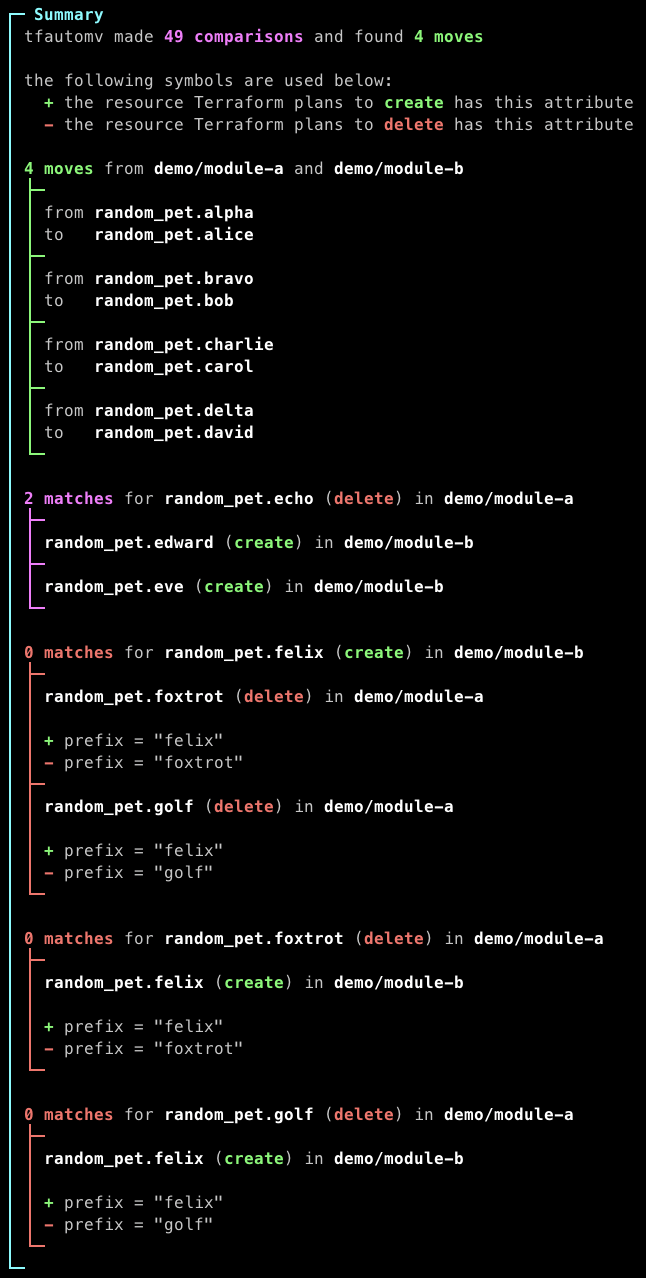 |
The output shows which attributes differ between create/delete pairs. Based on what you see, you can edit your code, write a moved block manually, or use --ignore (below) to skip specific differences.
Ignoring differences
tfautomv matches resources by comparing all their attributes. Sometimes a Terraform provider transforms an attribute's value (normalizing JSON whitespace, adding a prefix, etc.) so the value in your code never matches the value in state. The --ignore flag tells tfautomv to skip specific attributes during comparison.
[!WARNING] Use
--ignorefor provider quirks, not for configuration changes you made on purpose. Forcing a match by ignoring an attribute you intended to change can produce unintended infrastructure changes when the move is applied. If you find yourself reaching for--ignorebecause you changed a value, that's a sign refactoring and configuration changes have been mixed: separate them (see Best practices).
A rule looks like this:
<KIND>:<RESOURCE TYPE>:<ATTRIBUTE NAME>[:<KIND ARGUMENTS>]
You can pass --ignore multiple times:
tfautomv \
  --ignore="whitespace:azurerm_api_management_policy:xml_content" \
  --ignore="prefix:google_storage_bucket_iam_member:bucket:b/"
Available kinds
everything: ignore any difference. Example:--ignore="everything:random_pet:length"whitespace: ignore whitespace differences (useful for provider-formatted JSON or XML). Example:--ignore="whitespace:aws_iam_policy:policy"prefix: strip a fixed prefix before comparing. Example:--ignore="prefix:google_storage_bucket_iam_member:bucket:b/"
Detailed examples for each kind
whitespace allows these two resources to match despite different formatting:
resource "azurerm_api_management_policy" "foo" {
  api_management_id = "..."

  xml_content = <<-EOT
  <policies>
    <inbound>
      <cross-domain />
      <base />
      <find-and-replace from="xyz" to="abc" />
    </inbound>
  </policies>
  EOT
}

resource "azurerm_api_management_policy" "bar" {
  api_management_id = "..."

  xml_content = "<policies><inbound><cross-domain /><base /><find-and-replace from=\"xyz\" to=\"abc\" /></inbound></policies>"
}
prefix with b/ strips that prefix before comparing the bucket attribute, useful when a provider stores b/my-bucket in state but the configuration sets my-bucket.
If you have a use case the existing kinds don't cover, please open an issue so we can track demand.
Nested attributes
Join parent and child attributes with .:
<KIND>:<RESOURCE TYPE>:parent_obj.child_field
<KIND>:<RESOURCE TYPE>:parent_list.0
To find an attribute's full path, run tfautomv -vvv and read the verbosity output.
Tool integration
Passing extra arguments to Terraform
Use Terraform's built-in TF_CLI_ARGS and TF_CLI_ARGS_name environment variables. For example:
TF_CLI_ARGS_plan="-var-file=production.tfvars" tfautomv
OpenTofu
OpenTofu is supported out of the box via the --terraform-bin flag:
tfautomv --terraform-bin=tofu
This works with all features, including moved blocks, tofu state mv commands, and --preplanned.
Terragrunt
Terragrunt does not work directly with --terraform-bin=terragrunt because Terragrunt's CLI does not behave identically to Terraform's. A wrapper script can bridge the gap. See issue #127 for the current discussion and an example wrapper.
Other Terraform-compatible tools
The --terraform-bin flag works with any executable that exposes init and plan commands compatible with Terraform.
Using existing plan files
If you've already generated Terraform plan files, the --preplanned flag tells tfautomv to use them instead of running terraform plan. This is useful for:
- Performance: avoid re-running plans while iterating on
--ignorerules. - Enterprise environments: where running Terraform locally is impractical due to secrets or remote state.
- CI/CD workflows: where plans are generated in earlier pipeline stages.
- Remote workspaces (TFE/Cloud): where you can download JSON plans but can't run Terraform locally.
Basic usage:
terraform plan -out=tfplan.bin
tfautomv --preplanned
Custom file paths, multiple directories, JSON vs binary plans
Custom plan file path:
terraform plan -out=my-plan.bin
tfautomv --preplanned --preplanned-file=my-plan.bin
Multiple directories (each must have its own plan file):
(cd production && terraform plan -out=tfplan.bin)
(cd staging && terraform plan -out=tfplan.bin)
tfautomv --preplanned production staging
JSON vs binary plans. tfautomv detects the format from the file extension:
- Binary plans (default): tfautomv runs
terraform show -jsonto convert them. - JSON plans (
.jsonextension): read directly.
terraform show -json tfplan.bin > tfplan.json
tfautomv --preplanned --preplanned-file=tfplan.json
If any specified directory is missing its plan file, tfautomv exits with an error.
Disabling colors
Pass --no-color or set the NO_COLOR environment variable to any value:
tfautomv --no-color
NO_COLOR=true tfautomv
Requirements
tfautomv shells out to the Terraform (or OpenTofu) CLI, so it works with any compatible version. Specific features have minimum version requirements:
movedblocks: Terraform v1.1+- Cross-module
terraform state mvcommands: Terraform v0.14+ - Single-module
terraform state mvcommands: Terraform v0.13+
Thanks
Thanks to Padok, where this project was born 💜
License
Apache 2.0. Summary.