
Time Tracker
A simple time tracking application made as a part of "Programming for Windows" course on University of Finance and Administration, department of Informatics and Mathematics. Written in C# / .NET 4 and using the WinForms library, released publicly as open-source software under MIT license.
Features
- Time tracking
- Visual display of currently tracked time
- Set tracking categories (or pick a category that's already in the table)
- Observe immediate totals (statistics for all rows / selection / selected category)
- Delete inconvenient entries
- Open / Save time tracker table files (which use CSV-like format that is easy to process further)
- Generic window manager options (stay on top, show in notification area, ...)
- Language picker (currently available in Czech and English) with Windows' locale autodetection.
- Settings are persisted in local storage
Usage
- Star tracking by clicking the
 button
 - The two read-only fields now show the time when tracking started and how much time elapsed since then:

- Optionally fill in the "category" field:

- Stop the tracking by clicking the
 button
 - A new record will appear in the table below:

Screenshots
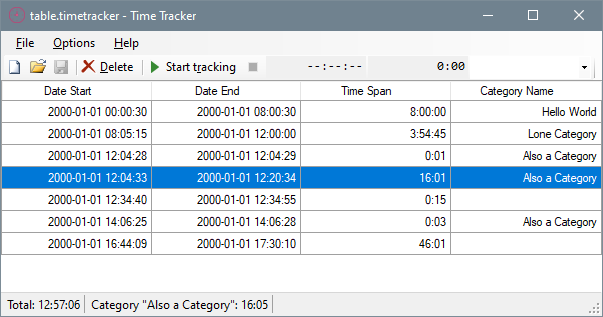
The following screenshot represents the table from examples/table.timetracker:
Installation
You can either grab the latest release, unpack it and run timetracker.exe or compile the software yourself.
Compiling
Clone this repository, open the solution (TimeTracker.sln) in Visual Studio,
pick a configuration (I'd suggest release unless you plan to tinker with the code)
and select Build > Compile Solution. The built code should appear in the project directory
under bin/Release. You'll see timetracker.exe here
(along with some generated resource files and default config).