
  _              _ _
 | |_ ___  _ __ (_|_)
 | __/ _ \| '_ \| | |
 | || (_) | |   | | |
  \__\___/|_|   |_|_|
See everything hitting your server. Block what should not be there.
Quick start · Features · Installation · Docs
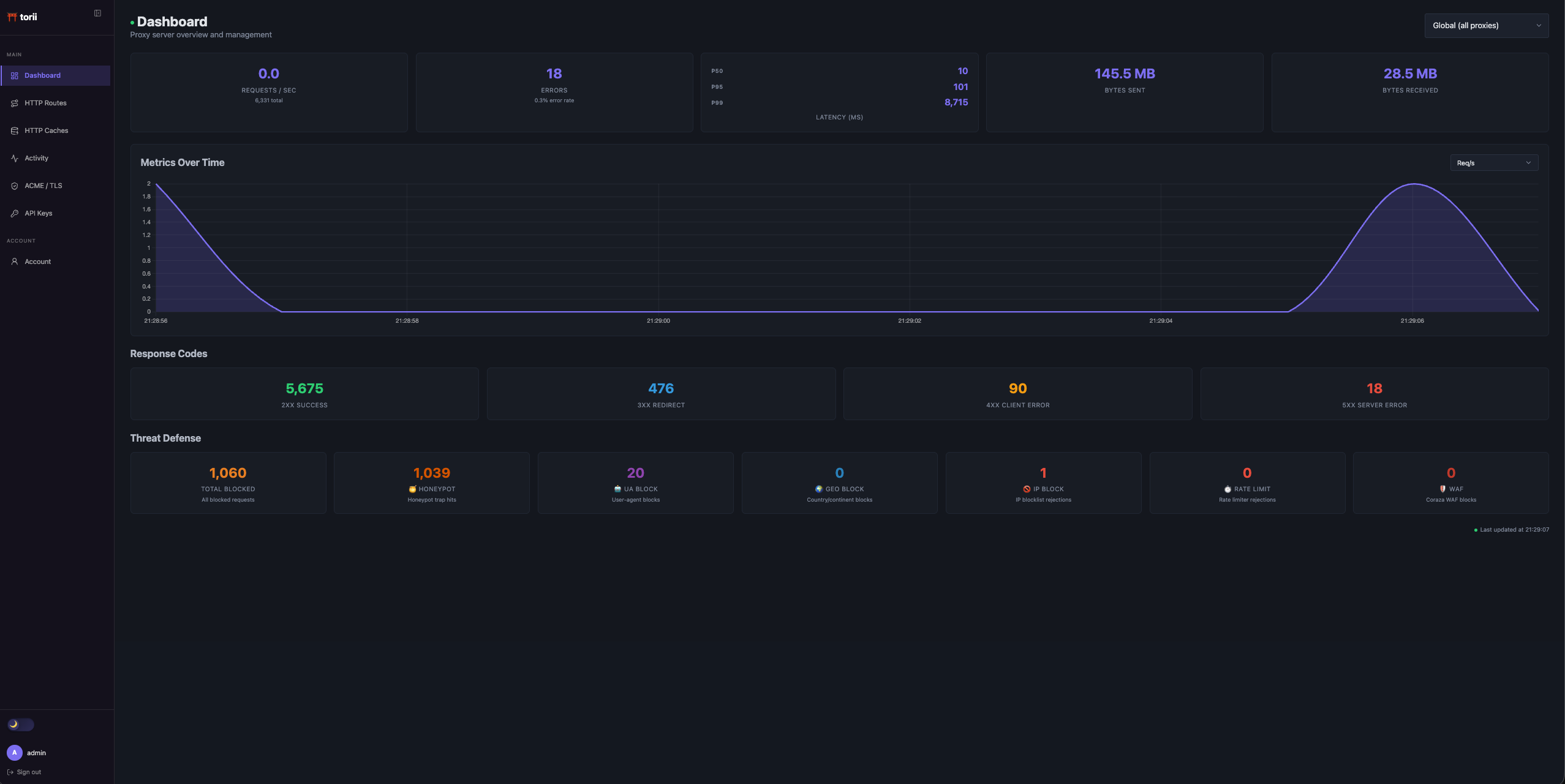
Live dashboard on a Raspberry Pi exposed to the internet. Every request, every blocked IP, every bot caught, in real time.
What Is Torii?
Torii is a reverse proxy with a built-in security dashboard. It sits in front of your services, routes HTTP/HTTPS traffic, handles TLS, applies security middleware, and shows live request activity from one small Go binary.
It is aimed at internet-facing home labs, Raspberry Pi deployments, and small self-hosted services where you want the convenience of a proxy and the visibility of a security console without running a stack of separate tools.
Quick Start
go build -o torii ./cmd/torii

cat > torii.yaml <<'YAML'
log:
  log-level: INFO

api-server:
  host: 127.0.0.1
  port: 27000

net-config:
  http:
    - port: 8090
      default:
        backend: http://127.0.0.1:9000
YAML

./torii -config torii.yaml -debug
Open http://127.0.0.1:27000/ui and set the first admin password. Debug mode starts stub backends for configured
services, so you can explore the dashboard before pointing Torii at real traffic.
Full configuration reference: docs/configuration.md
What It Catches
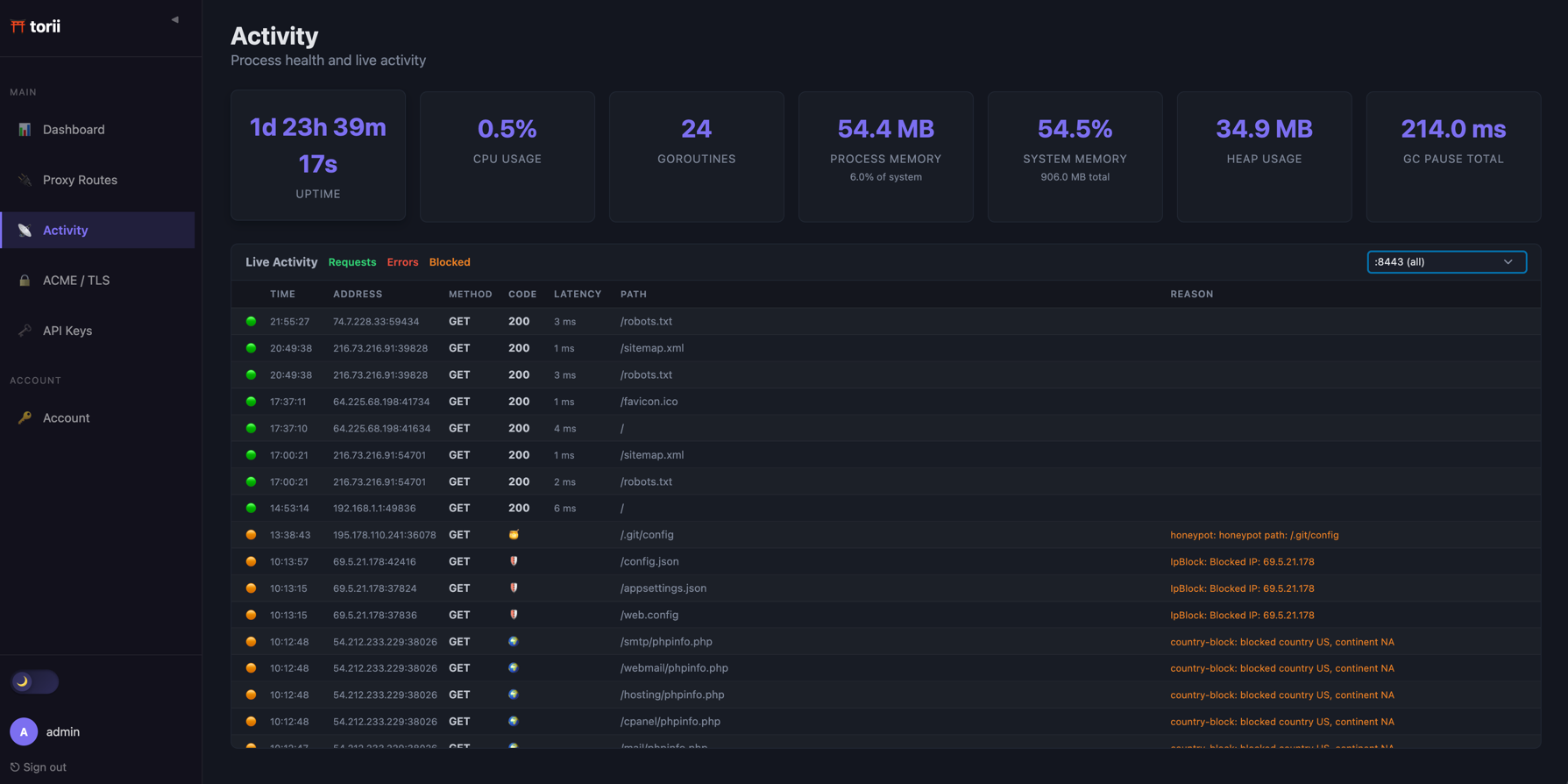
Torii is running on a Raspberry Pi 3 with ports open to the internet. On a normal day it sees and blocks things like:
- Vulnerability scanners probing
.env,wp-login.php,.git/config, and other high-signal paths - Known scanner user agents such as Nuclei, zgrab, scrapers, and AI crawlers
- IPs with abuse history through AbuseIPDB checks and optional reporting
- Brute-force attempts with token-bucket rate limits and proper
429+Retry-Afterresponses - Unexpected geography with GeoIP country and continent rules
- Suspicious payloads through the Coraza WAF and OWASP Core Rule Set
Blocked requests show up in the dashboard with timestamps, IPs, middleware names, and block reasons.
| Activity Log | Under Load |
|---|---|
 |
 |
Features
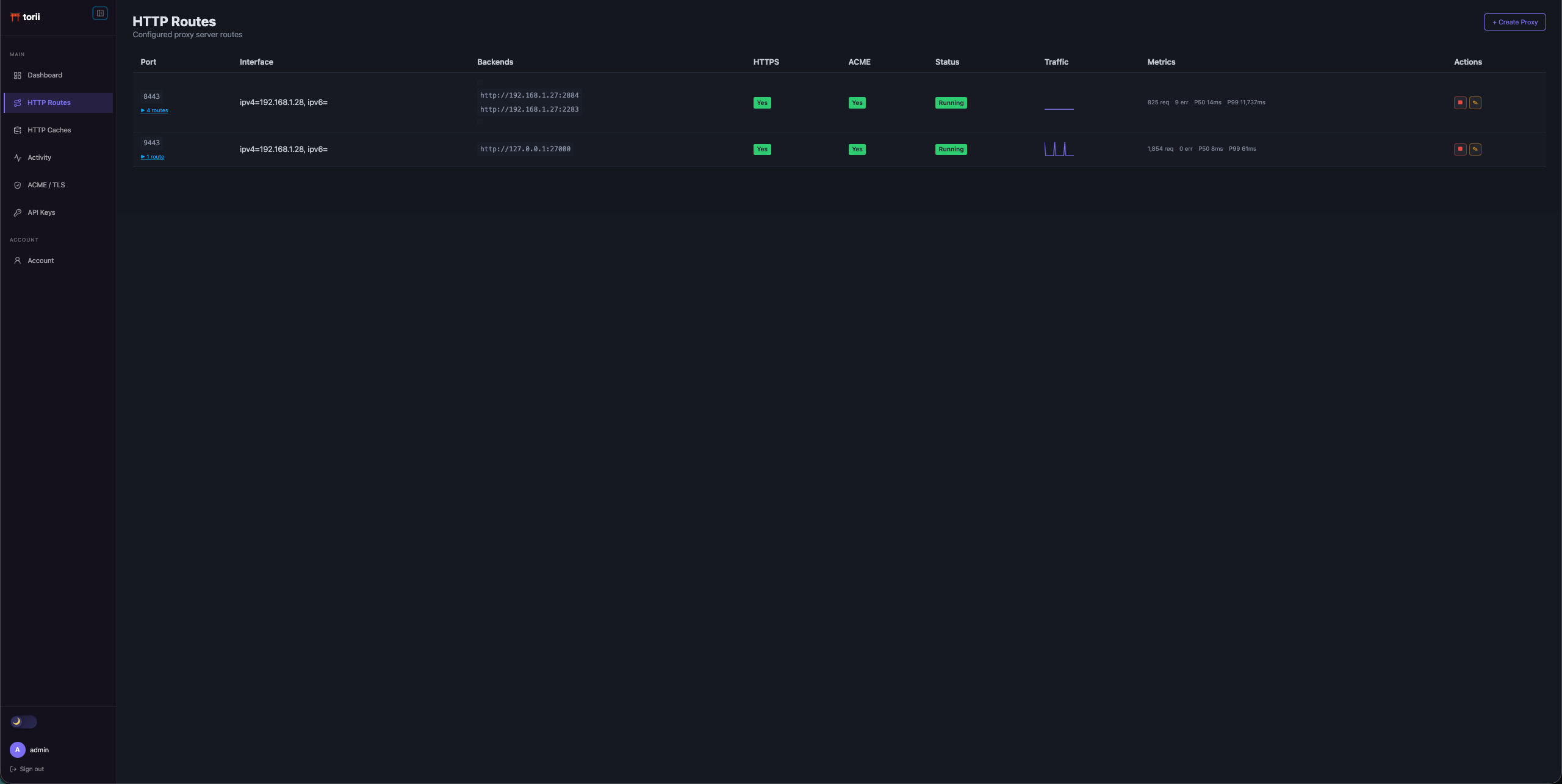
Routing: HTTP/HTTPS listeners, virtual-host routing, wildcard hosts, path rules, per-path backend overrides, and trusted proxy support.
Automatic TLS: Let's Encrypt via DNS-01, per-domain SNI, wildcard certificates, and background renewal.
Security middleware: WAF, user-agent blocking, IP filtering, AbuseIPDB, honeypots, GeoIP blocking, basic auth, TOTP, request/response header policies, body limits, timeouts, and rate limiting.
Resilience: Circuit breakers stop forwarding to unhealthy backends until they recover.
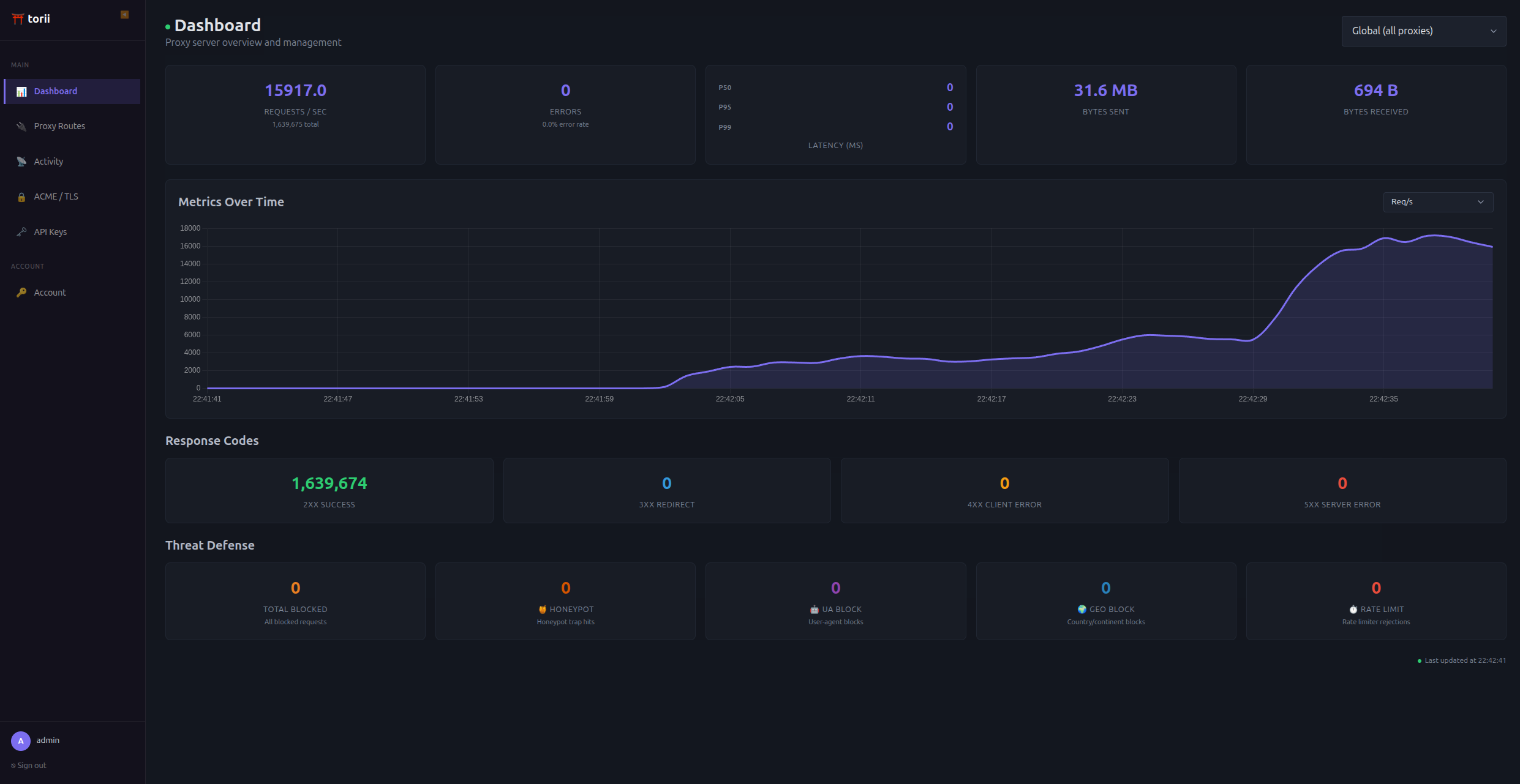
Observability: Hierarchical metrics from global to route to path, live request/error/block logs over SSE, request IDs, latency percentiles, byte counts, status-code buckets, and active connection counts.
Dashboard and API: First-time setup, route management, ACME configuration, API keys, read-only stats access, and a management API documented in docs/api.md.
20 composable middlewares: available globally, per route, or per path. See the middleware reference.
Homepage Integration
Torii has scoped API keys for read-only stats access. Create an API key with the read_stats scope, then add this to
your Homepage config:
- Torii:
    icon: shield
    href: http://127.0.0.1:27000/ui
    widget:
      type: customapi
      url: http://127.0.0.1:27000/api/v1/proxy/metrics
      headers:
        Authorization: Bearer <your-api-key>
      mappings:
        - field: request_count
          label: Requests
        - field: blocked_total
          label: Blocked

Screenshots
| Dashboard | Proxy Routes |
|---|---|
|
 |
Installation
Binary
go build -o torii ./cmd/torii
./torii -config torii.yaml
Torii uses SQLite through mattn/go-sqlite3, so local source builds need CGO enabled.
Docker
docker run -d \
  --network host \
  -v torii-data:/data \
  -v /path/to/torii.yaml:/etc/torii/config.yaml \
  ghcr.io/nunooliveiraqwe/torii:latest
--network host is recommended so Torii can bind directly to host interfaces.
| Mount | Purpose |
|---|---|
torii-data:/data |
SQLite database and runtime state |
/path/to/torii.yaml |
Config file mounted into the container |
Building from source with Docker
docker build -f docker/Multistage.Dockerfile -t torii .
Debian / Ubuntu
dpkg -i torii_<version>_amd64.deb
Performance
Full middleware chain over HTTPS on a Raspberry Pi 3 with 4-core ARM and 906 MB RAM:
| Concurrency | Req/s | p50 | p99 |
|---|---|---|---|
| 10 | 663 | 12 ms | 98 ms |
| 100 | 656 | 146 ms | 359 ms |
Desktop with AMD 9800X3D and 32 GB RAM:
| Concurrency | Req/s | p50 | p99 |
|---|---|---|---|
| 100 | 9,540 | 9 ms | 96 ms |
| 200 | 13,114 | 12 ms | 100 ms |
Documentation
Requirements
- Go 1.26+
- CGO for local source builds
License
GNU Affero General Public License v3.0
Project notes
This is a working scratchpad, not a public roadmap.
Needs Work
- HTTP proxy UI: works, but the UX needs another pass
- ACME UI: add a revoke button for individual certificates; reset button placement needs work
- Proxy Routes UI: host names should be clickable links that open in a new tab
Up Next
- Enable API server middlewares to be fully configurable through the config file
- TCP proxying: config schema is there, implementation is not
- UA fingerprint rotation detection: bots that rotate user agents mid-scan are easy to spot. Track UA consistency per IP and flag or block IPs whose OS/browser family changes unnaturally fast.
- ForwardAuth middleware: delegate auth decisions to an external service, like Traefik ForwardAuth or nginx
auth_request - Bait domains, such as
admin.yourdomain.com, that have no reason to receive traffic. Any request to them would be suspicious enough to block the source IP. - CrowdSec integration: implement Torii as a CrowdSec bouncer using streaming mode, with Torii as both enforcer and possible sensor.
- Suspicious activity scoring based on request patterns, odd paths, high request rates, and inconsistent user agents.
- Active backend health checks with per-backend path, interval, timeout, and success/failure thresholds.
Recently Done
- Internal event bus for request-blocked, honeypot-triggered, backend-down, suspicious-IP, and related events
- Header values based on request attributes, such as
X-Client-IP: $remote_addr - Rolling logs decoupled from metrics
Known Bugs
- Create proxy button does not show an error when middleware is configured incorrectly, such as a static response missing a status code
Maybe
- Proxy-level authentication: login pages so the proxy handles auth before forwarding to backends
- Dedicated tarpitting middleware separate from honeypot trickster mode
- Anubis integration, pending a good approach for its larger config surface
- Webhooks and alerts for suspicious activity, blocked IPs, backend health changes, and similar events
- JA3/JA4 fingerprinting if it can fit cleanly around TLS handshake handling