
toyterm
toyterm is a toy terminal emulator for Linux.
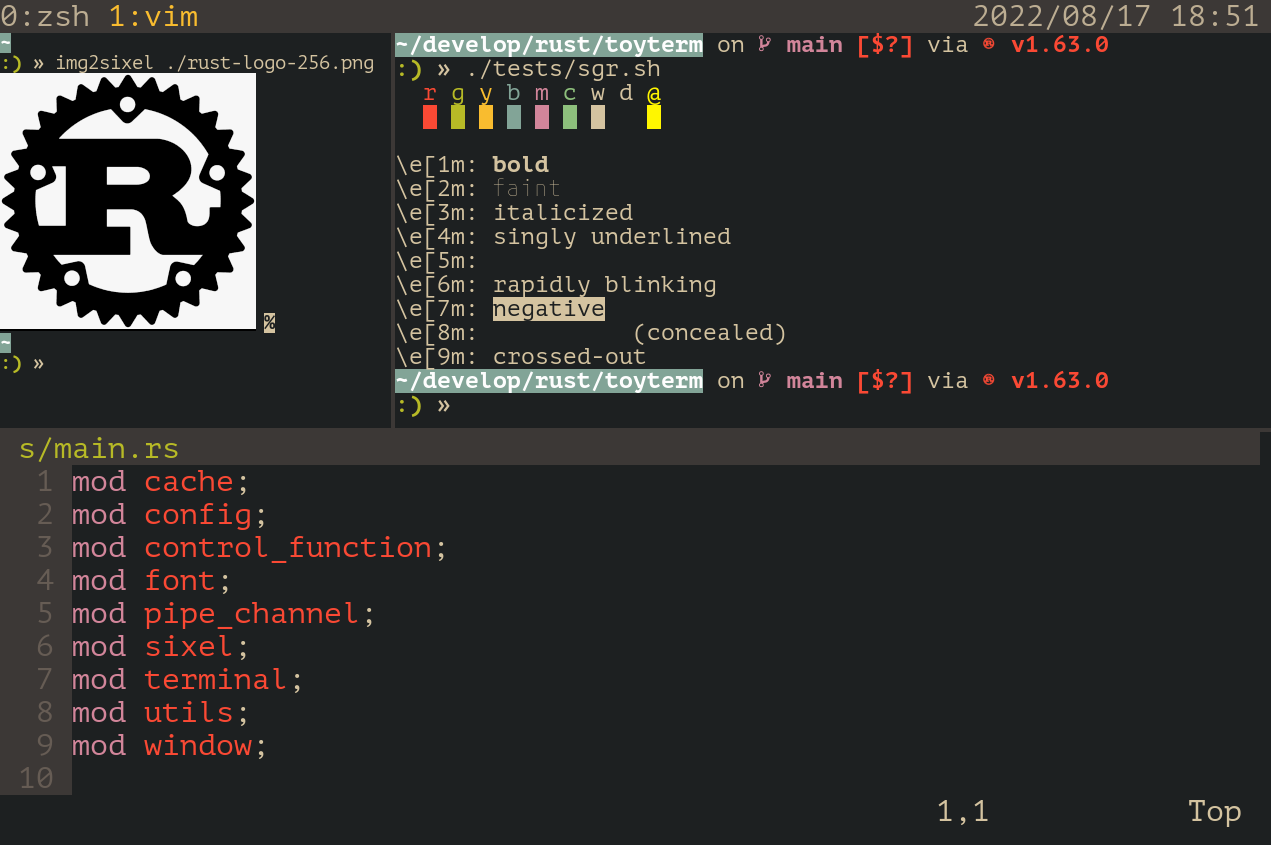
Features/Limitations
- hardware accelerated graphics
- support for SIXEL graphics
- support for X11 clipboard (copying & pasting)
- manual font fallback: you can specify the order of fonts for each style
- support for mouse reporting
- (optional) support for multiplexing
- toyterm assumes UTF-8 encoding
- following basic functions are TODO
- automatic font selection by integrating with fontconfig
- support for operating systems other than Linux
Usage
To install:
$ git clone https://github.com/algon-320/toyterm
$ cd toyterm
$ tic -x -o "$HOME/.terminfo/" toyterm.info
$ cargo install --path .
- To enable multiplexing feature, please add "--features multiplex" to the last line.
- To install the terminfo globally, please do
$ sudo tic -x toyterm.infoinstead.
To configure:
$ mkdir -p "$HOME/.config/toyterm"
$ cp ./config.toml "$HOME/.config/toyterm"
$ $EDITOR "$HOME/.config/toyterm/config.toml"
To uninstall:
$ rm "$HOME/.terminfo/t/toyterm-256color"
$ cargo uninstall toyterm
$ rm -r "$HOME/.config/toyterm"
- If you would like to remove the globally installed terminfo, please try
$ sudo rm /usr/share/terminfo/t/toyterm-256colortoo.
Keybinding
| Key | Function |
|---|---|
Ctrl + - |
Decrease font size |
Ctrl + = |
Increase font size |
Ctrl + Shift + c |
Copy selected text |
Ctrl + Shift + v |
Paste clipboard text |
Ctrl + Shift + l |
Clear history |
| Up key | Send \x1b[[A |
| Down key | Send \x1b[[B |
| Right key | Send \x1b[[C |
| Left key | Send \x1b[[D |
| PageUp key | Send \x1b[5~ |
| PageDown key | Send \x1b[6~ |
| Delete key | Send \x1b[3~ |
| Backspace key | Send \x7f |
| Mouse Wheel | Same effect as arrow keys (Up/Down/Right/Left) |
| Shift + Mouse Wheel | Scroll history |
If feature multiplex is enalbed:
| Key | Function |
|---|---|
Ctrl + a, c |
Create a new window |
Ctrl + a, n |
Switch to next window |
Ctrl + a, p |
Switch to prev window |
Ctrl + a, % |
Split current pane vertically |
Ctrl + a, " |
Split current pane horizontally |
Ctrl + a, z |
Maximize current pane |
Ctrl + a, s |
Save current layout |
Ctrl + a, r |
Restore saved layout |
Ctrl + a, x |
Close currently focused pane |
Ctrl + a, Up/Down/Left/Right |
Focus up/down/left/right pane |
Ctrl + a, Ctrl + Up |
Move the partition up (i.e. Decrease the width of upper pane) |
Ctrl + a, Ctrl + Down |
Move the partition down (i.e. Increase the width of upper pane) |
Ctrl + a, Ctrl + Left |
Move the partition left (i.e. Decrease the width of left pane) |
Ctrl + a, Ctrl + Right |
Move the partition right (i.e. Increase the width of right pane) |
Ctrl + a, Ctrl + a |
Send \x01 (Ctrl + a) |
Control Functions
toyterm aims to support the standard control functions described in ECMA-48. Some private functions, widely used by modern terminals, may be supported as well. Currently toyterm supports the following functions.
C0 functions
- BS
- CR
- ESC
- FF
- HT
- LF
- VT
C1 functions
- CSI
Control Sequences
-
CHA
-
CUB
-
CUD
-
CUF
-
CUP
-
CUU
-
DCH
-
DL
-
DSR
-
ECH
-
ED
-
EL
-
HVP
-
ICH
-
IL
-
RM
-
SGR
- Default:
\e[0m,\e[m - Bold:
\e[1m - Faint:
\e[2m - Blinking (slow):
\e[5m - Blinking (rapid):
\e[6m - Negative:
\e[7m - Consealed:
\e[8m - Foreground Black, Red, Green, Yellow, Blue, Magenta, Cyan, White:
\e[30m..\e[37m - Foreground Black, Red, Green, Yellow, Blue, Magenta, Cyan, White (Bright):
\e[90m..\e[97m - Foreground Default:
\e[39m - Foreground Gaming:
\e[70m - Foreground RGB:
\e[38;2;{R};{G};{B}m - Foreground 256 color:
\e[38;5;{idx}m - Background Black, Red, Green, Yellow, Blue, Magenta, Cyan, White:
\e[40m..\e[47m - Background Black, Red, Green, Yellow, Blue, Magenta, Cyan, White (Bright):
\e[100m..\e[107m - Background Default:
\e[49m - Background Gaming:
\e[80m - Background RGB:
\e[48;2;{R};{G};{B}m - Background 256 color:
\e[48;5;{idx}m
- Default:
-
SM
-
VPA
-
SetScrollRegion (DECSTBM):
\e[{top};{bottom}r -
SelectCursorStyle:
- Default (Block):
\e[0 q - Block:
\e[2 q - Underline:
\e[4 q - Bar:
\e[6 q
- Default (Block):
Device Control Function
- DCS
q(sixel string...) ST- see https://www.vt100.net/docs/vt3xx-gp/chapter14.html for the representation
Other Sequences
- SaveCursor (DECSC):
\e7 - RestoreCursor (DECRC):
\e8
Modes
toyterm supports the following modes.
- Cursor Visible Mode (
?25)- Set: cursor is visible.
- Reset: cursor is invisible.
- Sixel Scrolling Mode (
?80)- Set: a sixel image is displayed at the current cursor position.
- Reset: a sixel image is displayed at the upper left corner of the screen.
- Normal Mouse Tracking (
?1000)- Set: enable sending mouse report
- Reset: disable sending mouse report
- SGR Extended Mode Mouse Tracking (
?1006)- Set: enable SGR extended mode mouse tracking, change response of mouse click
- Reset: disable SGR extended mode mouse tracking
- Alternate Screen Buffer Mode (
?1049)- Set: clear the screen, save the cursor position, and switch to the alternate screen.
- Reset: restore the saved cursor position, and switch back to the primary screen.
- Bracketed Paste Mode (
?2004)- Set: insert
\x1b[200~at the beginning and\x1b[201~at the end of a pasted text. - Reset: a pasted text is send to the terminal as if it was typed by user.
- Set: insert
License
This software is licensed under MIT License.
The embedded fonts (M PLUS 1 Code) are redistributed under the Open Font License (OFL).
See also src/font/OFL.txt for more details.