
🌐 Trackarr
A modern, high-performance private BitTorrent tracker
Built with Nuxt 4 • PostgreSQL • Redis




Features • Quick Start • Security • Documentation • Live Demo
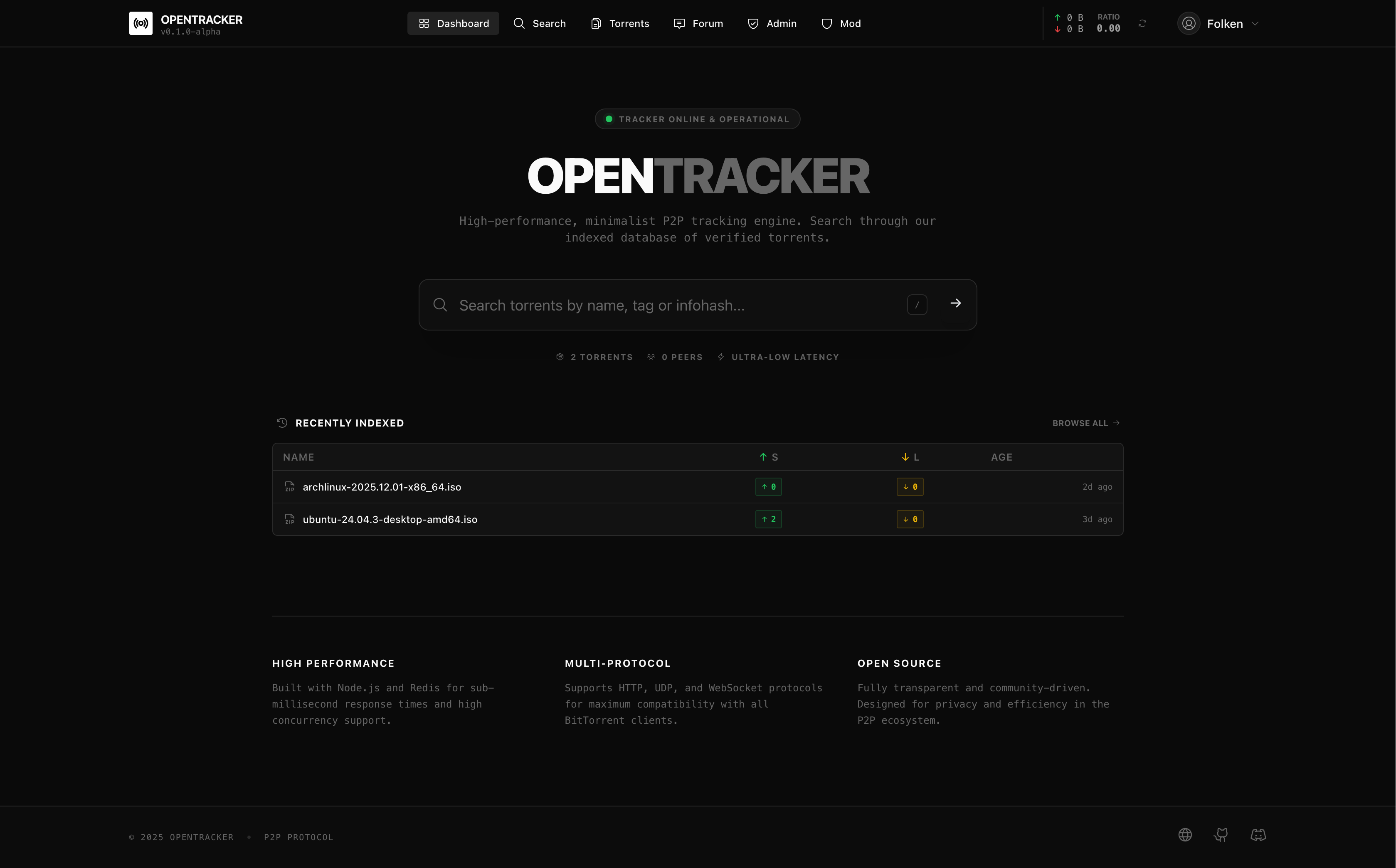
✨ Features
| Privacy & Authentication | Performance |
|---|---|
| Zero-Knowledge Authentication | Redis-powered sub-ms peer lookups |
| Proof of Work anti-abuse | PostgreSQL with full-text search |
| Private torrents (DHT/PEX disabled) | HTTP & WebSocket announce support |
| Ratio tracking & enforcement | Optimized for high concurrency |
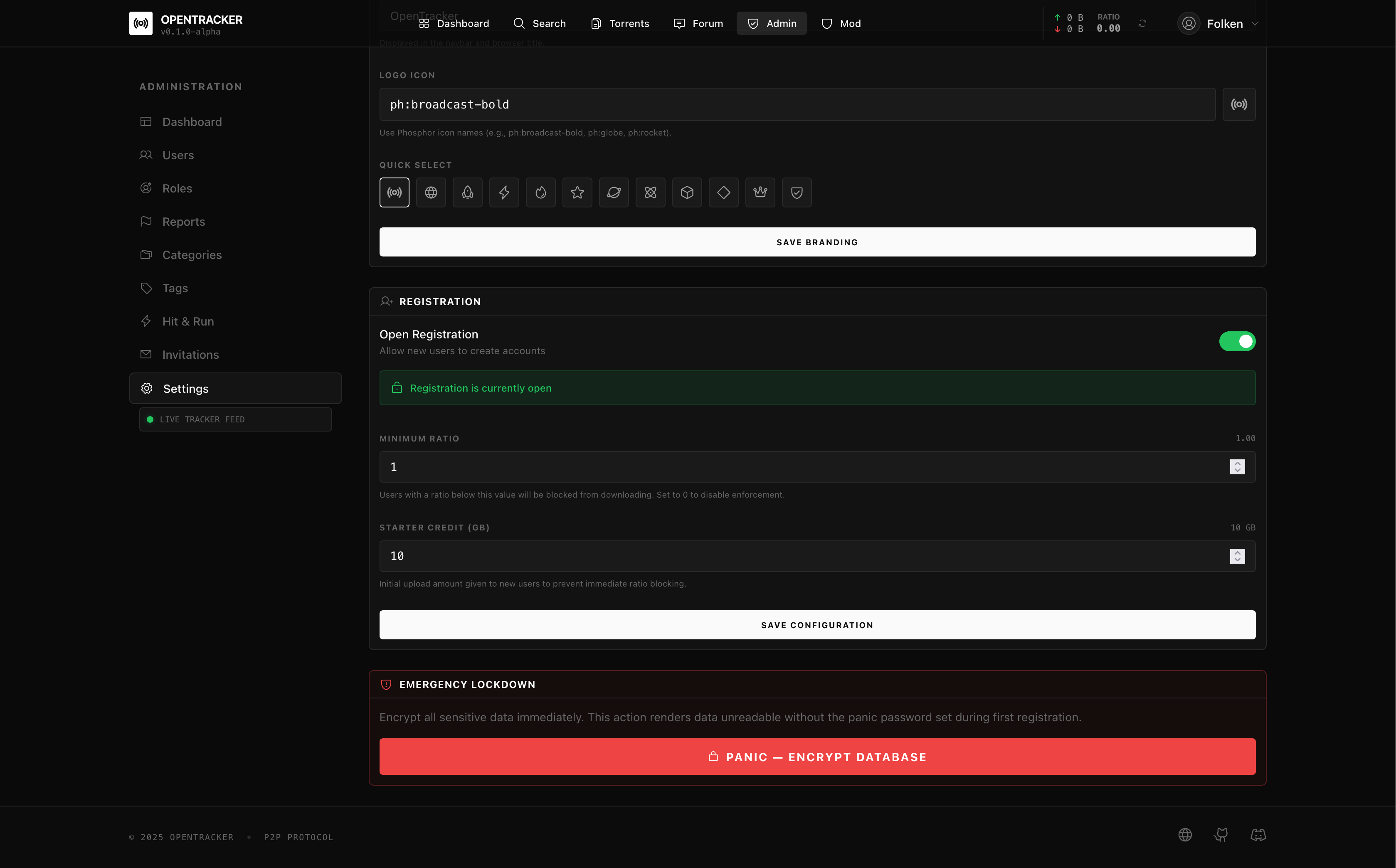
| Security | Emergency |
|---|---|
| Distributed rate limiting | Panic Mode — Instant database encryption |
| Auto IP blacklisting | AES-256-GCM protected data |
| SQL/XSS attack detection | Full restoration with master password |
| SHA-256 hashed IPs | Unrecoverable without password |
🔐 Security Architecture
Zero-Knowledge Authentication (ZKE)
Trackarr uses a Zero-Knowledge authentication system: the server never sees or stores your password. All cryptographic operations happen client-side.
┌─────────────────────────────────────────────────────────────────────┐
│                        REGISTRATION FLOW                            │
├─────────────────────────────────────────────────────────────────────┤
│                                                                     │
│  ┌─────────────┐                              ┌─────────────────┐  │
│  │   CLIENT    │                              │     SERVER      │  │
│  └──────┬──────┘                              └────────┬────────┘  │
│         │                                              │           │
│         │ 1. Solve PoW Challenge (anti-spam)           │           │
│         │ ◄────────────────────────────────────────────┤           │
│         │                                              │           │
│         │ 2. Generate random salt (32 bytes)           │           │
│         │ 3. Derive key = PBKDF2(password, salt)       │           │
│         │ 4. Compute verifier = SHA256(key)            │           │
│         │                                              │           │
│         │ 5. Send {username, salt, verifier} ─────────►│           │
│         │    Password NEVER leaves client           │           │
│         │                                              │           │
│         │                              6. Store salt + │           │
│         │                                 verifier     │           │
│         │                              7. Create session           │
│         │ ◄──────────────────────────────── 8. OK ─────┤           │
│                                                                     │
└─────────────────────────────────────────────────────────────────────┘

┌─────────────────────────────────────────────────────────────────────┐
│                          LOGIN FLOW                                 │
├─────────────────────────────────────────────────────────────────────┤
│                                                                     │
│  ┌─────────────┐                              ┌─────────────────┐  │
│  │   CLIENT    │                              │     SERVER      │  │
│  └──────┬──────┘                              └────────┬────────┘  │
│         │                                              │           │
│         │ 1. Request challenge ───────────────────────►│           │
│         │                                              │           │
│         │ ◄──────── 2. Return {salt, challenge} ───────┤           │
│         │                                              │           │
│         │ 3. Derive key = PBKDF2(password, salt)       │           │
│         │ 4. Compute verifier = SHA256(key)            │           │
│         │ 5. Generate proof = SHA256(verifier+challenge)           │
│         │                                              │           │
│         │ 6. Send {username, proof, challenge} ───────►│           │
│         │    Password NEVER leaves client           │           │
│         │                                              │           │
│         │                       7. Compute expected =  │           │
│         │                          SHA256(storedVerifier+challenge)│
│         │                       8. Verify proof == expected        │
│         │ ◄──────────────────────────────── 9. Session ┤           │
│                                                                     │
└─────────────────────────────────────────────────────────────────────┘
Key Properties:
- Password never transmitted — Only cryptographic proofs
- PBKDF2 with 100k iterations — Brute-force resistant
- Unique challenge per login — Prevents replay attacks
- Proof of Work — Stops automated registration attacks
🚨 Panic Mode (Emergency Encryption)
The Panic Button allows administrators to instantly encrypt all sensitive data in an emergency. Once activated, all torrent files become unusable and user data is unreadable.
┌───────────────────────────────────────────────────────────────────┐
│                       NORMAL STATE                                │
│  • Torrents downloadable                                          │
│  • User data readable                                             │
│  • Posts & comments visible                                       │
└───────────────────────────────────────────────────────────────────┘
                              │
                    PANIC ACTIVATED
                              │
                              ▼
┌───────────────────────────────────────────────────────────────────┐
│                      ENCRYPTED STATE                              │
│  • .torrent files → AES-256-GCM encrypted (unusable)              │
│  • Torrent names  → [ENCRYPTED]                                   │
│  • Torrent sizes  → 0                                             │
│  • User credentials → Encrypted                                   │
│  • Forum posts    → Encrypted                                     │
└───────────────────────────────────────────────────────────────────┘
                              │
                    RESTORE (with password)
                              │
                              ▼
┌───────────────────────────────────────────────────────────────────┐
│                       RESTORED STATE                              │
│  All data restored to original state                              │
└───────────────────────────────────────────────────────────────────┘
How it works:
- First admin sets a Panic Password during registration (min. 12 chars)
- Panic password is hashed and stored securely (never in plaintext)
- Activation: Admin → Settings → Panic → Type
ENCRYPT_ALL_DATA - Restoration: Enter the original Panic Password
Encryption details:
| Component | Algorithm |
|---|---|
| Key Derivation | scrypt (32 bytes) |
| Encryption | AES-256-GCM |
| IV | 16 bytes random (per session) |
WARNING: Without the Panic Password, encrypted data is permanently lost. There is no recovery mechanism.
🚀 Quick Start
Prerequisites
- Node.js 20+ • Docker & Docker Compose • npm
DNS Configuration (Required before installation)
IMPORTANT: Before running the installer, you must configure your DNS records to point to your VPS IP address.
Create the following A records pointing to your server's IP:
| Subdomain | Record Type | Value |
|---|---|---|
tracker.your-domain.com |
A | Your VPS IP |
announce.your-domain.com |
A | Your VPS IP |
monitoring.your-domain.com |
A | Your VPS IP |
Note: DNS propagation can take up to 24-48 hours, but usually completes within a few minutes. The installer will fail to obtain SSL certificates if DNS is not properly configured.
Option 1: Automated Installation (Recommended)
Best for production deployments. Handles dependencies, secrets, SSL, and systemd automatically.
# Download and run the installer
curl -fsSL https://raw.githubusercontent.com/florianjs/trackarr/main/scripts/install.sh -o install.sh
chmod +x install.sh
sudo ./install.sh
The installer will:
- Install Docker and dependencies
- Generate cryptographic secrets
- Configure firewall rules
- Set up TLS/SSL with Let's Encrypt
- Create systemd service for auto-restart
- Configure PostgreSQL, Redis, Caddy, and monitoring
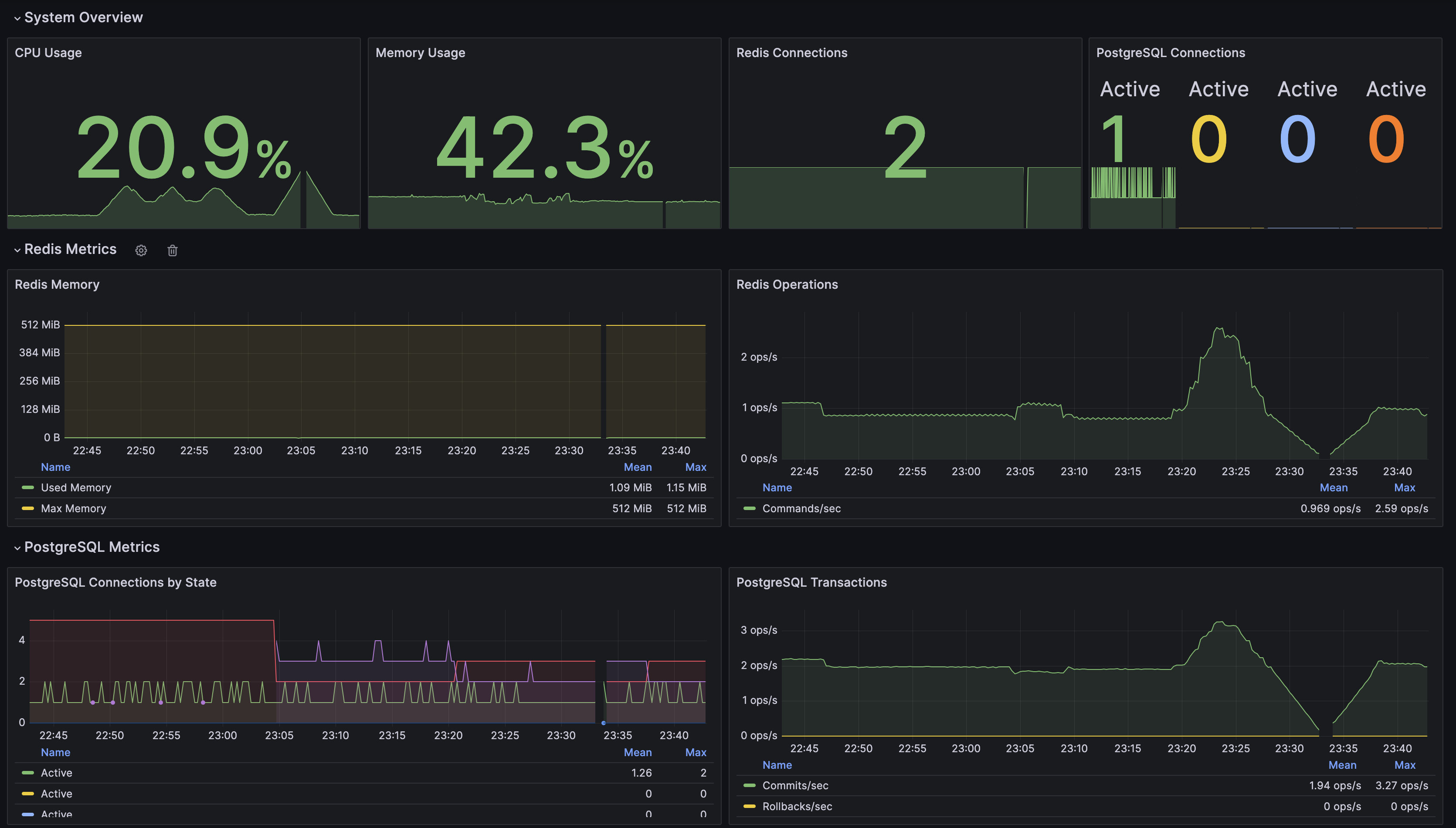
- Set up Prometheus + Grafana monitoring
Monitoring: After installation, Grafana is accessible at
https://monitoring.your-domain.com/grafanaDefault credentials:
admin/admin(you'll be prompted to change on first login) Having issues with the password ? Just launch :
cd /opt/trackarr
docker exec -it trackarr-grafana grafana cli admin reset-admin-password <new-password>
Option 2: Development with Docker
Databases are only exposed to the container network for security.
# Clone repository
git clone https://github.com/florianjs/trackarr.git && cd trackarr
cp .env.example .env

# Start all services (app + postgres + redis)
docker compose up -d

# View logs
docker compose logs -f app
🔒 Security
For production, always use the install script to ensure proper secret generation and security configuration.
Key Security Features
| Layer | Protection |
|---|---|
| Authentication | ZKE, PoW anti-abuse, session encryption, CSRF protection |
| Database | SCRAM-SHA-256 auth, TLS, prepared statements, pool limits |
| Redis | Password auth, command restrictions, memory limits |
| Network | Rate limiting, auto IP bans, attack pattern detection |
| Privacy | SHA-256 hashed IPs, no raw IP persistence, minimal logging |
Rate Limits
| Endpoint | Limit | Ban on Abuse |
|---|---|---|
| Public API | 100/min | 100+ req/10s → auto-block |
| Mutations | 10/min | Progressive penalties |
| Auth | 5/5min | IP blacklisted after violations |
| Tracker | 200/min | Distributed sliding window |
Production Security Checklist
Use install.sh — it handles security automatically:
- Generates cryptographic secrets (32-64 chars)
- Configures TLS for all connections
- Sets up Caddy reverse proxy with HTTPS
- Configures firewall (ports 80, 443 only)
- Network isolation (databases not exposed)
Manual steps after install:
- Set up automated PostgreSQL backups
🏗️ Tech Stack
| Layer | Technology | Purpose |
|---|---|---|
| Frontend | Nuxt 3, Vue 3, Tailwind CSS | SSR, Composition API |
| Backend | Nitro Server Engine | API routes, middleware |
| Database | PostgreSQL 16 + Drizzle ORM | Data persistence, full-text search |
| Cache | Redis 7 | Peer lists, sessions, rate limiting |
| P2P | bittorrent-tracker | HTTP & WebSocket announces |
| Crypto | Web Crypto API, scrypt, AES-256-GCM | ZKE auth, Panic encryption |
| Monitor | Prometheus + Grafana | Metrics, dashboards, alerting |
🐳 Docker Commands
docker compose up -d              # Start services
docker compose down               # Stop services
docker compose logs -f            # View logs
docker compose down -v            # Stop + remove volumes
Health Checks
docker exec trackarr-db pg_isready           # PostgreSQL
docker exec trackarr-redis redis-cli ping    # Redis
Updating
To update your Trackarr installation to the latest version:
cd /opt/trackarr
git checkout main
git pull origin main
docker compose -f docker-compose.prod.yml down
docker compose -f docker-compose.prod.yml up -d --build
Note: This will rebuild the containers with the latest code. Your data (PostgreSQL, Redis) is persisted in Docker volumes and will not be affected.
Troubleshooting
Full restart (stop and start all services):
cd /opt/trackarr
docker compose -f docker-compose.prod.yml down
docker compose -f docker-compose.prod.yml up -d
Full restart with rebuild (if you suspect issues with cached images):
cd /opt/trackarr
docker compose -f docker-compose.prod.yml down
docker compose -f docker-compose.prod.yml up -d --build --force-recreate
View logs to debug issues:
docker compose -f docker-compose.prod.yml logs -f
docker compose -f docker-compose.prod.yml logs -f app  # App only
🧪 Development
npm run dev              # Start dev server (HMR)
npm run build            # Production build
npx drizzle-kit push     # Push schema changes
npx drizzle-kit studio   # Database GUI
🤝 Contributing
- Fork the repository
- Create feature branch (
git checkout -b feature/amazing) - Commit changes (
git commit -m 'Add amazing feature') - Push to branch (
git push origin feature/amazing) - Open a Pull Request
🙏 Acknowledgements
Trackarr is built on the shoulders of giants. We'd like to thank the following open source projects:
| Project | Role |
|---|---|
| Nuxt | Fullstack Vue framework |
| Vue.js | Reactive frontend framework |
| bittorrent-tracker | BitTorrent tracker library |
| Drizzle ORM | TypeScript ORM |
| PostgreSQL | Database |
| Redis | In-memory cache |
| ioredis | Redis client for Node.js |
| Tailwind CSS | Utility-first CSS |
| Chart.js | Charts & visualizations |
| Prometheus | Metrics collection |
| Grafana | Monitoring dashboards |
| VitePress | Documentation framework |
| Vitest | Testing framework |
| Pinia | State management |
| Zod | Schema validation |
👥 Contributors
Thanks to all our contributors! Sorted by number of commits.
| Avatar | Contributor | Commits |
|---|---|---|
 |
Dim145 | 4 |
 |
IkiaeM | 4 |
📄 License
MIT License — see LICENSE for details.
Built with ❤️ for the P2P community