
trustlock


A Git-native dependency admission controller. Evaluates trust signals on every dependency change.
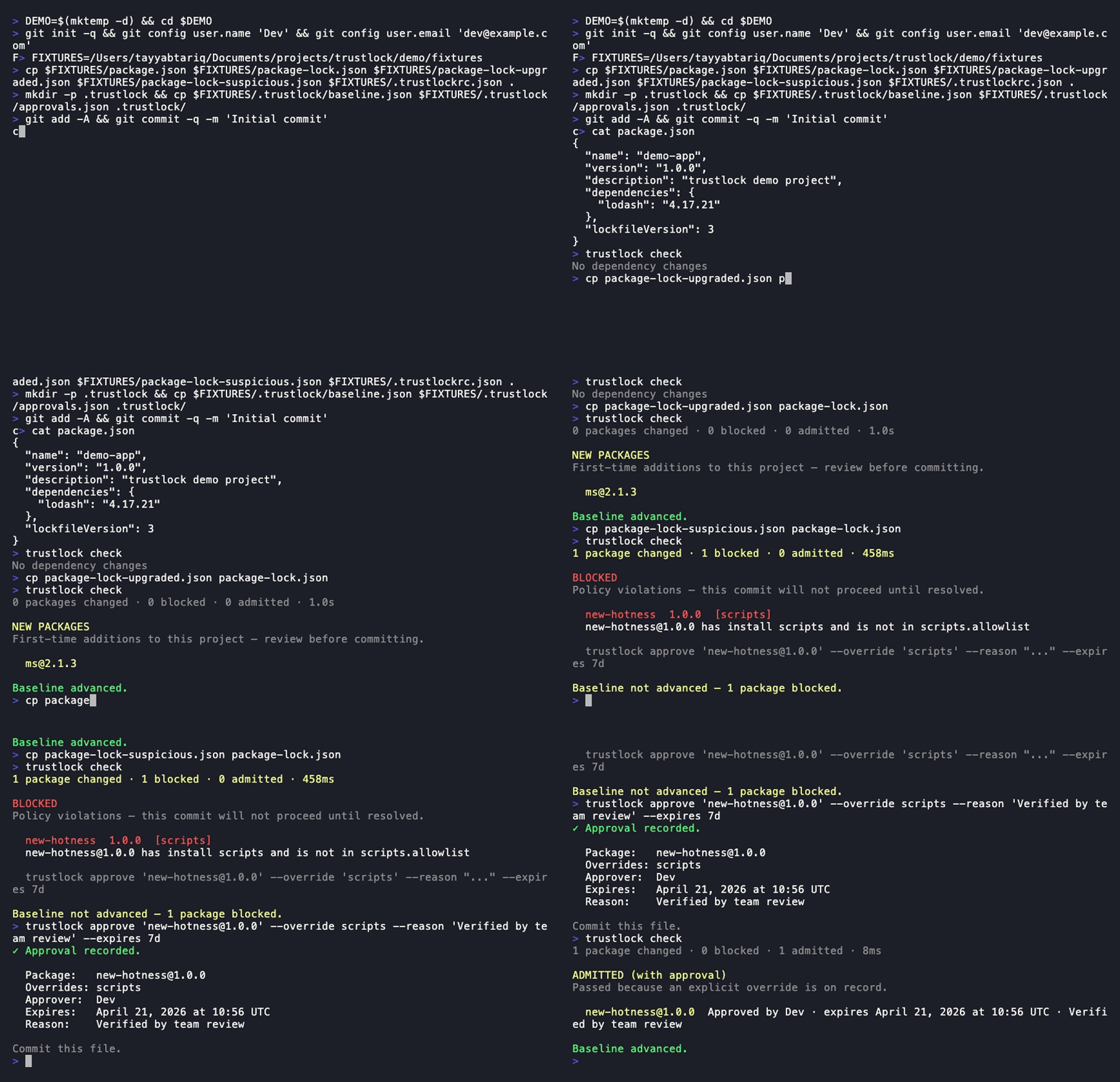
How it works
trustlock runs as a Git pre-commit hook (advisory mode) and a CI check (enforce mode):
- Advisory (pre-commit): warns on violations, exits 0, advances the trusted baseline when all packages are admitted.
- Enforce (
--enforce): blocks on violations, exits 1, never advances the baseline.
Trust signals evaluated per-package:
- Cooldown — how long since the version was published to the registry
- Provenance — whether the package has SLSA attestations
- Pinning — whether the lockfile uses exact versions
- Install scripts — whether the package runs install-time scripts
- Sources — whether the package comes from the registry, a git URL, a local path, or a URL
- New dependencies — first-time additions to the project
- Transitive surprise — unexpected jump in transitive dependency count
- Publisher change — whether the package's publisher identity changed between versions
Installation
npm install -g trustlock
Requires Node.js >= 18.3.
Supported lockfiles
| Lockfile | Ecosystem | Versions |
|---|---|---|
package-lock.json |
npm | v1, v2, v3 |
pnpm-lock.yaml |
pnpm | v5, v6, v9 |
yarn.lock |
yarn | classic (v1), berry (v2/v3) |
requirements.txt |
Python (pip) | — |
uv.lock |
Python (uv) | — |
Quick start
Workflow 1 — Onboarding a project
# 1. Initialize trustlock in your project
trustlock init

# 2. Install the Git pre-commit hook
trustlock install-hook

# 3. Optionally review your current dependency posture
trustlock audit
After init, trustlock creates:
.trustlockrc.json— policy configuration.trustlock/baseline.json— trusted dependency snapshot.trustlock/approvals.json— approval records.trustlock/.cache/— registry cache (gitignored)
Commit .trustlockrc.json and .trustlock/baseline.json to your repository.
Workflow 2 — Check and admit a dependency update
# Run dep install as normal
npm install [email protected]

# trustlock check runs automatically via the pre-commit hook.
# To run it manually:
trustlock check

# Output when all packages are admitted:
# ✔ [email protected] — admitted
When all packages pass, trustlock check advances the baseline automatically (advisory mode only) and exits 0.
Workflow 3 — Handle a blocked dependency
# A new package fails the cooldown rule:
trustlock check
# ✖ [email protected] — blocked
#   exposure:cooldown  Published 2h ago (policy requires 72h)
#   Run to approve: trustlock approve [email protected] --override cooldown --reason "..." --expires 7d

# Approve the override, then re-check:
trustlock approve [email protected] \
  --override cooldown \
  --reason "Needed for feature X; verified safe by team review" \
  --expires 7d

trustlock check
# ✔ [email protected] — admitted with approval
Workflow 4 — Compare dependency posture across projects
# Detect version drift and provenance inconsistencies across monorepo packages
trustlock audit --compare packages/frontend packages/backend packages/shared
Commands
| Command | Description |
|---|---|
trustlock init |
Initialize trustlock in the current project |
trustlock check |
Evaluate dependency changes against policy |
trustlock approve <pkg>@<ver> |
Approve a blocked package |
trustlock audit |
Scan the full dependency tree for trust posture |
trustlock audit --compare <dir...> |
Compare dependency posture across multiple projects |
trustlock clean-approvals |
Remove expired approval entries |
trustlock install-hook |
Install the Git pre-commit hook |
Policy profiles
trustlock ships two built-in profiles selectable with --profile:
| Profile | Effect |
|---|---|
strict |
168h cooldown, provenance required for all packages |
relaxed |
24h cooldown, no block on provenance regression or publisher change |
# Use strict profile in CI
trustlock check --enforce --profile strict
Org policy inheritance
Teams can centralize policy in a shared URL and extend it per repo:
{
  "extends": "https://policy.example.com/trustlockrc.json",
  "cooldown_hours": 96
}
Repo configs can only tighten org policy — floor enforcement prevents repos from reducing org-mandated thresholds.
Documentation
- USAGE.md — Full command reference, all flags, exit codes, error messages
- POLICY-REFERENCE.md — Every
.trustlockrc.jsonoption - ARCHITECTURE.md — Design decisions and module map
- examples/ — Config and CI workflow examples
CI integration
Add trustlock to your CI pipeline:
# GitHub Actions — see examples/ci/github-actions.yml
- run: npx trustlock check --enforce
See examples/ for GitHub Actions, Lefthook, and Husky configurations.
##Where trustlock sits in the timeline
Trustlock evaluates lockfile changes at commit time. It doesn't intercept or sandbox npm install. If a malicious package runs a postinstall script, that executes before trustlock sees it. Trustlock prevents the compromised lockfile from being committed and merged, containing blast radius to a single developer machine instead of the entire team and production. For install-time script blocking, use --ignore-scripts or pnpm's default lifecycle script controls.
What trustlock does NOT do
- Not a malware scanner — trustlock does not inspect package source code or detect known-malicious signatures. Use a dedicated scanner for that.
- It's not an install-time sandbox - trustlock doesn't intercept npm install. Use --ignore-scripts for that.
- Not a CVE tracker — use
npm auditor Snyk for vulnerability databases. - Not a license checker — use
license-checkeror similar. - Not a replacement for pnpm trustPolicy or npm's min-release-age — those are server-side controls enforced by the registry. trustlock is a client-side admission gate at the repo boundary.
About
trustlock was built out of frustration with how passive the standard Node.js toolchain is about what actually gets pulled into a project. npm install will fetch anything — a package published two minutes ago, one that runs arbitrary scripts at install time, one that swapped from a registry tarball to a git URL overnight — and the only feedback you get is a lockfile diff.
The threat model trustlock addresses is narrow but real: the window between when a malicious version is published and when it is pulled or flagged. Vulnerability scanners operate after the fact. trustlock operates at the admission point, before anything lands in your repo or your CI.
The design is intentionally minimal. trustlock has no runtime dependencies — it is itself a zero-supply-chain-risk tool. It does not replace a vulnerability scanner or a dependency audit; it enforces trust continuity. Once a version is in your baseline, it is trusted. Anything new has to earn admission against the policy you declare.
The approval workflow exists for teams that need an escape hatch without losing auditability. Every override is timestamped, scoped to specific rules, and expires. clean-approvals is a first-class command, not an afterthought.