
tun

Introduction
This is a simple and efficient reverse proxy toolkit that expose servers behind a NAT to the internet, such as accessing local web server via the internet.
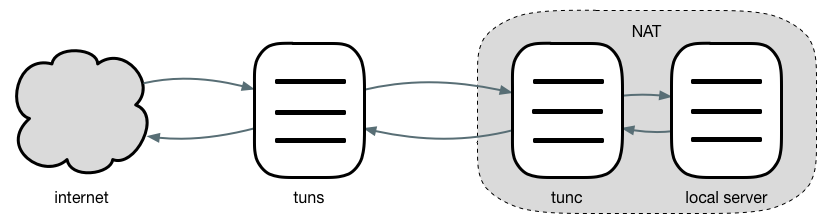
Usage
Developers can import tun packages to develop their own programs, import github.com/4396/tun/server development server program, import github.com/4396/tun/client development client program.
The server program need to implement authentication and load function, prototype as follows.
// AuthFunc using id and token to authorize a proxy.
type AuthFunc func(id, token string) error

// LoadFunc using loader to load a proxy with id.
type LoadFunc func(loader Loader, id string) error
At the same time the project also provides a default implementation, located in the github.com/4396/tun/cmd, support tcp and http two types of proxy.
~ go get github.com/4396/tun/cmd/tuns
~ go get github.com/4396/tun/cmd/tunc
For example, expose the local godoc service to internet.
-
Start godoc:
godoc -http=:9090 -
Start tuns:
./tuns -c tuns.ini# tuns.ini [tuns] addr = ServerIP:7000 # or :7000 http = ServerIP:7070 # or :7070 [godoc] type = http token = hello domain = godoc.mydomain.com -
Start tunc:
./tunc -c tunc.ini# tunc.ini [tunc] server = ServerIP:7000 [godoc] addr = 127.0.0.1:9090 # or :9090 token = helloOr do not use a configuration file:
./tunc -server=ServerIP:7000 -id=godoc -token=hello -addr=:9090 -
Resolve A record of
godoc.mydomain.comtoServerIP.If there are many proxies, you can resolve wildcard domain name.
-
Use nginx, not necessary.
server {
    listen       80;
    server_name  godoc.mydomain.com;

    # wildcard domain name
    # server_name  ~.mydomain.com;

    location / {
        proxy_pass http://localhost:7070;
        proxy_set_header Host $host;
    }
}