
UnTube — Self-Hosted YouTube Channel Downloader & Viewer
🔒 For Local Network Use Only
This application is not designed or intended to be run on a public-facing URL. There is no authentication, no user management, and no security hardening. Run it exclusively on your local network or behind a VPN. Do not expose it to the internet.
⚠️ Disclaimer
This project was built entirely through AI prompting using Claude — no manual code was written by the author. AI can and does make mistakes, and this application is not perfect. Bugs should be expected.
The author does not take any credit for the features and technologies that make UnTube function — all credit goes to the open-source projects this app is built on: yt-dlp, Flask, React, and others.
You are free to modify, improve, and adapt this project in any way you like. Use at your own risk.
A Docker-based web application that lets you follow YouTube channels, automatically download their videos, and watch them in a clean, ad-free interface — all on your own hardware.
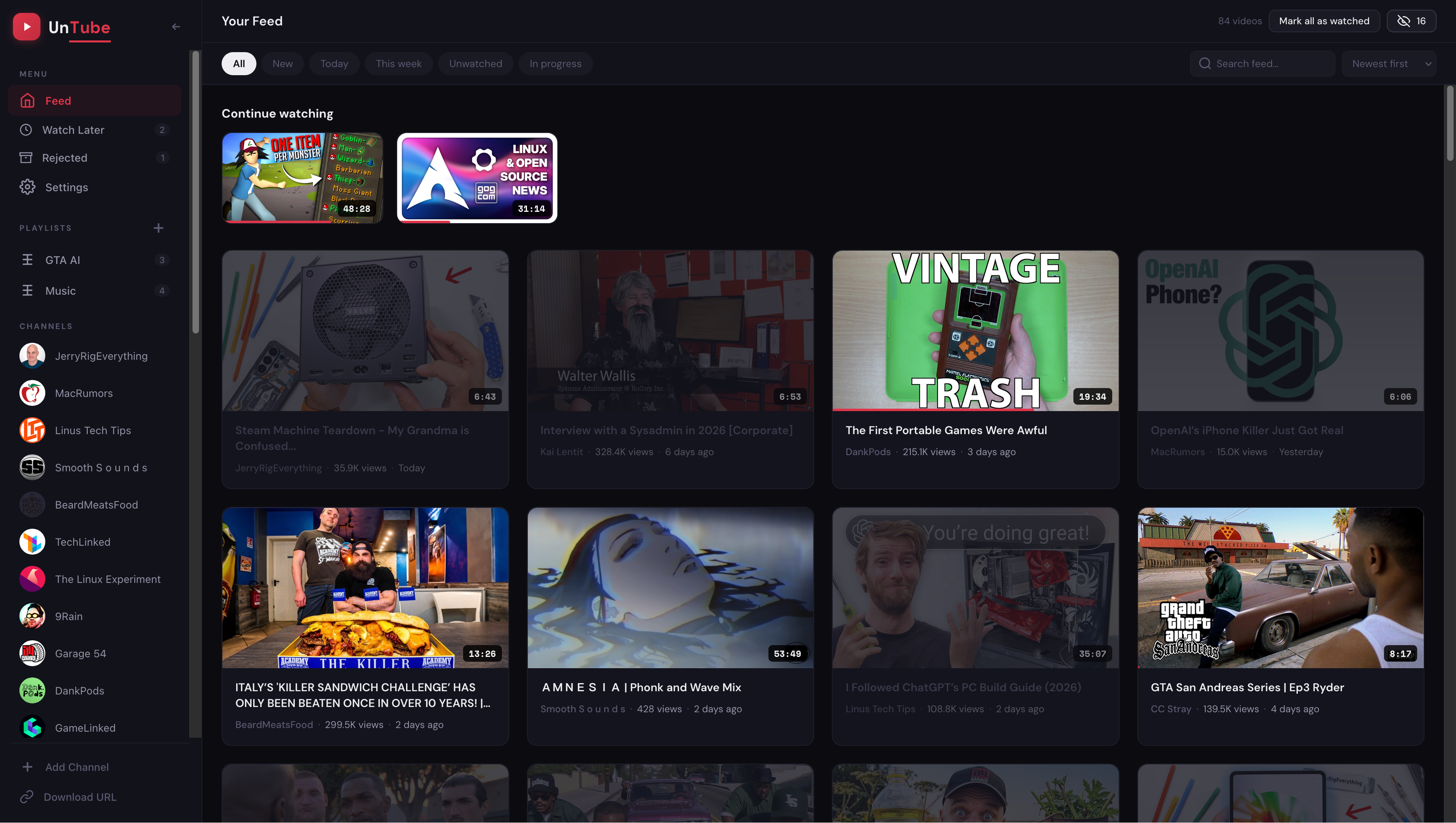
Features
- Channel Management — Add channels by URL,
@handle, or channel ID - Auto Downloads — Background scheduler polls for new videos at a configurable interval
- Quality Control — Per-channel quality overrides (360p to 4K or best available)
- Skip Shorts — Optionally skip YouTube Shorts (videos under 60 seconds)
- Auto-Delete — Automatically remove videos older than X days (global or per-channel)
- Built-in Player — HTML5 video player with HLS/transcoded stream support and CC subtitles
- Feed View — All videos sorted by newest first, filterable by channel
- Push Notifications — Optional Apprise-based notifications on new downloads
- Mobile-Friendly — Responsive layout optimised for phone/tablet use
- Persistent Storage — Everything saved to local Docker volumes
Quick Start
Prerequisites
- Docker and Docker Compose
Option 1 — Pull from Docker Hub (fastest)
docker pull tomfriart/untube:latest
Then create a docker-compose.yml:
services:
  untube:
    image: tomfriart/untube:latest
    container_name: untube
    ports:
      - "3987:80"
    volumes:
      - ./data:/app/data
      - ./downloads:/app/downloads
    restart: unless-stopped
docker compose up -d

# Open in your browser
open http://localhost:3987
Option 2 — Build from source
git clone https://github.com/tomfriart/untube.git
cd untube

docker compose up -d --build

# Open in your browser
open http://localhost:3987
Stop
docker compose down
Architecture
UnTube runs as a single Docker container combining the frontend and backend, managed by supervisord.
untube/
├── Dockerfile                  # Single image: React build → Python + nginx + supervisord
├── nginx.conf                  # Serves frontend, proxies /api/* to Flask on localhost:5000
├── supervisord.conf            # Runs Flask + nginx together in one container
├── docker-compose.yml
├── backend/
│   ├── requirements.txt
│   └── app.py                  # Flask API + yt-dlp + APScheduler
├── frontend/
│   ├── package.json
│   ├── vite.config.js
│   ├── index.html
│   └── src/
│       ├── main.jsx
│       ├── App.jsx
│       ├── icons.jsx
│       ├── styles.js
│       ├── utils.js
│       └── components/
├── data/                       # Auto-created: SQLite database + thumb cache
└── downloads/                  # Auto-created: downloaded video files
    ├── ChannelName1/
    │   ├── videoId1.mp4
    │   └── videoId2.mp4
    └── ChannelName2/
        └── videoId3.mp4
Configuration
All settings are adjustable from the Settings panel in the UI:
| Setting | Default | Description |
|---|---|---|
| Quality | 720p | Video download resolution (360p–4K or best) |
| Skip Shorts | On | Don't download videos under 60 seconds |
| Check Interval | 180 min | How often to poll channels for new uploads |
| Auto-Delete | Off | Remove videos older than N days |
| Notifications | Off | Apprise URL for push notifications on new downloads |
Per-channel overrides for quality and auto-delete are available from each channel's settings.
Custom Downloads Path
By default videos are saved to ./downloads/ next to the docker-compose.yml. To point at an existing media library, edit the backend volume in docker-compose.yml:
volumes:
  - /your/media/path:/app/downloads
API Endpoints
| Method | Endpoint | Description |
|---|---|---|
| GET | /api/channels |
List all followed channels |
| POST | /api/channels |
Add a channel { url: "..." } |
| DELETE | /api/channels/:id |
Remove a channel + its videos |
| GET | /api/videos |
List all videos (newest first) |
| GET | /api/videos?channel_id=X |
Filter by channel |
| GET | /api/settings |
Get current settings |
| PUT | /api/settings |
Update settings |
| POST | /api/check-now |
Trigger immediate check |
| GET | /media/:filepath |
Serve a downloaded video file |
| GET | /api/stream/:video_id |
HLS transcode stream |
Troubleshooting
- Videos not downloading? Check logs:
docker compose logs untube - yt-dlp errors? YouTube frequently changes its internals, which breaks yt-dlp. This is the most common source of issues and is outside this project's control. When it happens, rebuild the image to get the latest yt-dlp:
docker compose build --no-cache(ordocker pull tomfriart/untube:latestif using Docker Hub). Expect this to be needed every few weeks. - Disk space? Monitor
./downloads/— higher quality = bigger files; enable auto-delete in Settings
Tech Stack
- Backend — Python, Flask, yt-dlp, APScheduler, SQLite
- Frontend — React 18, Vite, hls.js
- Serving — nginx (reverse proxy + static files)
- Packaging — Docker Compose
License
MIT