
VibeCheck
Stop and read your diff before you ship it.
One question. Your exact diff. Skip anytime.
Built for Claude Code. CI mode works anywhere.
Install · How It Works · Modes · Configure · CI Gate · Team Mode · Update · FAQ
** Actively in development. Always update. Update instructions are available under update section **
More and more people are vibe coding but barely know what got built. You say "add rate limiting" and your AI does it. But do you know what your users actually see when they hit the limit? A friendly message? A raw 429? Does the page just hang?
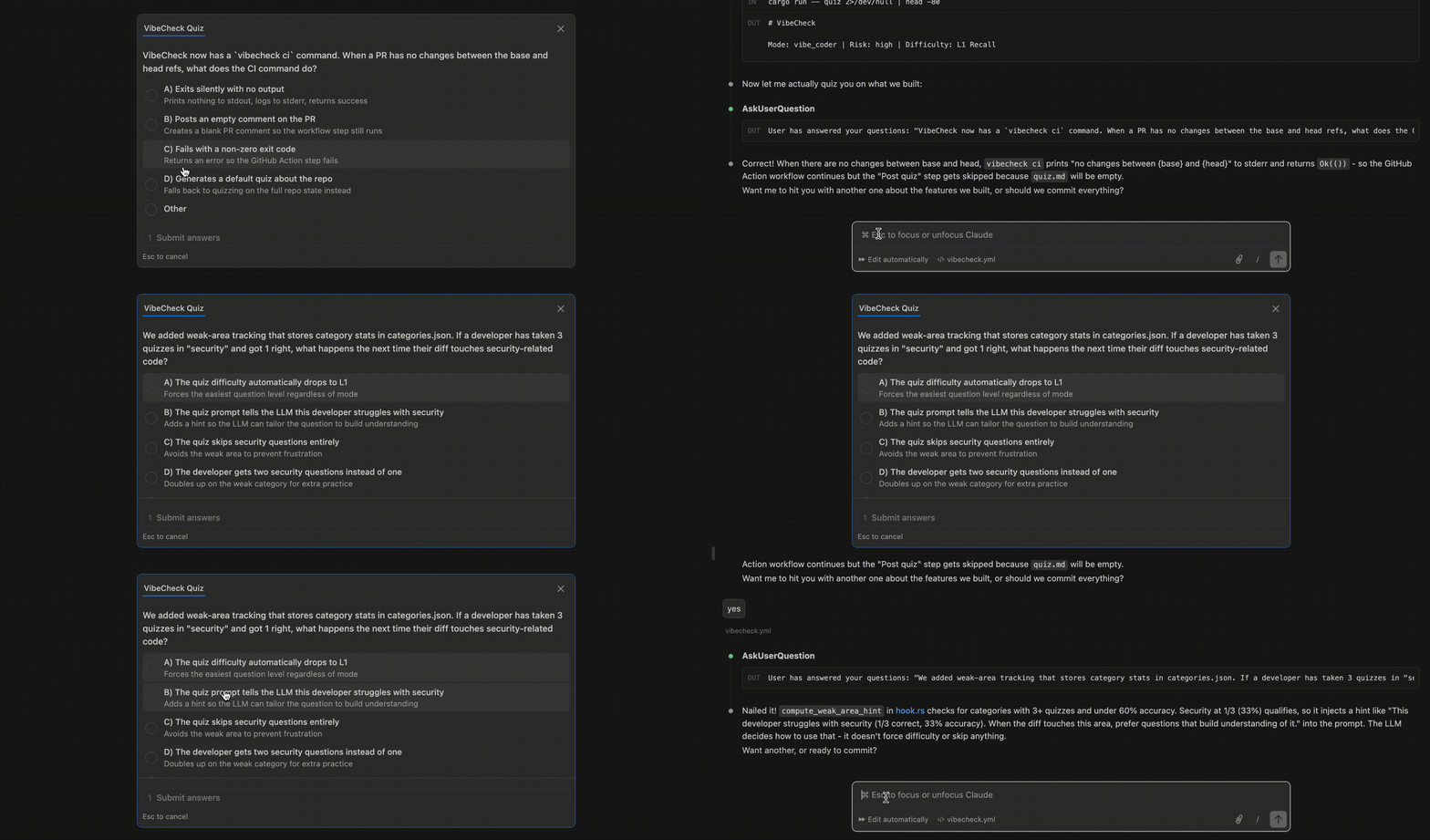
VibeCheck asks you stuff like that. One question after your AI finishes a task, based on your actual diff. It forces you to stop and actually read what was built before you move on.
The quiz is a forcing function, not an authority. An LLM generates the question and the "correct" answer from your diff - it might be wrong, and it definitely doesn't know what your real users expect. But if you stop to think "wait, that answer doesn't match what I wanted" - that's the point. You engaged with the code.
This is not a replacement for code review, pair programming, or talking to your team. Those are where real understanding happens. VibeCheck is just the minimum bar: did you personally look at what got built before you shipped it.
Auto-quiz in Claude Code with a single setup command. CI mode works in any GitHub Actions workflow.
Skip it every time if you want. By default, no scores or answers are saved. Just a quick pause to read your own diff.
Install
curl -fsSL https://raw.githubusercontent.com/akshan-main/vibe-check/main/install/install.sh | bash
This downloads a pre-built binary and wires up a Stop hook so quizzes trigger automatically after every task - no commit needed. Also installs a /quiz slash command for on-demand quizzes. Works in both the CLI and VS Code extension.
More options:
# Install globally (all projects)
curl -fsSL https://raw.githubusercontent.com/akshan-main/vibe-check/main/install/install.sh | bash -s -- --global

# Only the /quiz command, no auto-trigger
curl -fsSL https://raw.githubusercontent.com/akshan-main/vibe-check/main/install/install.sh | bash -s -- --skill-only
Read the install script - it downloads a binary, creates a config file, registers a Stop hook, and installs a /quiz skill.
Alternative: cargo install
cargo install vibe-check
vibecheck init
Sets up the Claude Code Stop hook. Requires Rust toolchain.
Manual binary download
Grab the latest binary for your platform from Releases:
vibecheck-darwin-arm64(macOS Apple Silicon)vibecheck-darwin-x86_64(macOS Intel)vibecheck-linux-x86_64(Linux x86_64)vibecheck-linux-arm64(Linux ARM64)vibecheck-windows-x86_64.exe(Windows)
Put it somewhere on your PATH, then run vibecheck init.
How It Works
You: "Add rate limiting to the API"
AI: *writes code*

  ┌─────────────────────────────────────────────────────┐
  │  You just added rate limiting. When a user hits     │
  │  the limit, what do they actually see?              │
  │                                                     │
  │  ○ A) A friendly "slow down" message with a         │
  │       retry timer                                   │
  │  ○ B) A raw "429 Too Many Requests" error with      │
  │       no explanation                                │
  │  ○ C) The page just hangs until the limit resets    │
  │  ○ D) They get redirected to the homepage           │
  └─────────────────────────────────────────────────────┘

You pick B. Or maybe you're not sure. Either way, you
just read your diff and thought about what your users
will actually see - and that's the whole point.

Maybe the answer says B is right. Maybe you disagree
because you know your frontend handles 429s already.
Good. You checked.
How it integrates with Claude Code
VibeCheck uses Claude Code's Stop hook system. After every task, the hook reads your git diff, analyzes the changes, and tells Claude to quiz you before continuing.
- Triggers after every task, not just commits - you get quizzed on uncommitted changes too
/quizslash command - type/quizanytime for an on-demand quiz- Conversation context - because the hook runs inside Claude Code, the LLM already knows what you asked for and what it built. The quiz can compare intent vs. implementation
vibecheck init      # set up the Stop hook
vibecheck remove    # remove it
Set "hookAction": "explain" in your config to get plain-language change explanations instead of quizzes.
Why Rust?
Single static binary with no runtime dependencies. Starts in under a millisecond. Runs multiple git commands in parallel using OS threads to collect diff context fast, even on large repos.
Modes
Different people need different things. Set your mode and the quiz adapts - trigger sensitivity, question style, and difficulty all change.
vibecheck mode              # show current mode
vibecheck mode developer    # switch modes
| Mode | Who it's for | How it works |
|---|---|---|
vibe_coder |
Flow-first builders | Light questions, casual tone. L1 difficulty (what changed). Default mode. |
developer |
Working engineers | Risk-scaled difficulty. Low-risk diffs get L2, high-risk get L3. Verification-focused. |
hardcore |
"I don't trust myself at 2am" | Always L4. Failure modes, rollback plans, security implications. High-risk diffs get a follow-up question. |
learning |
Leveling up | Adaptive difficulty based on your accuracy. Starts easy, escalates as you prove competence. |
Difficulty is based on what changed, not how much. A 2-line auth bug is harder than a 500-line refactor. The risk engine looks at file paths and diff content - auth, payments, migrations, public API, dependencies, infra, concurrency, error handling - and scores accordingly.
Or set mode in config:
{ "mode": "developer" }
Stats and weak-area tracking
Track which categories trip you up (scored by the LLM, so take it as a signal, not a verdict):
vibecheck stats
vibecheck stats

Overall: 8/12 correct (67%)
Streak: 3

By category:
  Category               Score   Quizzes
  --------------------------------------
  security                 33%    1/3   <-- weak
  api                      75%    3/4
  general                  80%    4/5
Enable tracking in your config:
{ "trackProgress": true }
After answering a quiz, record your result:
vibecheck record --correct
vibecheck record --wrong
vibecheck record --correct --category security
This updates personal stats, category tracking, and team leaderboard in one command. The Stop hook runs vibecheck record automatically after each quiz in Claude Code.
When weak areas are detected (under 60% accuracy with 3+ quizzes), future quizzes steer toward that area. The scores reflect what the LLM thinks, not ground truth - but patterns over time still tell you where to pay more attention.
CI Gate
Post a VibeCheck quiz as a PR comment. The author has to at least look at what they're merging, even if they disagree with the LLM's answer.
# Generate quiz markdown for a PR
vibecheck ci --base origin/main --head HEAD

# Pipe directly to GitHub CLI
vibecheck ci | gh pr comment --body-file -
GitHub Actions
Copy templates/ci/vibecheck.yml to your repo's .github/workflows/ directory. It will:
- Install vibecheck
- Generate a quiz from the PR diff
- Post it as a PR comment
Or add the steps to your existing workflow:
- name: Install vibecheck
  run: |
    curl -fsSL https://github.com/akshan-main/vibe-check/releases/latest/download/vibecheck-linux-x86_64 -o /usr/local/bin/vibecheck
    chmod +x /usr/local/bin/vibecheck

- name: Generate quiz
  id: quiz
  run: |
    vibecheck ci --base origin/${{ github.base_ref }} --head ${{ github.sha }} > quiz.md
    if [ ! -s quiz.md ]; then echo "skip=true" >> $GITHUB_OUTPUT; fi

- name: Post quiz as PR comment
  if: steps.quiz.outputs.skip != 'true'
  uses: actions/github-script@v7
  with:
    script: |
      const fs = require('fs');
      const body = fs.readFileSync('quiz.md', 'utf8');
      if (!body.trim()) return;
      await github.rest.issues.createComment({
        owner: context.repo.owner,
        repo: context.repo.repo,
        issue_number: context.issue.number,
        body: body
      });
Team Mode
A lightweight leaderboard so your team can see who's been reading their diffs. Not a substitute for code review or talking to each other - just a nudge to keep everyone honest. No server needed - stats are JSON files in the repo that sync through git.
# One person sets it up
vibecheck team init --name "Your Team"

# Each team member joins
vibecheck team join

# View the leaderboard anytime
vibecheck team
Your Team
============================================

 #   Name           Score   Streak   This Week
 -----------------------------------------------
 1   Milan           80%        5         4/5
 2   Sara            75%        2         3/4
 3   Mike            60%        0         2/3
 -----------------------------------------------
 Team average: 72%  |  12 quizzes this week
How it works:
- Stats stored as JSON files in
.vibecheck-team/at your project root - Each member identified by a hash of their git email (privacy-friendly)
- Commit the directory to git so the team can see each other's progress
- Weekly stats reset automatically
vibecheck recordupdates both personal and team stats- Each record is hash-chained (SHA-256). If someone manually edits their stats,
vibecheck teamflags them as[unverified]
vibecheck team reset # reset your own stats
Configure
Create or edit .claude/vibecheck.json in your project root (or ~/.claude/vibecheck.json for global):
{
  "enabled": true,
  "mode": "vibe_coder",
  "minSecondsBetweenQuizzes": 900,
  "maxDiffChars": 2000,
  "trackProgress": false,
  "hookAction": "quiz"
}
| Field | Default | Description |
|---|---|---|
enabled |
true |
Kill switch for auto-quiz (does not affect /quiz slash command) |
mode |
"vibe_coder" |
Quiz mode: vibe_coder, developer, hardcore, learning |
minSecondsBetweenQuizzes |
900 |
Minimum seconds between auto-quizzes |
maxDiffChars |
2000 |
Max diff characters sent as quiz context |
difficulty |
auto | Override difficulty: "L1", "L2", "L3", "L4". Normally set by mode + risk. |
trackProgress |
false |
Track quiz stats locally and on the team leaderboard. Enables weak-area detection. |
hookAction |
"quiz" |
What the auto-trigger does: "quiz" or "explain" |
Update
Your vibecheck.json config is never overwritten.
Cargo
cargo install vibe-check --force
Updates the binary on your PATH. The Stop hook automatically picks up the new version.
Claude Code (installer)
curl -fsSL https://raw.githubusercontent.com/akshan-main/vibe-check/main/install/install.sh | bash -s -- --update
What gets updated:
- The
vibecheckbinary in.claude/hooks/ - The
/quizskill prompt (SKILL.md) - asks before overwriting if you customized it
What stays the same:
- Your
vibecheck.jsonconfig (frequency, difficulty, etc.) - Your
settings.jsonhook setup - Your
.vibecheck/state (quiz timestamps)
Manual binary download
Grab the latest binary for your platform from the Releases page and replace the old one wherever you put it.
Uninstall
Remove Stop hook
vibecheck remove
Cargo
cargo uninstall vibe-check
Claude Code (installer)
curl -fsSL https://raw.githubusercontent.com/akshan-main/vibe-check/main/install/install.sh | bash -s -- --uninstall
FAQ
Can't I just ask my AI about my code?
You can. You won't. VibeCheck is proactive - it makes you stop and look at what changed before you move on. The questions come from an LLM reading your diff, so they're not always right. But they're usually enough to make you notice something you would have shipped without thinking about.
How is this different from learning mode?
Learning mode teaches you how the code works. VibeCheck makes you think about what your product does from a user's perspective. "What does the user see when they hit the rate limit?" vs "here's how the middleware pipeline works." The answers are LLM-generated and might not match your real product - the value is in the pause, not the score.
Will it loop forever?
No. The quiz outputs a [vibecheck:done] sentinel that prevents re-triggering. In Claude Code, the Stop hook also checks stop_hook_active to avoid loops.
Does it work with Cursor/Windsurf/Cline/Aider?
The auto-quiz feature requires Claude Code's Stop hook system. CI mode (vibecheck ci) works with any tool via GitHub Actions. The vibecheck record and vibecheck stats commands work standalone.
Can I change the frequency?
Yes. Set minSecondsBetweenQuizzes in vibecheck.json. Default is 900 (15 minutes). Set to 60 for every minute, 3600 for hourly.
Does it store my answers?
By default, no. A small state file (.claude/.vibecheck/state.json) tracks the last quiz timestamp for throttling. If you enable trackProgress, running vibecheck record after each quiz stores scores in that state file, per-category accuracy in categories.json, and team stats in .vibecheck-team/ if team mode is active.
Does the quiz affect what my AI does next?
No. The quiz runs after the task is done. Quiz answers don't influence anything.
I only want on-demand quizzes, not auto-trigger.
Use --skill-only during install to get just the /quiz slash command, or set "enabled": false in vibecheck.json to disable auto-trigger while keeping the hook installed.
Build from Source
cargo build --release
# Binary at target/release/vibecheck
Test it:
./target/release/vibecheck --help
./target/release/vibecheck doctor
Security and Privacy
VibeCheck runs entirely on your machine. It never phones home, sends telemetry, or talks to any server.
What it reads:
- Your git diff (via
git diffandgit show) - Your config at
.claude/vibecheck.jsonor~/.claude/vibecheck.json
What it writes:
.claude/.vibecheck/state.json- last quiz timestamp, diff hash, and (iftrackProgressis on) your score.vibecheck-team/members/<hash>.json- if team mode is active, stores your display name, a SHA-256 hash of your git email (not the email itself), and quiz stats
Nothing is sent over the network. The install script downloads the binary from GitHub Releases (with SHA-256 checksum verification) and that is the only network call VibeCheck ever makes.
Limitations
- Claude Code only for auto-quiz. The automatic quiz trigger requires Claude Code's Stop hook system. CI mode works with any GitHub Actions workflow.
- Only sees git-tracked changes. VibeCheck uses
git diff. New files that haven't beengit add-ed won't appear in the quiz. Files in.gitignore(like.env) are never read or sent as context. - Large diffs get truncated. The
maxDiffCharssetting (default 2000) caps how much diff context is sent. If your change is bigger than that, the quiz only covers the first portion. - Bash installer is macOS/Linux only. Windows users can use
cargo install vibe-checkand thenvibecheck init. - Pattern detection is keyword-based. The security, error handling, and API change flags use simple string matching, not AST parsing. They may flag false positives (e.g., a variable named
error_count) or miss changes that don't use common keywords.
Diagnose
If something isn't working, run:
vibecheck doctor
This prints your config path, git repo status, team mode status, post-commit hook status, Claude Code Stop hook status, and current config values.
Contributing
PRs welcome. Keep it simple. One question, one diff, skip anytime.