

VReader
Built entirely by AI — coded, tested, and debugged by AI agents. Human-directed.
An iOS reader for EPUB, AZW3/MOBI (Kindle), PDF, TXT, and Markdown — built entirely by AI coding agents, with Swift 6, SwiftUI, and SwiftData.
About
VReader is a modern reading app designed for iPhone and iPad, built entirely by AI coding agents (Claude Code + Codex CLI) with human direction on requirements and testing. It supports EPUB, AZW3/MOBI (Kindle), PDF, TXT, and Markdown with annotations, full-text search, AI assistant, TTS, book source scraping, and WebDAV backup.
Screens
VReader's v2 visual identity — a reading-focused design system with a Source Serif / Inter type pairing, an oxblood accent, and five page themes (Paper, Sepia, Dark, OLED, Photo).
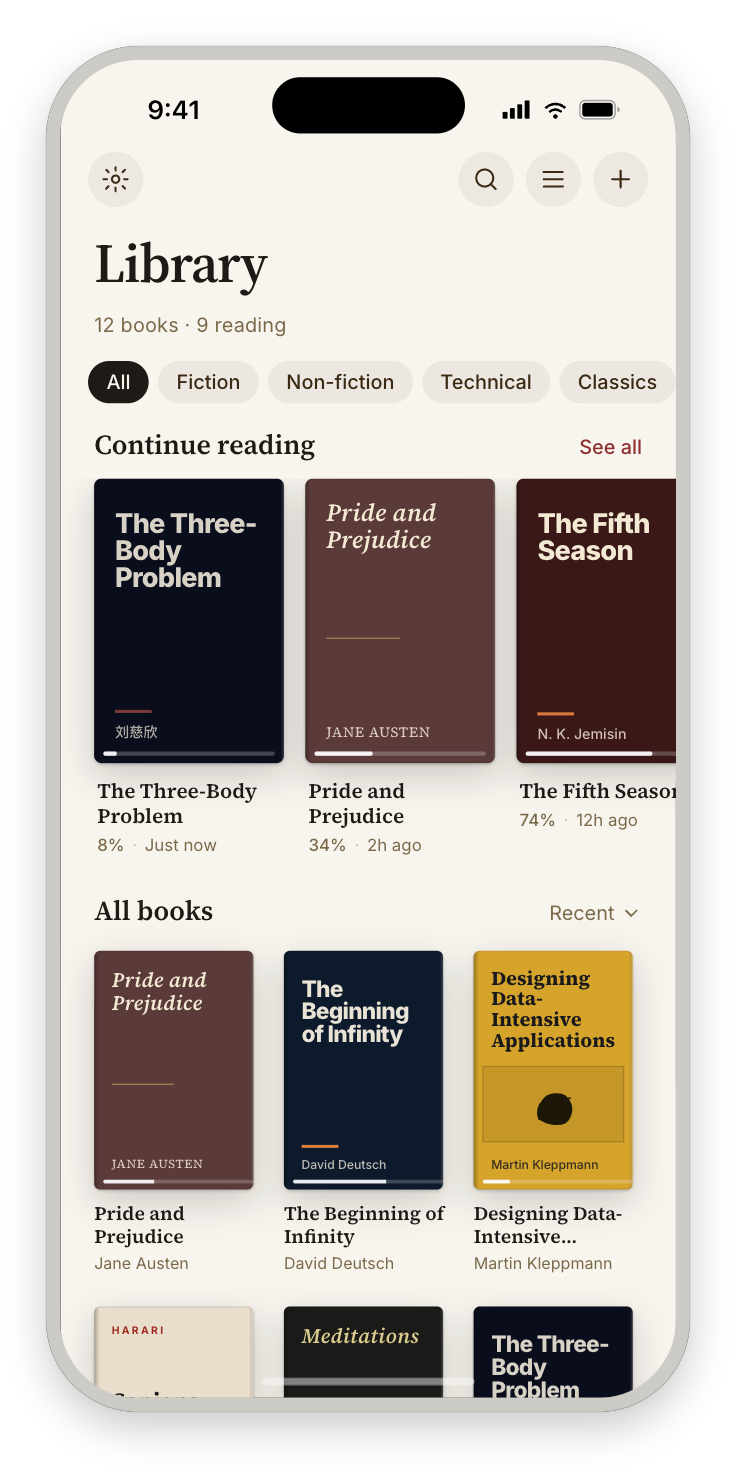 |
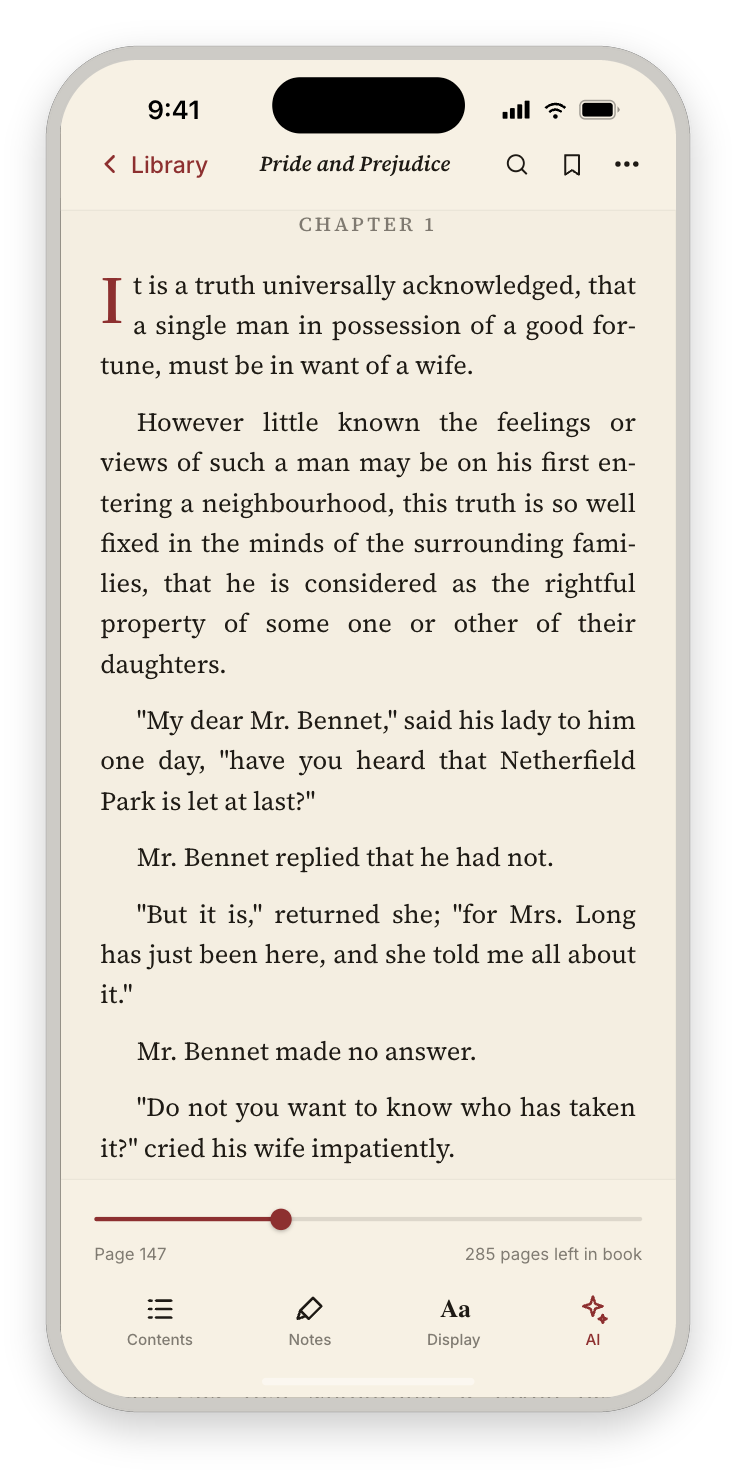 |
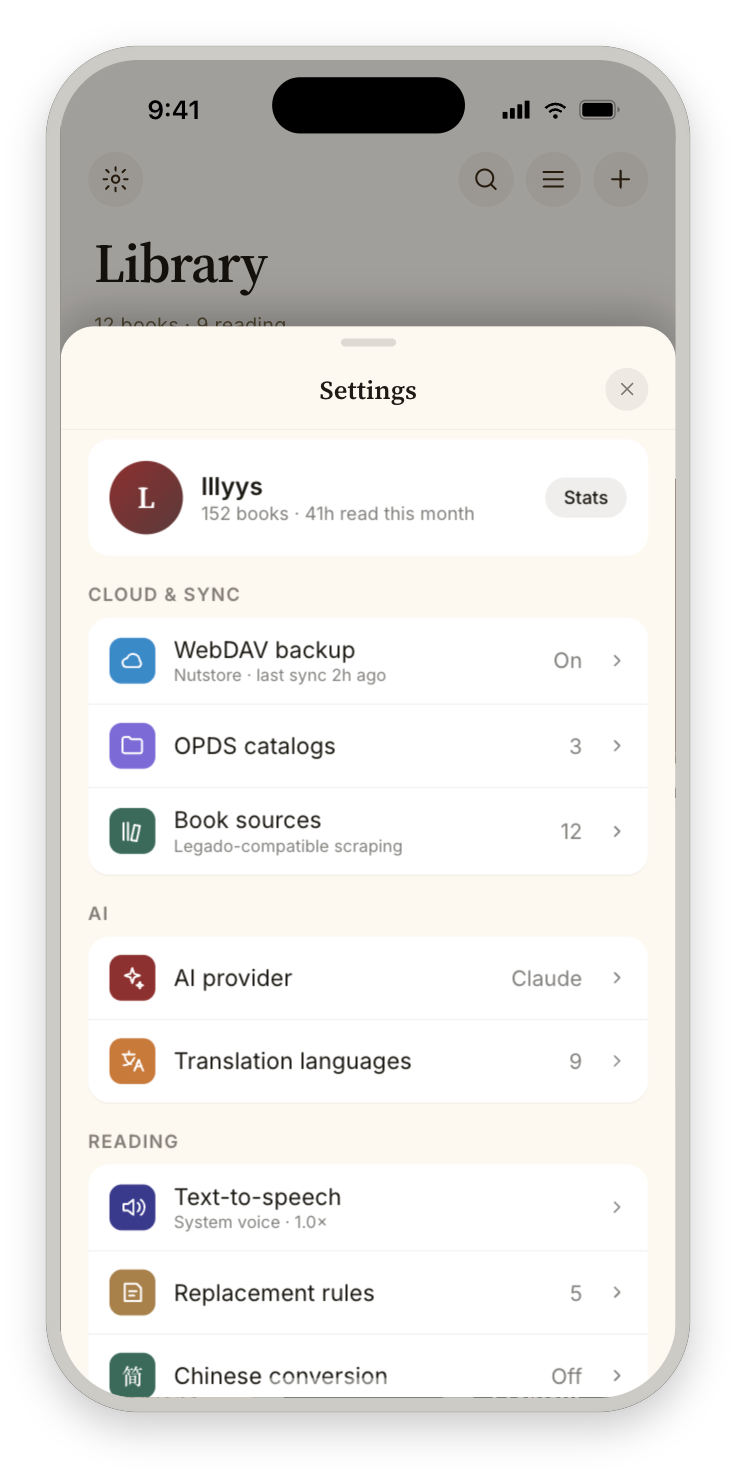 |
| Library | Reading | Settings |
Highlights
What sets VReader apart from a conventional e-reader:
- In-reader AI assistant, bring-your-own-LLM — chat, summarize, and translate against your OpenAI-compatible API key. Nothing is locked to a single vendor or hidden behind a subscription.
- Agentic AI chat with tool-calling (opt-in) — when enabled, the assistant can search the current book, reach into your other books, and pull content on demand to answer, instead of replying from a fixed context window.
- Bilingual interlinear reading — every paragraph rendered source-over-target across all formats, with a persistent on-disk translation cache so re-opens are instant.
- Whole-book AI translation — pre-translate an entire book in the background, with per-chapter re-translation and per-chapter provider/style override.
- Multiple AI providers, your choice per task — configure any number of provider profiles (Anthropic, OpenAI-compatible, or local), each with its own model, base URL, and keychain-held key plus a Test Connection check; point chat and translation at different backends.
- Per-book AI conversation sessions, synced over WebDAV — multiple named, persisted chat threads per book that you can switch, rename, and delete, with the full AI history backed up and restored across devices.
- Transparent AI with source disclosure — every chat reply carries a "Drew on" row naming exactly what it consulted (chapter scope, your highlights, bookmarks), so answers are auditable rather than a black box.
- WebDAV materializing restore — back up books, annotations, reading positions, reading history, and AI history to any WebDAV server and restore on a fresh device.
Features
Reading
- Multi-format — EPUB, AZW3/MOBI (Kindle), PDF, TXT, Markdown in a single app
- AZW3/MOBI — Kindle books via Foliate-js engine (DRM-free only)
- Per-format native rendering — each format renders with a purpose-built native engine (UIKit / WebView bridges), selected automatically — no rendering-mode toggle to configure
- Reading position — Auto-saves scroll position, survives app kills and relaunches
- CJK encoding — Auto-detect GBK, Big5, Shift-JIS, EUC-KR (8KB sample-based)
- Large file support — Chunked UITableView for TXT files >500K characters
- Paginated mode — CSS columns (EPUB), TextKit containers (TXT/MD), PDFKit pages
- Continuous cross-chapter scroll — EPUB scroll layout flows past a chapter's end straight into the next (lazy ±1-chapter window stitched into one document); AZW3/MOBI scroll mode does the same via a K=3 windowed multi-section surface inside the Foliate engine (feature #73) — no manual chapter tap, no boundary jump
- Page turn animations — Slide, cover-flip, or instant
- Auto page turning — Timer-based advancement with configurable interval
Annotations
- Bookmarks, highlights, notes — Full CRUD for TXT/MD/PDF/EPUB; AZW3 in progress
- EPUB highlights — CSS Highlight API with JS bridge + buffered delivery
- AZW3 highlights — Selection capture + CFI anchoring shipped; overlay restoration deferred to WI-7
- PDF highlights — PDFAnnotation-based with selection detection
- TXT/MD highlights — NSAttributedString with persistent rendering
- Tap-to-preview notes — Tapping an annotated highlight shows its note inline (read-only preview) across all five formats; a long-press opens the edit/delete menu on TXT/MD/PDF
- Export/import — Markdown + JSON export, VReader JSON round-trip import
Search & Navigation
- Full-text search — SQLite FTS5 with CJK tokenization, persistent index
- Reading progress bar — Draggable scrubber (continuous, page-based, chapter-based)
- Table of contents — EPUB nav/NCX, PDF outline, TXT auto-detection (25 Legado rules), MD headings; a filter field narrows the chapter list by title as you type (case-insensitive, diacritic-folded, CJK substring), so long-TOC books stay navigable
- Dictionary — System dictionary lookup + AI translation on text selection
AI
- Summarization — scoped summaries (Section / Chapter / Book-so-far) via OpenAI-compatible API, now bilingual: a language + Single/Bilingual control on the Summarize tab renders the summary in the source language, the target language, or interlinear (both stacked, dashed divider), with a dual-skeleton loading state and a "Retry translation / Keep original" recovery card if the translation step fails
- Chat — Multi-turn conversation with book context, with switchable conversation sessions per book: a slim session bar under the Chat tab (active conversation title + "New") opens a Conversations sheet to browse, switch, rename, and delete past threads — chat history is persisted (SwiftData) instead of a single ephemeral thread
- Translation — Bilingual interlinear (9 languages) with persistent disk cache, "Translate entire book" background job, and per-chapter re-translation with provider/style override. Set up the translation provider inline from the bilingual sheet's "Set up" / "Change…" button — a scoped in-reader AI Providers list, no trip to Settings
- General chat — AI chat without book context
- Multiple providers — configure any number of AI provider profiles (Anthropic, OpenAI-compatible, or local), each with its own model, base URL, and keychain-stored key; a Test Connection check validates a profile before you rely on it, and chat / summarize / translate can each target a different provider
- Agentic tool-calling (opt-in; off by default) — when enabled and the active provider supports tool use, chat routes through an agentic driver that can search the current book, search and pull content from your other books, and gather context on demand to answer (feature #91)
- Source disclosure — each chat reply carries a "Drew on" provenance row naming exactly what context it consulted (chapter scope, highlights, bookmarks), so the assistant's answers are auditable instead of opaque (feature #86)
- Stop control — interrupt an in-flight AI request on any tab: the Chat composer's send disc, the Translate language pill, and the Summarize indicator each morph into a Stop control while a request is in flight (tapping aborts; a partial chat reply is kept)
Library
- Grid/list view — Persistent sort order and view mode
- Cover art — Auto-extracted from EPUB and AZW3 metadata
- Collections — Tags, series, custom groups
- Custom covers — Set from photo library
- Context menu — Info, share, set cover, delete
- OPDS catalog — Browse and download from OPDS 1.2 feeds
- Book sources — Legado-compatible rule engine for web novel scraping
Text Processing
- TTS — System (AVSpeechSynthesizer) + cloud HTTP TTS with playback controls; all five formats, including AZW3/MOBI (whole-book text extracted from the Foliate engine)
- TTS sentence highlight — NLTokenizer-based sentence detection synced to speech position (TXT/MD)
- TTS auto-scroll — Text view follows speech position in real-time (TXT/MD)
- Simp/Trad Chinese — Toggle conversion via ICU (live re-apply without reloading)
- Content replacement — Regex rules for text cleanup (live re-apply via source text storage)
- Reading time tracking — Per-book session stats and speed calculations; the reader's bottom-chrome metrics label tap-cycles page ↔ time readouts ("12m read · 6h 40m total", choice persisted per book) and Book details carries the always-on Reading time rows (total · this session · average)
Sync & Backup
- WebDAV backup — Archive to any WebDAV server (Nutstore compatible) — books, annotations, reading positions, reading history, and AI conversation history all round-trip and restore on a fresh device. For a self-hosted Mac setup with iCloud Drive sync, see
lllyys/vreader-webdav-host. Tailscale-fronted servers work over plain HTTP; if the Test Connection returns502whilelocalhostsucceeds, your Mac's system HTTP proxy is intercepting Tailscale traffic — add*.ts.netand100.64.0.0/10to its bypass list. - Per-book settings — Font, theme, spacing overrides per book (JSON-persisted)
- Translation settings re-entry — change the bilingual target language or granularity any time via the More menu's "Translation settings" row or tapping the EN↔中 pill; the edit-framed sheet shows cached-language badges (switching back is instant) and re-translate cost strips
- Theme backgrounds — Custom background images via PhotosPicker with per-theme opacity
- Diagnostics — Settings → Support → Diagnostics shows the current session's app log (errors + key events) with level and category chip filters; a share button exports the log as a
.txtfor bug reports. Capture is always on (OSLog, subsystemcom.vreader.app); secrets, tokens, and file paths are scrubbed before anything leaves the app (feature #96)
Developer Tools (DEBUG-only)
- DebugBridge —
vreader-debug://URL scheme for autonomous testing. Drives the app from outside viaxcrun simctl openurl: reset library, seed fixtures, set theme, open books, snapshot state to JSON. Compiled out of Release builds. Reference:docs/subsystems/debug-bridge.md scripts/sim-tap.sh— CU-free gesture driver for the booted Simulator, built on idb. Taps by accessibility label or point, swipes, launches apps by bundle id, dumps the on-screen element tree, and screenshots — without the computer-use MCP server (which can't target the Xcode-nested Simulator). Pairs with DebugBridge for verification flows (preference order: DebugBridge command → XCUITest → idb). Requiresbrew install facebook/fb/idb-companion+pip3 install --user fb-idb. Reference:docs/subsystems/sim-gesture-driver.md
Tech Stack
| Component | Technology |
|---|---|
| UI | SwiftUI |
| Persistence | SwiftData (SchemaV6) |
| EPUB | Readium Swift Toolkit navigator (default since #42 WI-14); legacy WKWebView bridge available via override |
| AZW3/MOBI | Foliate-js in WKWebView (IIFE bundle via esbuild) |
| PDFKit + PDFAnnotation for highlights | |
| TXT | TextKit 1 (UITextView) + chunked UITableView |
| Markdown | NSAttributedString rendering via MDParser |
| Search | SQLite FTS5 with CJK tokenization |
| AI | OpenAI-compatible API (summarize, chat, translate) |
| TTS | AVSpeechSynthesizer + HTTP cloud TTS |
| Backup | WebDAV client |
| Encoding | ICU + heuristic detection (UTF-8/GBK/Big5/Shift-JIS) |
| Concurrency | Swift 6 strict concurrency |
Requirements
- iOS 17.0+
- Xcode 16+
- XcodeGen
Getting Started
# Generate the Xcode project
xcodegen generate

# Open in Xcode
open vreader.xcodeproj
Then select a simulator or device and run.
Architecture
See docs/architecture.md for the full architecture document.
vreader/
├── App/                 # App entry point, SwiftData schema init
├── Models/              # SwiftData models, DocumentFingerprint, Locator
├── ViewModels/          # Library and per-format reader view models
├── Views/
│   ├── Reader/          # Reader container, format bridges, chrome overlay
│   │   └── Annotations/ # TOCSheet, HighlightsSheet, AnnotationsSheetRoute
│   ├── Annotations/     # AddNoteSheet, AnnotationEditSheet
│   └── Settings/        # ReaderSettingsPanel, AI/TTS/WebDAV settings
├── Services/
│   ├── TXT/, EPUB/, MD/ # Format-specific parsing and loading
│   ├── Foliate/         # AZW3/MOBI via Foliate-js (scheme handler, adapters, JS bundle)
│   ├── Search/          # FTS5 indexing, text extraction
│   ├── AI/, TTS/        # AI service, TTS providers
│   ├── Backup/          # WebDAV client, BackupProvider
│   ├── Sync/            # CloudKit infrastructure (built but not wired — feature #10 WONT DO)
│   ├── DebugBridge/     # DEBUG-only: vreader-debug:// URL scheme + active-reader registry
│   ├── TextMapping/     # Simp/Trad, replacement rules
│   └── Locator/         # Reading position (Readium-inspired)
vreaderTests/            # XCTest unit tests (~90 unit-test methods plus integration suites)
vreaderUITests/          # UI tests (XCUITest)
Key Design Decisions
- Foliate-js for AZW3/MOBI — Kindle books are parsed and rendered by Foliate-js running in WKWebView. The entire library is bundled into a single 278KB IIFE via esbuild (WKWebView blocks ES modules on custom schemes). A
WKURLSchemeHandlerserves the JS bundle and book files from a single origin to avoid CORS issues. - Multi-renderer architecture — Each format uses the best tool: Readium Swift Toolkit navigator (EPUB, default since feature #42 — legacy WKWebView bridge still available via override), Foliate-js in WKWebView (AZW3/MOBI), PDFKit (PDF), UITextView (TXT/MD). Shared services (Locator, Highlight, Search, TTS, Position) work across all renderers.
- CFI-based positions for EPUB/AZW3 — Foliate-js generates EPUB CFI strings for both EPUB and MOBI (fake CFIs for MOBI). These are stored in
Locator.cfias the authoritative position, enabling unified persistence and highlight anchoring. - TextKit 1 for TXT rendering — UITextView with
NSLayoutManagerfor reliable offset-to-scroll mapping. TextKit 2 has better performance but lacks thecharOffset ↔ scrollOffsetAPIs needed for position persistence. - Chunked rendering for large files — Files over 500K UTF-16 code units use a UITableView where each cell renders one ~16K chunk. Only visible cells build attributed strings (LRU cache of 20 chunks).
- Two-phase scroll restore — Position restore uses a Phase 1 (t+0.15s) + Phase 2 (t+0.8s) pattern to handle TextKit 1 compatibility mode relayout storms that reset
contentOffset. @Statefor one-shot values — Rapidly-mutating@Observableproperties are never read in SwiftUI body to avoid observation feedback loops. Position restore uses@Statecaptured once afteropen().- Background task protection —
UIApplication.beginBackgroundTaskwraps all critical saves (close(),onBackground()) to prevent data loss when iOS suspends the process.
AI-Powered Development
All code, tests, bug fixes, and documentation are produced by AI coding agents. The human role is directing requirements, reporting bugs, and verifying on device.
Tools
| Tool | Role |
|---|---|
| Claude Code | Primary coding agent — implementation, editing, code review, fixes |
| Codex CLI | Architecture review, auditing, autonomous implementation in sandbox |
Workflow
The development process follows a gated, multi-agent pipeline:
- Plan — Features are designed as detailed implementation plans with work items, acceptance criteria, and test requirements (
docs/codex-plans/) - Review — Plans go through multi-round architecture review via Codex (consistency, completeness, feasibility, ambiguity, risk)
- Implement — Work items are implemented by the implementer agent following TDD (RED-GREEN-REFACTOR)
- Audit — Code is audited across 9 dimensions (correctness, security, concurrency, performance, etc.)
- Fix — Audit findings are fixed and verified in iterative loops until clean
- Commit — Changes are committed only on explicit request after passing all gates
Agent Rules
Shared rules for all AI agents live in ``:
- Test-first is mandatory — Write a failing test before implementing any new behavior
- Research before building — Search for established patterns and proven solutions before inventing
- Edge cases are not optional — Brainstorm and test: empty input, null values, Unicode/CJK, concurrent access, network failures
- Keep files under ~300 lines — Split proactively to maintain readability
- Keep diffs focused — No drive-by refactors; only change what's needed
Configuration
.claude/rules/— Rule files for TDD, UI consistency, design tokens, keyboard shortcuts, version bumping.claude/skills/— Custom skill definitions (plan-audit, etc.)CLAUDE.md— Claude Code project instructionsAGENTS.md— Shared instructions for all AI coding agents
Status
Active development. See features (52 done) and bugs (211 fixed) for current state.
License
MIT