
VTS (Vector Transport Service)



Overview
VTS (Vector Transport Service) is an open-source tool for moving vectors and unstructured data. It is developed by Zilliz based on Apache Seatunnel.
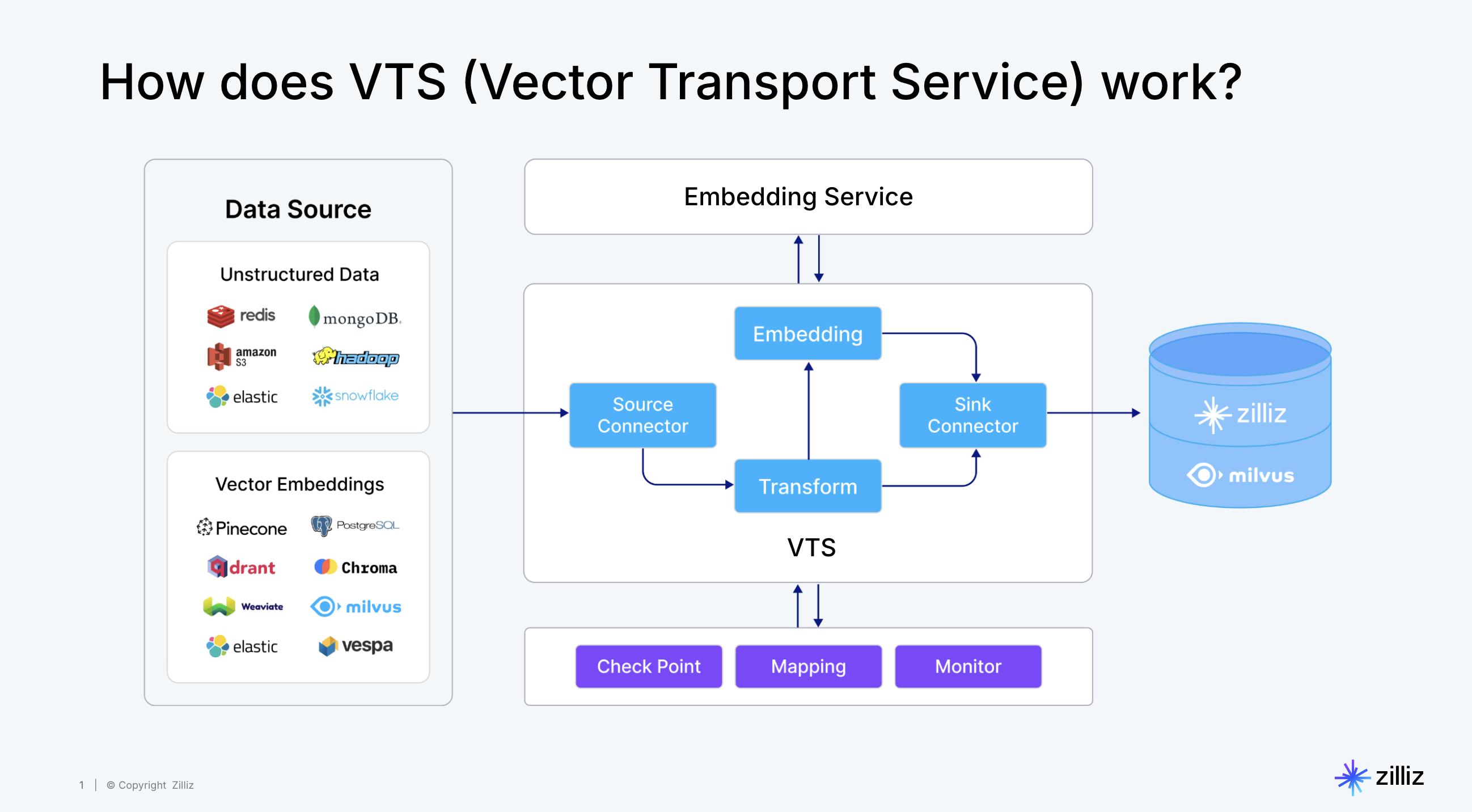
Why do you need a vector and unstructured data moving tool?
- Meeting the Growing Data Migration Needs: VTS evolves from our Milvus Migration Service, which has successfully helped over 100 organizations migrate data between Milvus clusters. User demands have grown to include migrations from different vector databases, traditional search engines like Elasticsearch and Solr, relational databases, data warehouses, document databases, and even S3 and data lakes to Milvus.
- Supporting Real-time Data Streaming and Offline Import: As vector database capabilities expand, users require both real-time data streaming and offline batch import options.
- Simplifying Unstructured Data Transformation: Unlike traditional ETL, transforming unstructured data requires AI and model capabilities. VTS, in conjunction with the Zilliz Cloud Pipelines, enables vector embedding, tagging, and complex transformations, significantly reducing data cleaning costs and operational complexity.
- Ensuring End-to-End Data Quality: Data integration and synchronization processes are prone to data loss and inconsistencies. VTS addresses these critical data quality concerns with robust monitoring and alerting mechanisms.
Core Capabilities of VTS
Built on top of Apache Seatunnel, Vector-Transport-Service offers:
- Rich, extensible connectors
- Unified stream and batch processing for real-time synchronization and offline batch imports
- Distributed snapshot support for data consistency
- High performance, low latency, and scalability
- Real-time monitoring and visual management
Additionally, Vector-Transport-Service introduces vector-specific capabilities such as multiple data source support, schema matching, and basic data validation.
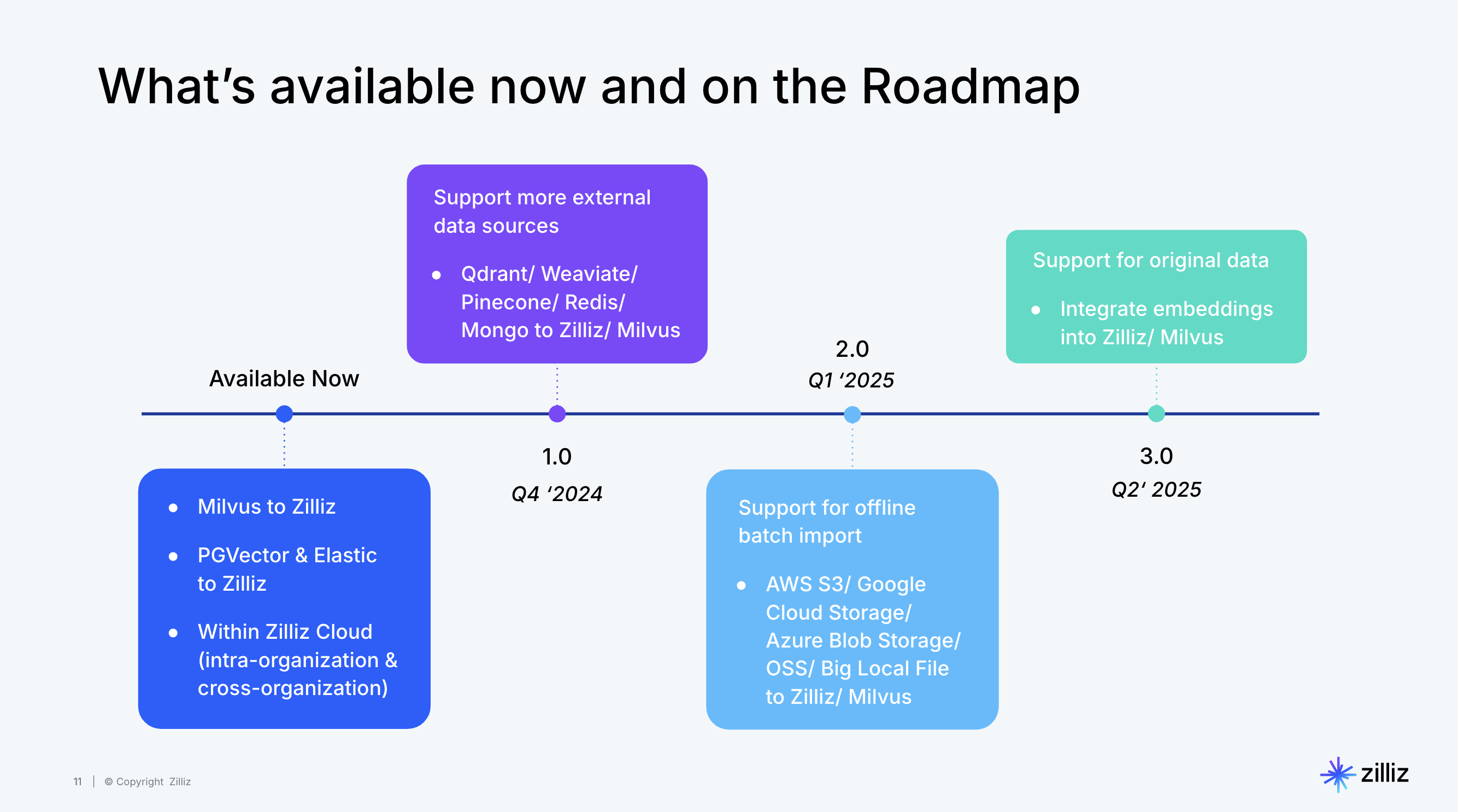
Roadmap
Future developments include:
- Incremental synchronization
- Combined one-time migration and change data capture
- Advanced data transformation capabilities
- Enhanced monitoring and alerting
Getting Started
Prerequisites
- Docker installed
- Access to source and target databases
- Required credentials and permissions
- Milvus Version >= 2.3.6
Quick Start
- Pull the VTS Image Fetch the prebuilt VTS container (built on Apache SeaTunnel) and open an interactive shell inside the image so you can run jobs without building from source.
docker pull zilliz/vector-transport-service:latest
docker run -it zilliz/vector-transport-service:latest /bin/bash
- Configure Your Migration Create a job configuration (e.g.,
migration.conf) that declares the execution env, a source connector, and a sink connector. Start with small batches and a single collection/table to validate connectivity before scaling up.
env {
  parallelism = 1
  job.mode = "BATCH"
}

source {
  # Source configuration (e.g., Milvus, Elasticsearch, etc.)
  Milvus {
    url = "https://your-source-url:19530"
    token = "your-token"
    database = "default"
    collections = ["your-collection"]
    batch_size = 100
  }
}

sink {
  # Target configuration
  Milvus {
    url = "https://your-target-url:19530"
    token = "your-token"
    database = "default"
    batch_size = 10
  }
}
- Run the Migration Run in cluster mode for production‑like workloads, or local mode for quick validation. Watch the console output to confirm progress.
Cluster Mode (Recommended):
# Start the cluster
mkdir -p ./logs
./bin/seatunnel-cluster.sh -d

# Submit the job
./bin/seatunnel.sh --config ./migration.conf
Local Mode:
./bin/seatunnel.sh --config ./migration.conf -m local
Configuration Tips
- Adjust
parallelismbased on your data volume - Configure appropriate
batch_sizefor optimal performance - Set up proper authentication and security measures
- Monitor system resources during migration
Supported Connectors
VTS supports various connectors for data migration:
- Milvus (example config)
- Elasticsearch (example config)
- Pinecone (example config)
- Qdrant (example config)
- Postgres Vector (example config)
- Tencent VectorDB (example config)
- Weaviate(example config)
- S3 Vector(example config)
Advanced Features
For more advanced features, refer to our Tutorial.md and the Apache SeaTunnel Documentation:
- Transformers (TablePathMapper, FieldMapper, Embedding)
- Cluster mode deployment
- RESTful API for job management
- Docker deployment
- Advanced configuration options
Development
For development setup and contribution guidelines, see Development.md.
Support
Need help? Contact our support team:
- Email: [email protected]
- Discord: Join our community
About Apache Seatunnel
SeaTunnel is a next-generation, high-performance, distributed data integration tool. It's:
- Capable of synchronizing vast amounts of data daily
- Trusted by numerous companies for efficiency and stability
- Released under Apache 2 License
- A top-level project of the Apache Software Foundation (ASF)
For more information, visit the Apache Seatunnel website.