

WattSeal shows you a live breakdown of power consumption of your PC, by component and by app. Monitor which hardware is drawing the most energy, which apps are the biggest energy hogs, and how your usage changes over time.
Available in English and French.




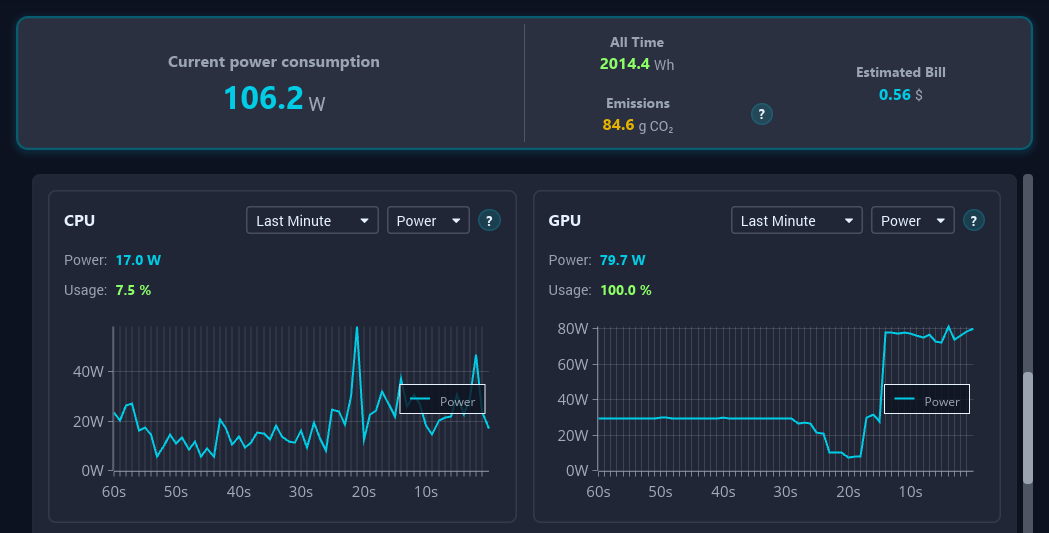
Why use WattSeal?
Most people have no idea how much electricity their computer actually uses, or which apps are silently draining power in the background. WattSeal gives you that visibility:
- 🔍 Live dashboard: watch power draw update every second
- 🧩 Per-component breakdown: CPU, GPU, RAM, storage, network
- 📋 Per-app breakdown: find out which processes are costing you the most
- 📈 Historical charts: spot trends over time
- 💾 Local database: all your data stays on your machine, private
Power readings are validated against real hardware measurements using a Shelly Plug Gen3 S smart plug.
Getting Started
Step 1 — Download
Grab the latest release for your operating system from the Releases page:
| Your system | File to download |
|---|---|
| Windows (64-bit) | WattSeal-windows.exe |
| Linux (64-bit) | WattSeal-linux |
| macOS (Apple Silicon) | WattSeal-macos |
WattSeal is a single executable file — no installation needed. Just download it, and you're ready for the next step.
Step 2 — Run it
WattSeal doesn't need administrative privileges to run, but Windows needs a one-time admin step to install the CPU MSR driver for precise power measurements. If you skip that step, you'll still get power estimates based on CPU usage, but they won't be as accurate.
🪟 Windows
- Double-click the downloaded
WattSeal-windows-x86_64.exefile - If prompted by Windows Defender SmartScreen, click "More info" and then "Run anyway" to launch the app. This is a standard warning for new apps that haven't yet built up reputation on Windows.
- If prompted by User Account Control (UAC) to install the CPU MSR driver, click "Yes" to install it (this is a one-time step). If you click "No", WattSeal will still run but CPU power readings will be estimated.
The app will launch in the system tray in the taskbar and the dashboard will open in a new window. If you close the dashboard, WattSeal will keep running in the background and you can reopen it by clicking the tray icon.
🐧 Linux
Open a terminal in the folder where you downloaded WattSeal and run:
chmod +x WattSeal-linux
sudo ./WattSeal-linux
Note: the only extra runtime dependency is an X11 system tray library. If either
libappindicatororlibayatana-appindicatoris installed the app will show a tray icon with menu items; otherwise WattSeal will simply run in the background without a tray icon (you can still open the dashboard by re‑running the command).
🍎 macOS
Run the app normally, WattSeal will work without admin privileges.
What can WattSeal measure?
| Component | How it's measured |
|---|---|
| CPU (Intel / AMD) | Direct hardware energy counters (RAPL) — very accurate |
| GPU (NVIDIA) | NVML vendor API — very accurate |
| GPU (AMD, Windows) | ADLX vendor API — very accurate |
| GPU (Intel, Windows) | PDH performance counters |
| RAM | Estimated from memory usage |
| Disk | Estimated from read/write activity |
| Network | Estimated from data throughput |
| Per-process | CPU + GPU + I/O breakdown per app |
What does "estimated" mean? For components without built-in energy sensors, WattSeal calculates a best-guess power draw based on how hard the hardware is working and its known power specs. It's less precise than hardware counters, but still gives a solid picture.
Platform Support
With admin privileges, WattSeal provides the most comprehensive power monitoring experience possible on each platform:
| Windows | Linux | macOS | |
|---|---|---|---|
| Full application | ✅ | ✅ | ✅ |
| CPU energy counters | ✅ | ✅ | Estimated |
| NVIDIA GPU | ✅ | ✅ | ❌ |
| AMD GPU | ✅ | ❌ | ❌ |
| Intel GPU | ✅ | ❌ | ❌ |
| Other sensors (usage, I/O) | ✅ | ✅ | ✅ |
| Auto admin elevation | ✅ UAC (one time) | Manual (sudo) |
Manual |
Support without admin privileges
| Windows | Linux | macOS | |
|---|---|---|---|
| Full application | ✅ | ✅ | ✅ |
| CPU energy counters | ✅ (after driver install) | Estimated | Estimated |
| NVIDIA GPU | ✅ | ✅ | ❌ |
| AMD GPU | ✅ | ❌ | ❌ |
| Intel GPU | ✅ | ❌ | ❌ |
| Other sensors (usage, I/O) | ✅ | ✅ | ✅ |
Troubleshooting
Rendering issues? If the UI looks broken or fails to launch, try setting the environment variable ICED_BACKEND=tiny-skia before running the app. This forces Iced to use a software renderer which is more compatible with older GPUs and VMs.
🛠️ Developer Documentation


The rest of this README is aimed at contributors and developers who want to build WattSeal from source, understand its architecture, or add new features.
Want to contribute? Check out our CONTRIBUTING.md and our ROADMAP.md for planned features and areas where help is needed.
Architecture Overview
WattSeal is a Rust workspace made up of three crates:
wattseal/               ← Root binary (tray icon, lifecycle management)
  ├── collector/        ← Background sensor polling, power estimation, DB writes
  ├── common/           ← Shared types, SQLite layer, utilities
  └── ui/               ← Iced GUI (dashboard, hardware info, settings, charts)
How the pieces fit together:

The collector and UI share the same SQLite database file via WAL (Write-Ahead Logging) mode, which allows concurrent reads and writes without locking.
Prerequisites
-
Rust stable toolchain (version pinned in
rust-toolchain.toml). -
On linux, install the build deps for the tray icon, not needed at runtime but required to build the Linux version:
sudo apt install libgtk-3-dev pkg-config libxkbcommon-dev libwayland-dev
Building from Source
Clone the repository:
git clone https://github.com/daminoup88/wattseal.git
cd wattseal
Debug build and run:
cargo run
Release build:
cargo build --release
⚠️ Elevated privileges are required only to install the Windows CPU MSR driver once. Run with administrator rights on Windows (you will be prompted to elevate for driver setup), or use
sudoon Linux for RAPL access.
Project Layout
| Path | What it does |
|---|---|
src/main.rs |
Entry point: admin elevation, tray icon, collector thread, UI subprocess |
collector/ |
All sensor implementations (CPU, GPU, RAM, disk, network, per-process) |
common/ |
Shared types (Event, SensorData, …), SQLite database layer, utilities |
ui/ |
Iced application: pages, components, charts, themes, translations |
Code Style & Quality
The project enforces the formatting and linting rules defined in rustfmt.toml. Compliance is checked in CI. You can run the following command locally to ensure your code meets the project's style guidelines before pushing:
cargo +nightly fmt
The
.vscode/settings.jsonand.zed/settings.jsonare configured to format on save, so if you're using VS Code or Zed your code will be formatted automatically when you save a file.
License
WattSeal is licensed under GPL-3.0. See the LICENSE file for details.