
WeChat Daily-Report Bot
Automated daily work-report collection for a WeChat work group — post the roll-call → chase non-submitters → AI-summarize for the manager, fully unattended on workdays, and triggerable on demand by a chat command.






中文文档见 README.zh-CN.md。
Note This is an anonymized portfolio version of a real, in-production project. All company names, department names, people, factories, customers and M&A project names have been replaced with fictional placeholders, and all secrets removed.
Demo
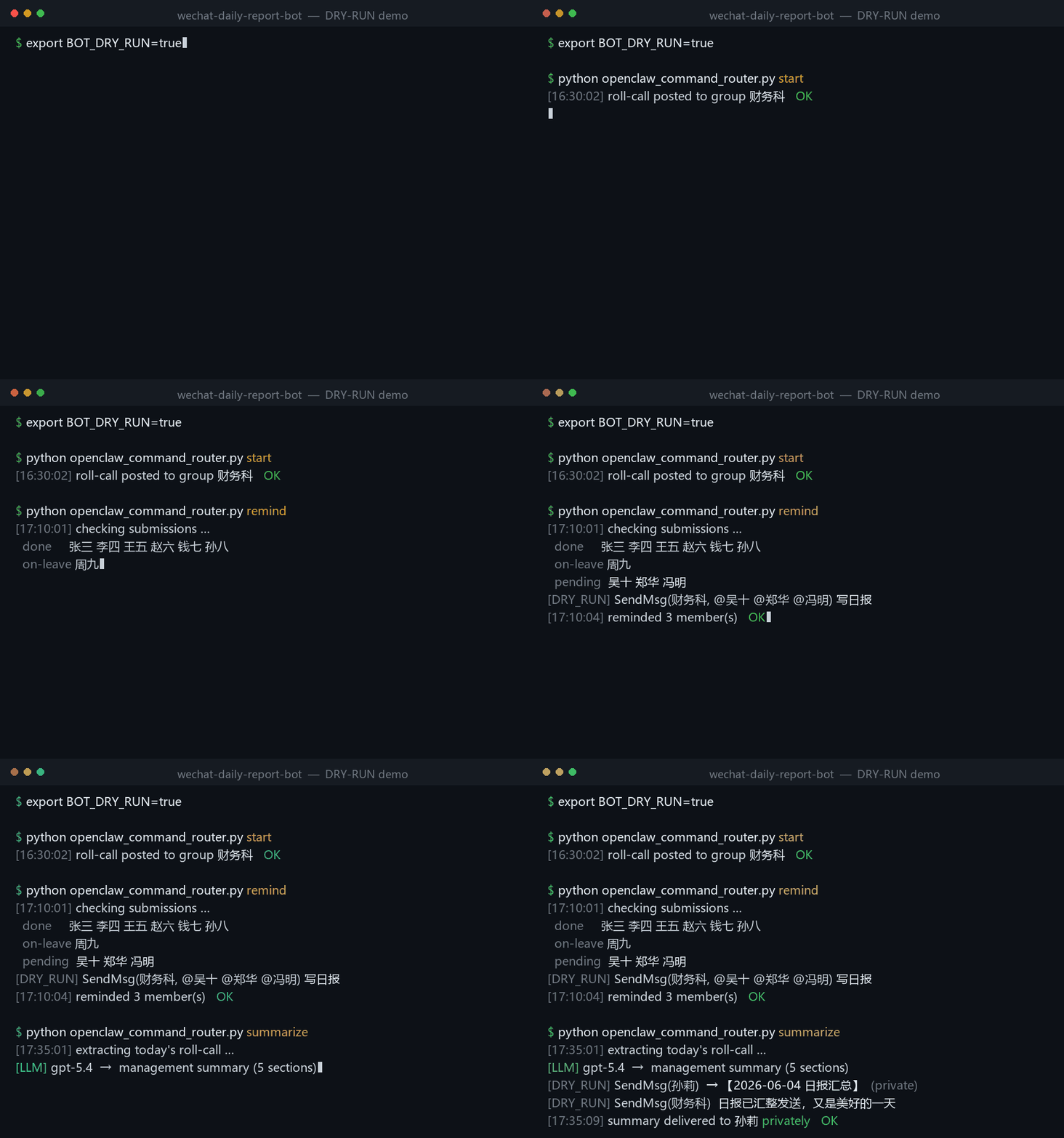
BOT_DRY_RUN=true — the full start → remind → summarize flow running with no real WeChat (names anonymized).
The problem
A team posts a daily work report every workday using WeChat's native "接龙" (roll-call / chain sign-up) feature. Three chores were done by hand every day:
- Start the roll-call at a fixed time.
- Chase whoever hasn't submitted (excluding the manager, the bot, and people on leave).
- Summarize ten people's raw entries into a clean, management-grade report and send it privately to the manager.
This bot automates all three — accurately, on time, and with a hot-reloadable rule set driving the AI summary.
Features
- 🚀 Native roll-call — drives WeChat's real
#接龙 → edit table → launchflow (not a fake text message), so entries keep their auto-numbering and names. - ⏰ Workday scheduling —
16:30start ·17:10chase ·17:35summarize, skipping public holidays viachinese-calendar. - 🎯 Accurate roll-call parsing — locates the day's roll-call by searching its date (avoids collapsed cards & stale history), parses participants, diffs against the roster.
- 🙋 Leave-aware chasing — merges all non-submitters into a single multi-
@message; never chases the manager, the bot, or anyone who declared leave before the cutoff. - 🧠 LLM summary with hot-reloadable rules — the summarization prompt lives in an external rules file that is re-read on every run; edit the rules and the next summary uses them, no restart/redeploy.
- 🔁 Model fallback chain —
gpt-5.4 → gpt-5.4-mini → deepseek-chat-v3with transient-error retries and region-unavailable fallback. - 🔌 Three trigger paths — workday timer, remote control from Telegram via OpenClaw, and an HTTP API (
/jielong /cuiban /huizong /status). - 🧪 DRY-RUN mode — exercise the API/logic without touching real WeChat.
remindandsummarizerun end-to-end, whilestartintentionally degrades to a no-op failure because the dry-run stub has no native WeChat roll-call input box (ChatBox.editbox).
Architecture
A clean five-layer separation of concerns:
flowchart TD
    PH["Telegram - you, anywhere"]
    OC["OpenClaw agent - same PC as the bot"]
    T1["Timer - workdays 16:30 / 17:10 / 17:35"]
    T3["HTTP API - /jielong /cuiban /huizong /status"]
    R["openclaw_command_router.py - start / remind / summarize / status"]
    A["api_server.py - FastAPI + scheduler"]
    C["bot_core.py - start / remind / summarize"]
    W["wxauto / wxautox4 - WeChat GUI automation"]
    M["llm_summary.py - hot-reload rules to LLM"]
    RULES[("summary rules: md + txt")]
    LLM[("OpenRouter / DeepSeek")]
    WX[("PC WeChat - group + manager DM")]
    CFG[("config.py - roster / times / copy")]
    PH --> OC
    OC -->|bash wrapper| R
    T1 --> A
    T3 --> A
    R --> A
    A --> C
    C --> W
    C --> M
    M -->|reads each run| RULES
    M --> LLM
    W --> WX
    CFG -->|config| C
    classDef trig fill:#1f6feb,color:#ffffff,stroke:#1f6feb;
    class PH,OC,T1,T3 trig;
Daily flow
sequenceDiagram
    autonumber
    participant S as Trigger
    participant B as bot_core
    participant W as WeChat
    participant L as LLM
    participant M as Manager
    S->>B: 16:30 start
    B->>W: post native roll-call and at-everyone
    S->>B: 17:10 remind
    B->>W: read roll-call, diff vs roster
    B->>W: at-mention pending, merged and leave-aware
    S->>B: 17:35 summarize
    B->>W: extract latest roll-call
    B->>L: roll-call plus hot-reloaded rules
    L-->>B: management-grade summary
    B-->>M: send summary privately
    B->>W: post done receipt to group
Layers map to files: openclaw_command_router.py (command) · api_server.py (API + timer) · bot_core.py (business) · llm_summary.py (model) · wxauto/wxautox4 (WeChat). Full write-up: docs/ARCHITECTURE.md.
Engineering highlights
The interesting part of this project is the robustness work behind GUI automation. A few examples (full list in docs/PITFALLS.md):
- Force WeChat to the foreground using
AttachThreadInputto bypass Windows' foreground-lock — otherwise hotkeys/clicks land on the wrong window. - Read collapsed roll-call cards by opening the chat-history search, querying the date, and double-clicking to copy the full text — instead of fragile scroll-and-scrape.
- Four-level
@everyonefallback (nativeAtAll→ simulated input + candidate pick →SendMsg(at=...)→ plain text) across WeChat versions. - Multi-
@message fix: when@-ing many people, the text would get inserted between names — fixed by sending the mentions with a placeholder, then the message separately. - Private-send safety: the summary is sent with a forced
who=target so a session-switch glitch can never leak it to the group. - Data-driven prompt engineering: the summary rules were distilled by comparing the manager's manual summary (ground truth) against the model's output, day after day — see docs/SUMMARY_RULES.md.
Tech stack
Python 3.10+ · FastAPI · uvicorn · schedule · chinese-calendar · pyautogui · pyperclip · uiautomation · OpenRouter/DeepSeek (LLM) · wxauto/wxautox4 (WeChat backend).
Project structure
wechat-daily-report-bot/
├── api_server.py                # entry point: backend init, FastAPI, timer thread
├── bot_core.py                  # core: start / chase / summarize + all WeChat I/O & robustness
├── llm_summary.py               # LLM summary: provider resolve, rule hot-reload, model fallback
├── config.py                    # config: group, roster, name map, times, copy
├── openclaw_command_router.py   # CLI: Chinese command → core functions → JSON
├── summary_rules.txt            # supplementary rules (hot-updatable)
├── rules/
│   └── summary_fixed_rules.md   # fixed summary rules (hot-reloaded as the LLM system prompt)
├── scripts/                     # OpenClaw remote-trigger patch (Telegram commands)
├── docs/                        # architecture, pitfalls, summary-rule methodology
├── tests/                       # unit tests for the pure parsing/diff functions
├── requirements.txt
└── .env.example
Quick start
# 1) install
pip install -r requirements.txt

# 2) configure (never commit your real .env)
cp .env.example .env      # Windows: copy .env.example .env
#   set OPENROUTER_API_KEY=...   ; keep BOT_DRY_RUN=true to test without real WeChat

# 3) run
python api_server.py
#   → API docs at http://localhost:8000/docs
On a real run, log into PC WeChat first and keep its window visible (this is GUI automation). For full functionality on WeChat 4.x, use the wxautox4 backend.
Triggering
| Method | How |
|---|---|
| Timer | Auto on workdays: 16:30 start · 17:10 chase · 17:35 summarize |
| HTTP API | GET /jielong · /cuiban · /huizong · /status ; POST /send_msg ; GET/POST /rules |
| CLI | python openclaw_command_router.py start|remind|summarize|status [--json] |
| Remote (Telegram → OpenClaw) | Send start / remind / summarize / status to your OpenClaw assistant from Telegram → it runs on the bot's PC (setup: scripts/repatch_openclaw_no_prefix.ps1) |
Remote control (Telegram → OpenClaw)
The bot runs unattended on a Windows PC, but it is driven from a phone:
- From Telegram, send a one-word command —
start/remind/summarize/status— to OpenClaw, a local AI-assistant agent running on the same PC as the bot. scripts/repatch_openclaw_no_prefix.ps1registers those words in OpenClaw and maps each to abashwrapper that runspython openclaw_command_router.py <action> --json.- The router calls
bot_coredirectly to drive WeChat, and the JSON result flows back to you in Telegram.
So the workday timer covers the routine, while Telegram + OpenClaw gives off-site, on-demand control — fire the summary early, or re-run a chase on a holiday. OpenClaw is an external, optional component; the timer, CLI and HTTP API all work without it.
Updating the summary rules
Edit rules/summary_fixed_rules.md (or summary_rules.txt) — the next summary picks it up automatically; no restart. Point LLM_FIXED_RULES_FILE at any local .md/.txt/.docx.
Tests
pip install pytest
pytest        # unit tests for parsing / roster-diff / message-slicing (no WeChat needed)
Security & disclaimer
- No secrets are stored in the repo; provide your own via
.env(git-ignored). - This is GUI automation (RPA) for personal/educational use. Automating IM clients may conflict with the platform's Terms of Service — use responsibly and at your own risk.
- All business identifiers in this repo are fictional (anonymized from the original project).