
:postbox: Whatsapp Actions for Github :postbox:
Introduction
This is an action repository with an objective of notifying the user on Whatsapp regarding several changes in their github repositories. Messages sent to Whatsapp are rich-formatted, easy to read and comprehend and also contains supportive media to enhance the experience.
Unique Features
- Offers rich-formatted push messages with texts, emojis and all details regarding the event
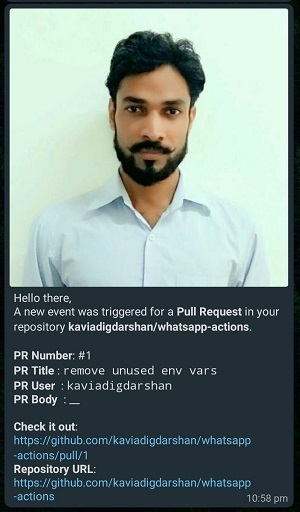
- Automatically adds the Github Avatar of the user who triggers the event in the message
- Includes all relevant URLs for your quick review and launch them in Github app or website
Get Started
Create Twilio Account
- Create an account in twilio from here
- Take note of
ACCOUNT SIDandAUTH TOKENfrom your twilio account. You can find it under your Twilio Account Dashboard
Configure your repository secrets
- Navigate to your repository secrets
Settings > Secrets - Add below secrets using button
New repository secret
| Name | Value |
|---|---|
| ACCOUNT_SID | ACCOUNT SID copied earlier |
| AUTH_TOKEN | AUTH TOKEN copied earlier |
| TO_WHATSAPP_NUMBER | Your Whatsapp Number |
Subscribe to Twilio Whatsapp Sandbox
-
Add a contact on your phone for Twilio number:
+14155238886) -
From your Whatsapp number, send a message to the above twilio number in the below format:
join "your-name"
Example:
join kavia-digdarshan
Prepare the action workflow
- In your repository page, navigate to
Actions > New Workflow > set up a workflow yourself. It will open up ayamlfile in code editor. - Replace everything in this
yamlfile with below:
name: Whatsapp Notification

on: [push, pull_request, issues, fork, watch]

jobs:
  build:
    runs-on: ubuntu-latest
    steps:
      - name: whatsapp-notify
        uses: kaviadigdarshan/whatsapp-actions@main
        env:
          ACCOUNT_SID: ${{ secrets.ACCOUNT_SID }}
          AUTH_TOKEN: ${{ secrets.AUTH_TOKEN }}
          TO_WHATSAPP_NUMBER: ${{ secrets.TO_WHATSAPP_NUMBER }}
Screenshots
Pull Request Message
Support
Give us a :star2: to support!
Copyright © 2020 Digdarshan Kavia