

Whisp
The Anti-Note for GNOME. A fluid, gesture-driven scratchpad designed for speed.



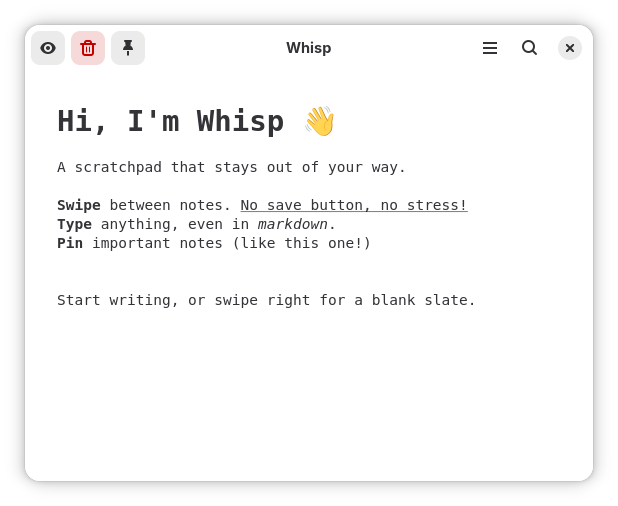
Whisp is a minimalist, lightning-fast note-taking application built strictly for the GNOME desktop environment. It abandons traditional complex file hierarchies in favor of a spatial, swipeable canvas. Inspired by the "anti-note" philosophy, it is designed to act as a seamless desktop scratchpad offering distraction-free Markdown editing while blending perfectly with modern GNOME aesthetics using GTK4 and Libadwaita.
Why Whisp?
Most note-taking apps force you into a heavy workflow of creating files, managing folders, and hitting "Save". Whisp is different.
- Zero Friction: There are no titles to type, no files to name, and no folders to manage. Just open the app and start typing.
- Swipeable Canvas: Instead of a sidebar of files, your notes exist in a spatial, horizontal carousel. A quick trackpad swipe instantly glides you to your next thought.
- The "Anti-Note": Use it as a scratchpad. Jot down quick thoughts, paste temporary links, and when you're done, hit
Ctrl+Dto delete it forever and keep your desk clean.
Core Features
- Spatial Navigation: Fluidly swipe between your recent notes using 1:1 touchpad gestures via Adwaita Carousel.
- WYSIWYG Markdown: Real-time rendering of Markdown. Toggle WYSIWYG mode to instantly hide Markdown syntax symbols and view clean rich text.
- Paper Themes: Native dynamic styling. Choose between Dotted, Grid, or Blank backgrounds to mimic physical engineering paper or scratchpads.
- Smart Paste: Copy a URL and press
Ctrl+Vto automatically shrink it via TinyURL in the background, or useCtrl+Shift+Vto extract and paste pure plain text, actively stripping all source Markdown formatting. - Keyboard-Centric Workflow:
Ctrl+Nto instantly create a new note.Ctrl+B,Ctrl+I,Ctrl+Ufor quick text formatting.
- Performance Focused: Maintains a lightweight footprint by rendering only the most recently active notes, ensuring instant startup times.
- Robust Management: Search, filter by tags, and safely manage deleted files within a hidden
.trashdirectory.
Roadmap
Here are the features we are planning to add, ordered by priority:
- Math Engine
- Reactive variables
- Auto Paste with paste module
- Image to text
- Themes
- Adding normal themes like gruvbox to variables
- Large Grid
- Search
- Find and Replace
- Generate Random numbers
- Roll Dice
- Generate Random Strings
- Modules (like
todayetc) - Reminders (e.g.
// Reminder: "complete x on 2 aug 3am") - Pinning notes (stays at the start, moves to the top like a stack, cannot be deleted until unpinned)
Maybe
- Conversions
- Export
Very maybe
- Templates
Installation
Whisp is officially distributed through Flathub, making it easy to install on any Linux distribution.
flatpak install flathub io.github.tanaybhomia.Whisp
Contribution & Development
If you'd like to contribute to Whisp or build your own version, we have set up scripts to make local development frictionless.
Local Testing
You do not need to install the app or compile it with Meson just to test Python code changes. Run the following command in the project root to instantly launch the app from the source code:
./run.sh
Development Environment Setup
If you want to use the official Flathub release for your daily notes, but also want a separate development version of Whisp in your app launcher for testing, run:
./install-dev.sh
This script creates a separate "Whisp (Development)" entry in your GNOME app grid. It uses a custom development icon and saves your test notes to a completely isolated folder (~/.local/share/Whisp/), keeping your official Flatpak notes safe. Any code changes you make in your IDE will instantly be reflected the next time you click the Development app icon.
Architecture
Whisp adheres strictly to the GNOME Human Interface Guidelines (HIG). It leverages Adw.Carousel for its swipeable interface and uses a highly optimized Gtk.TextView wrapper to instantly parse and decorate Markdown text dynamically.
License
Whisp is free and open-source software licensed under the GNU General Public License v3.0 (GPL-3.0). See the LICENSE file for more details.