
Xenon
A polished, all-in-one dashboard for the CORSAIR Xeneon Edge 14.5" LCD touchscreen — and any browser on Windows. Monitor your PC, control media and audio, mute your mic, manage your day, talk to a built-in AI assistant, drive your RGB lighting, and more — all from one glanceable screen.
Everything runs 100% locally: no cloud, no telemetry, no account required.




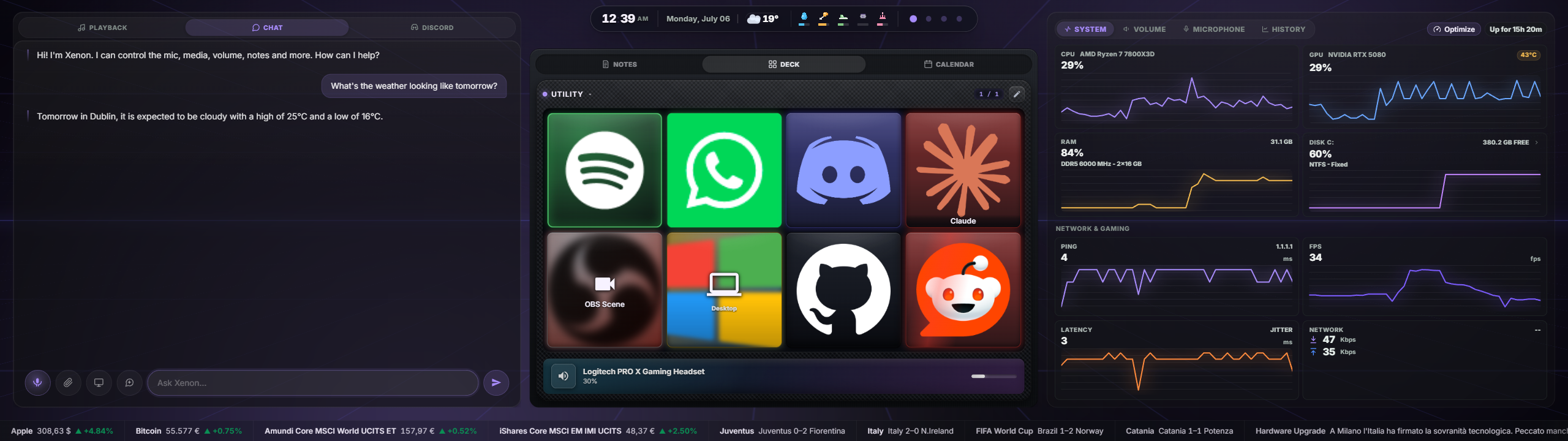
Built for the Xeneon Edge — great in any browser
Xenon is optimized for the CORSAIR Xeneon Edge 14.5" touchscreen: dense, glanceable tiles, comfortable touch targets, and a layout tuned for that display.
But it is just a local web app, so it works just as well in any Chromium-based browser (Edge, Chrome) on a normal monitor — touchscreen or not. Every control works with a mouse, and the layout reflows to fit landscape, portrait, large desktop windows, and the Xeneon Edge's short screen. Use it as a second-monitor dashboard, a browser tab, or an embedded panel in iCUE — same features everywhere.
Note: This is not a native iCUE widget. It runs as a tiny local Node.js server and is displayed inside iCUE via an iFrame. A native iCUE widget version is in development.
What's inside
A quick tour — see FEATURES.md for the full breakdown with screenshots.
- Customizable, multi-page dashboard — modular Bento grid with drag-and-drop layout, resizable tiles, tab-grouping, widget duplication, savable layout presets, and up to 8 pages.
- System & network monitor — CPU, GPU, RAM, disks, throughput, ping/jitter, and real in-game FPS (PresentMon).
- Media — now-playing from any SMTC app, transport controls, album art, per-source volume.
- Audio & microphone — output/input device pickers, master volume, mute, and a per-app mixer with real app icons.
- Xenon AI — a voice + vision + chat assistant that can control the whole dashboard. Runs on Google Gemini (cloud) or a free local provider (Ollama).
- Advanced AI features (opt-in) — Genesis (ask the AI to compose a dashboard page for you), Game Companion (in-game overlay with FPS, session time and AI screen insights), Guardian (PC health history with AI analysis — and viewable trend charts on the System tile), and Ambient presence (proactive greetings and alerts).
- RGB lighting bridge — drive Corsair/iCUE LEDs from real data (CPU temp, timers, volume, album art), coexisting with iCUE — plus network lights Govee, LIFX, WLED, Philips Hue and Nanoleaf (local, key-free).
- Deck — a programmable, Stream Deck-style key grid (apps, media, OBS, hotkeys, webhooks, soundboard, AI, and more).
- Productivity — calendar (with external Outlook/Google
.icssync), tasks, countdown timers, notes. - Weather — current conditions, forecast, and an hourly timeline.
- Focus lock screen — a distraction-free overlay with clock, now-playing, events, and weather.
- Streaming — Twitch, YouTube, and OBS widgets and Deck actions.
- Remote PC control — turn your phone into a remote for your PC (Sunshine + Tailscale + Moonlight).
- Performance Mode — game mode auto-pauses ambient effects during full-screen play, plus on-demand, fully reversible system optimization (power plan, priority boost, closing background apps).
- App switcher — every open window at a glance, tap to focus, with favourite app shortcuts.
- Settings — Light/Dark/Auto theme, accent colours, ambient backgrounds, language (EN/IT/KO/JA/ZH), custom backgrounds, a cinematic daily greeting, optional auto-open at logon, and more.
Installation
Xenon runs as a small local Node.js server on http://127.0.0.1:3030/ and works in any browser. On the Xeneon Edge it is embedded in iCUE as an iFrame.
Step 1 — Run the installer (once)
- Download the ZIP from Releases and extract it anywhere.
- Open the extracted folder.
- Double-click
INSTALL.bat. - If Windows asks permission, click Yes (it needs admin rights for hardware sensors and the startup task).
The installer automatically:
- installs Node.js LTS if missing;
- installs FFmpeg if missing (so MP4 backgrounds can be converted for iCUE);
- installs LibreHardwareMonitor and PawnIO (CPU/disk temperature sensors);
- downloads PresentMon into
server/presentmon/(real in-game FPS counter); - registers the server to start silently with Windows (no terminal, no tray icon);
- starts the server and opens
http://127.0.0.1:3030/so you can confirm it works.
The installer does not download the free local-AI components (Ollama / Whisper) — that keeps first-time setup fast. You set those up on demand from Settings → Xenon AI only if you switch to the local provider. See FEATURES.md.
Step 2 — Use it
In a browser (any monitor, touch or not):
Just open http://127.0.0.1:3030/.
On the Xeneon Edge (via iCUE):
-
Open CORSAIR iCUE.
-
On your Xeneon Edge dashboard, add an iFrame widget.
-
Paste this tag and save:
<iframe src="http://127.0.0.1:3030/" width="100%" height="100%" frameborder="0"></iframe>Size XL is recommended.
Every time you start your PC after that
Nothing. The server starts silently in the background and iCUE remembers your layout — the dashboard is live before you even open iCUE.
To remove the startup entry, double-click UNINSTALL.bat.
Requirements
- Windows 10 or 11 (x64)
- Node.js 18.15+ — installed automatically by
INSTALL.bat - FFmpeg — installed automatically; used for MP4 → WebM background conversion
- LibreHardwareMonitor + PawnIO — installed automatically; CPU/disk temperatures (degrades gracefully if absent)
- PresentMon — downloaded automatically; real in-game FPS (falls back to a DWM reading if unavailable)
- NirCmd — bundled; used for screen capture (Xenon AI vision)
- SoundVolumeView — bundled (NirSoft freeware, unmodified); audio device control
Optional:
- A free Gemini API key for Xenon AI (cloud) — everything else works without it.
- Ollama + Whisper.cpp for the free local AI provider — set up on demand from Settings.
- Sunshine + Tailscale for Remote Control — installed for you when you opt in; you use Moonlight on your phone.
nvidia-smiis auto-detected for NVIDIA GPU usage/temperature.
Background videos in iCUE
iCUE's embedded WebView can reject some MP4 files even when they play fine in Chrome. Xenon handles this for you:
-
Upload JPG, PNG, WebP, GIF, MP4, or WebM from Settings → Background media (up to 200 MB).
-
When you upload an MP4, the server converts it to WebM (VP8, 30 FPS) when FFmpeg is available.
-
If you run the server manually without FFmpeg, install it once:
winget install --id Gyan.FFmpeg.Essentials --exact --source winget --accept-package-agreements --accept-source-agreementsThen restart the server and re-upload the MP4. (Existing uploads are not converted retroactively.)
Troubleshooting
nodenot recognised — install Node.js 18+ and reopen your terminal.- Port 3030 already in use — close any other instance, or change the port in
server/server.js. - No CPU temperature — rerun
INSTALL.batand accept the admin prompt so it can install LibreHardwareMonitor/PawnIO and register the elevated startup task. - Mic mute does nothing on first launch — wait a second or two; the device cache populates right after startup.
Documentation
- FEATURES.md — the complete feature guide, with screenshots.
- DEVELOPER.md — developer quick start, HTTP API, file layout, and architecture.
- CHANGELOG.md — full version history.
- docs/streaming-setup.md — Twitch & YouTube connection guide.
Support
Found a bug? Open a Bug Report with your Windows version, what you did and what happened, and any error text from INSTALL.bat.
Have an idea? Open a Feature Request — all feedback is welcome.
If this saved you some time — no pressure, always appreciated:

A note on AI assistance
This project was built with AI assistance throughout — architecture, code, debugging, and documentation. Every feature was designed, tested, and iterated on hands-on: the ideas, product direction, and every decision about what ships are mine. AI was a tool, not the author.
License
Custom non-commercial license. © 2026 Marcello Mastroeni (marcimastro98) — all rights reserved.
Xenon is free for personal, non-commercial use, and you're welcome to read, run, and modify it for yourself. What is not allowed without the author's written permission: selling or monetizing it, integrating it into a commercial product, redistributing or repackaging it as your own work, or using the Xenon name and branding for another product. Any permitted fork or redistribution must keep attribution to the original author. See LICENSE for the full terms.
Includes SoundVolumeView © Nir Sofer (freeware, redistributed unmodified).