
Zenii (zen-ee-eye)

One local AI backend. Every interface.
Run a daemon at localhost:18981. Your desktop app, CLI, TUI, scripts,
and MCP clients share the same memory, tools, providers, channels, and scheduler — no sync, no duplication.



Start in 60 seconds
curl -fsSL https://raw.githubusercontent.com/sprklai/zenii/main/install.sh | bash
zenii-daemon &

# Store a fact once
curl -s -X POST http://localhost:18981/memory \
  -H "Content-Type: application/json" \
  -d '{"key":"deploy","content":"Production database is on port 5434"}' >/dev/null

# Ask about it later — from a script, cron job, or another machine
curl -s -X POST http://localhost:18981/chat \
  -H "Content-Type: application/json" \
  -d '{"session_id":"ops","prompt":"What port is the production database on?"}' | jq -r '.response'
That is the core contract: write state once, read it from anywhere that speaks HTTP.
[!TIP] Interactive API Docs — once the daemon is running, open http://127.0.0.1:18981/api-docs in your browser. You get a full Swagger-style explorer: every endpoint documented, live request testing, and code-snippet generation for curl, Python, Go, TypeScript, Rust, and more. No separate setup needed — it's built in.
Why Zenii
Most AI tools are per-session and per-interface. You get memory in the chat UI but not in your shell script. You wire a tool to one agent and have to re-wire it to the next.
Zenii solves this with a shared local backend:
| Without Zenii | With Zenii |
|---|---|
| Each script manages its own AI context | One daemon holds memory for all of them |
| Tools re-implemented per project | 19 tools registered once, available everywhere |
| Provider API keys scattered across configs | One credential store, one place to rotate |
| Desktop UI and scripts drift apart | Both call the same gateway |
| MCP tools only available inside the IDE | Expose the same tools to any MCP client |
Architecture
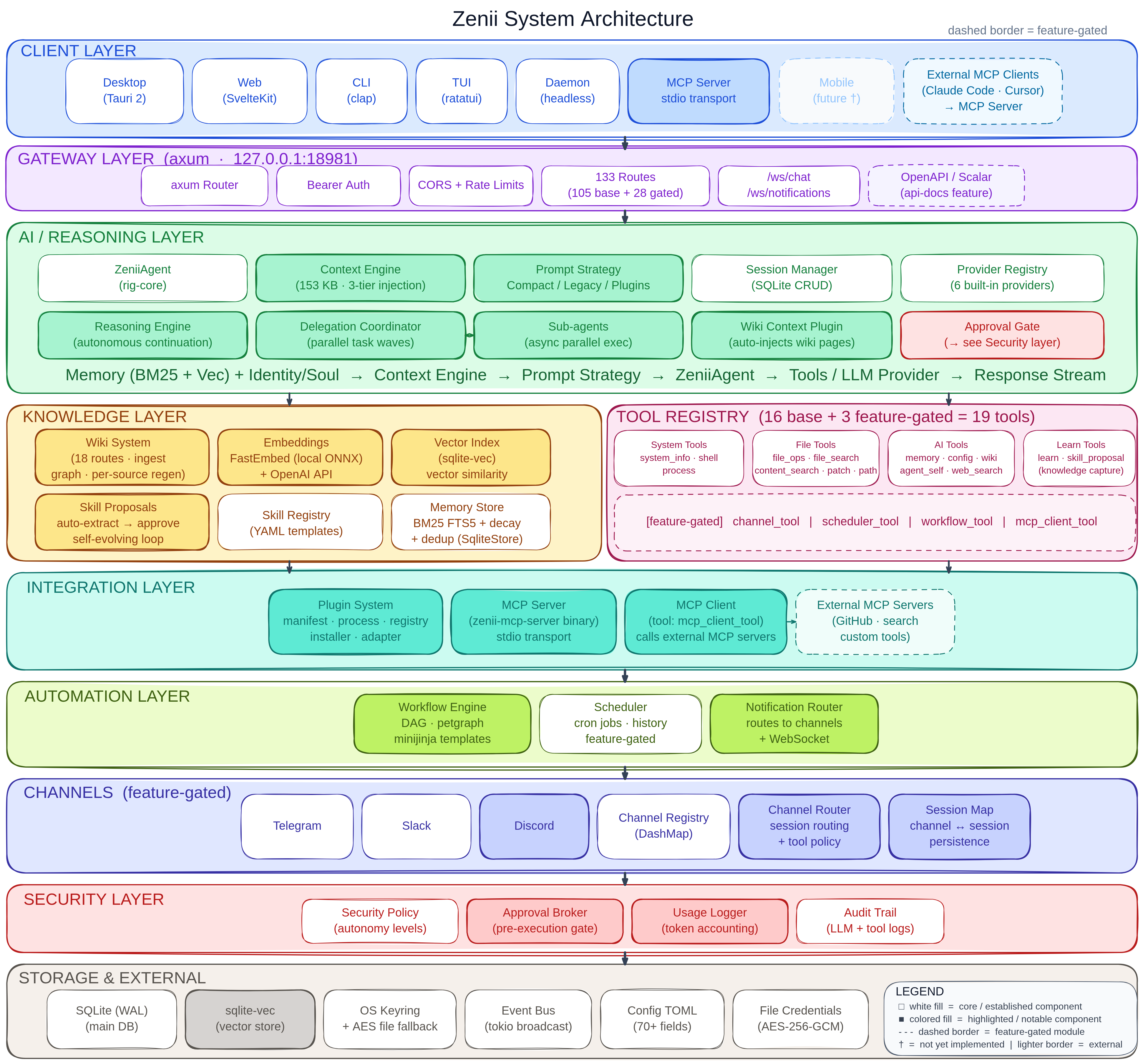
One Rust library crate (zenii-core) holds all business logic. Five thin binary crates (daemon, CLI, TUI, desktop, MCP server) are shell wrappers around the same axum gateway, SQLite database, agent loop, and tool registry.
What Ships Today
Interfaces
| Binary | Use it for |
|---|---|
zenii-daemon |
Local HTTP + WebSocket API server — the core of everything |
zenii |
Quick prompts, shell pipelines, terminal workflows |
zenii-tui |
Interactive terminal UI |
zenii-desktop |
Native Tauri desktop app |
zenii-mcp-server |
Expose all 19 Zenii tools to Claude Code, Cursor, VS Code |
Capabilities
| Domain | What it does |
|---|---|
| Memory | Persistent semantic recall — BM25 field weighting, temporal decay, vector deduplication, content-addressed dedup |
| Karpathy LLM Wiki | Ingest PDFs, DOCX, PPTX, XLSX, images — knowledge graph, AI query, auto-lint |
| AI Agent | Multi-step reasoning, tool use, streaming, delegation with human approvals |
| Tools (19) | Shell, file ops, web search, process control, patch, memory, wiki — one registry, every interface. Tool output compression keeps context lean (configurable per-tool line/result limits) |
| Providers (6+) | OpenAI · Anthropic · Gemini · OpenRouter · Vercel AI Gateway · Ollama · any OpenAI-compatible endpoint |
| Workflows | TOML/YAML DAG chains — tools, conditionals, loops, parallel steps, run history, cancellation |
| Scheduler | Cron + interval jobs, each run as a full agent turn with access to all tools |
| Channels | Telegram · Discord · Slack — inbound routing, unified inbox, threaded conversations (feature-gated) |
| PAR (Polyglot Agent Runtime) | Run external GitHub code (Python via uvx, Node via npx) as tools — dependencies installed on demand into an isolated cache (no bundled sidecar), with self-healing on failure |
| MCP | Server: expose all tools to Claude Code, Cursor, Gemini CLI, Windsurf · Client: consume external MCP servers |
| Security | OS keyring · AES-256-GCM encryption · surface-based permission model (CLI/desktop/TUI/MCP/API) |
Model Routing Hints
Prepend a hint prefix to any prompt to route it to a specialized model without changing your provider config:
# Route to a reasoning-capable model
curl -s -X POST http://localhost:18981/chat \
  -H "Authorization: Bearer $ZENII_TOKEN" \
  -d '{"prompt":"hint:reasoning Explain how the Raft consensus algorithm handles leader election"}'

# Route to a fast low-latency model
curl -s -X POST http://localhost:18981/chat \
  -H "Authorization: Bearer $ZENII_TOKEN" \
  -d '{"prompt":"hint:fast What time is it?"}'
Configure each hint target in config.toml:
routing_hint_reasoning = "claude-opus-4-5"
routing_hint_fast = "gpt-4o-mini"
routing_hint_vision = "gpt-4o"
routing_hint_summarize = "claude-haiku-3-5"
If a hint has no configured target, the default model is used and a warning is logged.
Karpathy LLM Wiki
Knowledge compiled at ingestion time, not re-derived at every query. Drop in a document; Zenii extracts, indexes, and links the knowledge so your agent can answer questions against it instantly.
# Ingest a runbook, spec, or doc
curl -s -X POST http://localhost:18981/wiki/ingest \
  -H "Authorization: Bearer $ZENII_TOKEN" \
  -d '{"url": "https://example.com/runbook.pdf"}'

# Query it — answers come from the compiled knowledge base
curl -s -X POST http://localhost:18981/wiki/query \
  -H "Authorization: Bearer $ZENII_TOKEN" \
  -d '{"query": "What does section 3 say about rollback?"}'
- Supports PDF, DOCX, PPTX, XLSX, and images via MarkItDown
- Knowledge graph with force-directed visualization in the web UI
- Queryable from any interface — CLI, desktop, or agent loop
- Auto-lint detects inconsistency and gaps across pages
Full guide: docs.zenii.sprklai.com/wiki
MCP: Server and Client
As MCP server — expose all 19 Zenii tools to any agent:
// .mcp.json — works with Claude Code, Cursor, Gemini CLI, Windsurf, Codex
{
  "mcpServers": {
    "zenii": {
      "command": "zenii-mcp-server",
      "args": ["--transport", "stdio"]
    }
  }
}
As MCP client — Zenii can also consume external MCP servers. Add GitHub, Postgres, Filesystem, or any custom MCP server and its tools become available in your agent loop alongside Zenii's own 19.
AGENT.md — a machine-readable guide written for AI coding agents (Claude Code, Cursor, Gemini CLI, Windsurf, Codex). Drop it in your project or point your agent at it to give it a complete map of Zenii's API surface.
Full guide: docs.zenii.sprklai.com/mcp
Polyglot Agent Runtime (PAR)
Run external code from GitHub as Zenii tools. Write a Python script or Node module, declare it in a manifest, and Zenii handles everything: dependency installation, runtime detection, isolation, and automatic repair on failure.
Install a Python Tool
# Check runtimes
zenii runtime status

# Install uv (Python runtime) if needed
zenii runtime install uv

# Install a Python tool from GitHub
zenii plugin install https://github.com/yourteam/repo-analyzer

# Use it immediately
zenii chat
# > analyze the complexity of my Python project
Write Your Own Tool
zenii-plugin.toml:
[plugin]
name = "repo-analyzer"
version = "0.1.0"
description = "Analyze repository structure"

[[tools]]
name = "analyze"
description = "Analyze repo complexity"
binary = "main.py"
runner = "uvx"
package = "git+https://github.com/yourteam/[email protected]"
required_runtime = "python>=3.11"

[[tools.tests]]
input = { repo_path = "." }
expect = { file_count = { ">": 0 } }
main.py:
import sys, json
# Tool receives JSON on stdin, returns JSON on stdout
data = json.loads(sys.stdin.read())
result = analyze(data["repo_path"])
print(json.dumps({"success": True, "output": result}))
Key Features
- On-demand deps — installed via
uv/npxinto an isolated cache (no fat sidecar) - Runtime auto-detect — doctor probes for Python, Node.js, etc.; users can install with
zenii runtime install uv - Self-healing — tools with declared
testsauto-repair on failure: dependency errors get the missing module added, logic bugs get a reflective patch - Works everywhere — available in chat, delegation, workflows, CLI, desktop, and MCP
Full guide: docs.zenii.sprklai.com/par-guide
Workflows and Scheduler
Workflows — chain tools into DAGs with conditionals, loops, and parallel steps:
# ~/.config/zenii/workflows/daily-digest.yml
name: daily-digest
steps:
  - id: search
    tool: web_search
    args: { query: "Rust ecosystem news today" }
  - id: store
    tool: memory_store
    args: { key: "digest/{{date}}", content: "{{steps.search.result}}" }
Run manually: POST /workflows/daily-digest/run
Natural Language Workflow Creation — describe a workflow in plain English; Zenii generates the TOML and opens the visual builder automatically. Available from the Workflows page (toggle to "Describe in English") and from the chat window (⬡ Workflow button, mutually exclusive with Delegate).
Scheduler — trigger any prompt or workflow on a cron schedule, executed as a full agent turn with access to all tools:
curl -s -X POST http://localhost:18981/scheduler/jobs \
  -H "Authorization: Bearer $ZENII_TOKEN" \
  -d '{"name":"daily-digest","cron":"0 8 * * *","prompt":"Run the daily-digest workflow"}'
Full guide: docs.zenii.sprklai.com/workflows · docs.zenii.sprklai.com/scheduler
Install
macOS / Linux
curl -fsSL https://raw.githubusercontent.com/sprklai/zenii/main/install.sh | sh
Installs zenii (CLI) and zenii-daemon to ~/.local/bin.
Windows
Download and run the desktop installer (.msi or .exe) from
GitHub Releases.
For headless / CLI-only, grab zenii.exe and zenii-daemon.exe from the same page.
Cargo
cargo install --git https://github.com/sprklai/zenii zenii zenii-daemon
Full platform notes: Installation & Usage
Build from Source
Prerequisites: Rust 1.85+, Bun, SQLite development libraries.
git clone https://github.com/sprklai/zenii.git
cd zenii
cargo build --release -p zenii-daemon       # headless server
cargo build --release -p zenii-cli          # CLI client
cd crates/zenii-desktop && cargo tauri build # desktop app
Full setup guide: docs/development.md
Good Fit
- Local automations that need shared memory across scripts, bots, and scheduled jobs
- Developer tooling that wants a single AI backend reachable via HTTP or MCP
- Self-hosted workflows where privacy and local control matter
- Projects that want a desktop UI and a scriptable backend without maintaining two stacks
- Self-hosted on a VPS, Raspberry Pi, or Docker — runs as a systemd service or container behind nginx/Caddy (Deployment guide)
Zenii PiDog (Raspberry Pi) Demo

Zenii runs on ARM — same binary, same API. Deploy it on a Raspberry Pi, attach tools, and your hardware becomes an AI-addressable endpoint over HTTP.
Not a Good Fit
- Multi-user or SaaS deployments (single-user daemon, no multi-tenant auth)
- Drop-in OpenAI-compatible server (Zenii has its own API surface)
- Mobile apps (planned, not yet shipped)
Docs
- Website
- Documentation
- Installation & Usage
- Interactive API Explorer — live Swagger-style docs at
localhost:18981/api-docs(daemon must be running) - API Reference
- CLI Reference
- Configuration
- Polyglot Agent Runtime (PAR) — run external code as tools
- LLM Wiki
- Workflows & Scheduler
- Architecture
- AGENT.md — guide for AI coding agents
- CHANGELOG.md
- ROADMAP.md
Contributing
Typo fixes, tests, and focused bug fixes can go straight to a PR. Larger feature work should start with CONTRIBUTING.md.
If Zenii is useful to you — star the repo and tell a developer friend.
License
MIT