

django-markdown-editor
## martor [![pypi version][1]][2] [![paypal donation][3]][4] [![license][5]][6] [![python version][7]][8] [![django version][9]][10] [![build][11]][12] [![black][18]][19] 📖 **Documentation:** https://django-markdown-editor.readthedocs.io **Martor** is a Markdown Editor plugin for Django, supported for _Bootstrap_, _Semantic-UI_ & _Tailwind CSS_. ### Features * Live Preview * Integrated with [_Ace Editor_](https://ace.c9.io) * Supported with [_Bootstrap_](https://getbootstrap.com), [_Semantic-UI_](https://semantic-ui.com) and [_Tailwind CSS_](https://tailwindcss.com) * Supported Multiple Fields [_fixed this issue_](https://github.com/agusmakmun/django-markdown-editor/issues/3) * Upload Images to imgur.com _(via API)_ and [custom uploader][13] * Direct Mention users `@[username]` - _(requires user to logged in)_. * Supports embed/iframe video from (Youtube, Vimeo, Dailymotion, Yahoo, Veoh, & Metacafe) * Spellchecking (only supports US English at this time) * Emoji `:emoji_name:` + Cheat sheets * Martor Commands Reference * Supports Django Admin * Toolbar Buttons * Highlight `pre` * Custom ID Attributes (Add custom IDs to any text element using `{#custom-id}` syntax, e.g., `# Heading1 {#my-h1-id}`, for easy linking and navigation. ### Preview 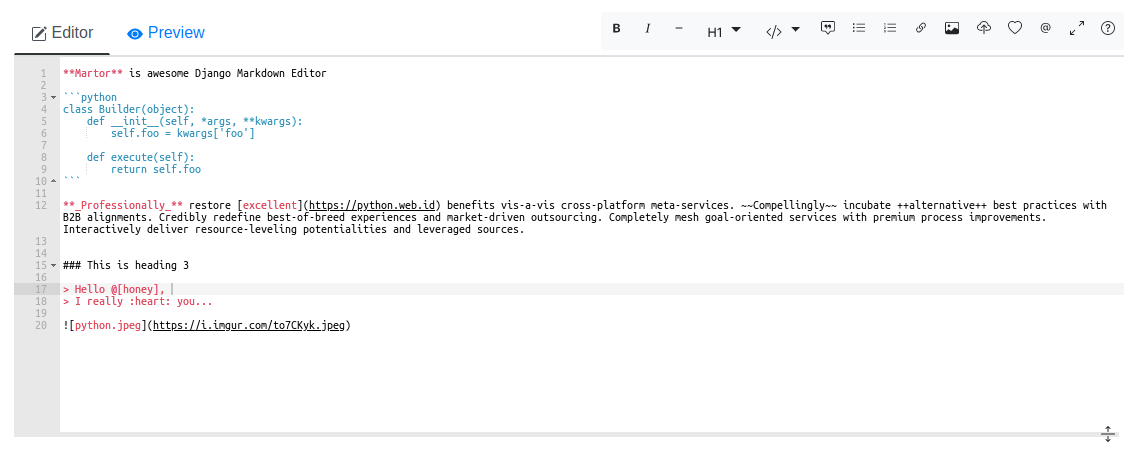 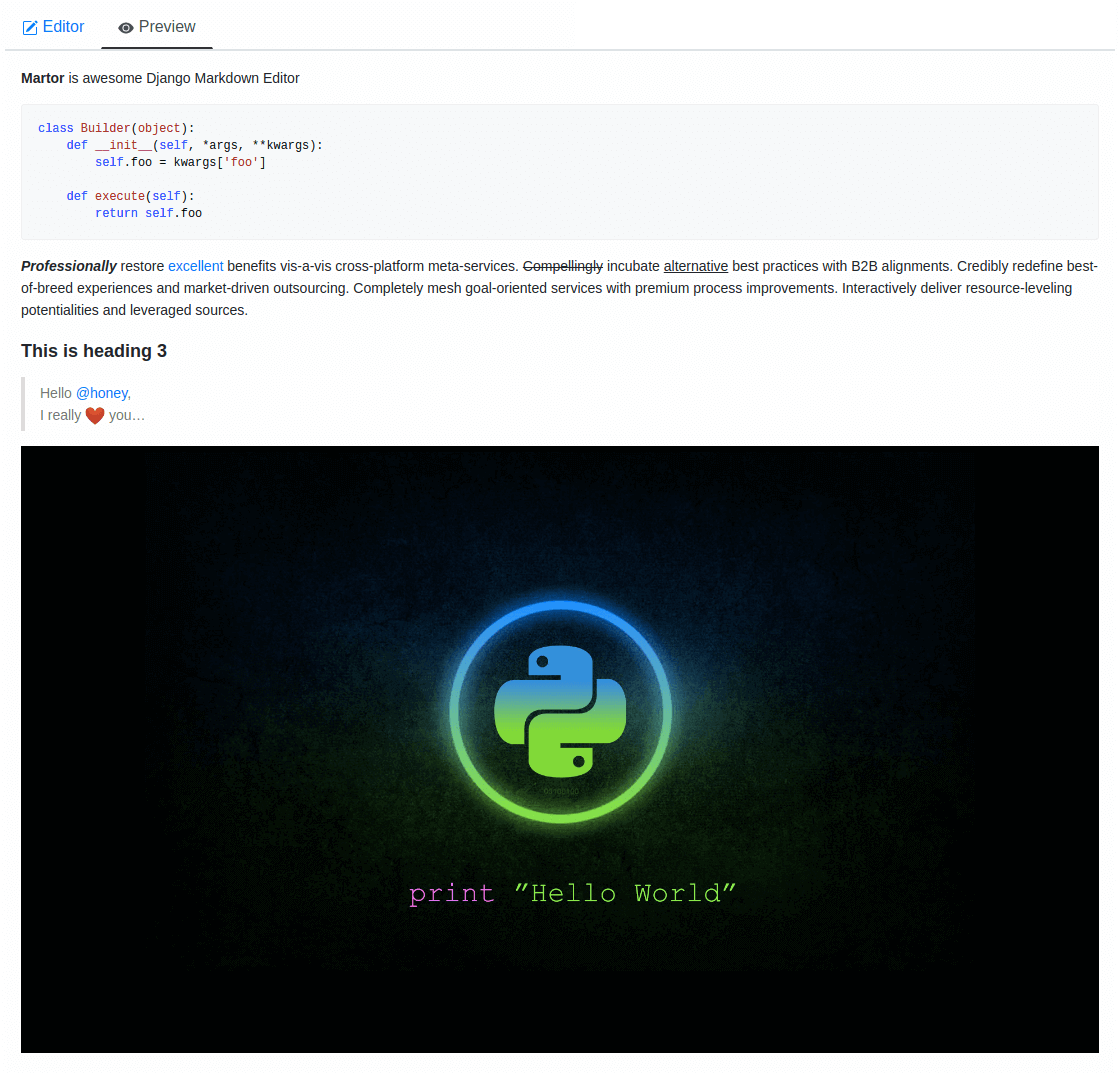 ### Requirements * `Django>=3.2` * `Markdown>=3.0` * `requests>=2.12.4` * `bleach` ### Installation Martor is available directly from [PyPI][2]: **1.** Installing the package. ``` $ pip install martor ``` **2.** Don't forget to add `'martor'` to your `'INSTALLED_APPS'` setting _(without migrations)_. ```python # settings.py INSTALLED_APPS = [ .... 'martor', ] ``` **3.** Add url pattern to your `urls.py.` ```python # urls.py urlpatterns = [ ... path('martor/', include('martor.urls')), ] ``` **4.** Collect martor's static files in your `STATIC_ROOT` folder. ``` ./manage.py collectstatic ``` ### Setting Configurations `settings.py` Please register your application at https://api.imgur.com/oauth2/addclient to get `IMGUR_CLIENT_ID` and `IMGUR_API_KEY`. ```python # Choices are: "semantic", "bootstrap", "tailwind" MARTOR_THEME = 'bootstrap' # Global martor settings # Input: string boolean, `true/false` MARTOR_ENABLE_CONFIGS = { 'emoji': 'true', # to enable/disable emoji icons. 'imgur': 'true', # to enable/disable imgur/custom uploader. 'mention': 'false', # to enable/disable mention 'jquery': 'true', # to include/revoke jquery (require for admin default django) 'living': 'false', # to enable/disable live updates in preview 'spellcheck': 'false', # to enable/disable spellcheck in form textareas 'hljs': 'true', # to enable/disable hljs highlighting in preview } # To show the toolbar buttons MARTOR_TOOLBAR_BUTTONS = [ 'bold', 'italic', 'horizontal', 'heading', 'pre-code', 'blockquote', 'unordered-list', 'ordered-list', 'link', 'image-link', 'image-upload', 'emoji', 'direct-mention', 'toggle-maximize', 'help' ] # To setup the martor editor with title label or not (default is False) MARTOR_ENABLE_LABEL = False # Disable admin style when using custom admin interface e.g django-grappelli (default is True) MARTOR_ENABLE_ADMIN_CSS = True # Imgur API Keys MARTOR_IMGUR_CLIENT_ID = 'your-client-id' MARTOR_IMGUR_API_KEY = 'your-api-key' # Markdownify MARTOR_MARKDOWNIFY_FUNCTION = 'martor.utils.markdownify' # default MARTOR_MARKDOWNIFY_URL = '/martor/markdownify/' # default # Delay in milliseconds to update editor preview when in living mode. MARTOR_MARKDOWNIFY_TIMEOUT = 0 # update the preview instantly # or: MARTOR_MARKDOWNIFY_TIMEOUT = 1000 # default # Markdown extensions (default) MARTOR_MARKDOWN_EXTENSIONS = [ 'markdown.extensions.extra', 'markdown.extensions.nl2br', 'markdown.extensions.smarty', 'markdown.extensions.fenced_code', 'markdown.extensions.sane_lists', # Custom markdown extensions. 'martor.extensions.urlize', 'martor.extensions.del_ins', # ~~strikethrough~~ and ++underscores++ 'martor.extensions.mention', # to parse markdown mention 'martor.extensions.emoji', # to parse markdown emoji 'martor.extensions.mdx_video', # to parse embed/iframe video 'martor.extensions.escape_html', # to handle the XSS vulnerabilities "martor.extensions.mdx_add_id", # to parse id like {#this_is_id} ] # Markdown Extensions Configs MARTOR_MARKDOWN_EXTENSION_CONFIGS = {} # Markdown urls MARTOR_UPLOAD_URL = '' # Completely disable the endpoint # or: MARTOR_UPLOAD_URL = '/martor/uploader/' # default MARTOR_SEARCH_USERS_URL = '' # Completely disables the endpoint # or: MARTOR_SEARCH_USERS_URL = '/martor/search-user/' # default # Markdown Extensions # MARTOR_MARKDOWN_BASE_EMOJI_URL = 'https://www.webfx.com/tools/emoji-cheat-sheet/graphics/emojis/' # from webfx MARTOR_MARKDOWN_BASE_EMOJI_URL = 'https://github.githubassets.com/images/icons/emoji/' # default from github # or: MARTOR_MARKDOWN_BASE_EMOJI_URL = '' # Completely disables the endpoint MARTOR_MARKDOWN_BASE_MENTION_URL = 'https://python.web.id/author/' # please change this to your domain # If you need to use your own themed "bootstrap" or "semantic ui" dependency # replace the values with the file in your static files dir MARTOR_ALTERNATIVE_JS_FILE_THEME = "semantic-themed/semantic.min.js" # default None MARTOR_ALTERNATIVE_CSS_FILE_THEME = "semantic-themed/semantic.min.css" # default None MARTOR_ALTERNATIVE_JQUERY_JS_FILE = "jquery/dist/jquery.min.js" # default None # URL schemes that are allowed within links ALLOWED_URL_SCHEMES = [ "file", "ftp", "ftps", "http", "https", "irc", "mailto", "sftp", "ssh", "tel", "telnet", "tftp", "vnc", "xmpp", ] # https://gist.github.com/mrmrs/7650266 ALLOWED_HTML_TAGS = [ "a", "abbr", "b", "blockquote", "br", "cite", "code", "command", "dd", "del", "dl", "dt", "em", "fieldset", "h1", "h2", "h3", "h4", "h5", "h6", "hr", "i", "iframe", "img", "input", "ins", "kbd", "label", "legend", "li", "ol", "optgroup", "option", "p", "pre", "small", "span", "strong", "sub", "sup", "table", "tbody", "td", "tfoot", "th", "thead", "tr", "u", "ul" ] # https://github.com/decal/werdlists/blob/master/html-words/html-attributes-list.txt ALLOWED_HTML_ATTRIBUTES = [ "alt", "class", "color", "colspan", "datetime", # "data", "height", "href", "id", "name", "reversed", "rowspan", "scope", "src", "style", "title", "type", "width" ] ``` Check this setting is not set else csrf will not be sent over ajax calls: ```python CSRF_COOKIE_HTTPONLY = False ``` ### Usage #### Model ```python from django.db import models from martor.models import MartorField class Post(models.Model): description = MartorField() ``` #### Form ```python from django import forms from martor.fields import MartorFormField class PostForm(forms.Form): description = MartorFormField() ``` #### Admin ```python from django.db import models from django.contrib import admin from martor.widgets import AdminMartorWidget from yourapp.models import YourModel class YourModelAdmin(admin.ModelAdmin): formfield_overrides = { models.TextField: {'widget': AdminMartorWidget}, } admin.site.register(YourModel, YourModelAdmin) ``` #### Template Renderer Simply safely parse markdown content as html output by loading templatetags from `martor/templatetags/martortags.py`. ```html {% load martortags %} {{ field_name|safe_markdown }} # example {{ post.description|safe_markdown }} ``` Don't miss to include the required css & js files before use. You can take a look at this folder [martor_demo/app/templates][14] for more details. The below example is a one of the way to implement it when you choose the `MARTOR_THEME = 'bootstrap'`: ```html {% extends "bootstrap/base.html" %} {% load static %} {% load martortags %} {% block css %} <link href="{% static 'plugins/css/ace.min.css' %}" type="text/css" media="all" rel="stylesheet" /> <link href="{% static 'martor/css/martor.bootstrap.min.css' %}" type="text/css" media="all" rel="stylesheet" /> {% endblock %} {% block content %} <div class="martor-preview"> <h1>Title: {{ post.title }}</h1> <p><b>Description:</b></p> <hr /> {{ post.description|safe_markdown }} </div> {% endblock %} {% block js %} <script type="text/javascript" src="{% static 'plugins/js/highlight.min.js' %}"></script> <script> $('.martor-preview pre').each(function(i, block){ hljs.highlightBlock(block); }); </script> {% endblock %} ``` #### Template Editor Form Different with *Template Renderer*, the *Template Editor Form* have more css & javascript dependencies. ```html {% extends "bootstrap/base.html" %} {% load static %} {% block css %} <link href="{% static 'plugins/css/ace.min.css' %}" type="text/css" media="all" rel="stylesheet" /> <link href="{% static 'martor/css/martor.bootstrap.min.css' %}" type="text/css" media="all" rel="stylesheet" /> {% endblock %} {% block content %} <form class="form" method="post">{% csrf_token %} <div class="form-group"> {{ form.title }} </div> <div class="form-group"> {{ form.description }} </div> <div class="form-group"> <button class="btn btn-success"> <i class="save icon"></i> Save Post </button> </div> </form> {% endblock %} {% block js %} <script type="text/javascript" src="{% static 'plugins/js/ace.js' %}"></script> <script type="text/javascript" src="{% static 'plugins/js/mode-markdown.js' %}"></script> <script type="text/javascript" src="{% static 'plugins/js/ext-language_tools.js' %}"></script> <script type="text/javascript" src="{% static 'plugins/js/theme-github.js' %}"></script> <script type="text/javascript" src="{% static 'plugins/js/typo.js' %}"></script> <script type="text/javascript" src="{% static 'plugins/js/spellcheck.js' %}"></script> <script type="text/javascript" src="{% static 'plugins/js/highlight.min.js' %}"></script> <script type="text/javascript" src="{% static 'plugins/js/emojis.min.js' %}"></script> <script type="text/javascript" src="{% static 'martor/js/martor.bootstrap.min.js' %}"></script> {% endblock %} ``` #### Tailwind CSS Theme When using `MARTOR_THEME = 'tailwind'`, include the required CSS and JavaScript files: **Template Renderer (Tailwind):** ```html {% extends "base.html" %} {% load static %} {% load martortags %} {% block css %} <link href="{% static 'plugins/css/ace.min.css' %}" type="text/css" media="all" rel="stylesheet" /> <link href="{% static 'plugins/css/tailwind.min.css' %}" type="text/css" media="all" rel="stylesheet" /> <link href="{% static 'martor/css/martor.tailwind.min.css' %}" type="text/css" media="all" rel="stylesheet" /> {% endblock %} {% block content %} <div class="container mx-auto px-4 py-8"> <div class="martor-preview bg-white rounded-lg shadow-sm p-6"> <h1 class="text-3xl font-bold text-gray-900 mb-4">{{ post.title }}</h1> <div class="prose prose-sm max-w-none"> {{ post.description|safe_markdown }} </div> </div> </div> {% endblock %} {% block js %} <script type="text/javascript" src="{% static 'plugins/js/highlight.min.js' %}"></script> <script> document.querySelectorAll('.martor-preview pre code').forEach((block) => { hljs.highlightBlock(block); }); </script> {% endblock %} ``` **Template Editor Form (Tailwind):** ```html {% extends "base.html" %} {% load static %} {% block css %} <link href="{% static 'plugins/css/ace.min.css' %}" type="text/css" media="all" rel="stylesheet" /> <link href="{% static 'plugins/css/tailwind.min.css' %}" type="text/css" media="all" rel="stylesheet" /> <link href="{% static 'martor/css/martor.tailwind.min.css' %}" type="text/css" media="all" rel="stylesheet" /> {% endblock %} {% block content %} <div class="container mx-auto px-4 py-8"> <form class="bg-white rounded-lg shadow-sm p-6" method="post">{% csrf_token %} <div class="mb-6"> <label class="block text-sm font-medium text-gray-700 mb-2">{{ form.title.label }}</label> {{ form.title }} </div> <div class="mb-6"> <label class="block text-sm font-medium text-gray-700 mb-2">{{ form.description.label }}</label> {{ form.description }} </div> <div class="flex justify-end"> <button class="bg-blue-600 hover:bg-blue-700 text-white font-medium py-2 px-4 rounded-md transition-colors"> Save Post </button> </div> </form> </div> {% endblock %} {% block js %} <script type="text/javascript" src="{% static 'plugins/js/ace.js' %}"></script> <script type="text/javascript" src="{% static 'plugins/js/mode-markdown.js' %}"></script> <script type="text/javascript" src="{% static 'plugins/js/ext-language_tools.js' %}"></script> <script type="text/javascript" src="{% static 'plugins/js/theme-github.js' %}"></script> <script type="text/javascript" src="{% static 'plugins/js/typo.js' %}"></script> <script type="text/javascript" src="{% static 'plugins/js/spellcheck.js' %}"></script> <script type="text/javascript" src="{% static 'plugins/js/highlight.min.js' %}"></script> <script type="text/javascript" src="{% static 'plugins/js/emojis.min.js' %}"></script> <script type="text/javascript" src="{% static 'martor/js/martor.tailwind.min.js' %}"></script> {% endblock %} ``` ### Custom Uploader If you want to save the images uploaded to your storage, **Martor** also provides a way to handle this. Please checkout this [WIKI][13] ### Test Martor from this Repository Assuming you are already setup with a virtual environment (virtualenv): ``` $ git clone https://github.com/agusmakmun/django-markdown-editor.git $ cd django-markdown-editor/ && pip install -e . $ cd martor_demo/ $ python manage.py makemigrations && python manage.py migrate $ python manage.py runserver ``` Checkout at http://127.0.0.1:8000/simple-form/ on your browser. ### Documentation Complete documentation is available online at: https://django-markdown-editor.readthedocs.io/ #### Running Documentation Locally To build and view the documentation locally: **1.** Clone the repository and set up your environment: ``` $ git clone https://github.com/agusmakmun/django-markdown-editor.git $ cd django-markdown-editor/ $ python -m venv venv $ source venv/bin/activate # On Windows: venv\Scripts\activate ``` **2.** Install documentation dependencies: ``` $ pip install -r docs/requirements.txt ``` **3.** Build the documentation: ``` $ cd docs/ $ sphinx-build -b html . _build/html ``` Or using the included Makefile: ``` $ cd docs/ $ make html ``` **4.** Open the documentation in your browser: ``` $ open _build/html/index.html # On macOS # Or on Linux/Windows, navigate to docs/_build/html/index.html ``` Alternatively, serve the documentation with a local HTTP server: ``` $ make serve # Then open http://localhost:8000 in your browser ``` The documentation includes: - Installation and quickstart guides - Complete configuration reference - Usage examples for models, forms, widgets, and admin - API documentation - Troubleshooting and FAQ #### Contributing to Documentation The documentation is built with [Sphinx](https://www.sphinx-doc.org/) and uses reStructuredText format. To contribute: 1. Edit the `.rst` files in the `docs/` directory 2. Build the docs locally to test your changes 3. Submit a pull request with your improvements ### Martor Commands Reference 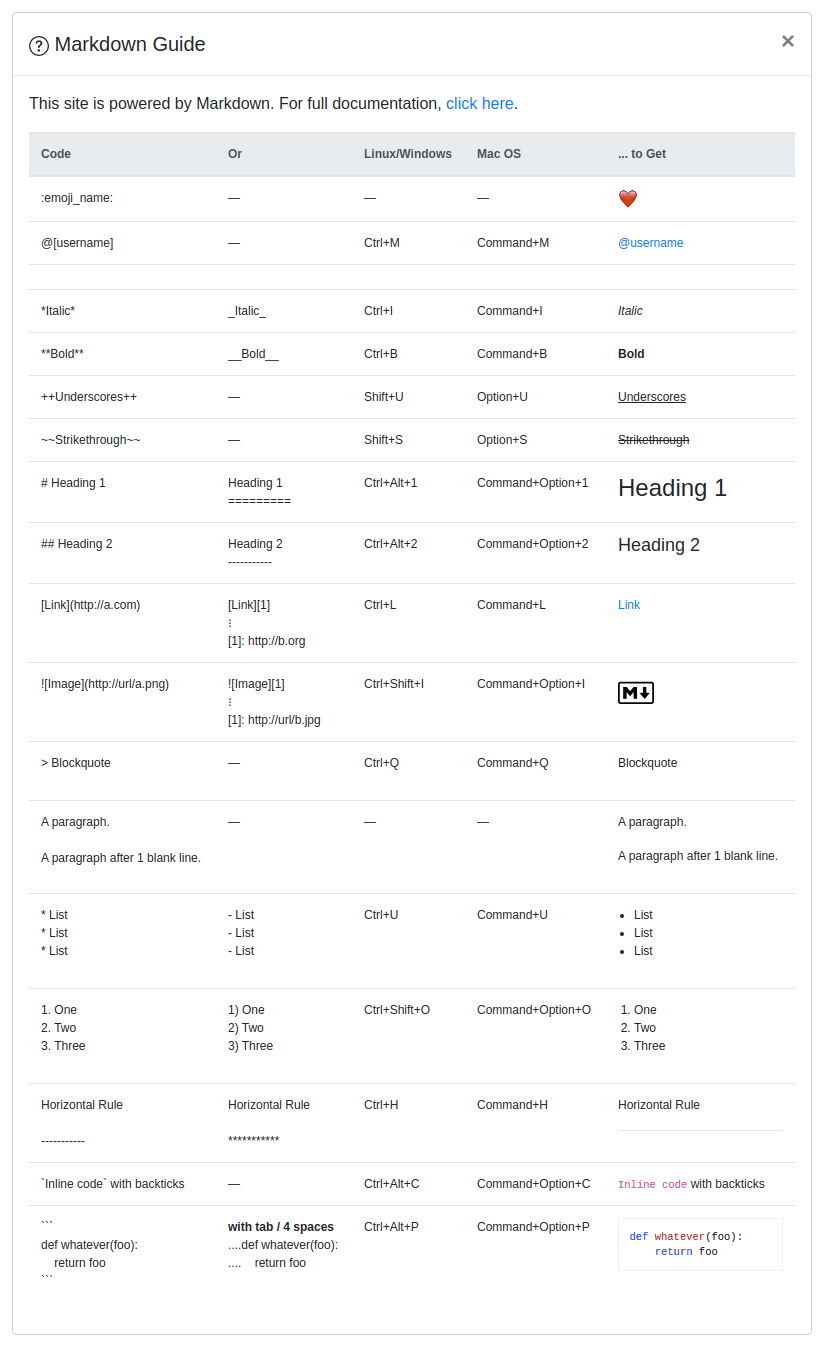 ### Notes **Martor** was inspired by these great projects: [django-markdownx][15], [Python Markdown][16] and [Online reStructuredText editor][17]. [1]: https://img.shields.io/pypi/v/martor.svg [2]: https://pypi.python.org/pypi/martor [3]: https://img.shields.io/badge/donate-paypal-blue [4]: https://www.paypal.com/paypalme/summonagus [5]: https://img.shields.io/badge/license-GNUGPLv3-blue.svg [6]: https://raw.githubusercontent.com/agusmakmun/django-markdown-editor/master/LICENSE [7]: https://img.shields.io/pypi/pyversions/martor.svg [8]: https://pypi.python.org/pypi/martor [9]: https://img.shields.io/badge/Django-3.2%20%3E=%204.2-green.svg [10]: https://www.djangoproject.com [11]: https://img.shields.io/github/actions/workflow/status/agusmakmun/django-markdown-editor/run-tests.yml?branch=master [12]: https://github.com/agusmakmun/django-markdown-editor/actions/workflows/run-tests.yml [13]: https://github.com/agusmakmun/django-markdown-editor/wiki [14]: https://github.com/agusmakmun/django-markdown-editor/tree/master/martor_demo/app/templates [15]: https://github.com/adi-/django-markdownx [16]: https://github.com/waylan/Python-Markdown [17]: https://rsted.info.ucl.ac.be [18]: https://img.shields.io/badge/code%20style-black-000000.svg [19]: https://github.com/ambv/black