
A Deterministic Orchestrator for Composable Micro-Workflows with Reusable Modules





FlowSynx is a deterministic orchestrator for composable micro-workflows, enabling reproducible, version-controlled, and audit-ready automation across any environment. With reusable modules and a marketplace-ready design, teams can build, share, and scale workflows efficiently without sacrificing governance or traceability.
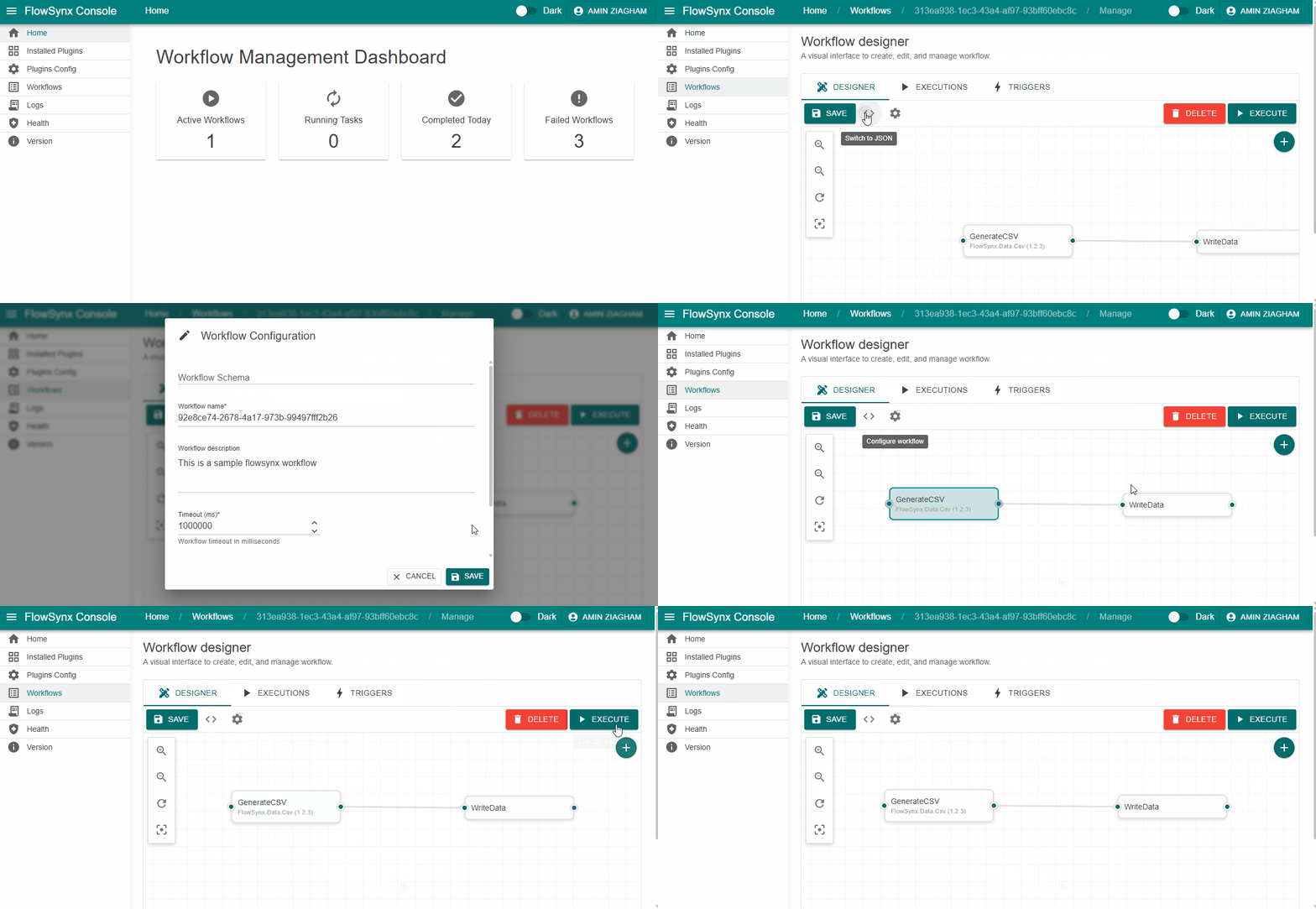
Table of Contents
- What is FlowSynx?
- How It Works
- Task Lifecycle
- Execution Modes
- Runtime Context
- Why FlowSynx?
- Differentiate & Articulate Uniquely
- Key Features
- Roadmap
- Quick Start Experience
- Build from Source
- Architecture Overview
- User Interfaces
- Related Repositories
- Community & Contributing
- Security
- License
What is FlowSynx?
In today’s fast-moving software landscape, teams need repeatable, modular, and secure automation — without being locked into rigid platforms.
FlowSynx redefines orchestration with:
- A .NET-based micro-kernel engine built for performance and reliability
- A plugin-driven architecture that evolves with your needs
- A JSON-based DAG (Directed Acyclic Graph) workflow model that’s both human-readable and machine-friendly
FlowSynx transforms your processes — from data management to API and ML/AI automation — into clear, maintainable, and reusable workflows.
How It Works
At its core, FlowSynx executes DAG-based workflows where each task represents an atomic operation — reading data, transforming it, sending HTTP requests, or interacting with external systems.
Core Concepts
- Workflow JSON — Define tasks, dependencies, and parameters in simple JSON
- Plugins — Modular building blocks for any functionality (file I/O, APIs, cloud storage, data transformation, ML/AI, etc.)
- Execution Engine — Smart orchestration with:
- Dependency resolution (topological sorting)
- Shared execution context and secure state handling
- Asynchronous execution, retries, and timeouts
- Built-in logging, metrics, and auditing
Task Lifecycle
Every task flows through a predictable, reliable lifecycle:
- Initialization – Validates plugin and parameters
- Dependency Wait – Ensures prerequisite tasks are complete
- Execution – Runs the plugin logic (e.g.,
ReadAsync,WriteAsync) - Error Handling – Retries, fallbacks, or workflow failover
- Post-Processing – Logs, stores outputs, and passes results downstream
Execution Modes
Choose how you run FlowSynx — on your terms:
| Mode | Description |
|---|---|
| Standalone | Lightweight binary for local or embedded use |
| Dockerized | Ready for CI/CD pipelines and Kubernetes clusters |
| API Mode | Trigger workflows via REST APIs |
CLI (flowctl) |
Command-line power for developers |
Runtime Context
- Shared Variables
- Secure Secrets Management
- Plugin Buffers & Metadata
- Real-Time State Tracking
Why FlowSynx?
Modern automation is complex — but it doesn’t have to be complicated.
FlowSynx is designed to:
- Empower developers with modularity and openness
- Simplify operations through declarative configuration
- Bridge teams across development, data, and business processes
- Scale effortlessly across environments
Built on clean architecture principles, FlowSynx provides clarity, control, and confidence — even in the most demanding automation scenarios.
Differentiate & Articulate Uniquely
There are countless workflow and orchestration engines on the market — but FlowSynx stands apart by focusing on flexibility, developer empowerment, and true portability.
Here’s what makes FlowSynx unique:
1. NET Native & Plugin-Based
- Built entirely in .NET, giving developers seamless integration with the .NET ecosystem.
- Plugin-first architecture: add, remove, or update capabilities dynamically. No core modifications required.
- Supports custom plugins, enabling anything from cloud storage and APIs to ML/AI tasks.
2. JSON-Defined DAG Workflows
- Workflows are fully declarative in JSON — human-readable and machine-friendly.
- DAG execution ensures reliable dependency handling, asynchronous execution, and full observability.
- Unlike other engines, FlowSynx makes complex workflows easy to version, maintain, and share.
3. Human-in-the-Loop Support
- Integrate approval gates and manual tasks directly into workflows.
- Automate most of the process while keeping humans in control where needed — ideal for enterprise scenarios.
4. Hybrid, Cross-Platform Execution
- Run on-premises, in containers, or fully cloud-native — no vendor lock-in.
- Lightweight footprint and fast startup for developer-friendly experimentation.
- Works everywhere: Windows, Linux, macOS, Docker, Kubernetes.
5. Marketplace of Plugins
- Discover, share, and manage pre-built and custom plugins via a central Marketplace/Registry.
- Extend capabilities quickly without reinventing the wheel.
6. What Competitors Lack
- Many orchestration tools either:
- Lock you into a proprietary ecosystem,
- Force heavyweight deployments, or
- Lack support for hybrid and human-in-loop workflows.
- FlowSynx solves these gaps while remaining lightweight, extensible, and fully open-source.
Bottom line: FlowSynx is not just another orchestration engine. It’s a developer-first, plugin-powered, hybrid automation fabric that adapts to your environment — not the other way around.
Key Features
✅ Plugin-Based Extensibility — Add, upgrade, or remove capabilities dynamically and version-controlled
✅ Cross-Platform Execution — Runs everywhere (Windows, Linux, macOS, Docker, Cloud)
✅ JSON-Defined Workflows — Declarative, portable, and version-controlled
✅ Schema Validation — Catch errors early with JSON schema checks
✅ CLI & SDK Support — Total control for developers and DevOps teams
✅ Robust Authentication & Access Control — Compatible with JWT and Basic Auth, featuring RBAC
✅ Secret Management Integration — Infisical, Azure Key Vault, HashiCorp Vault, AWS Secrets Manager
✅ Triggers & Events — Webhooks, schedules, and file-change detection
✅ Human-in-the-Loop Tasks — Combine automation with human approval
✅ Conditional Flow Control — Execute tasks based on conditions and branching logic
✅ Expression Evaluation — Dynamic parameterization using expressions
✅ Advanced Logging & Auditing — Full transparency into every execution
✅ Error Handling - Configurable Error Handling and Retry Policies per task and workflow level
✅ Marketplace & Registry — Discover and manage plugins easily
✅ Web Console UI — Intuitive dashboard for workflow monitoring and control
✅ Unified Data Abstraction Layer (UDAL) — Simplifies data access across diverse sources
✅ Source-Agnostic Processing — Operate uniformly and interchangeably, regardless of the original data source or protocol
Roadmap
Curious about what’s next? Review the planned milestones in our Roadmap.
Quick Start Experience
Get up and running with FlowSynx in 5 minutes — no complex setup required.
👉 FlowSynx in 5 Minutes (Quickstart)
Option 1 — Run via Docker (Recommended)
If Docker is already installed on your system, you can start FlowSynx immediately using a simple Docker command.
Just copy and paste the following into your terminal:
docker run -d --name flowsynx -p 6262:6262 -v flowsynx_data:/app/data flowsynx/flowsynx:1.2.4-linux-amd64 --start
This will:
- Start FlowSynx
- Automatically configure admin credentials (admin / admin)
- Expose the FlowSynx API at
http://localhost:6262(local-only access)
Verify it's running:
curl http://localhost:6262/version
Option 2 — Use a Pre-Built Binary
Prefer to run FlowSynx locally?
Download a pre-built binary for your OS from the latest release:
Then run:
flowsynx --start
Build from Source
Want to contribute or customize FlowSynx?
You can build it locally in just a few commands.
Prerequisites
- .NET 10 SDK — verify with
dotnet --version(should report 10.x) - Git
Local Build
git clone https://github.com/flowsynx/flowsynx
cd flowsynx
dotnet restore
dotnet build --configuration Release
dotnet test
- Works seamlessly on Windows, Linux, and macOS.
- Build outputs are placed in each project’s
bin/Releasedirectory.
Hello Workflow Example
Once FlowSynx is running (via Docker or binary), try creating and executing your first workflow using the REST API.
1️⃣ Add a Workflow
Call this api:
curl -u admin:admin -X POST http://localhost:6262/workflows \
  -H "Content-Type: application/json" \
  -d '
  {
      "name": "Hello Workflow",
      "description": "A minimal FlowSynx workflow example",
      "tasks": [
        {
          "name": "print_hello",
          "type": "",
          "parameters": {
            "operation": "write",
            "path": "results/test.txt",
            "data": "Hello, FlowSynx!",
            "overwrite": false
          }
        }
      ]
    }
  '
Example response
{
  "data": {
    "id": "<UUID>",
    "name": "Hello Workflow"
  },
  "messages": [
    "The workflow has been added successfully."
  ],
  "succeeded": true,
  "generatedAtUtc": "2025-11-04T14:40:27Z"
}
📘 Note: Keep the <UUID> value — you’ll need it to run the workflow.
2️⃣ Execute the Workflow
curl -u admin:admin -X POST http://localhost:6262/workflows/<UUID>/executions
3️⃣ Verify Output
After execution, check the file results/test.txt
inside the FlowSynx container or on your host system — you should see:
Hello, FlowSynx!
For advanced workflows, Docker setup:
📘 Documentation: Getting Started Guide
🧩 Samples: Example Workflows & Configs
Architecture Overview
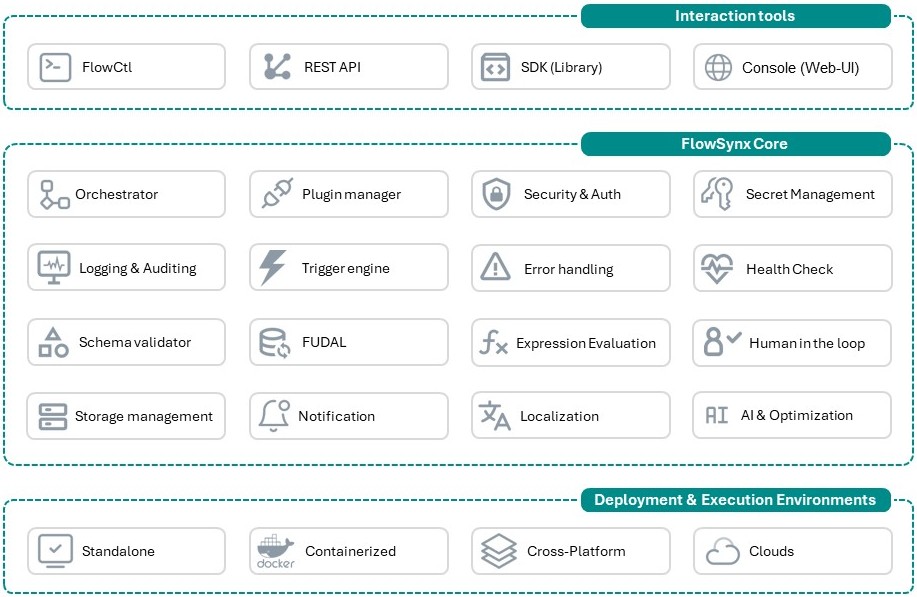
Interaction Layers
- CLI (FlowCtl) — Lightweight command-line orchestration
- REST API Gateway — Secure, API-first automation
- SDKs & Libraries — Integrate FlowSynx into your own apps
Core Components
- Workflow Orchestrator — Executes and manages JSON-defined DAGs
- Plugin Manager — Loads and maintains plugins dynamically
- Security & Auth Layer — Ensures safe access and execution
- Logging & Auditing Engine — Observability built in
- Trigger Engine — React to events, schedules, and external signals
Environments
Deploy FlowSynx locally, in containers, or cloud-native — with complete portability.
User Interfaces
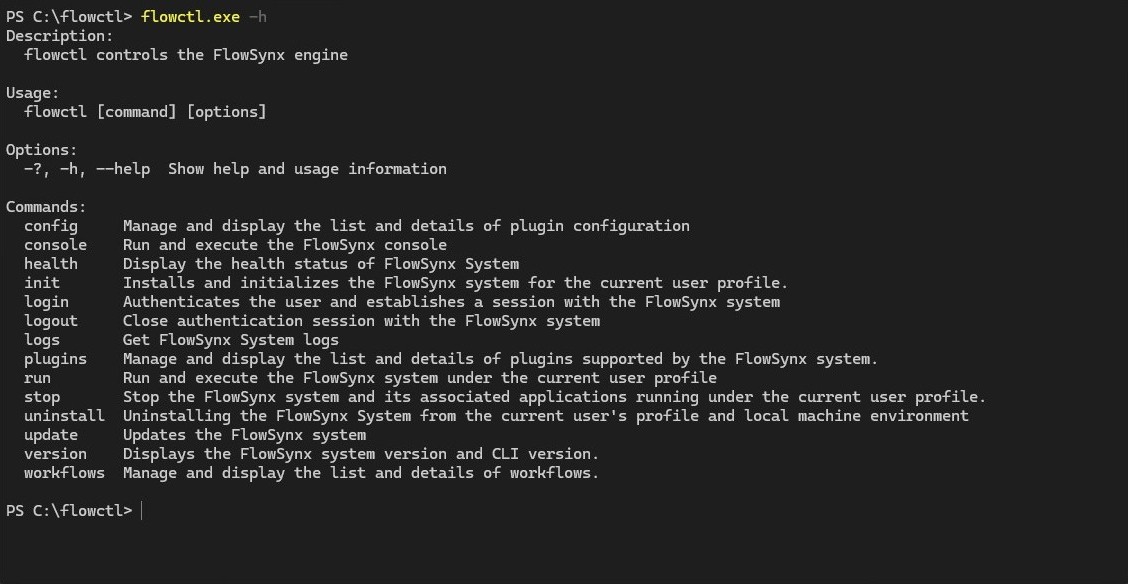
FlowCtl (CLI)
Powerful, scriptable, and developer-friendly.
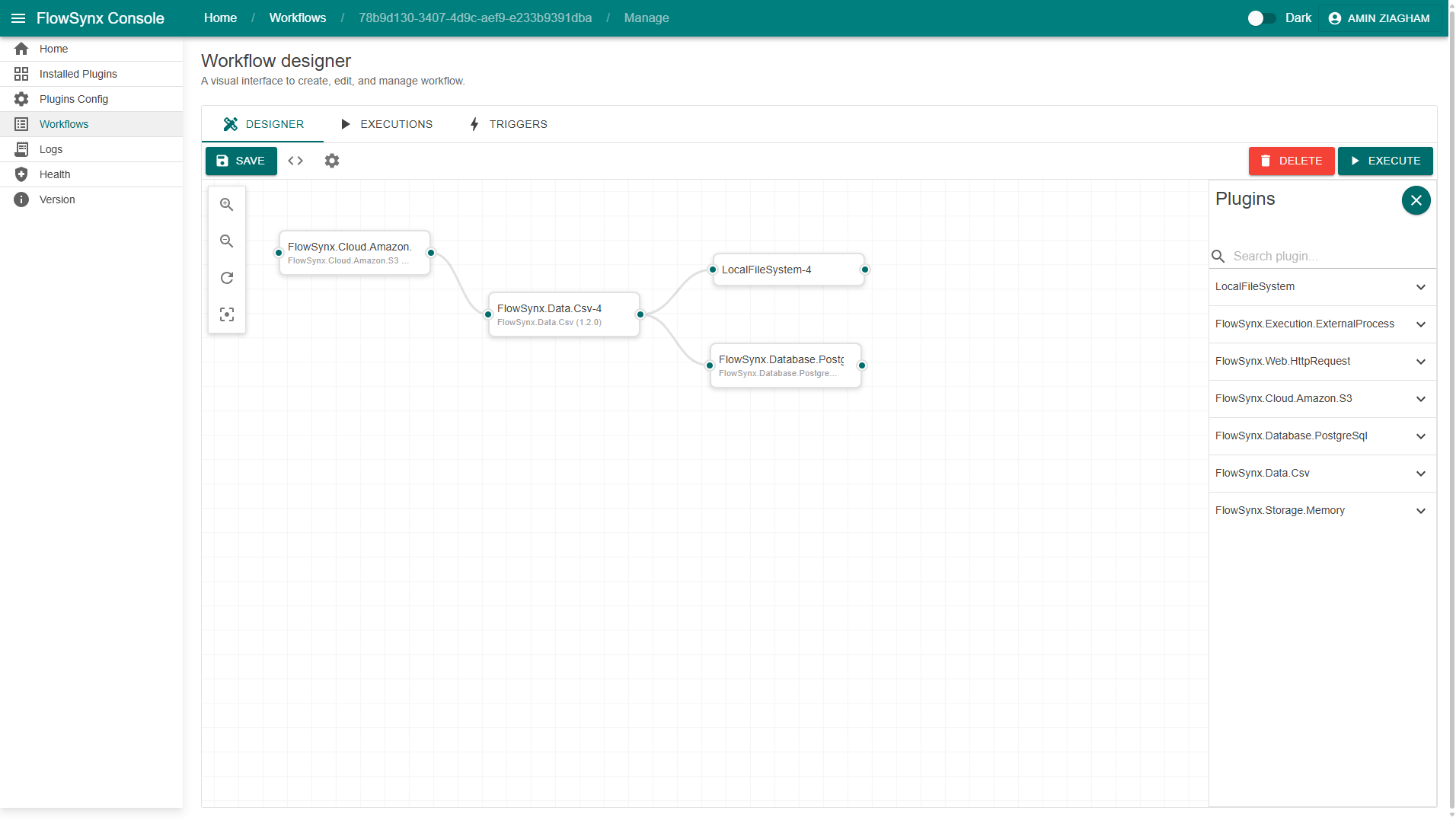
Web Console
A clean, interactive dashboard for:
- Workflow management
- Real-time monitoring
- Execution logs and metrics
- Human task approvals
Related Repositories
| Repository | Description |
|---|---|
| FlowSynx | Core engine and runtime for executing JSON-based DAG workflows with plugin-based orchestration. |
| FlowCtl | Command-line tool for initializing, running, and managing FlowSynx workflows. |
| Console | Web-based dashboard for managing, monitoring, and visualizing workflows. |
| Docs | Official documentation with setup guides, examples, and API references. |
| Samples | Ready-to-run example workflows and configuration templates. |
| Plugin Core | SDK and interfaces for building custom FlowSynx plugins. |
| FlowPack | CLI tool to package and publish FlowSynx plugins as .fspack bundles. |
| C# SDK | .NET SDK for integrating and controlling FlowSynx programmatically. |
| Plugin Marketplace | Central hub to discover, publish, and manage FlowSynx plugins. |
| Plugin Template | .NET project template for creating new FlowSynx plugins quickly. |
Community & Contributing
Join our growing community of developers and automation experts.
You can:
- 💡 Submit ideas and feature requests
- 🔌 Build and publish plugins
- 🧱 Contribute to the core or documentation
- 🌍 Collaborate in discussions
- 🤝 Review the Code of Conduct to help keep the community welcoming
👉 See CONTRIBUTING.md
Communication and Discord
We’d love your contributions and feedback! Join our community and discussions on Discord or follow us on X (Twitter):
| Platform | Link |
|---|---|
| Discord (preferred) | Discord |
| X (Twitter) | @flowsynxio |
Security
We take the security of FlowSynx seriously.
If you discover a vulnerability, please review our Security Policy for responsible disclosure guidelines.
Thank you for helping us keep the community safe!
License
FlowSynx is open-source and licensed under the MIT License.
See LICENSE for details.
Support FlowSynx
✨ Support FlowSynx by giving it a star! ✨
Your support helps others discover the project and drives continued innovation.
