
fm.awk
File manager written in awk
Preview
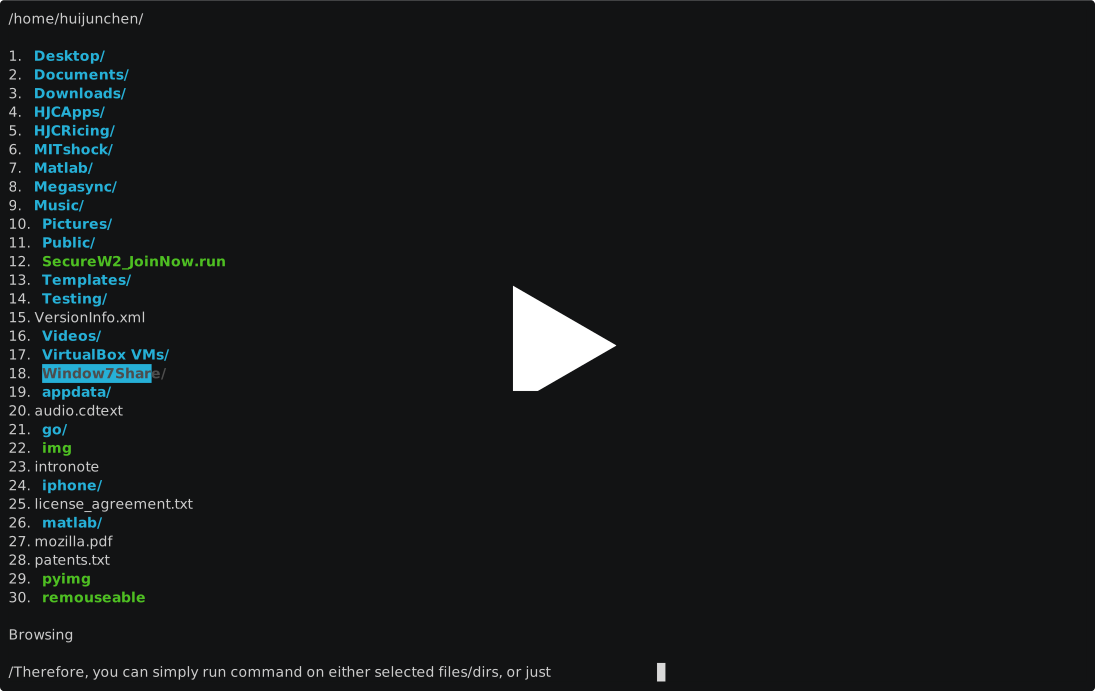
Browsing
- cd on exit:
cd $(command fm.awk) - last path:
export LASTPATH="$HOME/.cache/lastpath"; cd $(cat -u $LASTPATH) && $TERMINAL -e fm.awk
Key bindings
NUMBERS:
	[num] - move cursor to entry [num]
	[num]+G - Go to page [num]

NAVIGATION:
	k/↑ - up                      j/↓ - down
	l/→ - right                   h/← - left
	Ctrl-f - Half Page Down       Ctrl-u - Half Page Up
	n/PageDown - PageDown         p/PageUp - PageUp
	g/Home - first page           G/End - last page
	H - first entry               L - last entry
	M - middle entry

MODES:
	/ - search
	: - commandline mode
	    commandline mode special function:
	        {}: represent selected files/directories
	        tab completion on path: start with ' /', use tab to complete on that path
	        tab completion on cmd: completion based on command history
	            ><: enter selecting mode for directory (choose ./ to confirm destination)

SELECTION:
	␣ - bulk (de-)selection       S - bulk (de-)selection all
	s - show selected

PREVIEW:
	v - toggle preview
	> - more directory ratio      < - less directory ratio

MISC:
	r - refresh                   q - quit
	- - previous directory        ! - spawn shell
	. - toggle hidden             ? - show keybinds
	o - local history             O - all history
Actions
- Bulk selection
- Bulk selection all
- Directory / File preview
- Command line mode
Try to use those file manipulation function with cmd mode
Configuration
edit fm.awk, modify the first configuration section:
    ###################
    #  Configuration  #
    ###################

    OPENER = ( ENVIRON["FMAWK_OPENER"] == "" ? ( ENVIRON["OSTYPE"] ~ /darwin.*/ ? "open" : "xdg-open" ) : ENVIRON["FMAWK_OPENER"] )
    LASTPATH = ( ENVIRON["LASTPATH"] == "" ? ( ENVIRON["HOME"] "/.cache/lastpath" ) : ENVIRON["LASTPATH"] )
    HISTORY = ( ENVIRON["HISTORY"] == "" ? ( ENVIRON["HOME"] "/.cache/history" ) : ENVIRON["HISTORY"] )
    CMDHIST = ( ENVIRON["CMDHIST"] == "" ? ( ENVIRON["HOME"] "/.cache/cmdhist" ) : ENVIRON["CMDHIST"] )
    CACHE = ( ENVIRON["CACHE"] == "" ? ( ENVIRON["HOME"] "/.cache/imagecache" ) : ENVIRON["CACHE"] )
    FIFO_UEBERZUG = ENVIRON["FIFO_UEBERZUG"]
    FMAWK_PREVIEWER = ENVIRON["FMAWK_PREVIEWER"]
    PREVIEW = 0
    HIDDEN = 0
    RATIO = 0.35
    HIST_MAX = 5000
    SUBSEP = ","
OPENERis the default file opener. External opener script can be set by environmental variableFMAWK_OPENER.LASTPATHis path whichfm.awkwere last time.HISTORYis the history for directory visited.CMDHISTis the command line history, which only the unique command will be left.CACHEis the cache file path for image file generated by preview.FIFO_UEBERZUGandFMAWK_PREVIEWERwill be automatically set by shell wrapperfmawk.PREVIEWis indicator for review or not, boolean.RATIOis the ratio for directory / preview.HIST_MAXis the maximum number ofHISTORY.
cmd mode
- all auto completed command can be edited using left/right arrow and backspace.
:cd /path/to/destination- can be relative:
:cd ../../goes to parents two tiers
- can be relative:
:cmdon each selected item.- e.g., After selection,
:chmod +xto give execution permission on selected entries.
- e.g., After selection,
:cmd {} destinationto replace{}with each selected item and execute the whole command.- e.g., After selection,
:mv {} ~will move selected item to$HOMEdirectory.
- e.g., After selection,
- File manipulation is done by this process:
- Select file/dir => go to destination by browsing => type
:cmd {} ./to executecmdon selected file to destination - e.g. select files, go to destination and type
:mv {} ./.
- Select file/dir => go to destination by browsing => type
cmdcan be shell alias (bashandzshconfirmed.fishnot sure).- tab completion on
:cdand search (/) - tab completion on path:
- press tab or shift-tab for path completion => press Enter to confirm current completion, and go the either of the following two path:
- => press tab / shift-tab for next-level path completion.
- => press Enter again to confirm current path and exit cmd mode.
- press tab or shift-tab for path completion => press Enter to confirm current completion, and go the either of the following two path:
- tab completion on command line mode based on command line history.
- left / right arrow to move cursor; up / down arrow to access command line history.
scripts
scripts stores the shell scripts that serve some purposes that I think is better to be done externally. They are
decompressall: go through all compression files in current directory and decompress all of them.renameall: rename all files and directories in current directory. The list of all files/directories will open in default text editor usingxdg-openfiles/directories will be renamed line by line.
TODO
- Image preview (start using ueberzug)
- Make preview script be independent
- Able to redraw by
SIGWINCH. - Tab completion on path
- Make cmd bottom line can be scrollable horizontally even when the string is over the dimension
- Eliminate action menu by implementing all of those in cmd mode