
One-off Invoice Generator
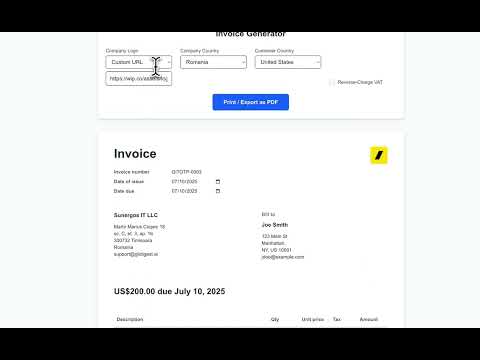
A simple, free invoice generator for payments received from clients built with plain HTML, CSS, and JavaScript. This project was born out of frustration with having to manually create invoices for Stripe payments and not wanting to pay for external services so I pretty much vibe coded this with Claude Code inspired by @levelsio's Stripe invoice generator.
[!NOTE] Stripe now offers post-payment invoice generation for one-time payments, but it's not free. It costs 0.4% of the transaction's total up to a maximum of $2 per invoice. Learn more about Stripe's pricing for post-payment invoices.
Demo
Deployment Options
Cloudflare Pages (Recommended)
- Fork this repository
- Connect your GitHub account to Cloudflare Pages
- Create a new project and select your forked repository
- Deploy directly - no build command needed!
GitHub Pages
- Fork this repository
- Go to Settings > Pages
- Select "Deploy from a branch" and choose main branch
- Access your invoice generator at
https://[username].github.io/invoice-generator/form.html
Any Static Host or VPS
Simply upload all files and directories (index.html, form.html, stylesheets/, javascript/, images/, favicon/) to your web server.
Features
- No Backend Required: Runs entirely in your browser
- Works Offline: Clone the repository and run completely offline - no internet connection needed after initial download
- localStorage Persistence: Your invoice details are automatically saved
- Print to PDF: Generate professional PDFs using your browser's print function
- Customizable: Add your company logo and details
- Real-time Preview: See your invoice update as you type
- EU VAT Support: Automatic VAT calculation and reverse-charge handling for EU businesses
- Multiple Line Items: Add multiple products/services to your invoice
- Country Selection: Built-in country dropdown with all global countries
- Business & Client Management: Save and reuse frequently used business and client details
- Responsive Design: Works seamlessly on desktop and mobile devices
- Clean Print Layout: Optimized print styles for professional PDF output
Getting Started
Installation
# Clone the repository
git clone https://github.com/sunergos-ro/invoice-generator.git

# Navigate to the project directory
cd invoice-generator

# Option 1: Open directly in browser (works offline!)
# Simply open form.html in your web browser

# Option 2: Use a local web server (Python)
python -m http.server 8000
# Open http://localhost:8000/form.html

# Option 3: Use a local web server (Node.js)
npx http-server
# Open http://localhost:8080/form.html

# Note: Once downloaded, the application works completely offline
# No internet connection required!
Usage
- Business/Client Selection:
- Choose from saved businesses/clients or create new ones
- Save frequently used details for quick reuse
- See "Unsaved changes" indicator when details are modified
- Company Setup: Select your company's country and add your logo (or choose from presets)
- Invoice Details: Set invoice number, issue date, and due date
- Customer Information: Add customer details including country and VAT number (for EU businesses)
- Add Line Items: Add one or more products/services with quantities and prices
- VAT Handling:
- Automatic VAT calculation based on EU rules
- B2B reverse-charge support for cross-border EU transactions
- Smart detection of when VAT should apply
- Print/Export: Click "Print / Export as PDF" to generate your invoice
The application automatically saves your inputs to localStorage, so your data persists between sessions.
Customization
You can customize the invoice by:
- Selecting different company logos from the dropdown or providing a custom URL
- Modifying the default company details in
javascript/form.js - Adding new logo options by placing them in the
images/directory - Adjusting the invoice layout in
form.html - Customizing styles in
stylesheets/form.css - Modifying print styles for PDF generation in the
@media printsection ofstylesheets/form.css
Development
This project uses:
- Plain HTML5 - No framework dependencies
- Vanilla JavaScript (ES6+) - No transpilation needed
- CSS3 with Tailwind-inspired utility classes
- localStorage for data persistence
- Zero build process - Just edit and refresh!
Development Tips
- The application works entirely in the browser
- All data is stored in localStorage
- No server or backend required
- Works completely offline once downloaded/cloned
- No external dependencies or API calls
- Modify
javascript/form.jsto change default values and behavior - Edit
stylesheets/form.cssto customize styling - Add security headers via your hosting provider (e.g., Cloudflare)
Contributing
Contributions are welcome! Please feel free to submit a Pull Request.
License
This project is open source and available under the MIT License.
Key Features Explained
EU VAT Support
The invoice generator includes comprehensive EU VAT handling:
- Automatic VAT Rates: All 27 EU member states with their current standard VAT rates
- B2B Reverse Charge: Automatically applies reverse charge for cross-border B2B transactions within the EU
- B2C VAT: Correctly applies company country VAT for B2C transactions
- Smart Detection: Automatically determines when VAT should apply based on countries and VAT numbers
Multiple Line Items
- Add unlimited products or services to your invoice
- Each item can have its own description, quantity, and unit price
- Real-time calculation of subtotals and totals
- Easy-to-use interface for managing invoice items
Business & Client Management
- Save frequently used business and client details
- Quick selection from dropdown menus
- Create new entities or update existing ones
- Automatic unsaved changes detection
- All data persisted to localStorage for future sessions
Acknowledgments
- @levelsio for the original Better Stripe Invoice Generator
- Built as a free alternative to paid invoice services