
MQTTTiles

Dashboard based on MQTT. Supports MQTT 5.0 and 3.1.X protocols, connections to multiple brokers, multiple subscribe widgets. Saves configuration in browser's local cache or in retain message on broker.
Live version available here: MQTTTiles.
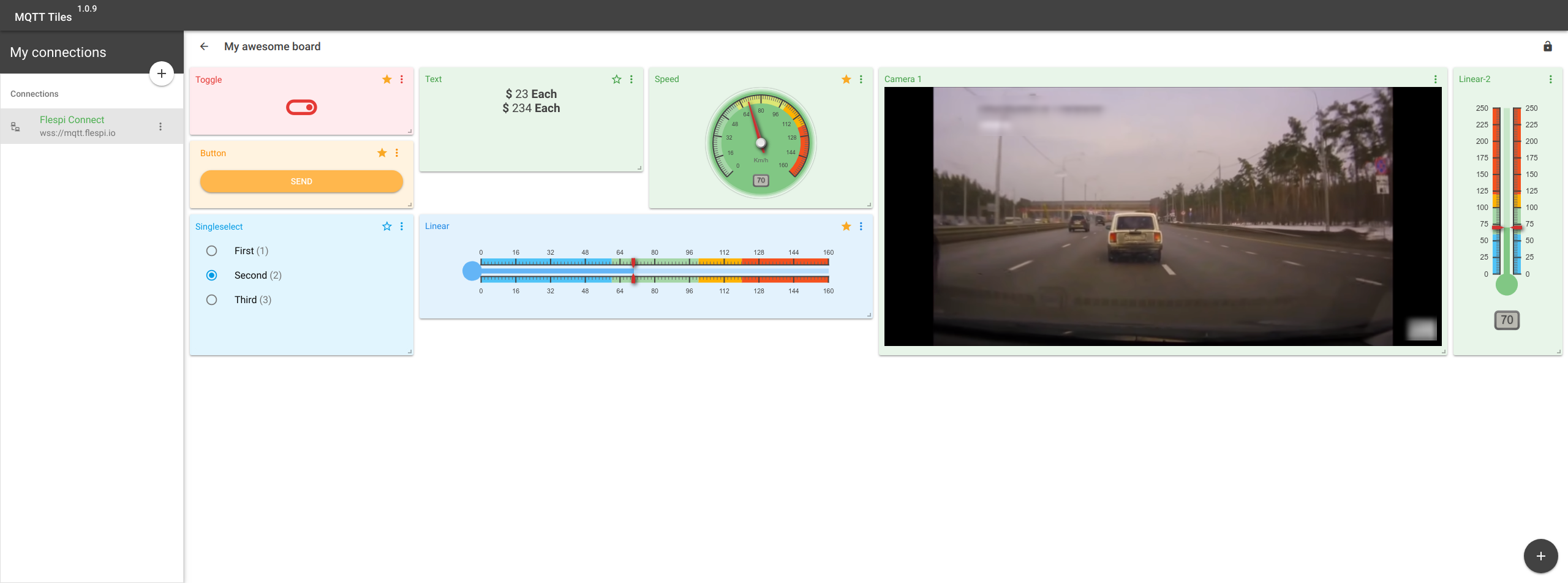
Features
- ES6 Javascript
- Vue.js (Quasar)
- Writing .vue files
- Vuex
- Webpack
- Responsive layout
- NPM ecosystems
- Material theme
- Dev Hot Reload
- and many more!
Prerequisites:
Build Setup
# clone the repo
$ git clone https://github.com/flespi-software/mqtttiles.git mqtttiles

# go into app's directory and install dependencies
$ cd mqtttiles
$ npm install

# serve with hot reload at localhost:8080
$ quasar dev

# build for production with minification for flespi.io
$ quasar build
Use like component
You must have a Quasar-based app.
# install like repo
$ npm install git+https://git.gurtam.net/flespi/frontend/MQTTTiles.git
in quasar.conf.js
framework: {
  components: [
    'QIcon',
    'QToolbar',
    'QToolbarTitle',
    'QModal',
    'QModalLayout',
    'QList',
    'QListHeader',
    'QItem',
    'QItemMain',
    'QItemSide',
    'QItemTile',
    'QItemSeparator',
    'QBtn',
    'QInput',
    'QSelect',
    'QCheckbox',
    'QTooltip',
    'QPopover',
    'QCard',
    'QCardTitle',
    'QCardMain',
    'QCardSeparator',
    'QCardActions',
    'QCardMedia',
    'QToggle',
    'QChip',
    'QBtnToggle',
    'QChipsInput',
    'QField',
    'QResizeObservable',
    'QCollapsible',
    'QRadio',
    'QDialog',
    'QProgress',
    'QKnob',
    'QSlider',
    'QColorPicker',
    'QBtnDropdown',
    'QPagination'
  ],
  directives: [
    'Ripple',
    'CloseOverlay'
  ],
  plugins: [
    'Notify',
    'LocalStorage',
    'SessionStorage',
    'Dialog',
    'Loading'
  ]
}
import Dash from 'mqtttiles'

export default {
  components: { Dash }
}
<dash
  :clientSettings="clientSettings"
  @change:status="changeStatusHandler"
  @share="shareHandler"
  @change:title="t => title = t"
  @update:boards="saveBoardsToLocalStorage"
/>
Props:
| Name | Description | Default |
|---|---|---|
| clientSettings | Connection client settings | undefined |
| initBoards | Your saved boards | undefined |
clientSettings structure:
let clientSettings = {
  clientName: 'New client',
  clientId: `mqtt-tiles-${Math.random().toString(16).substr(2, 8)}`,
  host: 'wss://mqtt.flespi.io',
  keepalive: 60,
  protocolVersion: 5,
  clean: true,
  username: 'FlespiToken XXXXXXXXXXXXXXXXXXX',
  password: '',
  properties: {
    sessionExpiryInterval: undefined
  },
  syncToRetain: false,
  syncNamespace: 'xflespifront/mqtttiles/boards'
}
Events:
| Name | Description | Payload |
|---|---|---|
| change:status | connect client status changes | status: <Boolean> |
| share | share board | <Share_model> |
| change:title | generated title | {active-board-name} - MQTT Tiles: <String> |
| update:boards | updated boards configuration | boards collection: <Object> |
share model structure:
let shareModel = {
  boardId: "XXXXXXX-XXXXX-XXXX-XXXX-XXXXXXXXXX"
  token: "FlespiToken XXXXXXXXXXXXXXXXXXXXXXXXXXXX"
  topic: "topic/to/sync/data",
  share: [<Flespi_MQTT_ACL_instance>]
}
License
MIT license.