
 drawtonomy
Whiteboard for Driving Diagrams 🚗
Intuitively place lanes, vehicles, pedestrians, and traffic lights.
Browser-based. For autonomous driving development, traffic planning, and driving education.
🌐 Try it now at drawtonomy.com | 📖 Docs | 💬 Report issues / Request features
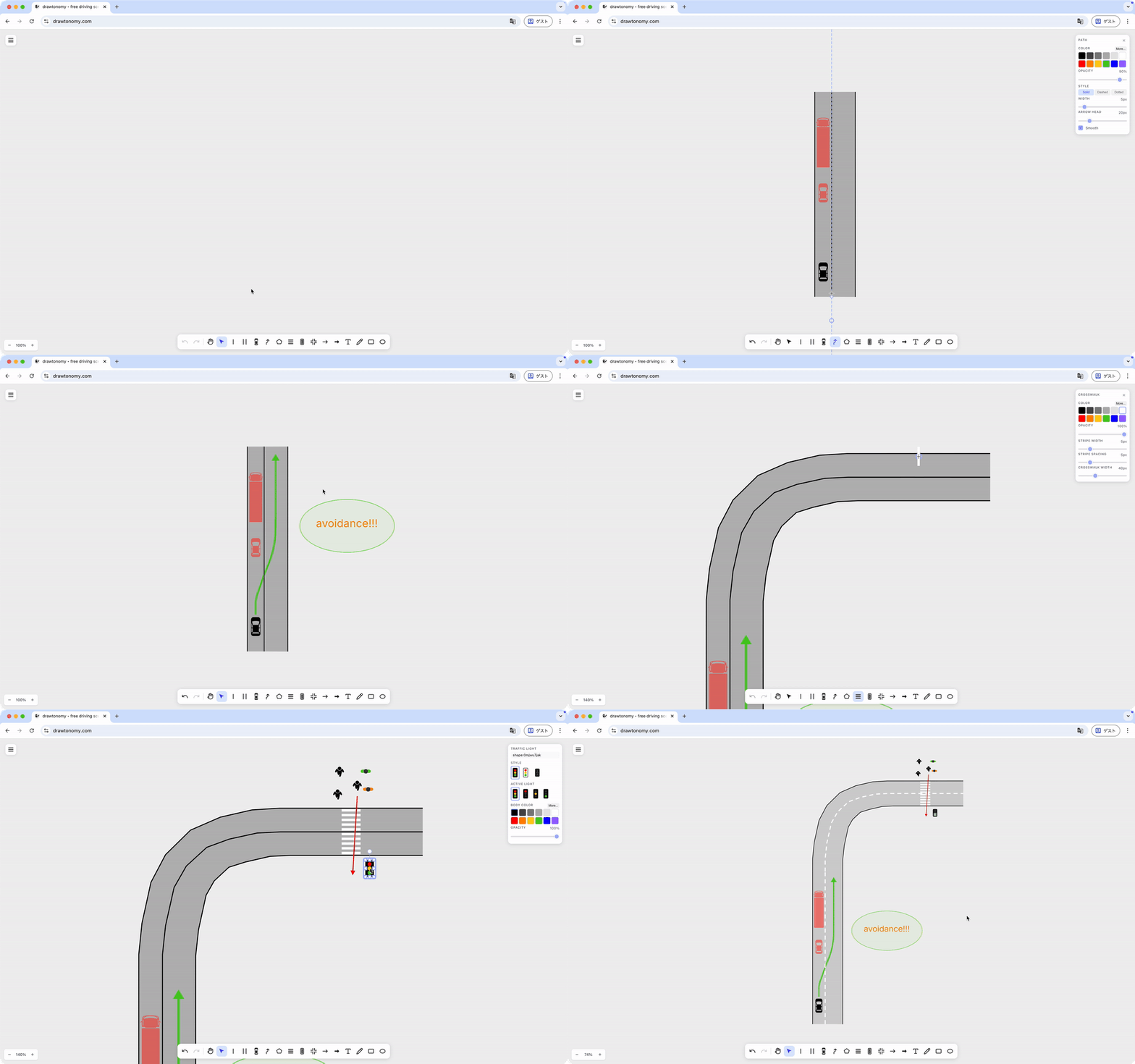
✨ Features
- 🎨 Infinite Canvas - Draw extensive road networks
- 🛣️ Lane Connection Management - Edit with understanding of lane relationships
- ⚡ Lane Tool - Auto-generate from centerline or create from existing boundaries. Smooth boundaries with one click
- 🛰️ Lane Generator (Satellite Map → Lane) - Click or drag on road/satellite map to generate lanes from OSM data
- ➕ Intersection Templates - Place complex intersections with one click
- 🚙 Rich Drawing Tools & Templates - Various vehicles, pedestrians, traffic lights. Add your own
- 🧲 Snap Function - Auto-snap to existing points and lines
- 🔗 Point Sharing - Connect shapes by sharing existing points
- 👣 Path Footprint - Auto-place footprints on paths with synced style, size, and orientation
- 🎨 Style Customization - Set color, opacity, width, and style individually
- 🧮 Math Tool (LaTeX) - Place typeset LaTeX equations on the canvas, re-editable anytime (KaTeX)
- 💾 Editable Save Format - Re-edit while preserving lane connection info
- 🗺️ Lanelet2 Support - Import and export OSM format maps
- 🤖 ROS Map Support - Import OccupancyGrid maps (.pgm + .yaml) from SLAM
- 🚗 ASAM Export - Export OpenDRIVE / OpenSCENARIO and esmini-ready zip bundles
- 🤖 AI Scene Generator - Generate editable scenes from natural language, OpenSCENARIO XML, or DSL
🎯 Main Features
🛣️ Lane Connection Management
Edit with understanding of lane relationships. Moving boundaries auto-transforms connected lanes. Set direction and adjacency with Next/Previous/Left/Right Lane.
⚡ Lane Tool
Auto-generate left and right boundaries by clicking the centerline. Efficiently create multiple lanes by specifying width, and draw connected lanes continuously. You can also create lanes by selecting two existing Linestrings.
Smooth lane boundaries with one click from the Attribute Panel.
🛰️ Lane Generator (Satellite Map → Lane)
Switch on the road or satellite map background, then click a road to generate a single lane, or drag to enclose a region and generate every road inside it. OSM road data is fetched and converted into editable Lane shapes aligned to the map.
➕ Intersection
Place complex intersection structures with templates in one click.
🚙 Rich Drawing Tools & Templates
Drawing tools and shape templates for easily expressing autonomous driving scenarios. You can also add custom SVG templates via PR.
🚗 Autonomous Driving Focused:
- Linestring (continuous lines for lane boundaries, etc.)
- Lane
- Participants — Vehicle (Sedan, Bus, Truck, Motorcycle templates) and Pedestrian (Walking, Simple templates)
- Path (Arrow style, Band style)
- Polygon
- Crosswalk
- TrafficLight (vehicle and pedestrian signals)
- TrafficSign
- RoadMarking
- Intersection
- Others (additional road/scene templates)
✏️ Basic Shapes:
- LineArrow
- Arrow
- Text
- Freehand
- Rectangle
- Ellipse
- Image
🧲 Snap Function
Auto-snaps to existing points and lines. Hold Shift while drawing to temporarily disable snapping.
🔗 Point Sharing
Hold Alt(Option) and click to share existing points and connect Linestring, Polygon, and Path.
🎨 Style Customization
Set color, opacity, width, and style individually. Change default values from the hamburger menu.
✏️ Segment Editing
Double-click Linestring, Lane, or Polygon to select and edit segments (between two points). Click on a segment to add new points for fine shape adjustments.
👣 Path Footprint
Generate footprints on a Path with the Generate button. Rectangle or any vehicle template (Sedan, Bus, Truck, etc.) can be set as footprints. Changing the style of one footprint syncs to all — color, template, opacity, and size changes are applied to every footprint simultaneously while maintaining equal intervals. Footprint orientation is automatically calculated from the Path direction, including smooth curves. The Anchor Offset slider lets you shift the reference point along the travel direction — for example, aligning to the base link or front bumper position instead of the center.
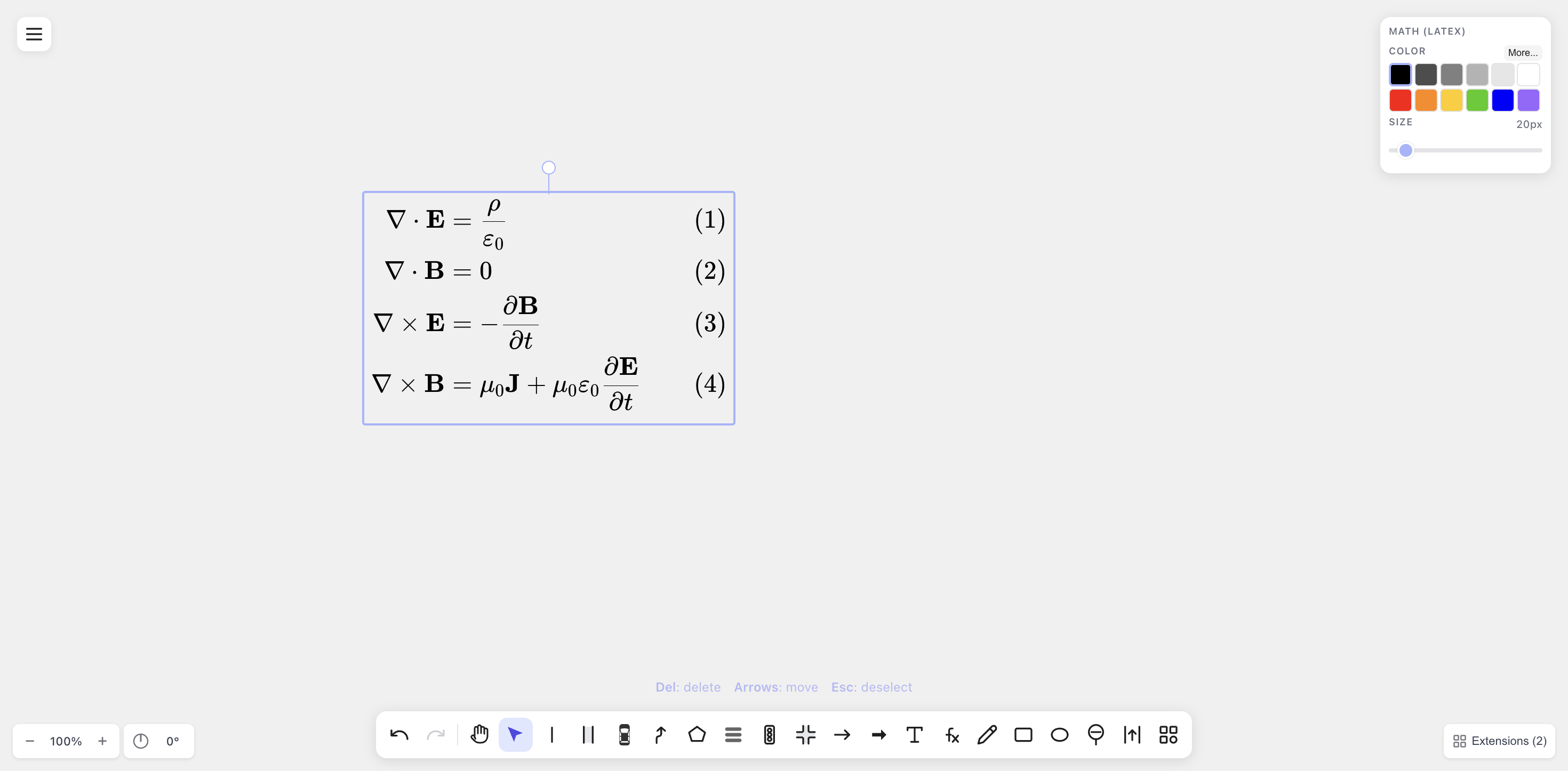
🧮 Math Tool (LaTeX)
Place typeset LaTeX equations anywhere on the canvas with the fx tool. The source stays editable and renders with KaTeX, so you can write anything from a simple formula to full multi-line systems.
📦 Export/Import
Supported Formats
| Format | Export | Import | Note |
|---|---|---|---|
| SVG | ✓ | ✓ | |
| PNG | ✓ | ✓ | |
| JPG | ✓ | ✓ | |
| ✓ | |||
| EPS | ✓ | No transparency | |
| drawtonomy.svg | ✓ | ✓ | Re-editable |
| OSM (Lanelet2) | ✓ | ✓ | Export lanes as a Lanelet2 map |
| PGM+YAML (ROS) | ✓ | OccupancyGrid map | |
| OpenDRIVE (.xodr) | ✓ | ASAM 1.8 | |
| OpenSCENARIO (.xosc) | ✓ | ASAM 1.3 | |
| esmini bundle (.zip) | ✓ | .xodr + .xosc together |
Note on EPS export: EPS format does not support transparency. When exporting shapes with opacity settings, the exported EPS will show shapes at full opacity, which may differ from the canvas display. For accurate transparency rendering, use PDF export instead.
Lanelet2 Import
Import Lanelet2 OSM format maps for editing. Sample maps: Autoware Documentation
You can also select and import only specific lanes. For optimal performance, we recommend keeping the number of lanes under 500.
Lanelet2 Export
Export the lanes you draw back out as a Lanelet2 OSM map via the .osm (Lanelet2) menu item. Lane boundaries become way linestrings and each lane becomes a relation type=lanelet referencing its left/right boundary ways, so the result round-trips back into drawtonomy (or any Lanelet2-aware tool). Maps imported from OSM preserve their original IDs and tags on re-export. The exporter is implemented in @drawtonomy/sdk — see the Exporter Developer Guide.
ROS OccupancyGrid Map Import
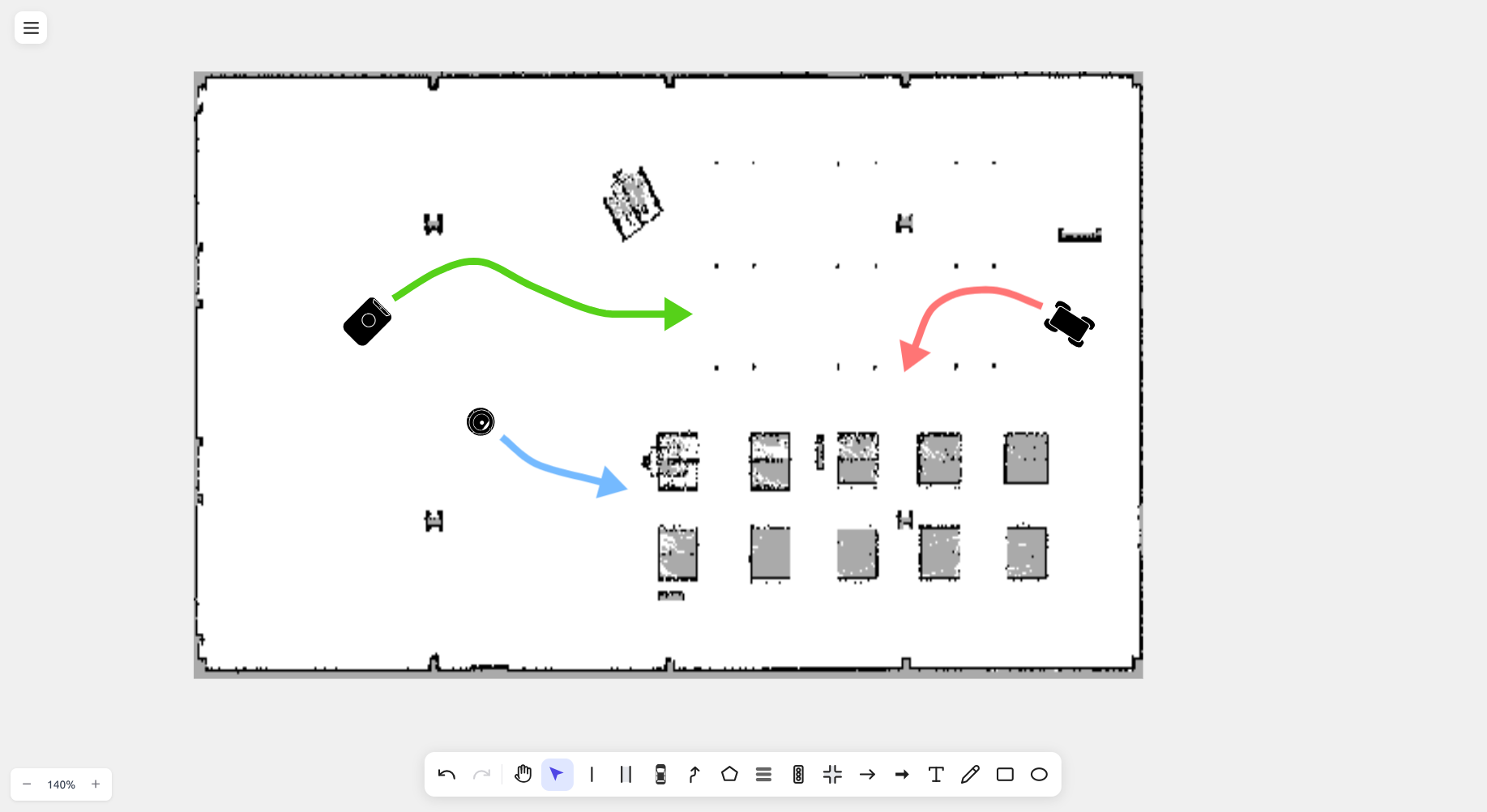
Import SLAM-generated maps from ROS map_server format (.pgm + .yaml). Select both files together in the file dialog. The map is automatically colored (occupied=black, free=white, unknown=gray) and scaled to match lane dimensions.
.pgm+.yaml→ Uses YAML settings (resolution, thresholds).pgmonly → Uses defaults (resolution=0.05 m/px)
Compatible with nav2, cartographer, gmapping, and other SLAM tools.
ASAM Export (OpenDRIVE / OpenSCENARIO / esmini)
Export the current scene as an ASAM-format file or a single zip bundle ready
for esmini to play back. Use the Export
for esmini menu item to produce a zip containing both .xodr and .xosc.
The exporter is implemented in @drawtonomy/sdk and is the main extension
point for adding new shapes, animation features, or entirely new target
formats (CARLA, Unity, SUMO, …).
The clip below is a single round-trip: draw an intersection, draw a path,
generate footprints, export the esmini zip, then play the exported .xosc
back in esmini — the vehicle follows the trajectory built from the path.
📖 Exporter Developer Guide | 日本語 | 🧪 Exporter Playground extension for canvas-driven verification
🤖 AI Scene Generator
Generate editable driving scenes on the canvas from natural language descriptions, OpenSCENARIO XML, or DSL input. AI automatically interprets the scenario and places lanes, vehicles, pedestrians, and other elements as fully editable shapes. Supports Anthropic Claude, OpenAI GPT, and Google Gemini as AI providers. Open from the Extensions button at the bottom-right of the canvas.
Natural Language
Prompt: "A 3-lane highway going left-to-right. An ego sedan (blue) in the center lane, a truck (grey) in the right lane slightly ahead. Show a dashed path for the ego vehicle changing to the left lane."
OpenSCENARIO
Generated from ASAM OpenSCENARIO DSL - Euro NCAP scenario example:
Contributors: @vishwesh5
⌨️ Keyboard Shortcuts
Tool Switching
| Key | Function |
|---|---|
| M | Hand (pan tool) |
| V | Select tool |
| L | Create Linestring |
| N | Create Lane |
| P | Participants (Vehicle/Pedestrian) |
| H | Create Path |
| G | Create Polygon |
| X | Create Crosswalk |
| Y | Create Traffic Sign |
| R | Create Road Marking |
| O | Create Others (road/scene templates) |
| I | Create Intersection |
| W | Create LineArrow |
| T | Create Text |
| D | Create Freehand |
Edit Operations
| Key | Function |
|---|---|
| Ctrl+Z / Cmd+Z | Undo |
| Ctrl+Shift+Z / Cmd+Shift+Z | Redo |
| Ctrl+C / Cmd+C | Copy |
| Ctrl+V / Cmd+V | Paste |
| Delete / Backspace | Delete |
| Shift | Temporarily disable snap (while drawing) |
| Alt + Click | Share existing point (Linestring/Polygon/Path) |
| Double-click | Segment editing (Linestring/Lane/Polygon) |
🧩 Extensions
drawtonomy supports an iframe-based extension system. Build custom extensions using the SDK and postMessage API.
# Start drawtonomy locally
pnpm add -g @drawtonomy/dev-server
drawtonomy-dev-server

# Start your extension
cd my-extension
pnpm dev --port 3001

# Open in browser
open "http://localhost:3000/?ext=http://localhost:3001/manifest.json"
Available npm packages:
| Package | Description |
|---|---|
@drawtonomy/sdk |
SDK for building extensions (ExtensionClient, shape factory functions, types) |
@drawtonomy/dev-server |
Local dev server for extension development |
📖 Extension Development Guide | 日本語 | AI Scene Generator | Template Preview
📖 Exporter Developer Guide | 日本語 — extend OpenDRIVE / OpenSCENARIO output, or add a new target format (CARLA, Unity, SUMO, …)